
Font size
 Worksheets
Y7 Revision
Total questions: 40
Worksheet time: 23mins
Junk mail sent by advertisers that is sometimes used in identity theft scams is referred to ______.
The diagrammatic representation that illustrates the steps for the solution of a problem or a set of instructions is called_______
Algorithm
Flowchart
None

Process
How are symbols connected together in a flowchart?
Symbols do not get connected together in a flowchart
With lines and an arrow to show the direction of flow
By numbers

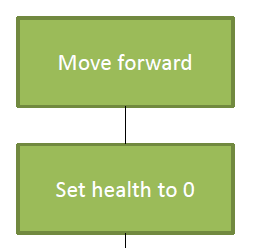

What's missing from the diagram shown ?
.csv is a a file extension for...
text
audio
video
podcasts
.rtf stands for
Rich Text Format
Right Text Format
Ranch Tile Format
Rife Text Format
Select All true Facts about PNG
PNG format allows an image to a have a transparent background.
PNG is the best option for Digital photos with details like landscapes.
PNG images can be animated
PNG stands for Portable Network Graphics
Select All true Facts about JPEG
JPEG images can be scaled infinitely without losing quality.
Is a popular image file format. It is commonly used by digital cameras.
JPEG images support/allows transparency.
JPEG stands for Joint Photographic Experts Group.

What kind of file does a document end in .ppt?
CSV stands for
Comma Simple Values
Common Separated Values
Comma Separated Values
Common Simple Values
What is a "generic file format"?(multiple answers)
A file type that can only be opened by specific programs or platforms.
Files that are saved in "package-specific formats."
Files create on PC's that can be read or imported on Apple Macs or other operating systems.
A file type that can be opened by multiple programs and platforms.
Which are generic file formats/file extensions for spreadsheets?(multiple answers)
.CSV
.XLSX
.DOCX
.TSV
Which are generic file formats for word processing software programs?(multiple answers)
.DOCX
.TXT
.RTF
Which are some generic file formats for compressed files?(multiple answers)
.RAR
.ZIP
.PPTX
.SMAL
What are compressed file formats?(multiple answers)
File formats that are used to reduce the size of files.
File formats that allow you to combine multiple files into a single file.
File formats that are often used when sending files from one device to another.
File formats that cannot be sent to others.
What is a virus?
Software that attaches itself to another file and when the file is opened it runs and causes damage.
Software that runs independently to speed up your computer
Software that helps the operating system function better.
Software that damages itself and gets deleted when opened.
Which of the following may result in a virus infection?
Opening an email attachment
Downloading a file from a website
Clicking on an infected link
All of the above
Special program which can detect and remove viruses from computer is called
Virus
Anti virus
Group ware
Custom

What is phishing?
The creator send out a legitimate looking emails to target users.
Act of gaining unauthorised access to a computer system
Software that gather data by monitoring key presses on the user's keyboard
Malicious code installed on user's computer or on a web server
Similar to Phishing but instead of using email it uses SMS
Pharming
Cookies
Smishing
Vishing
What is pharming?
A cyber attack that redirects a user from a genuine website to a fake one.
The manipulating of people into handing over confidential information such as a PIN or password
The act of inventing a story or scenario to gain a targeted victim's interest. This may encourage them to give away confidential information, or even send money.
An attempt to gain personal information about someone by way of deception
Tick all the choices to prevent phishing.(multiple answers)
Spam / phishing filters
Don't open executable attachements
Caution when opening unsolicited emails
Surf the internet without any worry.

A computer can be protected from the risk of unwanted emails by __________.
Using anti-virus software
Using anti-spam software
Never using free email sites.
Using a firewall

To ensure that anti-virus software is effective you must __________
Install windows software updates
Update the anti-virus software regularly
Restrict computer access to known persons
Install the latest versions of software
What do we use a SPAM filter for?
To arrange emails in order by name
To prevent common scams
To attach a file to an email
To scan an email for viruses
What are the strategies to prevent phishing?(multiple answers)
Use a filter on your email account so that only emails from an allowed users appear in your inbox
Always double check the URL and email address
Do not simply click any link and provide password
Subscribe for all promotions in all websites
How can you prevent smishing?(multiple answers)
Double check the SMS message – check for spelling mistakes
Check the link of the website to see if it is legitimate?
Contact your bank directly if you are requested to provide or change any of your personal details
Provide all the required information asked in the SMS
Strategies to prevent Spam Email include...(multiple answers)
Use a junk email filter to stop spam email coming into the inbox
Do not sign up for any commercial mailing lists
Do not reply to spam email
Untick the check box if you are asked to give your email to a third party

Select all the measures to prevent virus attack.(multiple answers)
we should not scan the computer everyday
We should not download files from unknown websites
We should backup important files everyday
We should use a secure network and use strong password

What is E-Safety?
Knowing how to be safe online
Knowing how to be safe in a public place
Knowing how to cross a road
Knowing how to be safe in school

To protect your online identity on social networking sites, you should...
only log on from your own personal computer
give false details about yourself
not use social networking sites
make sure only your friends can see your personal details

