wayground logo

Free Printable Worksheets

Font size

S
M
L
XL
Worksheets

Hardware Part 1

Total questions: 180

Worksheet time: 2hrs 40mins

Name
Class
Date
1.

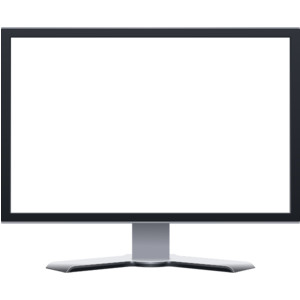
What is this?

a)

Mouse

b)

Speakers

c)

Keyboard

d)

Monitor

2.

What is this?

a)

TV

b)

Motherboard

c)

Keboard

d)

Monitor

3.

What is this?

a)

Mouse

b)

RAM

c)

Speaker

d)

Keyboard

4.

What is this?

a)

Scanner

b)

Monitor

c)

Printer

d)

HDD

5.

What is this?

a)

Monitor

b)

Headphones

c)

Printer

d)

Speakers

6.

What are all of these?

a)

Documents

b)

Software

c)

Hardware

7.

What are all of these?

a)

Documents

b)

Software

c)

Hardware

8.

What is this?

a)

Monitor

b)

Headphones

c)

Printer

d)

Speakers

9.

What is this?

a)

Scanner

b)

Monitor

c)

Printer

d)

HDD

10.

What is this?

a)

Mouse

b)

RAM

c)

Speaker

d)

Keyboard

11.

What is this?

a)

TV

b)

Motherboard

c)

Keboard

d)

Monitor

12.

What is this?

a)

Mouse

b)

Speakers

c)

Keyboard

d)

Monitor

13.

What is this?

a)

Mouse

b)

Speakers

c)

Keyboard

d)

Monitor

14.

What is this?

a)

TV

b)

Motherboard

c)

Keboard

d)

Monitor

15.

What is this?

a)

Mouse

b)

RAM

c)

Speaker

d)

Keyboard

16.

What is this?

a)

Scanner

b)

Monitor

c)

Printer

d)

HDD

17.

What is this?

a)

Monitor

b)

Headphones

c)

Printer

d)

Speakers

18.

What are all of these?

a)

Documents

b)

Software

c)

Hardware

19.
Anything that you can see or touch
a)
software
b)
hardware
20.
Which of these would be considered an input device?
a)
microphone
b)
printer
c)
speaker
d)
ram
21.
Which of these would be considered an output device?
a)
speaker
b)
CPU
c)
monitor
d)
power supply fan
22.
Which of these would be considered an output device?
a)
speaker
b)
CPU
c)
monitor
d)
power supply fan
23.
Which of these would be considered an output device?
a)
speaker
b)
CPU
c)
monitor
d)
power supply fan
24.
Which of these would be considered an input device?
a)
microphone
b)
printer
c)
speaker
d)
ram
25.
Which of these would be considered an input device?
a)
microphone
b)
printer
c)
speaker
d)
ram
26.
Anything that you can see or touch
a)
software
b)
hardware
27.
Anything that you can see or touch
a)
software
b)
hardware
28.
Anything that you can see or touch
a)
software
b)
hardware
29.
Anything that you can see or touch
a)
software
b)
hardware
30.
Keyboard, mouse, scanner and webcam are examples of which devices?
a)
Input
b)
output
c)
Software
d)
USB
31.
Keyboard, mouse, scanner and webcam are examples of which devices?
a)
Input
b)
output
c)
Software
d)
USB
32.
Headphones, speakers, monitor and printer are examples of which type of devices?
a)
Input
b)
Output
c)
Software
d)
Hard Drive
33.
Headphones, speakers, monitor and printer are examples of which type of devices?
a)
Input
b)
Output
c)
Software
d)
Hard Drive
34.
Keyboard,Mouse,Microphone,Scanner are which type of Hardware ?
a)
Hardware - OUTPUT
b)
Hardware - STORAGE
c)
Hardware - SYSTEM UNIT
d)
Hardware - INPUT
35.
Keyboard,Mouse,Microphone,Scanner are which type of Hardware ?
a)
Hardware - OUTPUT
b)
Hardware - STORAGE
c)
Hardware - SYSTEM UNIT
d)
Hardware - INPUT
36.
Keyboard,Mouse,Microphone,Scanner are which type of Hardware ?
a)
Hardware - OUTPUT
b)
Hardware - STORAGE
c)
Hardware - SYSTEM UNIT
d)
Hardware - INPUT
37.
Keyboard,Mouse,Microphone,Scanner are which type of Hardware ?
a)
Hardware - OUTPUT
b)
Hardware - STORAGE
c)
Hardware - SYSTEM UNIT
d)
Hardware - INPUT
38.
Is any hardware component that can display information to a user
a)
Hardware - OUTPUT
b)
Hardware - STORAGE
c)
Hardware - SYSTEM UNIT
d)
Hardware - INPUT
39.
Is any hardware component that can display information to a user
a)
Hardware - OUTPUT
b)
Hardware - STORAGE
c)
Hardware - SYSTEM UNIT
d)
Hardware - INPUT
40.
Is any hardware component that can display information to a user
a)
Hardware - OUTPUT
b)
Hardware - STORAGE
c)
Hardware - SYSTEM UNIT
d)
Hardware - INPUT
41.
Is any hardware component that can display information to a user
a)
Hardware - OUTPUT
b)
Hardware - STORAGE
c)
Hardware - SYSTEM UNIT
d)
Hardware - INPUT
42.
Is any hardware component that allows a user to enter data 
a)
Hardware - OUTPUT
b)
Hardware - STORAGE
c)
Hardware - SYSTEM UNIT
d)
Hardware - INPUT
43.
Is any hardware component that allows a user to enter data 
a)
Hardware - OUTPUT
b)
Hardware - STORAGE
c)
Hardware - SYSTEM UNIT
d)
Hardware - INPUT
44.
Is any hardware component that allows a user to enter data 
a)
Hardware - OUTPUT
b)
Hardware - STORAGE
c)
Hardware - SYSTEM UNIT
d)
Hardware - INPUT
45.
Screen that shows you what you are doing on the computer?
a)
MONITOR
b)
COMPUTER
c)
SPEAKER
d)
SCANNER
46.
Screen that shows you what you are doing on the computer?
a)
MONITOR
b)
COMPUTER
c)
SPEAKER
d)
SCANNER
47.
Screen that shows you what you are doing on the computer?
a)
MONITOR
b)
COMPUTER
c)
SPEAKER
d)
SCANNER
48.
Term for the physical parts of the computer
a)
HARDWARE
b)
HARD DRIVE
c)
SOFTWARE
d)
INPUT DEVICES
49.
Term for the physical parts of the computer
a)
HARDWARE
b)
HARD DRIVE
c)
SOFTWARE
d)
INPUT DEVICES
50.
Term for the physical parts of the computer
a)
HARDWARE
b)
HARD DRIVE
c)
SOFTWARE
d)
INPUT DEVICES
51.
Term for the physical parts of the computer
a)
HARDWARE
b)
HARD DRIVE
c)
SOFTWARE
d)
INPUT DEVICES
52.
Term for the physical parts of the computer
a)
HARDWARE
b)
HARD DRIVE
c)
SOFTWARE
d)
INPUT DEVICES
53.
Term for the physical parts of the computer
a)
HARDWARE
b)
HARD DRIVE
c)
SOFTWARE
d)
INPUT DEVICES
54.
Term for the physical parts of the computer
a)
HARDWARE
b)
HARD DRIVE
c)
SOFTWARE
d)
INPUT DEVICES
55.
What is Hardware?
a)
Computer Instructions or Data
b)
Physicals parts of a Computer
56.
What is Hardware?
a)
Computer Instructions or Data
b)
Physicals parts of a Computer
57.
What is Hardware?
a)
Computer Instructions or Data
b)
Physicals parts of a Computer
58.
What is Hardware?
a)
Computer Instructions or Data
b)
Physicals parts of a Computer
59.
What is Hardware?
a)
Computer Instructions or Data
b)
Physicals parts of a Computer
60.

What do we mean by "Computer Hardware?"

a)

Always wear a hard hat when using the computer.

b)

Games on a computer that are hard to play.

c)

The physical parts of a computer that you can touch.

61.

What do we mean by "Computer Hardware?"

a)

Always wear a hard hat when using the computer.

b)

Games on a computer that are hard to play.

c)

The physical parts of a computer that you can touch.

62.

What do we mean by "Computer Hardware?"

a)

Always wear a hard hat when using the computer.

b)

Games on a computer that are hard to play.

c)

The physical parts of a computer that you can touch.

63.

What do we mean by "Computer Hardware?"

a)

Always wear a hard hat when using the computer.

b)

Games on a computer that are hard to play.

c)

The physical parts of a computer that you can touch.

64.

What do we mean by "Computer Hardware?"

a)

Always wear a hard hat when using the computer.

b)

Games on a computer that are hard to play.

c)

The physical parts of a computer that you can touch.

65.

What is this computer hardware called?

a)

Printer

b)

Headphones

c)

Mouse

d)

Computer

66.

What is this computer hardware called?

a)

Printer

b)

Headphones

c)

Mouse

d)

Computer

67.

What is this computer hardware called?

a)

Printer

b)

Monitor

c)

Keyboard

d)

Mouse

68.

What is this computer hardware called?

a)

Printer

b)

Monitor

c)

Keyboard

d)

Mouse

69.

What is this computer hardware called?

a)

Printer

b)

Monitor

c)

Keyboard

d)

Mouse

70.

What does a monitor do?

a)

It does a dance on the floor.

b)

It lets us type letters of the alphabet to give information to the computer.

c)

It prints papers.

d)

The monitor shows words, pictures and other information from the computer.

71.

What does a monitor do?

a)

It does a dance on the floor.

b)

It lets us type letters of the alphabet to give information to the computer.

c)

It prints papers.

d)

The monitor shows words, pictures and other information from the computer.

72.

What does a monitor do?

a)

It does a dance on the floor.

b)

It lets us type letters of the alphabet to give information to the computer.

c)

It prints papers.

d)

The monitor shows words, pictures and other information from the computer.

73.

What does a monitor do?

a)

It does a dance on the floor.

b)

It lets us type letters of the alphabet to give information to the computer.

c)

It prints papers.

d)

The monitor shows words, pictures and other information from the computer.

74.

What is this computer hardware called?

a)

Monitor

b)

Headphones

c)

Computer Mouse

d)

Computer

75.

What is this computer hardware called?

a)

Monitor

b)

Headphones

c)

Computer Mouse

d)

Computer

76.

What is the name of this computer hardware?

a)

A rat

b)

A Monitor

c)

A Computer Mouse

d)

A surfboard

77.

What is the name of this computer hardware?

a)

A rat

b)

A Monitor

c)

A Computer Mouse

d)

A surfboard

78.

What is the name of this computer hardware?

a)

A rat

b)

A Monitor

c)

A Computer Mouse

d)

A surfboard

79.

What is the name of this computer hardware?

a)

A rat

b)

A Monitor

c)

A Computer Mouse

d)

A surfboard

80.

What is a computer mouse?

a)

A printer.

b)

An animal that loves CHEESE! Please feed it often.

c)

A small object you move with your hand to select things on the computer screen.

d)

A furry animal.

81.

What is a computer mouse?

a)

A printer.

b)

An animal that loves CHEESE! Please feed it often.

c)

A small object you move with your hand to select things on the computer screen.

d)

A furry animal.

82.

What is this?

a)

A Computer Mouse

b)

A Monitor

c)

A Computer

d)

A Keyboard

83.

What is this?

a)

A Computer Mouse

b)

A Monitor

c)

A Computer

d)

A Keyboard

84.

What does a keyboard do?

a)

It does groovy dances.

b)

I allows us to enter information into our computer using letter keys.

c)

It sings the ABC song.

85.

What does a keyboard do?

a)

It does groovy dances.

b)

I allows us to enter information into our computer using letter keys.

c)

It sings the ABC song.

86.
what does CPU stand for??
a)
Central Processing unit
b)
Control Processing unit
87.
Define Computer hardware
a)
the collection of physical parts of a computer system. 
b)
the color of the computer 
c)
how the computer looks 
88.
Define Computer hardware
a)
the collection of physical parts of a computer system. 
b)
the color of the computer 
c)
how the computer looks 
89.
Define Computer hardware
a)
the collection of physical parts of a computer system. 
b)
the color of the computer 
c)
how the computer looks 
90.
Define Computer hardware
a)
the collection of physical parts of a computer system. 
b)
the color of the computer 
c)
how the computer looks 
91.
Define Computer hardware
a)
the collection of physical parts of a computer system. 
b)
the color of the computer 
c)
how the computer looks 
92.
Define Computer hardware
a)
the collection of physical parts of a computer system. 
b)
the color of the computer 
c)
how the computer looks 
93.
A display screen used to provide visual output from a computer
a)
Mouse
b)
Keyboard
c)
 Monitor
d)
Speakers
94.
A display screen used to provide visual output from a computer
a)
Mouse
b)
Keyboard
c)
 Monitor
d)
Speakers
95.
A display screen used to provide visual output from a computer
a)
Mouse
b)
Keyboard
c)
 Monitor
d)
Speakers
96.
A display screen used to provide visual output from a computer
a)
Mouse
b)
Keyboard
c)
 Monitor
d)
Speakers
97.
A hand-operated device that allows control of the cursor on a computer screen.
a)
Mouse
b)
Keyboard
c)
Printer
d)
Hardware
98.
A hand-operated device that allows control of the cursor on a computer screen.
a)
Mouse
b)
Keyboard
c)
Printer
d)
Hardware
99.
A hand-operated device that allows control of the cursor on a computer screen.
a)
Mouse
b)
Keyboard
c)
Printer
d)
Hardware
100.
A hand-operated device that allows control of the cursor on a computer screen.
a)
Mouse
b)
Keyboard
c)
Printer
d)
Hardware
101.

The physical parts of computer that we can touch and see are called

a)

Software

b)

Hardware

c)

CPU

d)

Computer

102.

The physical parts of computer that we can touch and see are called

a)

Software

b)

Hardware

c)

CPU

d)

Computer

103.

The physical parts of computer that we can touch and see are called

a)

Software

b)

Hardware

c)

CPU

d)

Computer

104.

The physical parts of computer that we can touch and see are called

a)

Software

b)

Hardware

c)

CPU

d)

Computer

105.

The physical parts of computer that we can touch and see are called

a)

Software

b)

Hardware

c)

CPU

d)

Computer

106.
Why do we need a computer monitor?
a)
To keep the computer from overheating.
b)
Because it is like the brain of the computer
c)
To see what the computer is doing
d)
Just because
107.
Why do we need a computer monitor?
a)
To keep the computer from overheating.
b)
Because it is like the brain of the computer
c)
To see what the computer is doing
d)
Just because
108.
Why do we need a computer monitor?
a)
To keep the computer from overheating.
b)
Because it is like the brain of the computer
c)
To see what the computer is doing
d)
Just because
109.
Why do we need a computer monitor?
a)
To keep the computer from overheating.
b)
Because it is like the brain of the computer
c)
To see what the computer is doing
d)
Just because
110.
An example of the computer's hardware would be ...
a)
MS Word
b)
MS Publisher
c)
Keyboard
111.
An example of the computer's hardware would be ...
a)
MS Word
b)
MS Publisher
c)
Keyboard
112.
An example of the computer's hardware would be ...
a)
MS Word
b)
MS Publisher
c)
Keyboard
113.

Identify the most common type of connector for a keyboard and mouse.

a)

USB

b)

VGA

c)

RJ-45

d)

DB-25

114.

Identify the most common type of connector for a keyboard and mouse.

a)

USB

b)

VGA

c)

RJ-45

d)

DB-25

115.

Identify the most common type of connector for a keyboard and mouse.

a)

USB

b)

VGA

c)

RJ-45

d)

DB-25

116.

Identify the most common type of connector for a keyboard and mouse.

a)

USB

b)

VGA

c)

RJ-45

d)

DB-25

117.

Identify the most common type of connector for a keyboard and mouse.

a)

USB

b)

VGA

c)

RJ-45

d)

DB-25

118.

Identify the most common type of connector for a keyboard and mouse.

a)

USB

b)

VGA

c)

RJ-45

d)

DB-25

119.
Is an electrical device that supplies electric power to an electrical load. The primary function of a power supply is to convert electric current from a source to the correct voltage, current, and frequency to power the load.
a)
USB
b)

CPU

c)
RAM
d)
Power Supply
120.
Is an electrical device that supplies electric power to an electrical load. The primary function of a power supply is to convert electric current from a source to the correct voltage, current, and frequency to power the load.
a)
USB
b)

CPU

c)
RAM
d)
Power Supply
121.
Is an electrical device that supplies electric power to an electrical load. The primary function of a power supply is to convert electric current from a source to the correct voltage, current, and frequency to power the load.
a)
USB
b)

CPU

c)
RAM
d)
Power Supply
122.
Is an electrical device that supplies electric power to an electrical load. The primary function of a power supply is to convert electric current from a source to the correct voltage, current, and frequency to power the load.
a)
USB
b)

CPU

c)
RAM
d)
Power Supply
123.
Is an electrical device that supplies electric power to an electrical load. The primary function of a power supply is to convert electric current from a source to the correct voltage, current, and frequency to power the load.
a)
USB
b)

CPU

c)
RAM
d)
Power Supply
124.
Is a hand-held pointing device that detects two-dimensional motion relative to a surface. This motion is typically translated into the motion of a pointer on a display, which allows a smooth control of the graphical user interface.
a)
Mouse
b)
Light Pen
c)
Touch Pad
d)
Trackball Mouse
125.
Is a hand-held pointing device that detects two-dimensional motion relative to a surface. This motion is typically translated into the motion of a pointer on a display, which allows a smooth control of the graphical user interface.
a)
Mouse
b)
Light Pen
c)
Touch Pad
d)
Trackball Mouse
126.
Is a hand-held pointing device that detects two-dimensional motion relative to a surface. This motion is typically translated into the motion of a pointer on a display, which allows a smooth control of the graphical user interface.
a)
Mouse
b)
Light Pen
c)
Touch Pad
d)
Trackball Mouse
127.
Is a hand-held pointing device that detects two-dimensional motion relative to a surface. This motion is typically translated into the motion of a pointer on a display, which allows a smooth control of the graphical user interface.
a)
Mouse
b)
Light Pen
c)
Touch Pad
d)
Trackball Mouse
128.
A display screen used to provide visual output from a computer, cable box, video camera, VCR or other video generating device.
a)
Projector
b)
Printer
c)
Monitor
d)
Speakers
129.
A display screen used to provide visual output from a computer, cable box, video camera, VCR or other video generating device.
a)
Projector
b)
Printer
c)
Monitor
d)
Speakers
130.
A display screen used to provide visual output from a computer, cable box, video camera, VCR or other video generating device.
a)
Projector
b)
Printer
c)
Monitor
d)
Speakers
131.
A display screen used to provide visual output from a computer, cable box, video camera, VCR or other video generating device.
a)
Projector
b)
Printer
c)
Monitor
d)
Speakers
132.
Is a peripheral device which makes a persistent human-readable representation of graphics or text on paper.
a)
Projector
b)
Printer
c)
Monitor
d)
Speakers
133.
Is a peripheral device which makes a persistent human-readable representation of graphics or text on paper.
a)
Projector
b)
Printer
c)
Monitor
d)
Speakers
134.
Is a peripheral device which makes a persistent human-readable representation of graphics or text on paper.
a)
Projector
b)
Printer
c)
Monitor
d)
Speakers
135.
Is a peripheral device which makes a persistent human-readable representation of graphics or text on paper.
a)
Projector
b)
Printer
c)
Monitor
d)
Speakers
136.
A device that converts analog audio signals into the equivalent air vibrations in order to make audible sound.
a)
Projector
b)
Printer
c)
Monitor
d)
Speakers
137.
A device that converts analog audio signals into the equivalent air vibrations in order to make audible sound.
a)
Projector
b)
Printer
c)
Monitor
d)
Speakers
138.
A device that converts analog audio signals into the equivalent air vibrations in order to make audible sound.
a)
Projector
b)
Printer
c)
Monitor
d)
Speakers
139.
A device that converts analog audio signals into the equivalent air vibrations in order to make audible sound.
a)
Projector
b)
Printer
c)
Monitor
d)
Speakers
140.
Is a typewriter-style device which uses an arrangement of buttons or keys to act as a mechanical lever or electronic switch. 
a)

Mouse

b)
Speakers
c)
Keyboard
d)
Light Pen
141.
Is a typewriter-style device which uses an arrangement of buttons or keys to act as a mechanical lever or electronic switch. 
a)

Mouse

b)
Speakers
c)
Keyboard
d)
Light Pen
142.
Is a typewriter-style device which uses an arrangement of buttons or keys to act as a mechanical lever or electronic switch. 
a)

Mouse

b)
Speakers
c)
Keyboard
d)
Light Pen
143.
Is a typewriter-style device which uses an arrangement of buttons or keys to act as a mechanical lever or electronic switch. 
a)

Mouse

b)
Speakers
c)
Keyboard
d)
Light Pen
144.
Is a typewriter-style device which uses an arrangement of buttons or keys to act as a mechanical lever or electronic switch. 
a)

Mouse

b)
Speakers
c)
Keyboard
d)
Light Pen
145.
Is a typewriter-style device which uses an arrangement of buttons or keys to act as a mechanical lever or electronic switch. 
a)

Mouse

b)
Speakers
c)
Keyboard
d)
Light Pen
146.
The physical, tangible parts of a computer system is the...
a)
Tower Casing
b)
Monitor
c)
Keyboard
d)
Hardware
147.
The physical, tangible parts of a computer system is the...
a)
Tower Casing
b)
Monitor
c)
Keyboard
d)
Hardware
148.
The physical, tangible parts of a computer system is the...
a)
Tower Casing
b)
Monitor
c)
Keyboard
d)
Hardware
149.
The physical, tangible parts of a computer system is the...
a)
Tower Casing
b)
Monitor
c)
Keyboard
d)
Hardware
150.
The physical, tangible parts of a computer system is the...
a)
Tower Casing
b)
Monitor
c)
Keyboard
d)
Hardware
151.
A connector used to allow a computer to network with other types of hardware such as printers, keyboards, and speakers is called a... 
a)
USB Port
b)
Printer
c)
USB Cable
d)
Hardware
152.
A connector used to allow a computer to network with other types of hardware such as printers, keyboards, and speakers is called a... 
a)
USB Port
b)
Printer
c)
USB Cable
d)
Hardware
153.
A connector used to allow a computer to network with other types of hardware such as printers, keyboards, and speakers is called a... 
a)
USB Port
b)
Printer
c)
USB Cable
d)
Hardware
154.
A connector used to allow a computer to network with other types of hardware such as printers, keyboards, and speakers is called a... 
a)
USB Port
b)
Printer
c)
USB Cable
d)
Hardware
155.
This is an image of what type of hardware?
a)
tower casing
b)
printer
c)
computer
d)
monitor
156.
This is an image of what type of hardware?
a)
tower casing
b)
printer
c)
computer
d)
monitor
157.
This is an image of what type of hardware?
a)
tower casing
b)
printer
c)
computer
d)
monitor
158.
This is an image of what type of hardware?
a)
tower casing
b)
printer
c)
computer
d)
monitor
159.
A universal serial bus that supports data transfer to and from other devices is called the...
a)
USB Cable
b)
Printer
c)
Portable Storage
d)
USB Port
160.
A universal serial bus that supports data transfer to and from other devices is called the...
a)
USB Cable
b)
Printer
c)
Portable Storage
d)
USB Port
161.
A universal serial bus that supports data transfer to and from other devices is called the...
a)
USB Cable
b)
Printer
c)
Portable Storage
d)
USB Port
162.
A universal serial bus that supports data transfer to and from other devices is called the...
a)
USB Cable
b)
Printer
c)
Portable Storage
d)
USB Port
163.
This is an image of what type of hardware?
a)
USB Port
b)
USB Cable
c)
Portable Storage
d)
CD/DVD Drive
164.
This is an image of what type of hardware?
a)
USB Port
b)
USB Cable
c)
Portable Storage
d)
CD/DVD Drive
165.
This is an image of what type of hardware?
a)
USB Port
b)
USB Cable
c)
Portable Storage
d)
CD/DVD Drive
166.
A hand-operated device that allows control of the cursor on a computer screen.
a)
Mouse
b)
Keyboard
c)
Printer
d)
Hardware
167.
A hand-operated device that allows control of the cursor on a computer screen.
a)
Mouse
b)
Keyboard
c)
Printer
d)
Hardware
168.
A hand-operated device that allows control of the cursor on a computer screen.
a)
Mouse
b)
Keyboard
c)
Printer
d)
Hardware
169.
A hand-operated device that allows control of the cursor on a computer screen.
a)
Mouse
b)
Keyboard
c)
Printer
d)
Hardware
170.

Pick up the Computer Mouse at your desk and declare to the class "OH MY GOSH! IT'S A COMPUTER MOUSE!!!"

a)

Did it

b)

Chickened out....

171.

Pick up the Computer Mouse at your desk and declare to the class "OH MY GOSH! IT'S A COMPUTER MOUSE!!!"

a)

Did it

b)

Chickened out....

172.

Pick up the Computer Mouse at your desk and declare to the class "OH MY GOSH! IT'S A COMPUTER MOUSE!!!"

a)

Did it

b)

Chickened out....

173.

Pick up the Computer Mouse at your desk and declare to the class "OH MY GOSH! IT'S A COMPUTER MOUSE!!!"

a)

Did it

b)

Chickened out....

174.

Point with excitement at the Computer Monitor at your desk and declare to the class "LOOK EVERYONE, IT'S A COMPUTER MONITOR!!!"

a)

Did it

b)

Chickened out....

175.

Point with excitement at the Computer Monitor at your desk and declare to the class "LOOK EVERYONE, IT'S A COMPUTER MONITOR!!!"

a)

Did it

b)

Chickened out....

176.

Point with excitement at the Computer Monitor at your desk and declare to the class "LOOK EVERYONE, IT'S A COMPUTER MONITOR!!!"

a)

Did it

b)

Chickened out....

177.

Point with excitement at the Computer Monitor at your desk and declare to the class "LOOK EVERYONE, IT'S A COMPUTER MONITOR!!!"

a)

Did it

b)

Chickened out....

178.

Declare to the class "IF IT'S PHYSICAL ON A COMPUTER IT's HARDWARE, GLORIOUS HARDWARE!!!"

a)

Did it

b)

Chickened out....

179.

Declare to the class "IF IT'S PHYSICAL ON A COMPUTER IT's HARDWARE, GLORIOUS HARDWARE!!!"

a)

Did it

b)

Chickened out....

180.

Declare to the class "IF IT'S PHYSICAL ON A COMPUTER IT's HARDWARE, GLORIOUS HARDWARE!!!"

a)

Did it

b)

Chickened out....