wayground logo

Free Printable Worksheets

Font size

S
M
L
XL
Worksheets

Revision - Computer

Total questions: 69

Worksheet time: 42mins

Name
Class
Date
1.
What is the purpose of the CPU?
a)
To process all the data and instructions.
b)
To turn the computer on.
c)
To create PowerPoint presentations.
d)
To provide power to the computer.
2.
What is the main function of the CPU?
a)
To carry out processing of the data.
b)
To help with playing games.
c)
To fetch instructions from memory, decode them and execute the instructions.
d)
To heat up the computer.
3.

What is the name of the cycle that CPU performs?

a)

Fetch, Decode, Execute

b)

Collect, Decode, Run

c)

Eat, Sleep, Mine, Repeat

d)

Fetch, Decipher, Execute

4.

Where does the CPU fetch memory from?

a)

ROM

b)

RAM

c)

The fridge

d)

Cache

5.

Which of the following are an output?

a)

Monitor

b)

Speaker

c)

Mouse

d)

The park

6.

The CPU Stands for (a)   .

7.

Speaker is Input/Output (a)   device.

8.

The (a)   is the Brain of Computer.

9.

What is the purpose of the CPU?

a)

To process all the data, instructions and calculations

b)

To turn the computer on.

c)

To create PowerPoint presentations.

d)

To provide power to the computer.

10.

What is this?

a)

CPU

b)

RAM

c)

ROM

d)

Speakers

11.

What is this?

a)

Audio Card

b)

Graphics Card

c)

CPU

d)

Motherboard

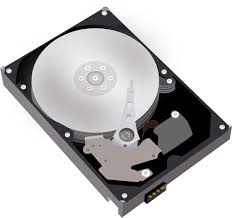
12.

What is this?

a)

CPU

b)

Motherboard

c)

Graphics Card

d)

Hard Disc Drive

13.

What is this?

a)

CPU

b)

Motherboard

c)

ROM

d)

RAM

14.

What is this?

a)

ROM

b)

RAM

c)

Printer

d)

CPU

15.

What are all of these?

a)

Documents

b)

Software

c)

Hardware

16.

Mac OS is an example of ______________ software.

a)

application

b)

utility

c)

system

d)

programming

17.

The instructions that tell the computer what to do:

a)

Hardware

b)

Input

c)

Software

d)

Ooutput

18.

The physical objects that make up the computer system:

a)

Software

b)

Storage

c)

Input

d)

Hardware

19.

System Software:

a)

Consists of the operating System.

b)

performs a useful function.

c)

Is the outside of the computer.

d)

Controls the computer.

20.

Types of operating systems:

a)

Unix

b)

Robotics

c)

Linux

d)

Windows

e)

Business

21.

Hardware and Software do not have to work together.

a)

True

b)

False

22.

You can touch software

a)

True

b)

False

23.
What is Hardware?
a)
Computer Instructions or Data
b)
Physicals parts of a Computer
24.
This is the image of a __________ .
a)
RAM
b)
ROM
c)
Keyboard
d)
Motherboard
25.
An example of the computer's hardware would be ...
a)
MS Word
b)
MS Publisher
c)
Keyboard
26.
Programs that are digital and you cannot physically touch. They give instruction to the computer.
a)
keyboard
b)
mother board
c)
hardware
d)
software
27.
What does RAM stand for?
a)
Random Accurate Maps
b)
Really Awesome Memory
c)
Read Only Memory
d)
Random Access Memory
28.

What is this computer software called?

a)

Google Docs

b)

Google Classroom

c)

Google Meet

d)

Google Slide

29.

What is this computer software called?

a)

Google Docs

b)

Google Classroom

c)

Google Meet

d)

Google Slide

30.

What is this computer software called?

a)

Google Chrome

b)

Google Classroom

c)

Google Meet

d)

Google Slide

31.

The software you use to see your lesson is ..

a)
b)
c)
d)
32.

The software you use to browse the internet is ..

a)
b)
c)
d)
33.

What is this computer software called?

a)

Google Chrome

b)

Google Classroom

c)

Youtube

d)

Google Slide

34.
Physical parts of a computer...such as the keyboard and monitor.
a)
software
b)
hardware
35.
The CPU is called the _______________ of the computer.
a)
arm
b)
mother
c)
brains
d)
leg
36.
Programs that give instruction to the computer.
a)
keyboard
b)
mother board
c)
hardware
d)
software
37.
An example of software would be...
a)
MS Power Point
b)
keyboard
c)
monitor
d)
printer
38.
What does the hard drive do?
a)
Stores information temporarily 
b)
Gives Instructions
c)
Stores information permanently 
d)
Drives through the computer
39.
Which of the following is an Output device?
a)
Printer
b)
Mouse
c)
Microphone
d)
Keyboard
40.
RAM is what kind of memory?
a)
Permanant
b)
Forever
c)
Slow
d)
Temporary
41.

What is software?

a)

The physical parts of a computer

b)

The operating information used by a computer

c)

The memory bank of a computer

d)

The electrical current inside of a computer

42.

What are the 2 main types of software?

a)

System and Application

b)

Informational and Entertainment

c)

Dynamic and Static

d)

Professional and Home-based

43.

Software that controls all of the computers hardware is...

a)

Program Software

b)

Application Software

c)

Instructional Software

d)

System Software

44.

A list of instructions to complete a task is...

a)

Algorithm

b)

Operating System

c)

Word Processor

d)

Cloud Computing

45.
What is copyright? 
a)
a form of protection
b)
an image
c)
a form of protection for kids
d)
copies of work
46.
Who Owns the Copyright in a Work?
a)
you and family members 
b)
author who created it 
c)
the president 
d)
the government
47.

This symbol is copyleft

a)
b)
c)
48.

This guy is suing?

a)
b)
c)
d)
49.
What is Copyright Infringement?
a)
anyone who uses someone work without permission 
b)
a copy of someone work
c)
anyone who uses copyright owners work with permission
d)
a picture of someone work
50.

A work must have a copyright symbol (©) to be copy protected

a)

True

b)

False

51.

This symbol is copyright

a)
b)
c)
52.
What does this symbol represent?
a)
Copyright
b)
Cookies & Cream
c)
Creative Commons
d)
Creative Copyright
53.

What is Public Domain?

a)

Material that is under fair use

b)

Material that is free to use and has no owner or copyright

c)

Public Activities that are free to do within the area

d)

Area or territory owned by the government

54.

Creative Commons licensing helps creators retain copyright while

a)

allowing others to copy, distribute, and make some uses of their work

b)

allowing others to make parodies of their work

c)

preventing others from copying their work

d)

releasing their work into the public domain

55.
 You don't need permission to use Public Domain? 
a)
True 
b)
False
56.
Amy tells Daniel about her summer vacation, and he says he'd love to see pictures. She uses a file-sharing program to upload her photos so he can download them. This is copyright infringement.
a)
True
b)
False
57.
Sam buys a new band's CD but decides he doesn't like the singer, so he resells the CD on eBay. That's legal.
a)
True
b)
False
58.
You are NOT breaking the law when you download something if:
a)
No one finds out about it
b)
You have permission from the owner
59.
Which of the following are the best sites for researching articles on the web?  Hide answers
   
a)
 Wikipedia.org
b)
Google, Yahoo, Bing
c)
 Snapchat, Twitter, Reddit
d)
.edu, .gov, .org
60.
What does .net stand for?  
a)
netflix 
b)
network  
c)
 networth
d)
internet 
61.
Which of the following is NOT important when evaluating websites.
a)
The date 
b)
The domain name
c)
The spelling and grammar
d)
The colors of the site
62.
______ is the 'uniform resource locators', are the web browser addresses of internet pages and files.
a)
firewall
b)
operating system
c)
URL
d)
application
63.
___________________ tells one how suitable a website is for a particular person, place or condition.
a)
Accuracy
b)
Detail
c)
Currency
d)
Appropriateness
64.
A system for searching the info available on the Web such as google.com, bing.com, etc. is a __________.
a)
search engine
b)
webpage
c)
browser
d)
dictionary.com
65.

I should always compare the information I find online with at least 2 other sources.

a)

True

b)

False

66.

If I can find it online, it must be true.

a)

True

b)

False

67.

Check all that you should consider when using an online resource especially when researching.

a)

Be a skeptic.

b)

Always check facts that you find.

c)

Ask yourself what’s the point of view of the site.

d)

Investigate the source.

e)

Find out who published the information.

68.
Finding information that is up-to-date is also important.  What can you look for on a website to let you know how current the information is?
a)
title of the website
b)
date last updated
c)
author of the website
d)
works cited
69.
Sometimes it's hard to tell the intent or the reason why information has been published on the web.  What might distract you from getting the information you need?
a)
ads or pop-ups
b)
a mission statement explaining why he/she created the website
c)
date last updated
d)
links to additional information