
Font size
 Worksheets
Intro the Arduinos
Total questions: 40
Worksheet time: 24mins

Identify this component
Uno Cards
Raspberry Pi
Arduino Duo board
Arduino Uno board

Identify this component
Arduino Uno board
Raspberry Pi
Breadboard / Protoboard
White Plastic Board

What is this?
wire
light bulb
resistor
capacitor

What is this?
Digital Pins
Analog Pins
PWN Pins
Microchip

What is this?
Digital Pins
Analog Pins
Microchips
Power and Ground

What is this?
Power regulator
Voltage Regulator
Battery
Microchip (brain of the arduino)

What is this?
Connector for external power supply
USB
Reset Button
LED lights

What is this?
Reset Button
Regulator of power
Joystick Button
USB Button

What is this?
Power LED
Transmit and Receive LEDs (thinking LEDs)
Reset LEDs
Battery Level LED

What is this?
Connector for external power supply
USB Connector
Power Button
GPU

Does the color of the jumper wire matter?
Yes
No
Sometimes

What is this cable used for in Arduino?
to print
to connect Arduino board to computer (send code) and power
to send wifi
to control the computer
Which of these images corresponds to male-male cables?


Having the connections seen in the image, which pin should I put in the HIGH state so that the red led turns on?
PIN 8
PIN 9
PIN 7
PIN 6
Which of the following is an LED?


Which of the following is the resistor ?


Does it matter how you connect an LED?
Yes it matters
No it doesnt matter

Will the light turn on with this connection?
Yes
No

What is this?
Electrical diagram without elements
Electrical diagram with Led
Electrical diagram with a Led and a Pushbutton

This diagram that allows us to make in Arduino?
Turns on a RGB LED
Push a button for an LED
Turns a motor
Controls a computer
Which of these images corresponds to female-male cables?
Which of these images corresponds to alligator clip cable?

Will the light turn on? (more than 1 response)
No, the wires are connected the button incorrectly
No, the wires are not connected correctly
No, the Led is not connected correctly
Yes, everything is perfect

Will the light turn on?
No, the wires are connected the button incorrectly
No, the wires are not connected correctly
No, the Led is not connected correctly
Yes, everything is perfect

Will the light turn on?
Yes
No

What kind of circuit is this?
Series
Parallel

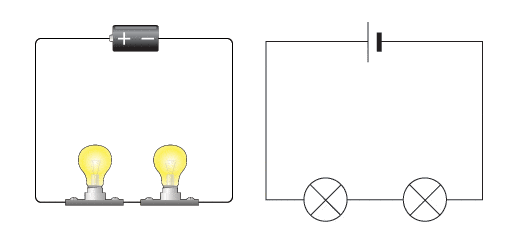
What kind of circuit is this?
Series
Parallel



What is the first thing you do when solving a problem?
Try
Prepare
Define
Reflect
If you are making a plan, what part of the problem solving process are you working on?
Define
Prepare
Try
Reflect
If you are attempting to put your plan into action, what part of the problem-solving process are you working on?
Define
Prepare
Try
Reflect
If you are comparing your results to the original goals you set, then you are doing this step in the Problem Solving Process?
Define
Prepare
Try
Reflect

Spot the Error in this Circuit
Backward LED
Resistor in wrong breadboard spot
Incomplete circuit. No grounding wire
No errors. This circuit will work!

Spot the Error in this Circuit
Backward LED
Resistor in wrong breadboard spot
Incomplete circuit. No grounding wire
No errors. This circuit will work!

Spot the Error in this Circuit
Backward LED
Resistor in wrong breadboard spot
Incomplete circuit. No grounding wire
No errors. This circuit will work!

Spot the Error in this Circuit
Backward LED
Resistor in wrong breadboard spot
Incomplete circuit. No grounding wire
No errors. This circuit will work!

