
 Worksheets
Computer Exam
Total questions: 80
Worksheet time: 44mins
1. A computer is used for keeping ________________ of all items.
a. decisions
b. books
c. records
2. _____________ device helps us to move the pointer on the computer screen.
a. Monitor
b. Mouse
c. Keyboard
3. When we select any icon on desktop, it turns ______________.
a. Grey
b. Blue
c. Yellow
4. The _______________ tool is used to erase any part of the drawing.
a. Rubber
b. Eraser
c. Wiper
6. Windows is an __________________ System.
a. Program
b. Document
c. Operating
7. Processed data is called _________________.
a. Input
b. Output
c. Process
It is the process of writing, testing, debugging, and maintaining the source code of computer programs.
C - Programming
Computer Program
Computer Programming
Computer Programmer
The C programming language was devised in the early __________.
1950's
1960's
1970's
1980's

Name of this part
Pre-Processor Command
Variables
Functions
Comment

Who is Mark Zuckerberg
an American technology entrepreneur and philanthropist who co-founded Facebook
a British technology entrepreneur and philanthropist who co-founded Facebook
an American technology entrepreneur and philanthropist who founded Facebook
a computer hacker

Who founded Google?
Larry Page and Sergey Brin
Larry Page and Mark Zuckerberg
Larry Page
Sergey Brin and Elon Mask

What is Jeff Bezos famous for?
Tesla Motors
Amazon
Amazonia

The principal founder of the Microsoft Corporation is:
Steve Jobs
Bill Gates
Larry Page
Clint Bezos

Apple Inc is a multinational technology company founded by:
Steve Jobs, Steve Wozniak and Ronald Wayne
Steve Wozniak, Ronald Wayne and Larry Page
Ronald Wayne, Larry Page and Bill Gates
Bill Gates and Steve Jobs
Computers are great machines for:
repetitive tasks
impossible tasks
small tasks
practical tasks
One of the dangers of using a computer is using it too much for way too long without moving or thinking for myself.
True
False

A computer is a digital machine, good at:
following a set of mathematical equations
following a set of instructions called an algorithm
following clever programs
following a list of encrypted data
A _______ is a set of instructions, that tells the computer what to do.
Program
Compiler
Assembler
Translator

Word Processing in Microsoft Word or Google Docs is the application you should use to
Write a letter to a friend
Calculate a monthly budget
Make a poster or flyer
Create a slideshow presentation

A spreadsheet in Microsoft Excel or Google Sheets would be the best application to use to
Make a calendar
Write a paper for English class
Create a greeting card
Create a bar chart

If you were creating a flyer to advertise for a dance you should use
Microsoft Excel
Microsoft PowerPoint
Microsoft Publisher
Microsoft Flyer Maker

What program would you use to create a slideshow presentation
Microsoft Excel or Google Sheet
Microsoft PowerPoint or Google Slides
Microsoft Word or Google Docs
Microsoft Shmicrosoft or Google Shmoogle

If you wanted to create an invitation to a party you would use
Microsoft Publisher
Microsoft Excel
Microsoft Word
Microsoft Invitation Maker
What is meant by the term software?
Data Storage Systems
Built in Computer System
Control System
Programs and Applications
What is meant by hardware?
Machines
Physical Components
Control System
Monitoring System
I am the main circuit board in a computer what am I?
Hard Disk Drive
CPU
Graphics Card
Motherboard
I can read information of optical discs. What am I?
Hard Disk Drive
CPU
Optical Drive
Graphics Card


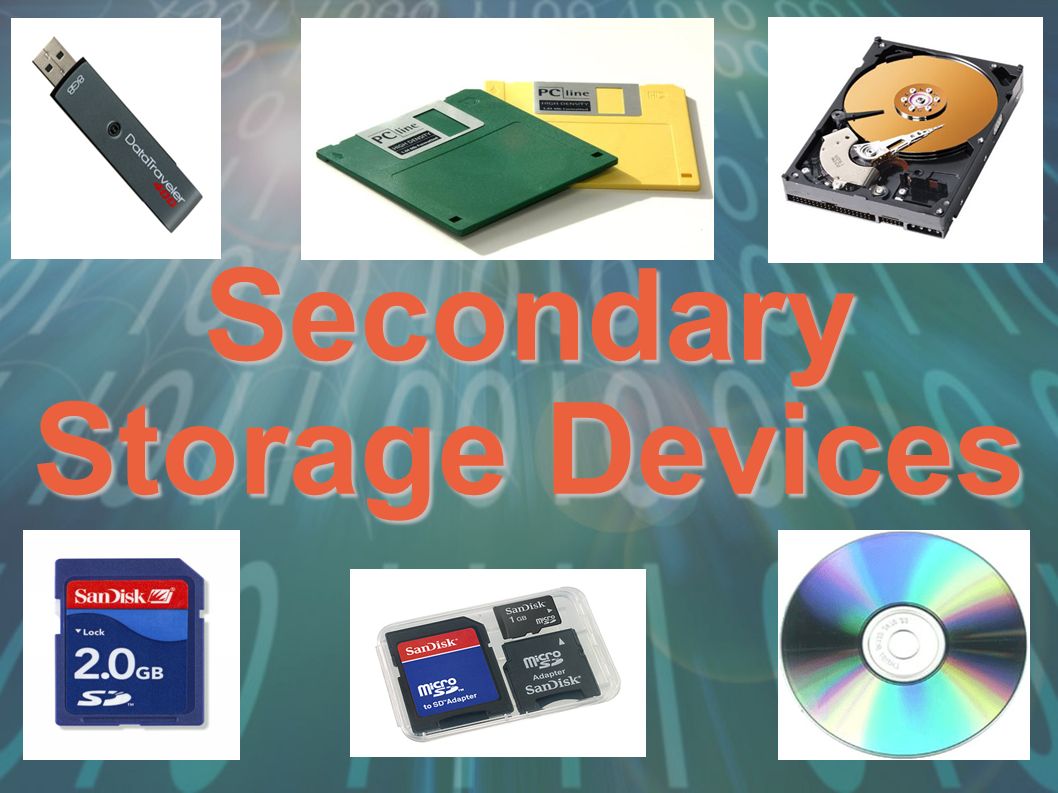
Secondary storage devices can be grouped into three categories - what are they?
Magnetic, Flash and Optical
Magnetic, Optical and Solid State
Solid State, Flash and Hard Drives
Hard Drives, CDs and USBs
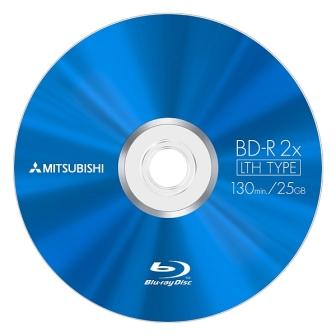
What category of storage is a Blu-Ray disk?
Magnetic
Optical
Solid State
Primary memory
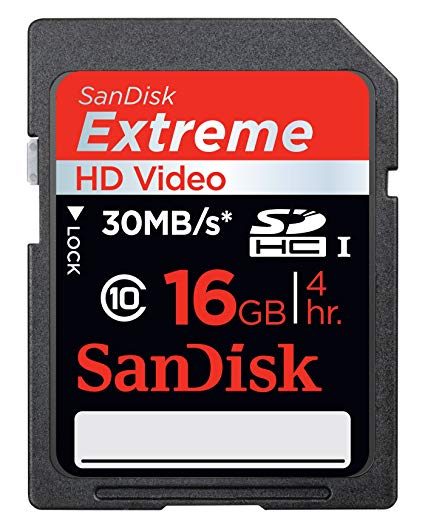
What category of storage device is a HD card?
Magnetic
Optical
Solid state
Primary memory
The types of storage are:
Primary
Hardware
Secondary
Software
RAM stands for:
Random Account Memory
Read Only Memory
Random Access Master
Random Access Memory
ROM stands for
Random Access Memory
Read Only Memory
Read Online Memory
Ready Only Memory
ROM stands for
Random Access Memory
Read Only Memory
Read Online Memory
Ready Only Memory

What application should you use to make a calendar to plan your life (if you had a life)?
Publisher
Word
Excel
TikTok

What application do Adalay and Amiyah use the most in Computer Science class?
Excel
Word
TikTok
PowerPoint

Microsoft Word would be the best application to use if you wanted to
Calculate a budget for a wishlist
Write an essay for English class
Make a poster for a school activity
Make a slideshow for a presentation

The best option for calculating the amount of money in a budget is a
Spreadsheet
Word Doc
Slideshow
Flyer

What is the meaning of this symbol?
WiFi
Power
Font
Upload
When I want to mute a device, which symbol should I choose?


What is the meaning of this symbol?
volume
power
WiFi
settings
If I want to open a Google Doc, I should click on which symbol?


If I am trying to save something, I should look for which symbol?


What does this symbol usually mean?
closing the program
sharing on Google Drive
opening a new window or program
When I want to add a photo to a document, which menu should I look in?
File
Edit
Insert
Making changes on a document means to
save
open
edit
file


What is the icon?
Internet Exlporer
Google Chrome
Mozilla Firefox
Safari


Jessica has connected her new printer to her Windows 10 computer, but Windows is not recognizing it. What should she do?
Power cycle the printer
Reset the USB cable
Install the latest driver
Restart Windows

When a presentation has both audio and video it is said to be this
multimedia
dara
process
internet
Any computer part that you can physically touch can be defined as:
Networks
Software
Hardware
Binary

The main processor, or brain, of the computer (pictured above) is called the:
CPU
Motherboard
Hard Drive
Expansion Card
A device that stores and processes data is called a:
software
computer
hardware
citation
a separate file sent with an email.
data
file
attachment
computer
a message sent electronically between computers or devices.
dm
message
text
a part of the internet made of documents linked to one another.
internet
web
data
technology

