
 Worksheets
Photoshop Layer Masks
Total questions: 64
Worksheet time: 32mins

Which of the buttons at the bottom of your layers panel creates a new mask?


What key command resets to your default colours (Black and white)?
command/control D
C
D
command/control C
When using a mask, things painted white will be ___________
Hidden
Visable
Erased
White
When using a mask, things painted black will be _________
Hidden
Visible
Erased
Black
Selection tools (such as quick select or magic want) will work while masking
True
False

The 2 headed arrow in the top right of this image will ___________
Undo your last command
Switch the foreground and background colours
Turn your image 90 degrees
Create a new mask
What key command will switch your background and foreground colour selection?
Command/Control X
S
Command/Control S
X
Painting a shade of grey on your mask will affect the masks ___________
Brightness
Clarity
Opacity
Hugh

What Photoshop tool is pictured
Paint Brush Tool
Selection Tool
Quick Select Tool
Healing Brush Tool

What do "Layer Masks" do?
refine the edge of a selection
allow for adjustment layers
erase portions of a layer
hide/show portions of a layer
If you do not see a specific panel, where do you go to find it?
Select Menu
Edit Menu
Window Menu
Workspace
Which tools can you use to make a selection?
Quick Selection
Lasso Tools
Marquee Tools
Masks
White "reveals": Black " (a) "...
Which tool repairs a part of an image?
Spot Healing Brush Tool
Lasso Tool
Brush Tool
Eyedropper Tool
Select the BEST option to hide all other layers.
Click on the Layer Visibility Toggle Icon one by one.
Alt+Layer Visibility Toggle Icon
CTRL + ,
Layer Menu>Hide Layers
Part of your image is missing. Which option is the BEST way to fill the the empty area?
Use the Rectangular Marquee tool to select the empty space and some of the content from the photo. Then to the Edit Menu>FILL>Content-Aware.
Use the Shape tool to select the empty space and some of the content from the photo. Then to EDIT>CONTENT AWARE SCALE
Use the Content Aware Move tool to select some of the content from the photo.Move selection to fill content.

______________ panel in Photoshop displays all the layers in an image.( This preserves the original state of an image while manipulating another version of it through another layer.)
Photoshop stuff
Drawings
Layers
Pictures
What is the standard Adobe Photoshop extension?
.txt
.psd
.docx
.phs
Who invented Adobe Photoshop?
Thomas Edison
Thomas Knoll
Thomas cook
What type of software is Adobe Photoshop?
Image Editor
Web Browser
Word Processor
The __________ gallery allows you to apply and combine three different kinds of blur and create effects.
Action
Blur
Power
Large
_______________ allows to heal undesirable portions of an image.
Content Aware move
Content Aware patch
Content Aware
_____________ enables you to select pixels and drag it to some other part of an image without using layers and masks
Content Aware Move
Content Aware Formula
Content Aware Patch
A selected area is indicated on the screen by a blinking selection border, called ________________.
Blinker
Border
Marquee

In Photoshop, the "History Panel" lets you see up to 100 of your most recent actions in a single document.
True
False

How do you refine the edge of a selection made with the quick select tool?
Blending Mode Dialog
Color Range Dialog
Select Subject Dialog
Select and Mask Dialog
Which Image has the highest resolution?


A raster image is made of pixels.
true
false
How do you change the size of a single layer in a Photoshop Document
free transform
image size
canvas size
crop
Which is not an example of a mask?
adjustment layer
smart object
clone stamp tool
What do you edit a layer mask with?
paint or selection tools
pen or shape tools
What do you edit a vector mask with?
paint or layer tools
pen or shape tools
What does a clipping mask do?
masks only the layers above it
masks only the layers below it
masks all the layers in the image

In what year was the iPhone first released?
2005
2009
2007
2010
Which unit of measure is NOT available for a ruler?
inches
pixels
picas
yards
What does "place embedded" do?
puts a file into your current file as it's own layer
pulls a file out of your current file
autosaves your file
What is the standard resolution for the web?
72
300
150
1200
What is the standard resolution for print?
72
300
12
1200
The main Photoshop window is called the Canvas.
True
False
Which is a legal sized print document?
8.5 x 11
11 x 17
Which tool would let you remove a random bird from the sky?
content aware
fill background
color replacement
cuddle
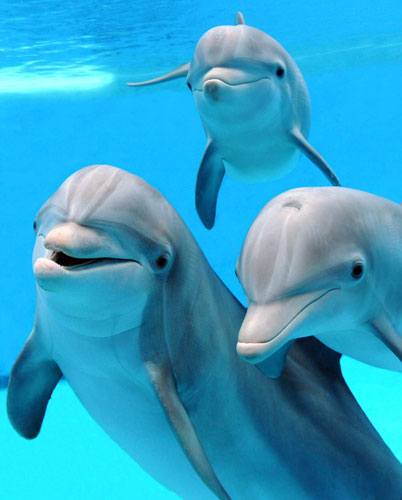
What sense dolphins don't have?
hear
smell
sight
taste
How do you access the Levels of a layer?
Double click the layer thumbnail
Choose the layer adjustment icon at the bottom of the layers panel
Which three are valid uses for the lasso tool?
To make a non geometric selection
To remove a selected area from an image
To make a selection and use content-aware fill
To group objects from separate layers together.
At the beginning of the design process, it's important to work closely with your client. Which of the following methods is a good way to explore creative options and ensure you are creating something the client is happy with?
Making rough sketches
Finalize concepts before showing them to the client
Work exclusively in digital format
Work only in traditional format
You are getting dozens of images ready to be published on the web, and you need to make sure they are in the correct color mode and the correct size while still maintaining the same ratio. Recording an Action will be the quickest way to make changes to all the images. Which of the following steps should you include in your action? CHOOSE TWO.
Use RGB color mode
Use CMYK color mode
Use 300 DPI
Constrain image proportions when exporting
Which option is NOT a factor when determining which kind of images to include in your project for a target audience?
Your own stylistic preference
Purpose of the project content
Age of the audience
Desired goals of the client
Which of the following statements are true regarding vector masks? (Choose two.)
Are resolution-dependent bitmap images that are edited with the painting or selection tools
Are created with either the pen or the shape tools and are resolution independent
Creates a sharp-edged shape on a layer and is useful anytime you want to add a design element with clean, defined edges
Are destructive, and you cannot re-edit the masks later
When designing a brochure for your client, what should be the first question you ask the client?
Who is the brochure meant to reach? Who is the audience?
What color scheme do they want?
How much am I getting paid for this?
How many copies is the client requesting?

What is the world's smallest country?
Monaco
Vatican
Maldives
Marshall Islands

Who founded the basketball game?
Steve Nash
William McGregor
William G. Morgan
James Naismith

In what state does Barrack Obama born in?
Kansas
Indiana
Alabama
Hawaii
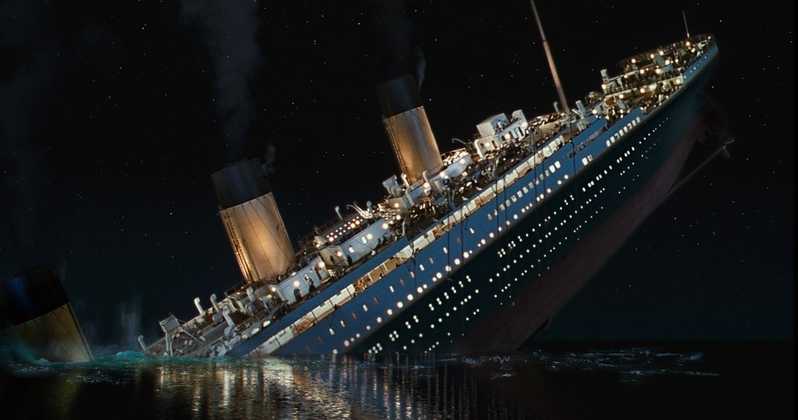
In what year did the Titanic sink?
1921
1915
1912
1951

How much does the human brain weigh?
3 pounds
5 pounds
8 pounds
12 pounds

What is the most spoken language in the world?
Spanish
English
Hindi
Chinese
Do you prefer to work in Photoshop or Illustrator?
Photoshop
Illustrator
Neither
Both

What is the most popular spice in the world?
pepper
garlic
ginger
cinnamon

What sports can improve your posture?
Olympic swimming
gymnastics
horseback riding
golf

What animal kills the most people in Africa?
Hippos
Nile Crocodile
Mosquito
Lion

