
 Worksheets
Year 9 Ms Excel
Total questions: 112
Worksheet time: 1hrs 22mins
What is the difference between Workbook and a worksheet?
A workbook is the actual file that contains the worksheets, which turn contain the data.
The worksheets contain the data and the workbook contains the tabs for each data type.
A workbook is a section that contains the worksheet reports; both are contained in a spreadsheet.
There is no difference other than which term you prefer to use for spreadsheets.
When you insert a row, where does Excel place it in relation to the cursor position?
Above the current row
Below the current row.
You must select the row before you can insert a new row.
You must copy and paste any existing data down one row to have a blank row at the cursor position.
Which character automatically indicates the contents of a cell are a formula?
$
=
‘
“
How can data be aligned within a cell?
Horizontally
Horizontal and Vertical
Vertically
Horizontally, vertically, or rotated
Why might you want to apply borders to a cell instead of just using the gridlines on the worksheet?
Borders can help to separate and identify specific cells.
You can highlight a row by clicking one button for outside borders.
To emphasize specific cells in the gridline.
To mark the print area of the worksheet.
Why might you prefer to apply a background color to a cell instead of applying a pattern
There is a limited number of patterns to choose.
Patterns can make it harder to read the data than using a solid color.
You can choose a lighter color whereas all patterns are dark in design.
Patterns should only be used with cells that have formulas.
All formulas begin with a
&
=
%
-
Columns go...
Across or Horizontally
Down or Vertically
Rows go...
Across or Horizontally
Down or Vertically
Which of these symbols is used for divide on a computer?
\
*
/
|
What is the "Active Cell" in Excel?
The Bottom cell in a worksheet. It is indicated by a dark border onscreen.
The current cell in a worksheet. It is indicated by a dark border onscreen.
The top cell in a worksheet. It is indicated by a dark border onscreen.
The past cell in a worksheet. It is indicated by a dark border onscreen.
What is the Sum formula?
Sum( )
Sum( )=
=Sum( )
=( )Sum
_______________ involves creating a single cell by combining two or more selected cells.
Cut and paste
Merging cells
Delete
None of these answers
A _______________, which appears when you right-click an object, is a list of frequently used commands that relate to the right-clicked object.
Page layout
Data
Cell style
Shortcut menu
The horizontal and vertical lines on the worksheet itself are called.
Excel window
Status bar
Gridlines
Worksheet
The ____________ presents information about the worksheet, the function of the button the mouse pointer is pointing to, or the mode of Excel.
Page layout
Status bar
Page break view
None of these answers
How should you name a cell?
Number + Letter
Letter + Number
What 3 types of data can be entered in a spreadsheet?
Texts, numbers, charts
Text, Colors, Pictures
Text, numbers, formulas
Which formula below finds the average of the cells?
=AVERAGE(A1:A3)
=AVERSGE(A1-A3)

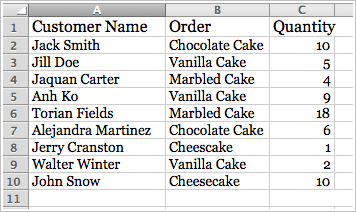
What is a bar graph used for?
Showing differing values of data
Showing parts of a whole
Organizing data
What is a pie chart used for?
Showing differing values of data points
Showing parts of a whole
Organizing data points
What tab do you click to find the charts and graphs?
Home
Insert
Page Layout
Formulas
When creating a chart in Excel, what is the first thing you need to do?
Select the data to be graphed.
Select the Insert Tab
Choose a chart from the ribbon
Double click the active cell
What does the mouse look like in a spreadsheet?
Arrow
Pointer
Two headed arrow
Selection cross
The ability to quickly add a formula, set of number, months or day of the week down a column or across a row.
Autofill
Copy and Paste
Drag and Drop
Typing

Cell value references should always be used when possible to avoid having to make multiple updates when a key value changes.
True
False
Define Formula Bar?
An element in Excel or Google Sheets that appears below the grid and to the left of the zoom control that shows the deleted commands.
A button or key in your keyboard to write the formulas.
An element in Excel or Google Sheets that appears below the Ribbon that shows the contents of the active cell so that you edit the text, value, date, formula, or function.
What is the Sum formula?
Sum( )
Sum( )=
=Sum( )
=( )Sum
When starting a formula what is the first thing you type in the cell?
;
?
%
=
How would you write a cell reference formula for cell A1 subtracted from Cell C3?
A1-C3
A1-C3=
=A1-C3
=C3-A1
Which formula gets the biggest value of a range of cells?
MAX
MIN
SHORT
SUM
Which formula gets the smallest value of a range of cells?
MAX
MIN
SMALL
SUM
A _________ is a prewritten formula that is built into EXCEL.
function
problem
equation
equal sign
A combination of numbers and symbols used to express a calculation. Always begins with an "=" sign.
Cell address
Worksheet
Formula
Which of the following formulas is not entered correctly?
=10+50
=B7+B8
=B7+14
=10+50;
Which of these symbols is used to do a division on a computer?
\
*
/
|
Which operator is used to multiply in Excel?
+
x
/
*
Formulas can be copied to adjacent cells with the ____________.
Fill handle
PgDn Key
Function key F4
None of the above
To edit a formula you
A. Double-click the cell
B. Click in the formula bar
C. Press Esc
D. Both A & B
Answer =2+3*3-2
9
10
11
12
Answer =3+5*(6-2)
23
32
31
64



What does the Average formula return?
Returns the lowest argument.
Returns the middle argument.
Returns the three highest arguments.
Returns the mean of all its arguments.
What does the Max formula do?
Returns the highest three values in a set of values and ignores text.
Returns the largest value in a set of values and ignores text.
Returns the text that you are searching for.
Returns the smallest value in a set of values and ignores text.
What does the Min formula return?
Returns the smallest three numbers form a set and ignores text.
Returns the smallest value in a set of values and ignores text.
Returns the largest three numbers form a set and ignores text.
Returns the largest value in a set of values and ignores text.
What does the Countif formula return?
Counts the number of cells within a range that meets the given condition.
Counts the number of words within a range that meets the given condition.
Counts the number of columns within a range that meets the given condition.
Counts the number of letters within a range that meets the given condition.
Which operator is used to multiply in Excel?
+
-
/
*
All formulas begin with a(n) _______________.
&
=
+
#
Excel will display _______________________ if the cell is not wide enough.
******
^^^^^
######
>>>>>
Formulas can be copied to adjacent cells with the ____________.
Fill handle
PgDn Key
Function key F4
None of the above
To edit a formula you
Double-click the cell
Click in the formula bar
Press Esc
Both A & B
Answer =2+3*3-2
9
10
11
12
Answer =3+5*(6-2)
23
32
31
64
__________________is an alphanumeric value used to identify a specific cell in a spreadsheet.
Formula
Calculation
Cell address
None of the above
There are two types of references.
Relative and Dependent
Relative and Proportionate
Absolute and Dominant
Relative and Absolute
A predefined formula that performs calculations using specific values in a particular order.
Function
Reference
Chart
Multiple arguments must be separated by a ______________.
Space
Comma
= Sign
!

