
Font size
 Worksheets
ICT Exam Q2
Total questions: 59
Worksheet time: 34mins
The software that we would use to create a database is
Microsoft Publisher
Microsoft Excel
Microsoft Word
Microsoft Access
In a database, data is stored in
Tables
Forms
Reports
Queries
The best data type to choose for date of birth would be
Number
Text
Date/Time
Currency
Besides entering data directly into the table, you could use a
Field
Form
Query
Report
Nick wants Access to assign an ID number to each record. What is this called?
Data Type
auto numbering
Properties
Text
This field can contain any characters with maximum of 255 letters
Memo
Short Text
Database
Texting
A software tool that allows you to use a computer to create a database
Records
Microsoft Access
Datasheet
Blind date
Describes a collection of data organized to allow access, retrieval, and use of data.
Micorsoft Word
Datasheet
Database
Run the bases
A computerized record keeping system is called as
Communication system
Database management System(DBMS)
Networking System
Which of the following is the correct definition of a Record?
It has only one type of information
Collection of Files
All information about a single entity.
When you close a new table, it asks you for what
name of the file
where to save it
nothing
Where do you configure the field properties of a Table?
Design View
Datasheet View
Access View

If you click on the shown icon, how many options would be listed about a table?
1
3
2
4
A telephone book is a good example of a database
True
False
In a database table, rows are called __________
Fields
Records
Primary Keys
Foreign Keys
Forms, queries, and reports are created based on the data in the _________
Forms
Tables
Reports
Spreadsheets
What software do you use to make databases?
Access
Excel
PowerPoint
Word
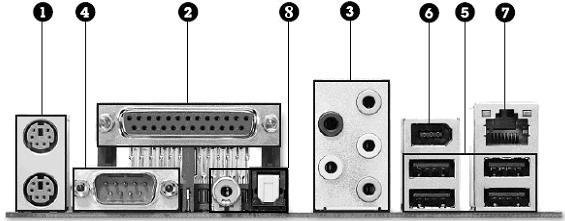
Which of the following ports are not shown in the picture? There are 2 correct answers
HDMI
PS/2
USB
VGA
Ethernet
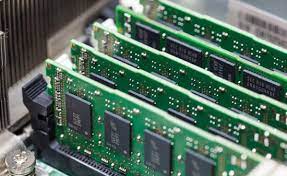
What is shown in the picture?
A ROM memory
A RAM memory
A hard drive
An optical memory

What is this?
CPU
RAM
ROM
Speakers

What is this?
Audio Card
Graphics Card
CPU
Motherboard

What is this?
CPU
Motherboard
Graphics Card
Hard Disc Drive

What is this?
CPU
Motherboard
ROM
RAM

What is this?
ROM
RAM
Printer
CPU

What are all of these?
Documents
Software
Hardware
what is powerpoint used for?
for lectures
for discussions
for making presentation of a report
all of the above
there are different formats for slides like
title only
title without content
blank
title with image
PowerPoint has feature like
animation
transitions
record powerpoint
all of above
What do we call one page of MS PowerPoint?
Slide
Page
Card
Display
A file created in MS Word is known as ______________________.
Powerpoint presentation
Document
Header
Footer
Which option in MS Word allows to create a new file?
Open
New
Close
SAve


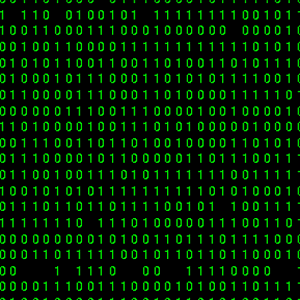
What will be the output?
name = "Dave"
print (name)
Dave
'Dave'
name
(name)
If I want to add a picture from the web, which button do I click?


If I want to add a shape, which button do I click?


If I want to add a video, which button do I click?


If I want to add writing, which button do I click?


If I want to change my background, which button do I click?


If I want to insert a picture that's not from Canva, which button do I click?


When I want to place something on my Canva, do I click the item or do I drag and drop it onto the Canva?
Click
Drag and Drop
None of these
How can I move objects on my Canva?
Click and drag it
Click "Position" and then choose where to put it
None of these
If I want to have a Youtube video on my Canva, how do I do it?
Copy and Paste the link
Drag the video from the tab
You cannot do it

What does this bar do?
Lets you change your text colour, size, font
Changes the background of your Canva
How can I delete something I do not want?

Backspace button
None of these

