
 Worksheets
Tech Apps Semester Review Fall 2024
Total questions: 38
Worksheet time: 21mins
What type of application would be best to use when typing a letter?
Google Docs
Google Slides
Google Drawings
Google Drive
What type of application would be best to use when making a presentation?
Google Docs
Google Slides
Google Drawings
Google Drive
______________all of the information online about a person, either posted by that person or others, intentionally or unintentionally
Digital Footprint
Oversharing
Rings of Responsibility

If you post something mean about someone, you can just delete it and everything will be OK
What is Malware?
Software that protects your computer from viruses
Software that protects your computer from spyware and adware infections
Software that updates your computers operating system
Software that may harm your computer
What does a Worm Virus do?
Web pages you have visited that are stored on your hard drive
Text files some websites use to identify users
Duplicates itself until your storage is full
A form where you type confidential information
The _____ type of malware collects personal information and sends it to a third party.
Worm
Toolbar
Homepage hijacker
Spyware
Which symbol tells the computer you want to create an equation or formula in Google Sheets
!
@
=
#
Select the data that would be best represented in a bulleted list.
Ingredients in a recipe
Steps to build a lego set
A grocery list
Instructions to cook a pizza
Which file extension did we use for animated images?
JPEG
DOC
HTML
GIF
AutoFill will automatically fill in which of these
Days of the Week
Formulas
Months of the Year
All of the above
Which of these formulas will add cells A5 and B5 together?
=SUM(A5:B5)
=ADD(A5+B5)
SUM(A5:B5)
The art we created in Google Sheets was called _______.
Bad Art
Spreadsheet Art
Pixel Art
What is cybersecurity?
the state of being protected against the criminal or unauthorized use of electronic data,
Security against breaking into your house
Top secret Government security
What is a computer hacker?
A virus that invades your computer and causes it to not work
A person who sends lots of e-mails to people asking for money
A person who uses a computer to illegally breaks into your computer and take your information
A person who cuts or hacks at something
Which of the following IS a best practice when using Social Media Apps.?
Use the same password for all accounts
Don't accept follow/friend requests from someone you don't know
Make sure your posts are public
Sending someone your address so they can send you a giftcard
Which operating system does the iPhone use
IOS
ChromeOS
Windows
Linux
Which operating system does the Computer Lab at Kitty Hawk use
IOS
ChromeOS
Windows
Linux

This icon is used to open which google application?
Google Sheets
Google Forms
Google Slides
Google Docs
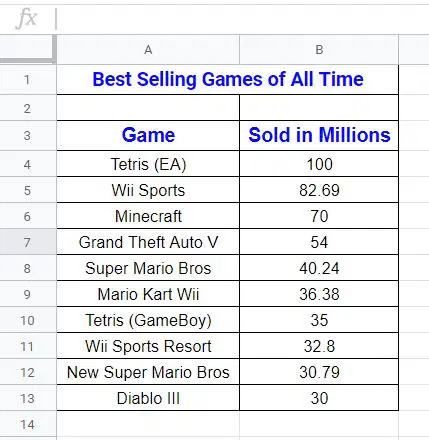
What information is in cell B6
100
Minecraft
Formula
70
The background for a slide can be ...
Color
Image
Theme
All choices
What are the steps for inserting an image into a google slide?
Insert | Image
Drag and drop from tab
Copy image and paste it
All choices are correct
Which is the shortcut to copy text
Control + C
Control + V
Control + Z
Control + X
Which is the shortcut to past text
Control + C
Control + V
Control + Z
Control + X

What is this icon
Google Drive
Google Docs
Google Suite
Google Stuff

What does this icon do?
Underline
Undo
Unmake
Bold
The art of creating a program.
Artistic
Programming
Looping

What direction does the rabbit move?
Left
Right
Down

In this program, what happens when you press the "h" key?
The sprite moves up
The sprite changes to a hippo
The sprite increases in size

What is the name of the variable created in this code?
randomNumber
petals
petalSize
purple

The ladybug should move only when the mouse is near the bottom of the screen. Which mouse y-value will cause the ladybug to move?
250
325
300
275

What is the x and y value for the watermelon?
(250,140)
(110,200)
(240,270)
randomNumber

What is the name of the sound played when the left arrow key is pressed?
bell.mp3
guitarChord.mps
bike.mp3
There is no sound
rect (200, 150, 50, 350);

Line 1: fill("blue");
Line 2: rect(200,200);
Line 3: fill("green");
Line 4 :rect(175, 175);

