
 Worksheets
Quiz-2 Sec-E
Total questions: 51
Worksheet time: 38mins
Which of the following selectors selects any tag with an id attribute set?
E#id
.class
#id
*
What will be the output of below mentioned code snippet?
p strong {background-color: yellow;}
Strong have yellow background
Strong element within a p element have a yellow background
Both p and strong have yellow background
None of the mentioned
The _____________ attribute is used to define the name(s) of the class(es) to which a particular tag belongs.
class
elelment
id
none of the choices
By applying an ___________ a style can be applied to just a single tag.
class rule
element rule
id rule
none of the choices
What type of selector is used in this case?
p {line-height: 150%;}
class selector
element selector
id selector
none of the choices
How many different types of selectors in CSS?
3
4
5
6
An id is NOT always unique within the page so it is chosen to select a single, unique element.
True
False
The universal selector is used as a ?
Wildcard Character
Page Character
Commas character
None of the above
___________ are used to separate each selector in grouping.
#
.
;
,
A ___________ is used to define a special state of an element.
pseudo-tag
pseudo-element
pseudo-id
pseudo-class
Which rule set would change the font size to 24?
font-size: 24
size: 24;
font-size: 24;
font size: 24;

Which CSS selector applies to the yellow element(s) only? Select the correct answers!
li a{ ... }
li.a{ ... }
li, a{ ... }
li-a{ ...}
none of the above
Which color value in CSS gives a transparency effect?
Color Names
Hex Codes
RGB
RGBA
What will this rule set create?
h1 {
text-decoration: underline overline dotted red;
}
red waves under the heading
red dots over and under the heading
red waves over and under the heading
red dots over the heading
A __________ is a protection for any published work that helps to prevent that work from being used without prior authorization.
Firewall
HTML
Copyright
CSS Declaration
____________ is a term used to describe how page elements are placed on the screen. For example, elements can be positioned left, right, or center.
Attribute
Style
Alignment
Properties
is an inline element used to create a single line break in a document.
<b> tag
<tr> tag
<br> tag
<ol> tag
an _____ _____ stays in the same line as the code that surrounds the text.
block element
inline element
HTML tags
alt attribute
a _____ _____ is any element that starts a new line (e.g., paragraph) and uses the full width of the page or container.
inline element
img href
CSS ID
block element

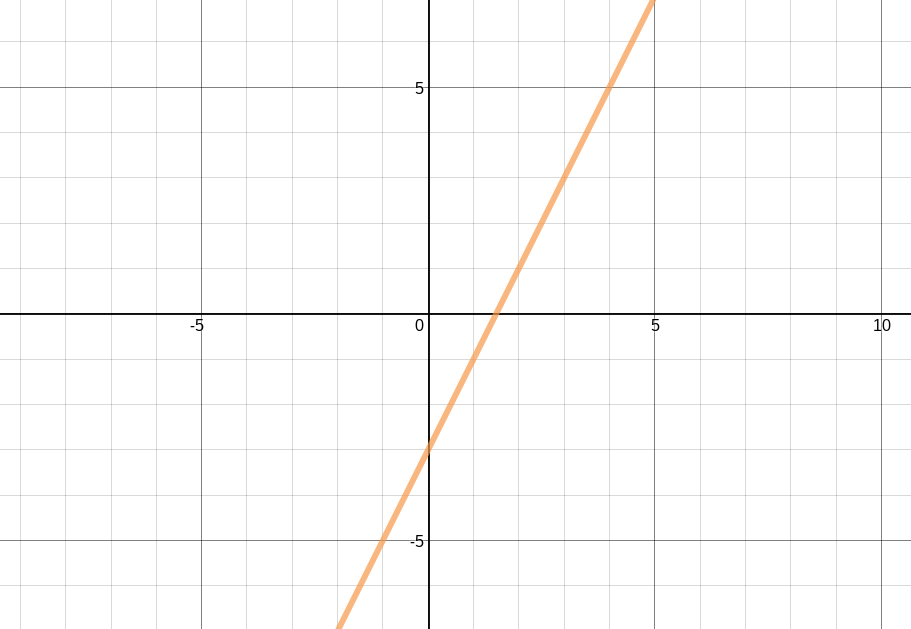
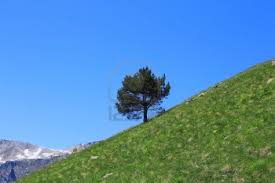
What gradient is represented here
negative
zero
undefined
positive

What gradient is represented here
Positive
negative
undefined
zero
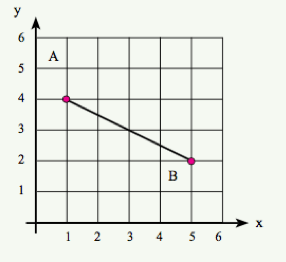
What is the gradient of this line
4
4/5
-2
-1/2
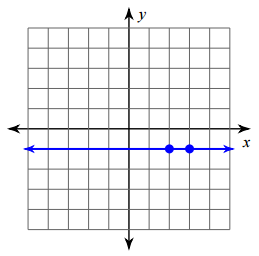
Find the gradient of the line.
Undefined
0
1
-1

Which of the straight line give the gradient in positive?


Find the gradient.
46
−64
−23
−32
What is the definition of Gradient of a Line?
It is the measure of degrees of a line.
It is the measure of length of a line.
It is the measure of steepness of a line.
It is the measure of strength of a line.

What is the gradient of the line parallel to the x-axis
0
undefined
+1
-1
The CSS box-sizing property allows us to include the padding and border in an element's total width and height?
False
True
What does CSS Box-Size do?
include the padding and border in an element's total width and height
Increase size
None of the above
How Can We Write Multiple CSS Gradients?
The Text is shown normal.
background-image: linear-gradient(to right, red,orange,yellow,green,blue,indigo,violet);
None of the above
inline-block, the top and bottom margins/paddings are respected, but with ___________?
The Text is shown normal.
Display
None of the above
HTML - semantic tag needed to complete this -
<_______>
<a href="index.html"> Home</a>
<a href="page2.html">Page 2</a>
<a href="page3.html">Page 3</a>
<________>
<nav>
</nav>
<article>
</article>
<aside>
</aside>
<footer>
</footer>

HTML Tables -
you want a cell to be super long...fit over the TOP of two other cells in another row
(like cell A in the image)
rowspan
colspan
cellspan
HTML - two semantic tags that create collapsible content
<header>
<footer>
<details>
<summary>
<nav>
<footer>
<aside>
<article>
Q.
Identify the CSS Selector Below
h1 {......}
answer choices
ID Selector
Class Selector
Element Selector
Grouping Selector
Multiple-choice
Add question
Q.
Identify the CSS Selector Below
p.crown {......}
answer choices
Element AND Class Selector
Descendant Selector
Element Selector
Grouping Selector
Multiple-choice
Add question
Q.
Identify the CSS Selector Below
h1, h2 {......}
answer choices
ID Selector
Class Selector
Element Selector
Grouping Selector
Multiple-choice
Add question
Q.
Identify the CSS Selector Below
p .crown {......}
answer choices
Element AND Class Selector
Descendant Selector
Element Selector
Grouping Selector
Multiple-choice
Add question
Q.
Which is an example of an CSS Element Selector?
answer choices
#title
.title
h1
h1.title
Multiple-choice
Add question
Q.
Identify the CSS Selector Below
.crown {......}
answer choices
ID Selector
Class Selector
Element Selector
Grouping Selector
Multiple-choice
Add question
Q.
Identify the CSS Selector Below
table .crown {......}
answer choices
Element AND Class Selector
Descendant Selector
Element Selector
Grouping Selector
Multiple-choice
Add question
Q.
Identify the CSS Selector Below
#crown {......}
answer choices
ID Selector
Class Selector
Element Selector
Grouping Selector
Multiple-choice
Add question
Q.
Which is an example of an CSS Descendant Selector?
answer choices
table
h1, h2
p .title
p
Which is an example of an CSS Element AND Class Selector?
answer choices
#title
.title
h1
h1.title
ID Selector
Class Selector
Element Selector
Grouping Selector
Identify the CSS Selector Below
p.crown {......}
Element AND Class Selector
Descendant Selector
Element Selector
Grouping Selector
Identify the CSS Selector Below
h1, h2 {......}
ID Selector
Class Selector
Element Selector
Grouping Selector
Identify the CSS Selector Below
p .crown {......}
Descendant Selector
Element AND Class Selector
Element Selector
Grouping Selector
Which is an example of an CSS Element Selector?
#title
.title
h1.title
h1
Identify the CSS Selector Below
.crown {......}
ID Selector
Class Selector
Element Selector
Grouping Selector
Identify the CSS Selector Below
table .crown {......}
Element AND Class Selector
Descendant Selector
Element Selector
Grouping Selector
Identify the CSS Selector Below
ID Selector
Class Selector
Element Selector
Grouping Selector
Which is an example of an CSS Element AND Class Selector?
#title
.title
h1
h1.title

