
 Worksheets
Computer Fundamentals F5
Total questions: 97
Worksheet time: 49mins
The brain of any computer system is
ALU
Memory
CPU
Control Unit
None of the above
Any data or instruction entered into the memory of a computer is considered as
Storage
Output
Input
Information
None of these
Select three input devices your computer uses:
Mouse, keyboard, monitor
Mouse, keyboard, scanner
Mouse, printer, CPU
Mouse, scanner, printer Mouse, scanner, printer
Which of the following is not an input device?
Keyboard
Joystick
Monitor
Microphone
Physical components that make up your computer are known as:
Software
Hardware
Operating Systems
Web Browsers
A computer has two main parts: _______________ and _______________.
hardware, lightware
software, brightware
hardware, software
lightware, brightware
Set of ____________________ given to the computer is called software.
instructions
stories
hardware
numbers
_____________________ software co-ordinates different parts of computer.
System
Application
Input
None of these
Hardware cannot be touched and seen.
True
False
____________________ and _______________ are two types of software.
System, application
Internal, external
System, external
Internal, application
................... are movable storage devices.
CD
DVD
Both
CD Stands for .......................
Circular Disk
Compact Disk
Common Disk

Which Storage device is this?
Memory Card
Flash Drive
Hard Disk

Identify this storage device
Pen Drive
Memory Card
CD
What lets the computer's hardware and software work together?
Operating System
Computer Virus
Monitor
Central Processing Unit
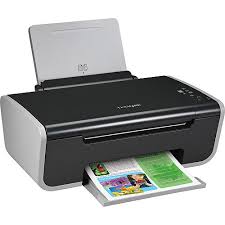
Is this device Input or Output?
Printer
Input
Output
All the following are input devices except:
Scanner
Joystick
Printer
Barcode Reader
A computer is
an electronic device that process data and provide useful informaiton.
a calculating machine that can perform very fast.
an automatic machine that can perform various functions.
a device made up of hardware and software parts.
The four main components of a computer system are
Hardware, software, data, and user
Input, output, data, and software
Input unit, output unit, CPU and memory unit
Data mining
Is same as big data
Application of software for extracting useful information from large data collection
Select the most appropriate sequence of processing in a computer?
input-output
output-processing-output
output-processing-input
input-processing-output

What does CPU stand for?
Critical Processing Unit
Core Processing Unit
Center Processing Unit
Central Processing Unit
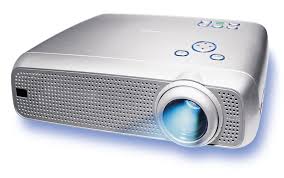
Is this device an Input or an Output? Projector
Which of the following is NOT one of the components of the CPU?
Advanced Resource Monitor (ARM)
Arithmetic Logic Unit (ALU)
Memory
Control Unit
The brain of any computer system is _________
ALU
Memory
CPU
Control Unit
RAM stands for ___________________________
Read And Memory
Random Access Memory
Random Actual Memory
Read Access Memory
A common boundary between two systems is called _________
Interdiction
Interface
Surface
)None of the above
________________is Microsoft OS
Windows
Unix
Linux
ios
The binary system uses powers of ___________
2
8
10
12
An operating system is a ______________
hardware
Software
device
EXE
1 byte = ____________bits
2
6
8
16
Who is known as the father of Computers?
James Gosling
Charles Babbage
Dennis Ritchied
Bjarne Stroustrup
RAM is used as a short memory because it is _______
Volatile
Has small capacity
Is very expensive
Is programmable
1. A group of _______________autonomous computers is called a computer network
independent
desktop
interconnected
stand alone
The ______________is the best-known example of a network of networks
Intranet
Internet
Extranet
Telnet
Which is the biggest unit of data storage in the following list?
Terabyte
Kilobyte
Megabyte
Gigabyte
Speed of computer is measured in...
Hertz
Liter
Meter
Watt
Which of the following is an input device?
Monitor
Keyboard
Printer
None of the above
Today's computer is used for...
Data storage
Computing
Playing games
All of the above
Which of the following device(s) converts a picture on paper to an electronic image on the computer?
Printer
Scanner
Photo-relay
Ultra mouse
Which device is used to generate an image on a paper from the computer?
Scanner
Printer
Mouse
Monitor
Which of these is the smallest in size?
Keyboard
Monitor
Printer
Mouse
Which of the following is/are NOT types of computer hardware?
What application allows you to gain access to the internet?
Which of the following is not a characteristic of a computer?
I.Q.
Versatility
Accuracy
Diligence
Which of the following is true about primary storage?
it is a part of the CPU
It allows very fast access to data
It is relatively more expensive
all of the above
Hardware attached to the computer is called
Input Device
Peripheral
Output Device
Software
Which of these is NOT an example of a peripheral?
Mouse
Monitor
Microsoft Word
Keyboard
Which of these is NOT an example of an output device?


Flash drive is an example of.....
Software
Storage Device
Hardware
Input Device
EEPROM means (a) .

Holds information for us to use later:
Software
Hardware
Peripheral
Storage Device
A personal computer is a machine designed to
store information you collect
run programs and access information
operate smaller computers
process financial transactions for banks
GUI stands for
Graph Use Interface
Graphical Universal Interface
Graphical User Interface
Graphical Unique Interface
None of these
Any data or instruction entered into the memory of a computer is considered as
Storage
Output
Input
Information
None of these
Which of the following is not a storage medium?
Scanner
CD
DVD
Floppy Disk
Which of the following is the extension of MS-Word?
.xls
.doc
.ppt
.mp3
The following are all essential parts of every computer EXCEPT
Motherboard
Speakers
CPU
Main memory
Byte=?
16 bits
4 bits
8 bits
2 bits

Which of the following is an example of cloud computing?
Using your laptop on an airplane
Using Wi-Fi to connect to a network printer
Using Google Drive
All of the options are examples of cloud computing
Which of the following is a benefit of cloud computing?
The ability to make a backup copy of your cloud computing software
The reliability of locally installed applications
Scalable storage capacity
Needs to be installed on the computer.
Which is the number one concern about cloud computing?
Too expensive
Security concerns
Too many platforms
Accessability
"cloud"in cloud computing represents what?
Wireless
Hard drives
Pepole
Internet
What is Cloud Computing?
Cloud Computing means providing services like storage, servers, database, networking, etc
Cloud Computing means storing data in a database
Cloud Computing is a tool used to create an application
None of the mentioned
Which of the following is a type of cloud computing service?
Service-as-a-Software (SaaS)
Software-and-a-Server (SaaS)
Software-as-a-Service (SaaS)
Software-as-a-Server (SaaS)
Which of the following is the application of cloud computing?
Adobe
Paypal
Google G Suite
All of the above
---------- responds to externally generated inputs within a specific time. These systems react quickly to critical situations
Standalone embedded system
Real-time embedded system
Networked embedded system
Mobile embedded system
---------- system works on its own, without needing any other computer.
Standalone embedded system
Real-time embedded system
Networked embedded system
Mobile embedded system
Sensors are --------
Input
Output
Memory
Processor
Which of the following is/are examples of Embedded Systems?
Mobile Phone
Washing Machine
Microwave
Fridge
Laptop
True or False, all embedded systems need an operating system to enable them to function correctly?
True
False
Which of the following are examples of the advantages of using Embedded Systems?
They make devices easier to use
They speed the processes a device can perform
It creates a more reliable device
It enhances the usability of the device

Embedded system makes life easier
True
False
Not given
Embedded system requires programming
yes
no
Bluetooth is.......
a wireless networking technology
Personal Area Network
A teeth coloured blue
Bluetooth devices communicate using.....
Infrared
radiowaves
both A and B
nor A and B
An interconnected collection of piconet is called ___
scatternet
micronet
mininet
multinet
Identify the main reason on why MOBILE COMPUTING revolutionize the way of using computers.
Mobile computing can prevent unauthorized access to data
Allow users to access information regardless of time and position
Conventional computer less efficient compare to mobile computing
Conventional computer is less secure compare to mobile computing
Which of the following is NOT one of the popular V's that characterize Big Data?
Volume
Velocity
Vagueness
Variety
Big data is the massive amount of rapidly moving and freely ..................
Available data
Unavailable data
Structured Data
Unstructured Data
What should you look for when you want to control who sees your content on social media?
cookies
target
privacy settings
not possible
What do companies do when they collect information about you based on your activity online?
track
internet use
hack
identity theft
What is the tiny piece of data that allows google to remember our password?
identity theft
cookie
personal information
privacy policy
What is the true definition of big data
huge amount of space
large, diverse sets of information
unlimited speed data internet connection
small, undiverse sets of information
What is NOT a characteristic of big data?
Volume
Variety
Vision
Velocity

