
 Worksheets
Computer Science Bi-Weekly
Total questions: 70
Worksheet time: 40mins
Which of the following is not done by abstraction?
Identifies essential details
Disregards non-essential information
Breaks the problem down into smaller tasks
Computational Thinking
looking for similarities among and within problems
Mental processes and strategies that include: decomposition, pattern matching, abstraction, algorithms
creating step-by-step algorithms
Reducing information and detail to focus on essential characteristics.
Breaking problems into smaller, more manageable problems.
Computational Thinking
looking for similarities among and within problems
Mental processes and strategies that include: decomposition, pattern matching, abstraction, algorithms
creating step-by-step algorithms
Reducing information and detail to focus on essential characteristics.
Breaking problems into smaller, more manageable problems.
Decomposition
looking for similarities among and within problems
Mental processes and strategies that include: decomposition, pattern matching, abstraction, algorithms
creating step-by-step algorithms
Reducing information and detail to focus on essential characteristics.
Breaking problems into smaller, more manageable problems.
pattern recognition
looking for similarities among and within problems
Mental processes and strategies that include: decomposition, pattern matching, abstraction, algorithms
creating step-by-step algorithms
Reducing information and detail to focus on essential characteristics.
Breaking problems into smaller, more manageable problems.
Abstraction
looking for similarities among and within problems
Mental processes and strategies that include: decomposition, pattern matching, abstraction, algorithms
creating step-by-step algorithms
Reducing information and detail to focus on essential characteristics.
Breaking problems into smaller, more manageable problems.
algorithmic design
looking for similarities among and within problems
Mental processes and strategies that include: decomposition, pattern matching, abstraction, algorithms
creating step-by-step algorithms
Reducing information and detail to focus on essential characteristics.
Breaking problems into smaller, more manageable problems.
Breaking a complex problem down into smaller problems and solving each one individually.
Decomposition
Abstraction
Pattern Recognition
Algorithmic Design
Picking out the important bits of information from the problem, ignoring the specific details that don't matter.
Decomposition
Abstraction
Pattern Recognition
Algorithmic Design
A logical way of getting from the problem to the solution. If the steps you take to solve a problem follow an algorithm then they can be reused and adapted to solve similar problems in the future.
Decomposition
Abstraction
Pattern Recognition
Algorithmic Design
Mike is posting an online advertisement on Facebook to promote his band's upcoming tour. Abstraction? (What is the relevant piece of information?)
Date of tour
Other bands
His parents names
His age

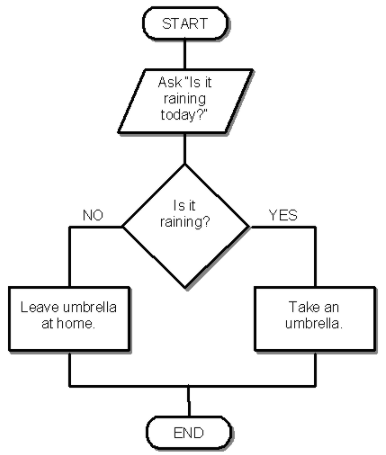
This flowchart represent which part of computational thinking?
Decomposition
Abstraction
Pattern Recognition
Algorithmic Design
When on social media, we should all be cautious of...
How our outfit looks
Oversharing
If we have a charger
If you think you got scammed or hacked, you should...
Email a teacher
Get a new internet provider
Change your passwords

What should you do if someone you do not know wants to chat?
Email them a picture of yourself.
Tell them to chat with your friend.
Block them from chatting with you and tell a grown up.
Send them a text message.
Mia thinks her computer has a virus. What should she do?
She should try to fix the virus herself.
She should e-mail her friends about it.
She should tell a grown up.
She should download more games.
How can you stay safe when you are online?
Share your passwords with friends.
Download as many games as you can.
Only open e-mails from people you know.
Give out your address and phone number.

I should ask my parent or guardian if it's okay before______.
Creating a social media account.
making a webpage.
Posting anything online.
All Of The Above.
A) Keeping passwords a secret & being nice
B) Telling an adult when I fell unsafe
C) None of the above
D) All of the above


Baseballer345 wants to meet Brent at the park.
What should Brent do?


What kind of device is this?
Input
Output
Input and output

What kind of device is this?
Input
Output
Input and output

What kind of device is this?
Input
Output
Input and output

What kind of device is this?
Input
Output
Input and output

What kind of device is this?
Input
Output
Input and output

What kind of device is this?
Input
Output
Input and output

What kind of device is this?
Input
Output
Input and output

What kind of device is this? (Tip - similar to the ones in the computer room)
Input
Output
Input and output

What kind of device is this?
Input
Output
Input and output

What kind of device is this?
Input
Output
Input and output

What kind of device is the screen on this phone?
Input
Output
Input and output

What kind of device is this?
Input
Output
Input and output

What kind of device is this?
Input
Output
Input and output

What kind of device is this? (Look at the ceiling of your classroom!)
Input
Output
Input and output



Yes

19

What will happen if the user's book return is late?
Sends them an SMS (text)
Does not send them an SMS (text)

How many arrows come out of the end symbol in the flowchart?
0
1
2
3
How many arrows come out of the start symbol in the flowchart?
0
1
2
3

This flowchart is made to...
Calculate the area and perimeter of a square
Output figures of different sizes
Calculate the area and perimeter of a circle
Find out how long it takes to get to the moon

In this flowchart, r ...
is the radius of a circle
stands for random number
represents a running total
is a miscellaneous variable

In this flowchart the diamond shape helps with...
Deciding whether the student should pass or fail
Adding up the student's marks
Making sure the student gets good marks
Checking the student's general behaviour

This flowchart is made to ...
Check whether a number is odd or even
Decide if we like a number or not
Calculate the remainder of a number + 2
Help people with Maths


