
NEW
Font size
 Worksheets
AI Workplace Test 1 Review
Total questions: 36
Worksheet time: 18mins

What is number 1?
Menu Bar
Essentials
Options Bar
Tool Bar
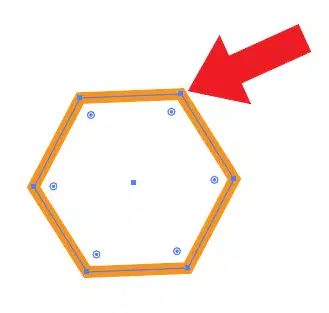
What are the squared dots on the shape used to create shapes called?
Points
Paths
Anchor Point
ellipse
What is the shortcut key: A
Direct Select Tool
Selection Tool
Anchor Point
Path

What is number 22?
Color
3 Screens Mode
Folders
Switcher
What is the shortcut Key: M
Rectangle Tool
Move Tool
Paint Tool
Switch

What is number 18?
Status Bar
Panel Name
Panels Menu
Tools

What is number 20?
Work Space
Artboard
Screen Mode
Canvas

What is number 8
Preview or Outline Mode
Options Bar
Doc Tab
Artboard

What is number 21?
Work Space
Panel Menu
Workspace Switcher
Status Bar
What determines the color model used to display and print images?
Print mode
Resolution
short cuts
color profile
What program uses objects defined by mathematical formulas that make shapes?
Raster graphics
Image graphics
vector graphics
bitmap graphics
What does CMYK stand for
Cyan, Magenta, Yellow, Kern
Cyan, Magenta, Yellow, Black
Cyan, Maroon, Yellow, Black
Crayon, Magenta, Yellow, Black
What do the colors RGB stand for
Red Green Black
Rose Green Blue
Red Green Blue
None of the choices
What is the shortcut: H
home
zoom
hand
selection
What is the Keyboard Shortcut: V
Selection
Direct Selection
Zoom
Hand

What is number 17
Canvas
Panels
Menu
Tools

What is number 16?
Menu
Options
Panels
Panels Name

What is number 15?
Expand
Zoom Amount
Status Bar
Bottom Line

What is number 14?
Tools
Colors, Gradients, and None
Colors
Fill & Stroke

What is number 11?
Curved arrow
Swap Fill & Stroke
Color, none & all
none

What is number 13?
Black and white
White
Panels
Default Fill and Stroke

What is Number 2?
Essentials
Menu Bar
Workspace Switcher
Options Bar

What is Number 12?
White and Black
Fill only
white fill and black stroke
swap fill and stroke

What is Number 10?
Menu
Workspace Switcher
Tools
Fill and Stroke

What is Number 9?
Collapse and Expand
Collapse
Expand Arrows
Switcher

What is Number 7?
Color Mode
CMYK always
RGB always
Docmument Name

What is number 5?
Tabbed Doc Window
Document Name
Menu Bar
Options Bar

What is number 4?
Tabbed Doc Window
Document Name
Art Board
Options Bar

What is Number 3?
Menu Bar
Options Bar
Essentials
Workspace Switcher

What is Number 6?
Tear Off
Viewing Zoom Percentage
Name
Menu
What color do you look for when you are docking panels?
Red
Blue
Green
Purple
What is it called when Panels and Tools move around the work area?
Docking
Moving
Floating
Rowiing
What does the no color icon look like in illustrator?
White Fill
No fill with red line
Black fill
no fill with blue line
What are the shortcuts ctrl + & ctrl -
zoom in and zoom out
close menu and open menu
close window and open window
close tools and open tools
What is the inside color of an object called?
Fill
Stroke
None
Gradient
What is used to create a custom workspace in illustrator
Essentials
Workplace Switcher
Graphic Design
Illustrator Panels

