
NEW
Font size
 Worksheets
Excel Sort/Filter Quiz
Total questions: 15
Worksheet time: 15mins
To arrange data in ascending order of age we will
Filter it
Sort it
Apply Conditional Formatting
Rearrange data manually
To display only those records where temperature is below 0 degree you will
Manually extract the data
Sort the data
Filter the data
Use Goto option
What can you use to help you see only what you want to see by hiding everything else.
Filters
Functions
Sorts
Charts
What can you use to organise your data by changing the order it appears in.
Filters
Functions
Sorting
Charts
The Sort & Filter group is present under which tab of Microsoft Excel?
Insert Tab
Data Tab
Page Layout
View
The arrangement of data in 0 to 9 will arrange the data in the order
Smallest to Largest
Largest to Smallest
A teacher wants to see only students who scored above 80 in Math. These are two separate conditions applied together.
Which filtering option should she use?
Simple Filter with OR condition
Simple Filter with AND condition
Advanced Filter with AND criteria
Sort by Score then by Subject

What is this icon?
Freeze Panes
Sort
Hyperlink
Conditional Formatting
The _____________ feature allows you to see only those records that you want display while it hides the rest of the data temporarily from the view.
Filter
sort
Custom Sorting
Removing Filter

What is this icon?
Freeze Panes
Sort
Filter
Conditional Formatting
The rearrangement of data in ascending (A-Z) or descending (Z-A) orders is called__________ .
Filtering
Clear Rules
Sorting
Custom Filter
You want to sort a dataset first by "Region" (A-Z), then by "Salesperson" (A-Z), How can you achieve this in Excel?
Use Filter > Sort by Region, then by Salesperson
Use Data > Sort and add two levels of sorting
Use Data > Custom list to add two Levels of Sorting
All of these
A teacher has a list of students with the following columns: Class, Name, and Average Score. She wants the list to show all students grouped by Class first, and within each class, students should appear from highest to lowest average score.
Which sorting order should she choose?
Primary: Name (A–Z), Secondary: Class (A–Z)
Primary: Average Score (Largest to Smallest), Secondary: Class (A–Z)
Primary: Class (A–Z), Secondary: Average Score (Largest to Smallest)
Primary: Class (Z–A), Secondary: Name (A–Z)
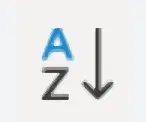
What is the purpose of the following icon?
Sort Paragraph
Sort Descending (Highest to Lowest)
Sort Ascending (Lowest to Highest)
Filter

What is the purpose of the following icon?
Sort Paragraph
Sort Descending (Largest to Smallest)
Sort Ascending (Smallest to Largest)
Filter

