
 Worksheets
Google Wallet
Total questions: 31
Worksheet time: 34mins
How must we compose the case summary?
Root cause
Request Type + Resolution of the case
Request type + Root cause
Request Type

For cases where the cx cant add a payment method and the error involves contacting RISK, what is the timeline if risk responds to the following? Please check the image
24 hours
48 hours
24 to 48 hours
12 hours
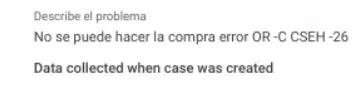
How would you explain the resolution to a cx who cannot make a purchase due to this error OR -C CSEH -26?
To tap to pay, the phone must:
-Android 6.0
-A camera to add the payment method
-Have an NFC capable phone and NFC must be turned on.
-Add a tap to pay payment method.
Android 7.0
-Be a rooted device
How can users find all their Google Wallet transactions?
What does this error “Payment not started” mean when performing a tap and pay transaction?
The user didn’t unlock the device (US only).
The user unlocked the device too far in advance of before they paid with the Google Wallet app.
The user’s payments account is suspended because some info couldn’t be verified.
The Google Wallet app transmitted the necessary data but the point of sale terminal didn’t respond.
The payment was blocked because a domain administrator turned off Google Wallet for this email address domain.
Within 30 days the user can add up to ¿____? cards total and 5 cards per merchant
From which country can users make use of the student card?
Mexico
Spain
Chile
USA
From which country can users make payments with the Wear OS?
Mexico
Panama
I can't add my payment method, I'm getting this error OR-TAPSH-08, what process should we follow regarding the mentioned error?
Escalate the case to the Risk team
Advise the user to contact the bank
Advise the user to try another FOP
Contact Google Workspace Admin to have the suspension removed.
What is the Kb where we can find information related to how to add cards in Google Wallet and troubleshooting for ''I can't add a card in Google Wallet''?
Use Google Wallet for transportation
Pay, Wallet & Payments Platform agent articles
Add or set up cards in Google Wallet
Verify cards in the Google Wallet app
What is the name of the Kb that has the information regarding the error ''CALL TO VERIFY YOUR CARD''?
[How to & troubleshoot] Verify cards in Google Pay app
Verify cards in the Google Wallet app
Add or set up cards in Google Wallet
Countries or regions where you can use Google Wallet
Some features in Google Wallet are only available in certain countries or regions and on certain devices, What is the name of the KB where I can find all that information?
Find supported payment methods
Countries or regions where you can use Google Wallet
Add or set up cards in Google Wallet
Use Google Wallet for transportation
What is the name of the KB where we can find general questions about transit passes?
Make payments or find transactions in the Google Wallet app
Use Google Wallet for transportation
Use loyalty cards & gift cards
[How to & troubleshoot] Verify cards in Google Pay app
In which KB we can find the resolution for the following error “Previous transaction attempt was too recent”?
Troubleshoot tap to pay transaction issues
Tap to pay errors & transaction states
Troubleshoot common issues with Google Wallet
Install or uninstall the Google Wallet app
Which is the kb we must following for the steps about delete cards in the Google Wallet app
Edit or delete cards in the Google Wallet app
Failure to add payment method
In which KB can we find the resolution for “Device not certified”?
About Google Wallet
Tap to pay errors & transaction states
Troubleshoot common issues with Google Pay
Verify cards in the Google Wallet app
Which is the KB where we can find the resolution when a customer asks us how to return a purchase?
Troubleshoot common issues with Google Wallet
Save & use boarding passes or event tickets with Google Wallet
Make payments or find transactions in the Google Wallet app
Install or uninstall the Google Wallet app
In which KB can we find the resolution if the customer asks us, Why do I have to unlock my phone before I pay with it?
Install or uninstall the Google Wallet app
Pay in-store with a Wear OS smartwatch
Make payments or find transactions in the Google Wallet app
Save your Student ID to Google Wallet (US & Canada only)
Which Kb should we use if the customer says that their Wear OS smartwatch is frozen?
Find top user issues for Google Wallet app
Make payments or find transactions in the Google Wallet app
Pay in-store with a Wear OS smartwatch
Troubleshoot common issues with Google Wallet
Which Kb has the resolution for this error OR-BSBBF-55?
Add or set up cards in Google Wallet
Troubleshoot failures to add payment methods
Add payment method
Install or uninstall the Google Wallet app
Which Kb can we use if the customer wants to transfer a digital car key to a new phone?
Use Google Wallet for transportation
About Google Wallet
About digital car keys
Use loyalty cards & gift cards
Which KB has the information regarding redeem passes or board with Google Wallet?
About Vaccination Cards
Save & use boarding passess
Save & use boarding passes or event tickets with Google Wallet
Save your student ID to Google Wallet (US & Canada only)
What is the process we must follow for this emerging issue [Tap and Pay] Purchase doesn't appear in history?
1) Confirm that recent in-store purchases do not appear in transaction history and purchase notifications do not show up in notifications bar. Note that if the user deletes the card from the Google Pay app and adds it back, purchase history will be deleted. 2) Ask the user when the issue started and if anything happened before the issue (system update, Google Pay updated). Ask the user to provide device model, Google Pay app version, FOP type (or example, PayPal, Visa etc), bank name and details of latest purchase which doesn't appear in history. 3) Please tell the users to navigate to the Menu > Activity and take a screenshot of the Activity list. 4) Escalate the case to Tier 2 agents
Confirm if the user has already contacted the bank and was directed back to us being given a reason similar to what is in the issue description. Ask for a screenshot of the response provided to the bank and escalate to Tier 2.
Ask the user:1) If the issue happens in different stores. 2) To confirm If they didn't unlock and relock back the device shortly before the purchase - in this case the device might not require to unlock it again during the purchase, it is working as intended. 3) Ask for a recent example (store name, price, date and time) where device did not request an unlock for high value transactions.
Escalate the case to Google Pay T3 (Deputies) EMEA.
What is the process for this emerging issue [Tap and Pay] Suspended Wallet (Legacy Checkout)?
1) Check in Customer Summary for a "suspended wallet" flag. If present, follow the next steps: 2) Determine if account is Gsuite (organisation). For this, follow the steps: https://screenshot.googleplex.com/PQLnvtC7BWa.png under KB article "Can't use Google Pay app". Do you see "Google Apps Administrator Control Panel (Dasher)" service? - Yes: The account is Gsuite (organization) and the needs to contact their organization administrator. - No: This is a standart Google account, escalate to T2.
Confirm if the user has already contacted the bank and was directed back to us being given a reason similar to what is in the issue description. Ask for a screenshot of the response provided to the bank and escalate to Tier 2.
1) Explain that the problem is caused by Visa and we are working with them to get the issue resolved. Users can try adding other cards as a workaround. 2) Block the case with bug id 193883593 and send CR [OP B BBP]3) Once the bug is fixed, check the go/payeidash for further guidelines. Issue is resolved. Advise users to try adding the card again. Use CR [OP B BAF]
1) Use the standard probing questions in the KB article "[How to & troubleshoot] Find cards in Google Pay app", under zippy "My cards disappeared in the Google Pay app or I got an email that says my cards were deleted". 2) If user answers "no" to all questions, escalate to Tier 2.
What is the resolution for this emerging issue [Sanctions] Screening not checked?
1) Collect the following information: - Screenshot of the error message - Card type and last 4 digits- Name of the bank- Device model- Ask the user to confirm how they added the card in Google Pay - directly from the Google Pay app or from the banking app (push-provisioning)2) Escalate to Tier 2
Please first double check with the user if they have received any email in this regard. If so, they can try using the button in the email. For reference (do not share): Emails about identity verification (Global Entry) (internal KB)Note: You can also assist the user in finding a missing email with this HC article (can be shared): Gmail messages are missingIf the user has not received any email or the step above didn't help, consult T2.
Go to the Customer summary and confirm that the payment profile is suspended by "Screening not checked", confirm with the user that they don't have any notification in pay.google.com and check in the "Payments Profile Troubleshooter" workflow to see if it shows "Engineering". If all steps mentioned are checked, escalate the case with Tier 2. Do not share the flag name with the user but inform that the case needs to be escalated.
1) Check if the issue persists in CS tool. If it doesn't, send a follow up to the T1 agent advising to set the case as finished. (No need to follow up with the User)2) If the issue persists or if you receive new cases, esclate to T3 to create a new bug.

What would be the case summary for this case?
Cx needs help with a card with no name
Needs help verifying cards with no name
CX needs help verifying cards
Need verify cards

What would be the case summary for this scenario?
Cx cant add FOP
Cx cant add FOP due to error
Cx cannot add FOP to make purchases due error OR-CCSEH-26
Cx unable to make purchases/direct to bank
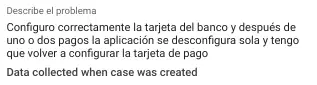
What would be the case summary to this scenario?
Cx google wallet deconfigure automatically after purchase
Cx has to re-add cards because the Google Wallet deconfigure automatically after purchase
Cx contact requesting help for deconfigure google wallet
Google wallet deconfigure

What would be the case summary for this case?
Cx wants to recover the payment profile/unable to recover the profile
Cx wants to recover the payment profile
Recover payment
Do I need to download the Google Wallet app if I already have the old one installed?
If you have the Google Pay app, you don’t need to download the Google Wallet app. You can access Google Wallet from the Google Pay app.
Yes, the cxs must download the application again, since it is an update
If they want they can do it

