
 Worksheets
Smartsheet Certification - Collaboration, Automation & Dashboard
Total questions: 31
Worksheet time: 47mins
Name
Class
Date
1.
Which feature allows licensed collaborators with proper permissions to audit and export changes made to the sheet?
a)
Conditional formatting
b)
View cell history
c)
Highlight changes
d)
Activity log
2.
What is the minimum permission level you need to add or edit the options available in the Column Properties section of a dropdown list column?
a)
Admin
b)
Viewer
c)
Editor - Can share
d)
Editor - Can't share
3.
Which type of user can create or own a sheet in Smartsheet?
a)
SysAdmin
b)
Licensed user
c)
Editor
d)
Admin
4.
Which is helpful when you need to share a number of items with the same group of people?
a)
Hyperlink
b)
Workspace
c)
Folder
d)
Dashboard
5.
The "Send..." action, available from the row menu, allows you to provide a view-only version of one or more rows to anyone you specify. Which two options can be customized?
a)
Columns included
b)
Custom message to recipient
c)
File format of the rows (PDF or Excel)
d)
Delivery recurrence (once, every hour, every day, etc.)
6.
When viewing cell history, which three actions are displayed?
a)
When the change was made
b)
Who made a change
c)
What attachments were made to the row
d)
What information was entered in the cell
7.

Based on the settings shown below, what permission level would Don Miller have on the sheet?
a)
Viewer
b)
Owner
c)
Editor
d)
Admin
8.
What information is tracked for each attachment? (select three)
a)
Date attached
b)
Name of the individual who attached the file
c)
File name
d)
Number of downloads
9.
Which allows you to quickly identify and review the changes that have been made to a sheet?
a)
Highlight changes
b)
Symbols column type
c)
Conditional formatting
d)
Format painter
10.
You can share a collaborator to which two of the following?
a)
Sheet
b)
Folder
c)
Resource View
d)
Workspace
11.
Both sharing and publishing are features that can be used to give view only access to a sheet. What is the difference between sharing a sheet as a viewer and sending a published link?
a)
Viewing a shared sheet requires a collaborator to log in, viewing a published sheet may not
b)
Viewing a shared sheet grants access to see attachments and comments, published sheets do not
c)
Shared sheets reflect changes in real-time, published sheets do not
d)
There is no difference between viewing a published sheet and a shared sheet
12.
When adding a new collaborator to a sheet or workspace, what should be customized to help the new collaborator understand why they are being added and how they should use the information?
a)
Collaborators
b)
Personal message
c)
Default View
d)
Permissions
13.
Which Automation Permissions setting only allows the users that are shared to a sheet to receive notifications and requests from the sheet?
a)
Restricted
b)
Limited
c)
Unlimited
d)
Unrestricted
14.
Scenario: Valentino created an alert to notify a contact in the "assigned to" column if their task is past due and incomplete. Valentino realized that one of his external contractors did not receive the notification when this occurred. Question: What is a likely reason an external collaborator does not receive an automated notification?
a)
Alerts can only be sent to people in your account. You must send a request, to your System Administrator, that the collaborator be added to the account contact list
b)
The user must first be in your personal My Smartsheet Contacts list in order to receive the notification
c)
Valentino needed to create an approval request rather than an alert
d)
The Automation Permissions is not set to unrestricted so external collaborators would not receive the notification
15.
You want to use automated Alerts to alert someone external to your organization who doesn't use Smartsheet. Because the alert is for external collaborators you want to safeguard the data on the sheet. Which option is the most secure way to send an alert without providing access to your data?
a)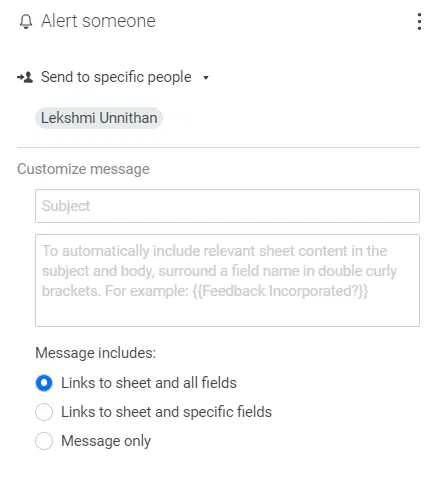
b)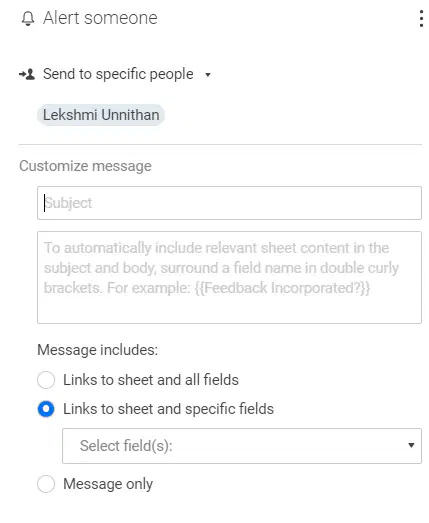
c)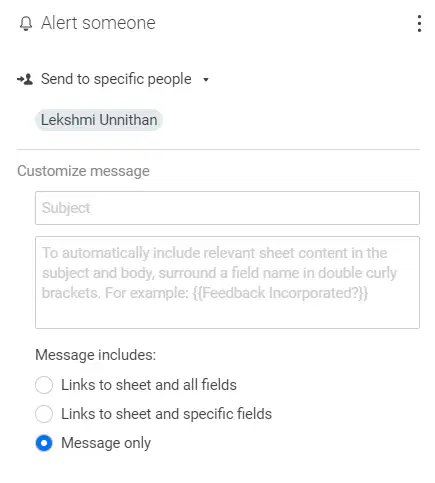
d)
None
16.
Scenario: Joy is the director of a sales team that manages its pipeline in Smartsheet. Every time an opportunity status is marked as "Closed Lost", reps should provide detail in a column called "Reason Won/Lost". Question: What is an automated way for Joy to ask reps to fill out the "Reason Won/Lost" column if they do not initially do so?
a)
Automate the workflow via a formula
b)
Set up a workflow that sends an automated Update Request when the opportunity status changes to "Closed Lost" and the "Reason Won/Lost" column is blank
c)
Set up an automated Approval Request any time the "Reason Won/Lost" column is left blank
d)
Create a Conditional Formatting rule that sends a request when a task is marked as "Closed Lost"
17.
Which option serves as a trigger for an automated workflow?
a)
When a collaborator unsubscribes from a notification
b)
When columns are added
c)
When a date is reached
d)
When the sheet is exported
18.
Scenario: You've created a form to gather new customer interest information. When new submissions are made, you need to assign a member of your sales team as the lead, who will follow-up with the customer. Which one of the following workflows would be the most efficient way to quickly take action after a form submission is made?
a)
Create an alert to notify you when anything on the sheet changes
b)
Send yourself the Activity Log, hourly, so you can adjust the assigned individual
c)
Create an automated update request to notify you of any new form submissions and lets you assign a lead immediately
d)
Use Send as Attachment to send yourself a daily email with directions to assign a lead
19.
Which is a possible use-case for establishing an alert with a date as the trigger?
a)
You want to automatically inform your boss when the status of a task becomes at-risk
b)
You want to notify all collaborators when a task is over budget
c)
You want to automatically let external vendors know when a task is marked as complete
d)
You want to be sent an email five days before the start of each task so that you can check in with key collaborators
20.
To dynamically add cell data in the subject and body of automated request messages, the column name must be wrapped inside which one as a placeholder?
a)
[[ ]] Double square brackets
b)
<< >> Double angle brackets
c)
(( )) Double parentheses
d)
{{ }} Double curly brackets
21.
When a task becomes at-risk, the project manager wants the individual assigned to the task to be immediately notified. How could the project manager achieve this goal?
a)
Create an alert to notify the assignee when a task is marked as at-risk
b)
Send the activity log to all shared users of a sheet
c)
Use the send row functionality to send a row when the task is marked as at-risk
d)
Create a conditional formatting rule to notify individuals when a task is marked at-risk
22.
Which options describe the Notification Center? (select two)
a)
Displays a red icon when new notifications arrive
b)
Allows a user to view and fulfill update requests
c)
Allows a user to create new alerts
d)
Allows a user to forward a notification to a different user
23.
Scenario: Shauna, a sheet level Admin, is receiving too many notifications from an established workflow. Shauna still wants to receive notifications from this workflow, but not as often. Question: Which one of the following options would reduce the number of notifications sent for a given workflow without changing the triggers?
a)
Add a conditional formatting rule to the alert
b)
Change the frequency by editing the "Run workflow" settings
c)
Replace the rule with an update request
d)
Lock the row after the first notification is sent
24.
What can be added to a dashboard to help users understand the data on a dashboard?
a)
Metric widgets
b)
Text labels
c)
Context widgets
d)
Chart widgets
25.
Which file type cannot be uploaded using the image widget?
a)
PNG
b)
PDF
c)
JPEG
d)
GIF
26.
Which option would allow someone to view a report if they are not shared to the underlying sheet(s)?
a)
Place the report in a shared folder
b)
Add the report to a dashboard by using the Report Widget
c)
Place the report in a workspace
d)
Grant the collaborator Admin permissions to the report
27.
Which widget behavior will allow the user to open the underlying sheet or report?
a)
Open a Smartsheet item
b)
Open another source
c)
Last widget editor
d)
Open the data source
28.
What is the default label for the data in a metric widget?
a)
Primary column value
b)
Row number
c)
Parent row
d)
Column name
29.
How is embedding a form on a dashboard via the web content widget effective?
a)
It automatically captures who completed a form submission in the dashboard's activity log
b)
Using an interaction setting, you can provide instant access to the underlying sheet
c)
It allows an individual to complete a form submission without leaving the dashboard
d)
Users no longer need to be shared to the form to complete a form submission
30.
Which two views of a row report can be displayed on a dashboard using the report widget?
a)
Card
b)
Calendar
c)
Grid
d)
Gantt
31.
Which dashboard widget type would be best to show a live updating budget number of a project?
a)
Rich text
b)
Shortcut
c)
Hyperlink
d)
Metric
100 %

