
Font size
 Worksheets
Adobe Premiere Basics Quiz 1
Total questions: 20
Worksheet time: 12mins
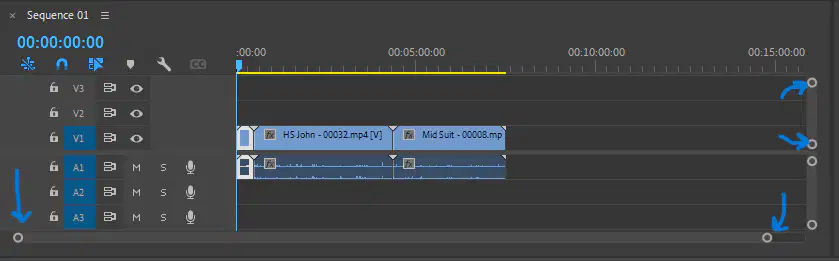
These sliders do what to your editing space and videos?
Deletes them
Allows you to zoom in and out on the timeline
Reorders your video clips
Allows you to zoom in and out on the video clips in the preview screen
frames in Adobe Premiere are
modifiers of appearance of images or the quality of sound
one whole still image
videos made up of a series of frames
like folders used in Windows File Explorer but only found in Premiere
Codec means
the way video and audio information are stored
a shortening of the words coder and decoder
30 frames per second
tracks meant for both mono and stereo audio clips
When attempting to display a video clip with special effects but not every single frame for each second is shown is called ________________.
real-time playback
dropping frames
preview rendering
Applying special effects that an be combined with your original file and previewed immediately is called _____________.
sequencing
dropping frames
preview rendering
real-time playback
When creating a new project you can
copy media files
create a new sequence
create a new bin
choose where to save the new project
You can adjust how media is displayed by clicking
grid view
slider bar
thumbnails
list view
You can layer clips so that one will appear on top of another clip.
false
true
Which is the standard default of frames/second used for videos?
24 f/s
32 f/s
30 f/s
15 f/s
The keyboard shortcut for a faster video playback is
L
K
J
Spacebar
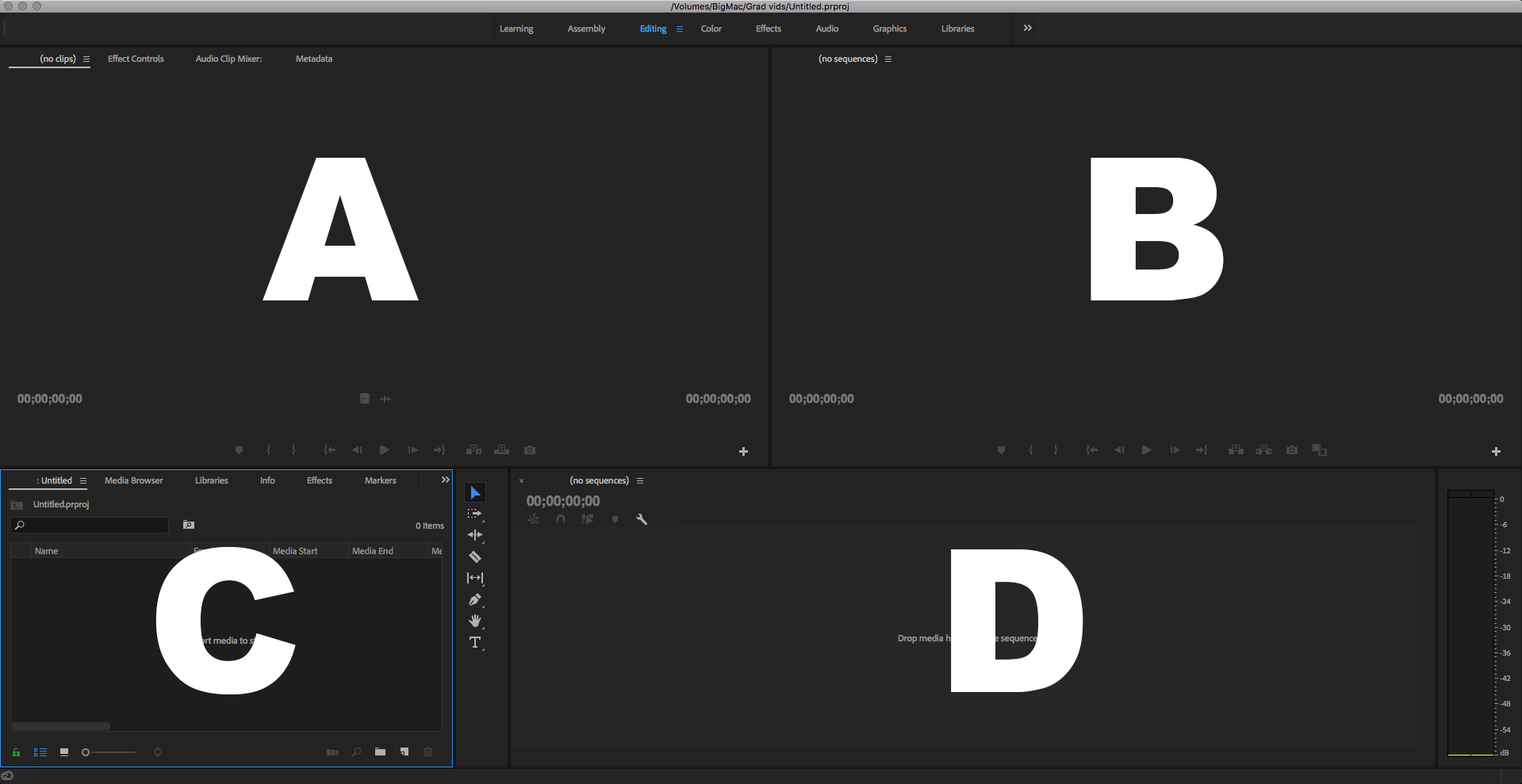
Which is the Timeline Panel?
A
B
C
D

Inside the Project panel, what does this Icon stand for?
A Subclip
A Folder
A Bin
A Sequence
Which file type is video file type:
.doc
.mov
.avi
.mp4
Video Effects
Preview Window
Timeline
Project Assets
Which of the following are audio files?
.mp3
.mp4
.mov
.wav
The keyboard shortcut for reverse video playback is
L
K
J
Spacebar
The keyboard shortcut for to pause video playback is
L
K
J
Spacebar
The name of the tool that allows you to make cuts in a clip is called the (a) tool.
You would find transitions under
Effects
Essential Graphics
Media Browser
Lumetri

