wayground logo

Free Printable Worksheets

Font size

S
M
L
XL
Worksheets

Periodical Exam G10-Q3

Total questions: 50

Worksheet time: 37mins

Name
Class
Date
1.

What Photoshop part is number 1

(a)  

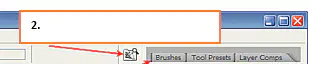
2.

What Photoshop part is number 2

(a)  

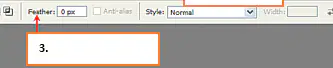
3.

What Photoshop part is number 3

(a)  

4.

What Photoshop part is number 4

(a)  

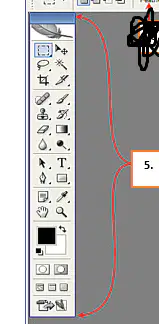
5.

What Photoshop part is number 5

(a)  

6.

What Photoshop part is number 6

(a)  

7.

What Photoshop part is number 7

(a)  

8.

What Photoshop part is number 8

(a)  

9.

What Photoshop part is number 9

(a)  

10.
Is the leading professional image- editing program, released by Adobe?
a)
Photoshope
b)
Photoshop
c)
Potoshope
d)
Photosope
11.
The menu bar consist of how many menus?
a)
6
b)
7
c)
8
d)
9
12.
Contains many of the tools you will be working with in Photoshop. This contains tools for working with images in Photoshop.
a)
Tool box
b)
edit
c)
layer
d)
window
13.
One on top of the another, which can be edited independently of each other and laid on top of or beneath one another, and then later combined to form a single, flat image.
a)
Layer
b)
Toolbar
c)
edit
d)
view
14.
When the eye icon is visible, the layer is displayed in your project. If the eye is clicked, then the layer is hidden but not deleted.
a)
Palette well
b)
Layer
c)
show/hide layer
d)
none of these
15.
Is technically not a layer, however, it can be edited. It is the Bottom-most portion of the image.
a)
Layer
b)
text
c)
Background
d)
mage
16.
What is the acronym of GIF?
a)
Graph Inter Format
b)
Graphic Interchange Format
c)
Glow internet form
d)
Gap information formation
17.
What is the acronym of JPEG?
a)
Join Process Emerge Graph
b)
Joint Photographic Escape Group
c)
Joint Photographers Expert Group
d)
Join Photo Excel Group
18.
What is the difference of PSD to JPEG file formats?
a)
PSD is the soft copy file of photoshop program while JPEG is the hard copy
b)
JPEG is the soft copy file of photoshop program while PSD is the hard copy
c)
PSD and JPEG are the same file regardless if its hard or soft copy
d)
No correct answer
19.
This tool makes the selections on your image, in a rectangular shape. This changes the area of your image that is affected by other tools or actions to be within the defined shape.
a)
Rectangular Marquee tool
b)
Move tool
c)
Shape tool
d)
Lasso tool
20.
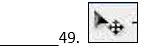
Usually you use it to move a Layer around after it has been placed. Hold the [Shift] key to limit the movements to vertical/horizontal.
a)
Shape tool
b)
Move tool
c)
Rectangular Marquee Tool
d)
Brush tool
21.
Use this to draw selections in whatever shape you would like. To close the selection, either click on the beginning point (you’ll see the cursor change when you’re on it), or just double-click. When holding the *Ctrl+ key, you’ll see the cursor change, and the next time you click, it will close your selection.
a)
Move tool
b)
Brush tool
c)
Spot Healing brush tool
d)
Lasso tool
22.
Use this tool to select a color range. It will select the block of color, or transparency, based on wherever you click
a)
Lasso tool
b)
Magic Wand tool
c)
close stamp tool
d)
Brush Tool
23.
It crops your image to the size of the box. Any information that was on the outside of the box is now gone. Not permanently, you can still undo.
a)
Spot Healing Brush tool
b)
Crop tool
c)
close stamp tool
d)
Blur tool
24.
Use this tool to repair scratches and specs and stuff like that on images. It works like the Brush tool.
a)
Dodge tool
b)
move tool
c)
Spot Healing Brush Tool
d)
Brush Tool
25.
It paints one your image, in whatever color you have selected, and whatever size you have selected.
a)
Blur tool
b)
dodge tool
c)
move tool
d)
Brush tool
26.
It’s a direct copy of the information from the first selected area to the second
a)
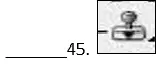
Clone stamp Tool
b)
move tool
c)
brush tool
d)
blur tool
27.
This is the anti-Brush tool. It works like an eraser and erases whatever information wherever you click and drag it.
a)
Spot Healing Brush Tool
b)
Eraser tool
c)
Gradient tool
d)
dodge tool
28.
It creates a blending of your foreground color and background color when you click and drag it.
a)
Brush tool
b)
move tool
c)
gradient tool
d)
rectangular marquee tool
29.
. It makes things blurry. Click and drag to make things blurry. The more you click and drag, the blurrier things get.
a)
Blur tool
b)
magic wand tool
c)
lasso tool
d)
brush tool
30.
It’s actually used to lighten whatever area you use it on. As long as it is not absolute black. Absolute black won’t lighten
a)
Dodge tool
b)
Spot healing Brush Tool
c)
magic wand tool
d)
Brush tool
31.
With this tool you can click a single point, and start typing right away.
a)
Horizontal Type tool
b)
Hand tool
c)
brush tool
d)
dodge tool
32.
This tool works by changing your foreground color to whatever color you click on. Holding the [Alt] key will change your background color.
a)
Eyedropper tool
b)
Brush tool
c)
magic wand tool
d)
blur tool
33.
It’s for moving your entire image within a window.
a)
Move tool
b)
hand tool
c)
magic wand tool
d)
lasso tool
34.
It allows you to zoom into your image. + and – magnifying glass is you need to use to zoom in and out.
a)
Move tool
b)
zoom tool
c)
Hand tool
d)
marquee tool
35.

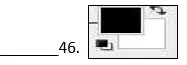
These are your color boxes. One in the front and one in the back Click on either one to bring up the color select dialog box.

a)

Eyedropper tool

b)

foreground color

c)

brush tool

d)

move tool

36.

What is the primary purpose of photoshop?

a)

To create a captivated  images and design

b)

To restore photos or images

c)

To enhanced images

d)

all of these

37.


(a)  

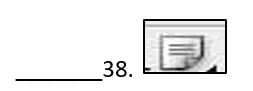
38.


(a)  

39.


(a)  

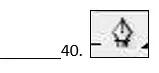
40.


(a)  

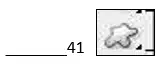
41.


(a)  

42.


(a)  

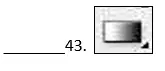
43.


(a)  

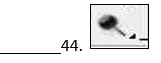
44.


(a)  

45.


(a)  

46.


(a)  

47.


(a)  

48.


(a)  

49.


(a)  

50.


(a)