
 Worksheets
Intro to Engineering Final
Total questions: 80
Worksheet time: 1hrs 20mins
When creating a new sketch you should first choose
an extrusion type.
the timeline.
a plane to draw on.
Every 3D Model starts with
extruding something
drawing a 2D sketch
revolving a face

What do these orange squares represent?
Planes you can put sketches on.
Ships you can sketch on.
Faces you can doodle on.

Which tool from the Create menu would be used to make this effect?
Extrude
Sweep
Revolve

What is the fastest way to fix this view?
Zoom in, rotate the View Cube.
Rotate the View Cube, zoom in.
Click the home button beside the View Cube.

What are the dimensions of the gray (top left) rectangle?
30mm x 50mm
30mm x 30mm
30 x 30
60mm x 30mm

Can we extrude a line?
Yes!
No!
Which icon means extrude?


Which icon means create sketch?


Which icon means thread?
Which icon means revolve?


Which icon means center diameter circle?


Which icon means Line ?


Which icon means circular pattern?


Which icon means inscribed polygon?


Which icon means 2 point rectangle?


What does this hole note symbol represent?
Diameter
Depth
Countersink
Counterbore

What does measurement 1 represent?
Hole depth
Hole diameter
Counterbore depth
Counterbore diameter
What does measurement 1 represent?
Hole depth
Hole diameter
Counterbore depth
Counterbore diameter

to create a cylinder in fusion 360, we should:
sketch a circle, then extrude it
create / circle
create /cylinder
sketch a polygon

What type of sketch is shown in the image?
orthographic
one point perspective
two point perspective
isometric

What type of drawing is the image?
multiview sketch
perspective
thumbnail sketch
isometric
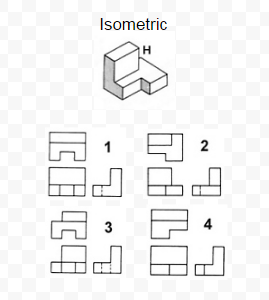

Which diagram below shows the right view of this object?


Put the Engineering Process in the correct order.
Where would you click to access your folder of old projects?
Where would you click to extrude a sketch?
Where would you click to fillet an edge?
Where would you click to see the home view of your object?
Where would you click to move/ copy something?
Where would you click to create a rectangular pattern?
Where would you click to create a drawing of your object?
Where would you click to see all of the changes you've made play in a row?
Place the points:
(3,2) and (-4,-6)

How would you find the distance between the two points you have made?
x values minus y values
Counting Spaces
Rise
______
Run
Distance Formula or Pythagorean Theorem
Match the following products to the engineers that would make them
Car Engine
Mechanical
Bridge
Civil
Prosthetic Arm
Biomedical
Fertilizer
Chemical
Navigation Unit in a Car
Computer
Defining the (a) is the first step of the engineering process. Generating Concepts is another way of saying (b) ideas. After that, students start to develop (c) before testing (d) . After this, students (e) and present solutions.
What is the correct order of making a 3D rectangle in Fusion 360?
Click create sketch
Chooses a plane to draw on
Create a sketch of a rectangle
Click "Finish Sketch"
Extrude the 2D Sketch of the rectangle
Draw an Isometric picture of a cube

Create a graph that has x-intercepts at (0,0) and (8,0) and has a vertex at (4,6)
The 3D software we use is (a) 360.
Drag the correct answer to the appropriate spot you would click.
Where do these need to go?
Our class is made by the company ______________.
Project
Lead
The
Way
Our class is called (a) to (b) (c) .
Most of the engineering degrees you researched take ____ years to complete.
Four
Three
Seven
Two

The 'S' and 'T' stand for (a) and (b) .
Match the product with the probable engineer

Aerospace Engineer

Civil Engineer

Petroleum Engineer

Software
Engineer

Environmental Engineer
Match the product with the probable engineer
Mechanical Engineer
Architectural Engineer
Chemical Engineer
Computer
Engineer
Agricultural Engineer
Match the following products to the engineers that would make them
Car Engine
Petroleum Engineer
Bridge
Architectural Engineer
Prosthetic Arm
Materials Engineer
Fertilizer
Agricultural Engineer
Navigation Unit in a Car
Software Engineer
Label the following

By winding up most of our self propelled cars, we created (a) energy before we released it.
Choose best where to place the following labels.
Where do you think Stanford University is?
Where do you think PurdueUniversity is?
Where do you think M.I.T. is?
Where do you think Missouri S&T is?
Where do you think Colorado School of Mines is?
What is the first step to the engineering process?
Prototype a solution
Communicate your design
Define the problem
Brainstorm multiple solutions
What does "constraint" mean in this step?
A restriction for possible solutions
A physical object holding you down
Any possible solution

creates T-Spline, solid, or surface revolved features by sweeping sketch and model geometry around an axis.
Sketch
Revolve
Line
Loft

Creates a 3D solid or surface by specifying a series of cross sections. The cross sections define the shape of the resulting solid or surface. You must specify at least two cross sections.
Sketch
Revolve
Line
Loft

creates a reversed/reflected image of the selected object in a specified direction and distance.
Arc
Construction Line
Mirror
Fillet

A tangent arc connecting endpoints of two intersecting lines or objects, often a rounded corner. Can be done in a Sketch or to a 3D Model
Arc
Construction Line
Mirror
Fillet

creates a hole feature on the face of an existing solid.
Hole
Work Plane
Origin
Cut

The orange plane that is selected for a sketch to be drawn on.
Hole
Work Plane
Orgin
Cut

(0,0,0) A fixed point from which coordinates are measured.
Hole
Work Plane
Origin
Cut

An operation that removes material from a feature and creates a hollow space or opening.
Shell
Pattern
Sweep
Extrude

This creates a body or cut feature by moving a profile (section) along a path.
Shell
Pattern
Sweep
Extrude

In Fusion 360 what does this button do?
Create a sketch
Create a rectangle
Extrude
Save

In Fusion 360 what does this tool do?
Create a sketch
Create a rectangle
Extrude
Save

In Fusion 360 when do you use this button?
Create a new sketch
Move from solid mode to sketch mode
Move from sketch mode to solid mode
Finish and save file

Which two buttons can you choose to Open a document that you have Saved?
1
2
3
4
5

How can you go to the Home view?
Choose the house icon
Click the Front side
Hit F3
Click the scroll wheel on your mouse

Which section do we choose to change the Units?
Document Settings
Named Views
Origin
Bodies
Which button do you choose to Undo the last step you took?
1
2
3
4
5
Which button do you choose to Redo something you've undone?
1
2
3
4
5
Which button do you choose to Save your work?
1
2
3
4
5
What does "constraint" mean in this step?
A restriction for possible solutions
A physical object holding you down
Any possible solution

