
 Worksheets
Microbit Robot Quiz
Total questions: 16
Worksheet time: 14mins
In any kind of electronics, a red wire indicates a ___________ connection and a black wire indicates a ________ connection.
(a)
What type of coding is used to program the microbit?
Block
Python
Java
HTML
What is a chassis?
The device that controls the motor.
A sirvo motor
The frame or body of a wheeled vehicle.
A special jumper wire that connects to the motor controller.

What is the function of this device?
Controlling the motors
Powering the robot
Providing structure for the robot
Providing the code for the robot.
What is the voltage the battery pack is providing?
3 V
6 V
9 V
12 V

Use the labels on the diagram. What would be attached to 1?
Red Wire for Motor
Black Wire for Motor
Red Wire for Battery Pack
Black Wire for Battery Pack
Use the labels on the diagram. What would be attached to 2?
Red Wire for Motor
Black Wire for Motor
Red Wire for Battery Pack
Black Wire for Battery Pack
Use the labels on the diagram. What would be attached to 3?
Red Wire for Battery Pack
Black Wire for Battery Pack
GND for Microbit
3V3 for Microbit
Use the labels on the diagram. What would be attached to 4?
Red Wire for Battery Pack
Black Wire for Battery Pack + GND for Microbit
Red Wire for Motor
3V3 for Microbit
Use the labels on the diagram. What would be attached to 5?
Red Wire for Battery Pack
Black Wire for Battery Pack + GND for Microbit
Red Wire for Motor
3V3 for Microbit

Use the diagram to fill in the blanks with numbers. 6 should be wired to Pin _, 7 should be wired to Pin _, 8 should be wired to Pin _ , and 9 should be wired to Pin (a) .
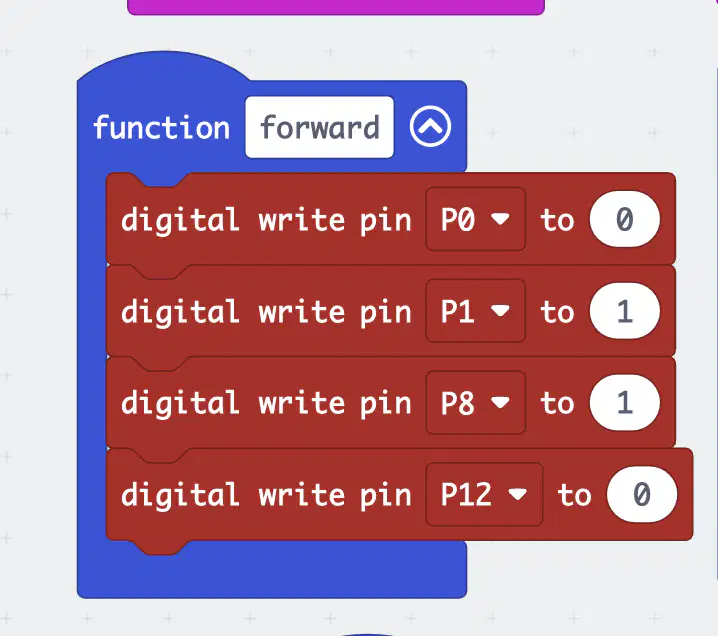
You make the following function and code, but you notice that your robot is just driving in a circle. What should you do?
Change Pin 0 to a 1.
Change Pin 1 to a 0.
Switch the 1 and 0 in Pins 8 and 12.
Change all of the Pins to 1.
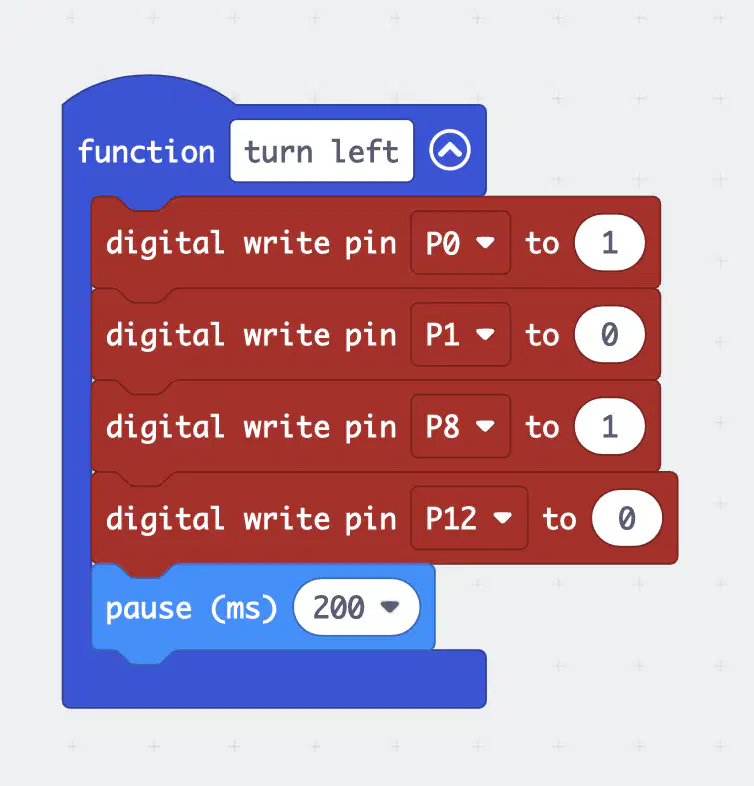
What would be the stop function for the code in the picture?


What would be the backwards function, for the pictured forward function?


Write the sequence of functions you would need to get your robot to drive in a square.
Describe how you would trouble shoot if you saw that your robot didn't work and noticed that the red light on the back of the microbit was off.

