
 Worksheets
Topic 3
Total questions: 35
Worksheet time: 23mins
You are developing a canvas app to monitor time. The app includes a Text Input control named TIC1 and a Timer control named TIM1.
You need to set TIM1 to a default value.
What should you do?
In the OnChange property of TIC1, set the value of the Text property for TIC1 to a context variable that stores the duration value. Assign the value of the variable to the OnTimerStart property for TIM1.
Assign the Text property of TIC1 to the Duration property of TIM1.
Set the Text property of TIC1 to the current system time.
Add the clock icon to the app and use the OnSelect property to set the Duration property for TIM1.
HOTSPOT -
A company is building a Power Apps app to track key project tasks.
Users assign three tasks a risk status on a scale of 0 to 100 by using slider input controls named RiskStatus on the app. The highest risks use the risk status value of 100.
If the combined value of all the tasks is 150 or above, a header bar on the screen must display the text HIGH RISK.
You need to configure a solution to change the text on the header bar.
How should you configure the app? To answer, select the appropriate options in the answer area.
NOTE: Each correct selection is worth one point.
Hot Area:
Where should apply logic to change the text? - On each RiskStatus slider input
Which formula should you use? - UpdateIf((RishStatus1.value+RiskStatus2.value+RiskStatus3.value)>=150,'HIGH RISK')
You create a Power Platform solution. Solution data is stored in a variety of documented cloud services.
You must also be able to connect to one or more industry data sources.
You need to configure the data sources.
What should you do?
Create a business process flow.
Create a data policy template.
Create a UI flow.
Use an existing data connector.
DRAG DROP -
You create an app with multiple screens.
Test users report that the size and type of gallery displayed on each screen are different. You must improve the consistency for the app screens.
You need to create a reusable gallery that displays information based on the current record.
Which three actions should you perform in sequence? To answer, move the appropriate actions from the list of actions to the answer area and arrange them in the correct order.
NOTE: More than one order of answer choices is correct. You will receive credit for any of the correct orders you select.
Select and Place:
1. Create a component.
2. Add an input property.
3.Add a gallery control.
You use a Microsoft SharePoint list to record information about customers.
You must perform a series of actions only when a new item is added to a SharePoint list.
You need to configure a Power Automate flow.
Which trigger should you use?
When an item is created
When an item is created or modified
When a file is created (properties only)
For a selected item
A company has a Common Data Service custom entity that stores customer account data.
You need to create a relationship between the custom entity and the Account entity.
Which two tools can you use? Each correct answer presents a complete solution.
NOTE: Each correct selection is worth one point.
Power Platform Admin center
Power Apps solution explorer
Power Apps Maker portal
SQL Server Management Studio
Visual Studio Code
You create a canvas app for technicians at a computer store. You assign technicians cases to work on. The technicians update cases at the end of customer site visit.
The manager wants the technicians to sell warranties to the customers. If a customer agrees to purchase a warranty, technicians must use the canvas app to immediately alert the sales team, and then the technician records details about the warranty into the app.
You need to create a flow to alert the sales team.
Which type of trigger should you use? ( Most Voted - Power Apps)
Flow button for mobile
Power Apps
Office 365 Outlook
Microsoft Dataverse
HOTSPOT -
A coworker creates a canvas app.
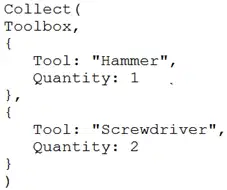
The canvas app contains the following formula. The formula is attached to the OnVisible property of the first screen that users see:
You are updating the canvas app.
For each of the following statements, select Yes if the statement is true. Otherwise, select No.
NOTE: Each correct selection is worth one point.
Hot Area:
The formula will update multiple records in a data source named Toolbox if the records exist. = NO
A local collection is created to store data if a data source named Toolbox does not already exist. =YES
If a collection named Toolbox exists the formula will clear any existing records before making any changes. = NO
You are an app maker.
You want to create apps and track customizations as part of the default solution.
You need to determine the impact of performing the work in the default solution.
What should you conclude?
The default solution does not contain all components and customizations from all solutions in the environment.
The prefix used when creating components as part of the default solution can be set to a specific value.
The default solution cannot be exported and distributed to another environment.
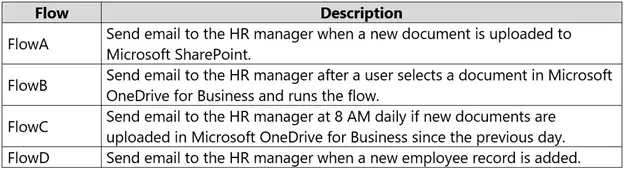
You are creating an app for an organization's human resources (HR) department. You create an Employee entity in an unmanaged Microsoft Dataverse solution.
Another user creates the following Power Automate flows separately from the solution:
You need to incorporate the flows that can be added to the solution.
Which two flows can you include? Each correct selection presents a complete solution.
NOTE: Each correct selection is worth one point.
FlowA
FlowB
FlowC
FlowD
You create a canvas app named Hardware Order that suggests computer hardware to customers.
A value must be entered for the EmployeeID field when creating a new order if the value in the OrderType field does not contain the prefix test.
You need to configure the business rule.
Which two actions should you perform? Each correct answer presents part of the complete solution.
NOTE: Each correct selection is worth one point.
Set the scope of the business rule to Entity.
Add a Recommendation action and configure it to enter the order type.
Set the scope of the business rule to All Forms.
Use the following condition expression: (OrderType Does not begin with [test]) AND (Modified By Does not contain data)
DRAG DROP -
You are configuring a new Common Data Service environment by using the Power Apps Maker portal.
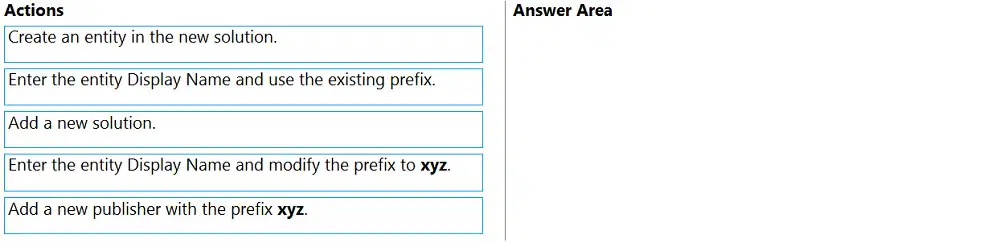
You need to create an entity that uses the prefix xyz.
Which four actions should you perform in sequence? To answer, move the appropriate actions from the list of actions to the answer area and arrange them in the correct order.
Select and Place:
1. Add a new Publisher with the Prefix xyz.
2. Add a new solujtion.
3.Create an entity in the new solution.
4.Enter the entity Display Name and modify the prefix xyz.
DRAG DROP -
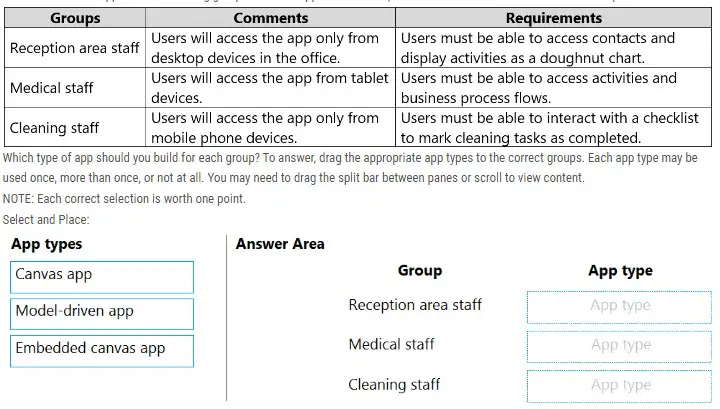
You are an app builder for a medical office. The medical office uses activities to book appointments and business process flows to track patient status. The cleaning staff wants the app to connect directly to a Microsoft Excel workbook to track cleaning tasks. The office does not have access to reporting tools including
Power BI.
You need to create apps for the following groups of users. Apps must not require customizations or the use of additional products.
Which type of app should you build for each group? To answer, drag the appropriate app types to the correct groups. Each app type may be used once, more than once, or not at all. You may need to drag the split bar between panes or scroll to view content.
NOTE: Each correct selection is worth one point.
Select and Place:
Reception area staff = Canvas App
Medical staff = Embedded Canvas App
Cleaning staff = Model-driven app
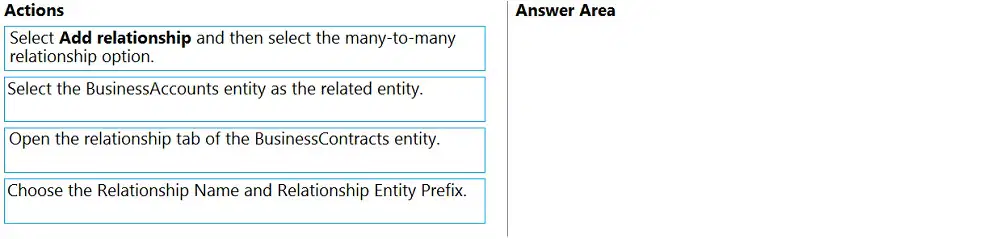
DRAG DROP -
You have the following Common Data Service entities: BusinessContracts and BusinessAccounts.
You need to configure an N:N relationship between the two entities.
Which three actions should you perform in sequence? To answer, move the appropriate actions from the list of actions to the answer area and arrange them in the correct order.
Select and Place:
1. Open the relationship tab of the BusinessContracts entity.
2. Select Add relationship and then select the many-to-many relationship option.
3. Select theBusinessAccounts entity as the related entity.
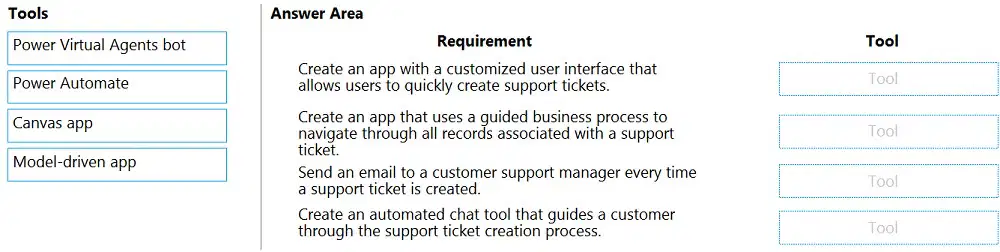
DRAG DROP -
You plan to create apps for a company.
You need to identify the Power Platform tools required.
What should you use? To answer, drag the appropriate tools to the correct requirements. Each tool may be used once, more than once, or not at all. You may need to drag the split bar between panes or scroll to view content.
NOTE: Each correct selection is worth one point.
Select and Place:
Create an app with a customized user interface that allows users to quickly create support tickets.
= Canvas app
Create an app that uses a guided business process to navigate through all records associated with a support
ticket. = Modern-driven app
Send an email to a customer support manager every time a support ticket is created. = Power Automate
Create an automated chat tool that guides a customer through the support ticket creation process. = Power Virtual Agents bot
A company uses data loss prevention (DLP) policies. You have a Power Automate flow that posts Twitter mentions into a Microsoft SharePoint list.
You are not able to activate the flow.
You need to troubleshoot the issue.
What are two possible reasons why you cannot activate the flow? Each correct answer presents a complete solution.
NOTE: Each correct selection is worth one point. (Most Voted - AD)
A. You are not assigned the Power Platform Admin role.
B. You placed all connectors into the Business group within the DLP policy.
C. You placed all connectors into the Non-Business group within the DLP policy.
D. You are not assigned the Environment Admin role.
You are an app maker. You are creating a canvas app.
You do not have access to Power BI.
You need to add charts to the app.
Which three chart types can you add directly to the canvas app? Each correct answer presents a complete solution.
NOTE: Each correct selection is worth one point.
pie
are
funnel
column
line
Note: This question is part of a series of questions that present the same scenario. Each question in the series contains a unique solution that might meet the stated goals. Some question sets might have more than one correct solution, while others might not have a correct solution.
After you answer a question in this section, you will NOT be able to return to it. As a result, these questions will not appear in the review screen.
You are creating a canvas app that displays a list of accounts.
Users must be able to select an account and view details for the account. The app must include a feature that brings the user back to the list of accounts.
You add a blank screen named Screen_Accounts and add a gallery named Gallery_Accounts to the screen. You set the data source of Gallery_Accounts to
Accounts and add another blank screen named Screen_AccountDetail.
You need to complete the app.
Solution:
✑ Add an edit form to Screen_AccountDetail and set the Default Mode of the form to View.
✑ Set the OnSelect property of Gallery_Accounts to Navigate(Screen_AccountDetail).
✑ Set the data source of the form to Accounts.
✑ Set the Item property of the form to Selected.
✑ Add a back icon on Screen_AccountDetail and set its OnSelect property to Navigate(Screen_Accounts).
Does the solution meet the goal?
YES
NO
Note: This question is part of a series of questions that present the same scenario. Each question in the series contains a unique solution that might meet the stated goals. Some question sets might have more than one correct solution, while others might not have a correct solution.
After you answer a question in this section, you will NOT be able to return to it. As a result, these questions will not appear in the review screen.
You are creating a canvas app that displays a list of accounts.
Users must be able to select an account and view details for the account. The app must include a feature that brings the user back to the list of accounts.
You add a blank screen named Screen_Accounts and add a gallery named Gallery_Accounts to the screen. You set the data source of Gallery_Accounts to
Accounts and add another blank screen named Screen_AccountDetail.
You need to complete the app.
Solution:
✑ Add an edit form to Screen_AccountDetail and set the Default Mode of the form to New
✑ Set the OnSelect property of Gallery_Accounts to Navigate(Screen_AccountDetail).
✑ Set the data source of the form to Accounts.
✑ Set the Item property of the form to Selected.
✑ Add a back icon on Screen_AccountDetail and set its OnSelect property to Navigate(Screen_Accounts).
Does the solution meet the goal?
YES
NO
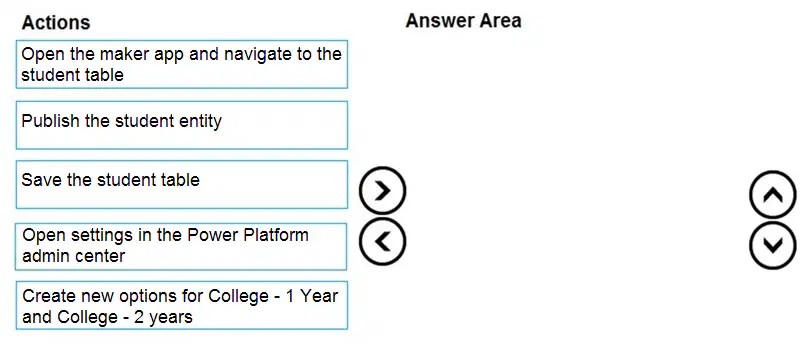
DRAG DROP -
You are an app maker for a college. You create an app for student enrollment. The app captures the education level of the applicants.
The education level at the time of enrollment is an option set is in the student entity. The entity includes three levels:
✑ High school
✑ College
✑ Bachelor
You must split the College option into two option sets:
✑ College `" 1 Year
✑ College `" 2 years
The split must not impact existing data.
You need to create the two option sets.
Which three actions should you perform in sequence? To answer, move the appropriate actions from the list of actions to the answer area and arrange them in the correct order.
Select and Place:
1. Open the maker app and navigate tot the student table
2. Create new options for College - 1 year and College - 2 years.
3. Publish the student entity.
Note: This question is part of a series of questions that present the same scenario. Each question in the series contains a unique solution that might meet the stated goals. Some question sets might have more than one correct solution, while others might not have a correct solution.
After you answer a question in this section, you will NOT be able to return to it. As a result, these questions will not appear in the review screen.
You are creating a canvas app that displays a list of accounts.
Users must be able to select an account and view details for the account. The app must include a feature that brings the user back to the list of accounts.
You add a blank screen named Screen_Accounts and add a gallery named Gallery_Accounts to the screen. You set the data source of Gallery_Accounts to
Accounts and add another blank screen named Screen_AccountDetail.
You need to complete the app.
Solution:
✑ Add a display form to Screen_AccountDetail.
✑ Set the OnSelect property of Gallery_Accounts to Navigate(Screen_AccountDetail).
✑ Set the data source of the form to Accounts.
✑ Set the Item property of the form to Selected.
✑ Add a back icon on Screen_AccountDetail and set its OnSelect property to Navigate(Screen_Accounts).
Does the solution meet the goal? (Most Voted - NO)
A. YES
B. NO
You are developing a canvas app to monitor time. The app includes a Text Input control named TIC1 and a Timer control named TIM1.
You need to set TIM1 to a default value.
What should you do?
In the OnChange property of TIC1, set the value of the Text property for TIC1 to a context variable that stores the duration value. Assign the value of the variable to the OnTimerStart property for TIM1.
Assign the Text property of TIC1 to the Duration property of TIM1.
Set the Text property of TIC1 to the current system time.
Write code in the OnChange property of TIC1 that assigns the value of the Duration property of the Timer control to Text property of the TIC1. In the OnChange property of TIC1, assign the value to the Duration property for TIM1.
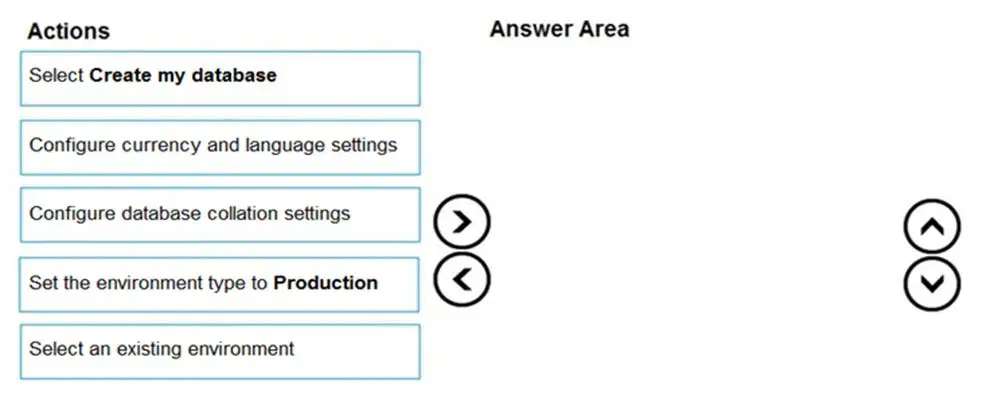
DRAG DROP -
You have an existing Power Apps environment.
You need to create a Microsoft Dataverse database for the environment.
Which three actions should you perform in sequence? To answer, move the appropriate actions from the list of actions to the answer area and arrange them in the correct order.
Select and Place:
1. Slect an existing environment
2. Select Create my database
3. Configure currency and language settings.
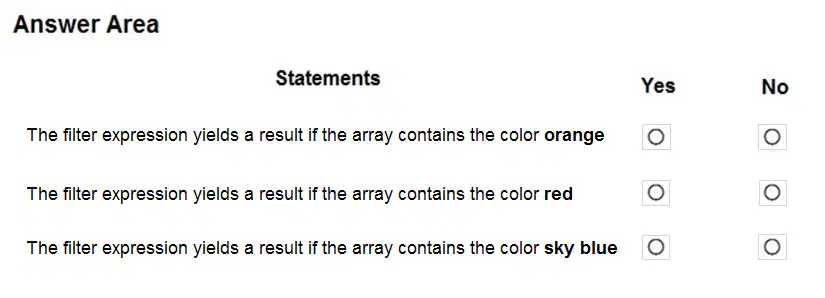
HOTSPOT -
You are creating a Power Automate flow.
You have an array that contains items with different color attributes. You plan to filter the array by using the following filter expression within the flow:
@or(equals(item()?['color'], 'red'),contains(item()?['color'],'blue'))
The filter returns results only when the expression resolves to true.
For each of the following statements, select Yes if the statement is true. Otherwise, select No.
NOTE: Each correct selection is worth one point.
Hot Area:
The filter expression yields a result if the array contains the color orange - NO
The filter expression yields a result if the array contains the color red - YES
The filter expression yields a result if the array contains the color sky blue - YES
You create and publish a canvas app component library to perform complex calculations.
You discover an error in one of the calculations. You correct the issue and publish the component library. A co-worker uses the original version of the component library in a canvas app.
You need to ensure that the co-worker uses the updated version of the component library.
What should you do? (MOST VOTED - C)
A. Export the updated component library and instruct the co-worker to import the updated version into the canvas app
B. Inform the co-worker to edit the canvas app and manually add the updated version of the component library
C. Instruct the co-worker to edit the canvas app and update the component library Most Voted
You are creating a canvas app. You plan to use variables that are scoped to a screen to store values.
You need to create and update the value of the variables.
Which three functions can you use? Each correct answer presents a complete solution.
NOTE: Each correct selection is worth one point.
A. Collect
B. Patch
C. Navigate
D. Set
E. UpdateContext
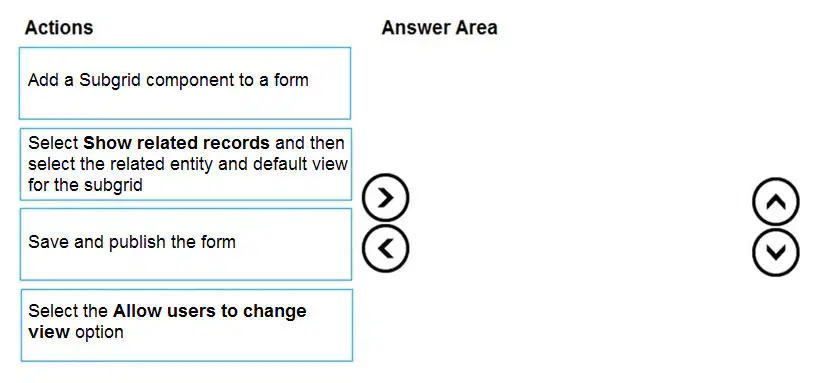
DRAG DROP -
You have a model-driven app that has an entity named Marinas. You have an entity named Boats that list the boats associated with each marina.
You must add a list of boats to the Marinas form. You must also add an option for users to select different views including boat owners and marina members.
You need to embed the list of boats associated with a Marina record in the entity form.
In which order should you perform the actions? To answer, move all actions from the list of actions to the answer area and arrange them in the correct order.
Select and Place:
1.Add a Subgrid component to a form
2.Select Show related records and then select the related entity and default view for the subgrid
3.Select the Allow users to change view option
4.Save and publish the form
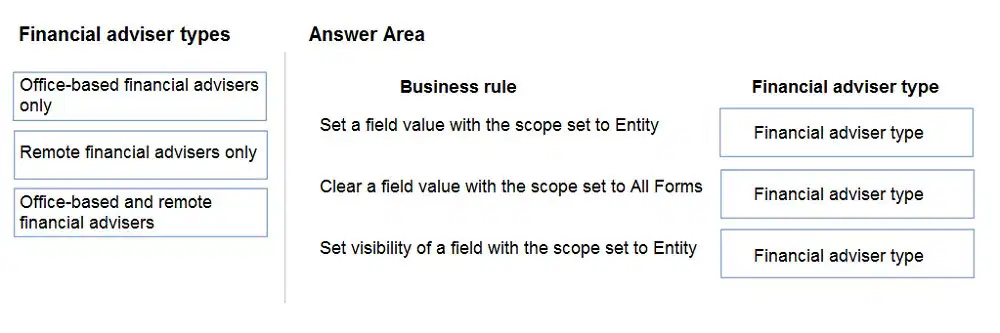
DRAG DROP -
You create the following apps for a company that provides financial guidance services: a model-driven app for financial advisers that work in the company's offices and a canvas app for remote financial advisers.
You need to create business rules for a custom counselling entity used by all financial advisers.
Who will be affected by the business rules?
To answer, drag the appropriate financial adviser types to the correct business rules. Each financial adviser type may be used once, more than once, or not at all.
You may need to drag the split bat between panes or scroll to view content.
NOTE: Each correct selection is worth one point.
Select and Place:
Set a field value with the scope set to Entity = Office-based and remote financial advisers
Clear a field value with the scope set to All Forms = Office-based financial advisers
only
Set visibility of a field with the scope set to Entity = Office-based financial advisers only
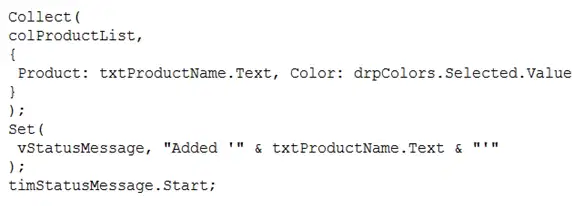
HOTSPOT -
You need to store a list of products and their colors. You have a Power Apps app that includes the following elements:
✑ a text box for the product name
✑ a drop-down list for the product color
✑ a button to add a product to the list
✑ a status message that shows whether the addition of a product to the list was successful
The button uses the following formula:
For each of the following statements, select Yes if the statement is true. Otherwise, select No.
NOTE: Each correct selection is worth one point.
Hot Area
You must explicitly declare the collection before you can add product names and colors to the collection. = NO
The formula stores the product name and the color in a collection. = YES
vStatusMessage is a context variable that is used to store the status message. = NO
You are creating a canvas app.
You need to store and retrieve small amounts of data on a local device when the app is offline.
Which set of functions should you use?
SaveData, LoadData
Set, Patch
Patch, Collect
Set, Collect
You are creating a canvas app.
You need to display a limited list of choices to the end user. You must standardize the values and appearance of the list across all forms.
Which two actions should you perform? Each correct answer presents part of the solution.
NOTE: Each correct selection is worth one point. (MOST VOTED - BD)
A. Add a drop-down field in the app
B. Create a Global Option Set
C. Add a new business rule
D. Add a component to the component library
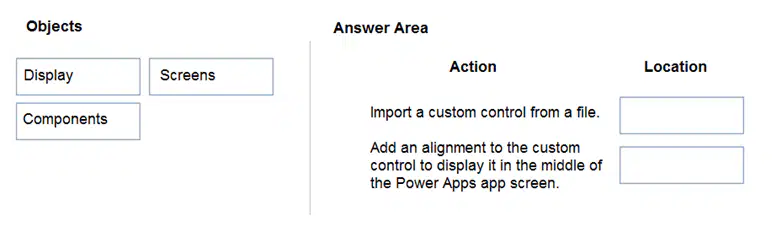
DRAG DROP -
A company must use a Power Apps app custom control that is exported from a different canvas Power Apps app.
You need to insert the custom control into the Power Apps app.
Where should you complete the actions? To answer, drag the appropriate locations to the correct actions. Each location may be used once, more than once, or not at all. You may need to drag the split bar between panes or scroll to view content.
NOTE: Each correct selection is worth one point.
Select and Place:
Import a custom control from a file. = Components
Add an alignment to the custom control to display it in the middle of the Power Apps app screen.
= Display
Note: This question is part of a series of questions that present the same scenario. Each question in the series contains a unique solution that might meet the stated goals. Some question sets might have more than one correct solution, while others might not have a correct solution.
After you answer a question in this section, you will NOT be able to return to it. As a result, these questions will not appear in the review screen.
A company has locations in multiple countries and regions across four continents.
The company stores the total amount of each order in the local currency of the country/region where the customer is located. The company stores the applicable exchange rates in a custom US dollars (USD) exchange rate table.
You need to create a visualization that displays the total amount of orders by country/region in USD.
Proposed solution:
Create a custom column that converts the order total to USD by using the relationship between order local currency and the USD exchange rate table in Power BI
Desktop and display this column in a Power BI chart by country/region.
Does the solution meet the goal?
YES
NO
Note: This question is part of a series of questions that present the same scenario. Each question in the series contains a unique solution that might meet the stated goals. Some question sets might have more than one correct solution, while others might not have a correct solution.
After you answer a question in this section, you will NOT be able to return to it. As a result, these questions will not appear in the review screen.
A company has locations in multiple countries and regions across four continents.
The company stores the total amount of each order in the local currency of the country/region where the customer is located. The company stores the applicable exchange rates in a custom US dollars (USD) exchange rate table.
You need to create a visualization that displays the total amount of orders by country/region in USD.
Proposed solution:
Create a custom rollup field of type currency on the country/region table that aggregates all the total amounts for the orders from that country/region and display this rollup field in a Power BI chart.
Does the solution meet the goal?
YES
NO
Note: This question is part of a series of questions that present the same scenario. Each question in the series contains a unique solution that might meet the stated goals. Some question sets might have more than one correct solution, while others might not have a correct solution.
After you answer a question in this section, you will NOT be able to return to it. As a result, these questions will not appear in the review screen.
A company has locations in multiple countries and regions across four continents.
The company stores the total amount of each order in the local currency of the country/region where the customer is located. The company stores the applicable exchange rates in a custom US dollars (USD) exchange rate table.
You need to create a visualization that displays the total amount of orders by country/region in USD.
Proposed solution:
Create a custom calculated field of type currency on the order table that converts the order total to USD and displays the total amounts by region in a Power BI chart.
Does the solution meet the goal?
YES
NO

