
 Worksheets
Unity Programming Certification
Total questions: 23
Worksheet time: 23mins

An error is being thrown when setting the velocity of the RigidBody2D in the Update() method.
The error produced states the following: CS1955 C# Non-invocable member 'Vector2' cannot be used like a method.
Select the appropriate options in the dropdown menus that would fix the error.
(a)

You want to be able to call the actionBtPressed() method from your player object. What is the appropriate access modifier and return type that the method should have? Select the appropriate option from the dropdown menu. (a)
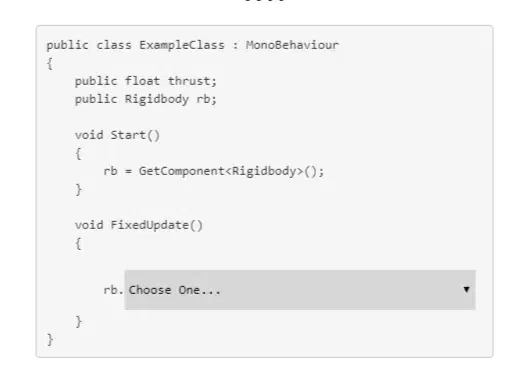
Based on the API definition, select the correct implementation of the AddForce() function from the dropdown menu.
Rigidbody.AddForce
public void AddForce(float x, float y, float z, ForceMode mode = ForceMode.Force);
Parameters:
∎x Size of force along the world x-axis.
∎y Size of force along the world y-axis.
∎z Size of force along the world z-axis.
∎mode Type of force to apply.
Description:
Adds a force to the Rigidbody.
Force is applied continuously along the direction of the x,y, and z vectors. Specifying the ForceMode mode allows the type of force to be changed to an Acceleration, Impuls, or Velocity Change.
Force can be applied only to an active Rigidbody. If a GameObject is inactive, AddForce has no effect.
By default, the Rigidbody's state is set to awake once a force is applied unless the force is Vector3.zero. (a)
Your current task is to create a script that will start an attack animation and instantiate a projectile when the play presses a button on the keyboard. Drag the appropriate code snippets to the correct place in the code block.
Instantiate(spear, projectileStartPos.t)
Input.GetKeyDown(KeyCode.Space)
anim.SetBool("ThrowSpear", true);
Input.GetMouseButtonDown(0)
anim.Trigger("Walk");
Input.GetMouseButton(0) returns true if the left mouse button is held down.
True
False
Input.GetMouseButtonDown(1) returns true if the middle mouse button was pressed.
True
False
Input.GetMouseButtonUp(2) returns true if the right button was released.
True
False

You want to write a log message to the console to check if a key was pressed. Select the correct way to write a debug log message. (a)

You just got an error message that says "NullReferenceException: Object reference not set to an instance of an object." Which object is likely null?
myName
myPos
Debug.Log
enemy
Given the line of code below, select the generic syntax of the GameObject.AddComponent() API.
SphereCollider sc = gameObject.AddComponent(typeof(SphereCollider)) as SphereCollider;
SphereCollider sc = gameObject.AddComponent SphereCollider;()
SphereCollider sc = gameObject.AddComponent<SphereColleder>
SphereCollider sc = gameObject.AddComponent(SphereCollider)() as SphereCollider;
SphereCollider sc = gameObject.AddComponent<SphereCollider>() as SphereCollider;

You have a dictionary of weapons. When the game starts, you want to ensure that a dagger is in the list so you can use it. Select the correct way to get an object stored in a dictionary. (a)

You are tasked with creating a function that will change the players current animation state based on an Enum value passed as an argument.
Select the correct options to create a viable function declaration that can be accessed from other objects and does not return anything. (a)

You have a pressure plate that activates a trap with an animation that automatically resets after the trap has been fired.
Drag the appropriate animator method to the designated spot for this scenario.
(a)

You have a collectible gem with several particle effects as child gameobjects.
When the player collects the gem, you want to deactivate each child as to visibly show that the gem can no longer be collected.
Select the correct code snippets from each dropdown menu to complete the code block.
(a)

In your game, you have wired up a UI button to a method that pauses the game and displays the menu when the player presses the button.
Drag the appropriate code statements to the appropriate spots to complete the code block.
(a) (b)

True or False: The the supplied class is an ECS class.
True
False
Determine whether each code snippet observes Unity naming standards.
Select Yes or No for each code snippet.
public class Enemy : MonoBehaviour {}
True
False
Determine whether each code snippet observes Unity naming standards.
Select Yes or No for each code snippet.
public class weapon : MonoBehaviour {}
True
False
Determine whether each code snippet observes Unity naming standards.
Select Yes or No for each code snippet.
public void enemyHit(int HITPoints){}
True
False
Drag each code comment to the appropriate spot in the code block.
public void EnemyHit(int hitPoints) {
(a)
if (healthPoints - hitPoints > 0 {
(b)
anim.Play(Hurt);
(c)
GameManager.Instance.AudioSource.PlayOneShot(SoundManager.Instance.Hit)
(d)
healthPoints -= hitPoints;
} else {
die();
}
}
Select all the options that are true about the Animator window. (Choose two)
The Animator window allows you to create, view, and modity Assets linked to the controller.
The Animator window allows you to define parameters to control the flow of animations.
The Animator window lets you create 3D or 2D models you can animate.
All of the above.
What 3 IDE's are supported in Unity?
NotePad++, Visual Studio, and Visual Studio Code
Visual Studio, Visual Studio Code, and JetBrains Rider
Visual Studio, Eclipse, and Xcode
What setting in an animator's transition allows you to make the transition duration independent of state length?
Transition Duration
Interruption Source
Fixed Duration
Exit Time

