
 Worksheets
Microbit - Grade 5 (Quiz 1)
Total questions: 57
Worksheet time: 29mins

Identify the picture given and choose the correct option.
Microbit
Arduino
Rasberry Pi

Identify the picture given and choose the correct option.
New project
Plus sign
Hospital
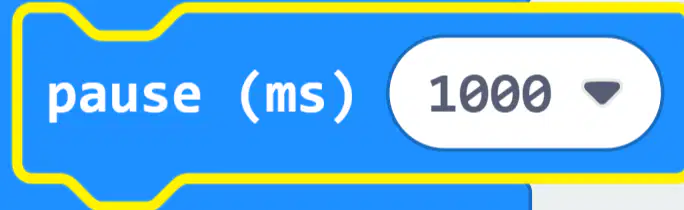
Identify the picture given and choose the correct option.
stopped for 1000 ms
stopped for 100 ms
run the script

Identify the picture given and choose the correct option.
Home
House
Hospital

Identify the picture given and choose the correct option.
Microbit
Arduino
Rasberry Pi

Identify the picture given and choose the correct option.
Microbit
Arduino
Rasberry Pi
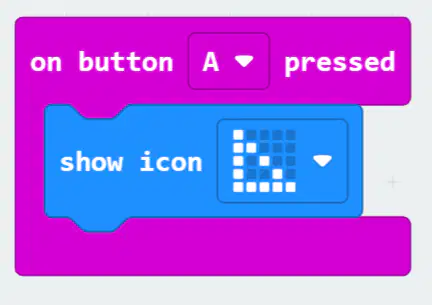
Examine the script and choose the correct option.
Triangle will be displayed when button B is pressed
Triangle will be displayed when button A is pressed
Triangle will be displayed when button A + B is pressed
Triangle will not be displayed when button A is pressed
What is the name of the application used to code programs for Microbit
MakeCode for Microbit
Microsoft Microbit
Microsoft Excel
Small Basic
Which block is used to slow down the script for Microbit?
Show number 0 block
Show string “Hello” block
forever block
pause ms 100 block
When you walk up to a grocery store door and it opens by itself, what type of sensor most likely detected you?
motion sensor
ultrasonic sensor
sound sensor
color sensor
Some smart trash cans open their lids automatically when you get close. What sensor do they most likely use?
motion sensor
ultrasonic sensor
sound sensor
color sensor
A smart home robot vacuum cleaner avoids hitting furniture by using a sensor. Which type is it most likely using?
motion sensor
ultrasonic sensor
sound sensor
color sensor
What is the name of the sensor that regulates the cooling level in a refrigerator?
motion sensor
ultrasonic sensor
sound sensor
temperature sensor
Which block makes the program run again and again?
Repeat
On Start
Forever
Pause
How are sensors in a robot similar to our body?
To create energy for a machine.
To make a decision about what to do next.
To talk to other machines or people.
To gather and detect information around it.
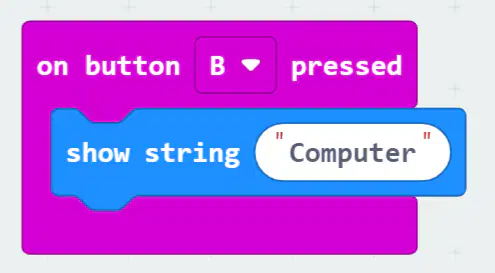
Examine the script and choose the correct option.
'Computer' will be displayed when button B is pressed
Computer will be displayed when button A is pressed
Computer will be displayed when button A + B is pressed
Computer will not be displayed when button A is pressed

Identify the picture given and choose the correct option.
To create a loop that repeats indefinitely
The script will run on start
The script will run on click
The script will no do anything

Identify the picture given and choose the correct option.
Ultrasonic Sensor
Light Sensor
Temperature Sensor
Color Sensor
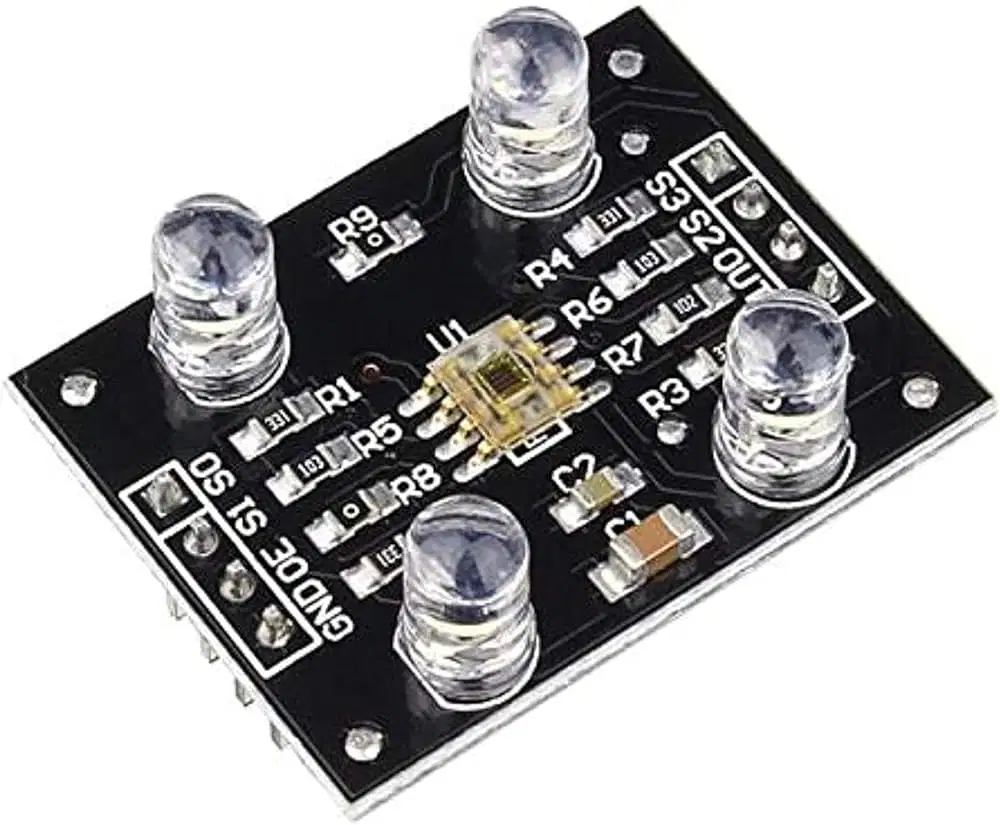
Identify the picture given and choose the correct option.
Ultrasonic Sensor
Light Sensor
Temperature Sensor
Color Sensor
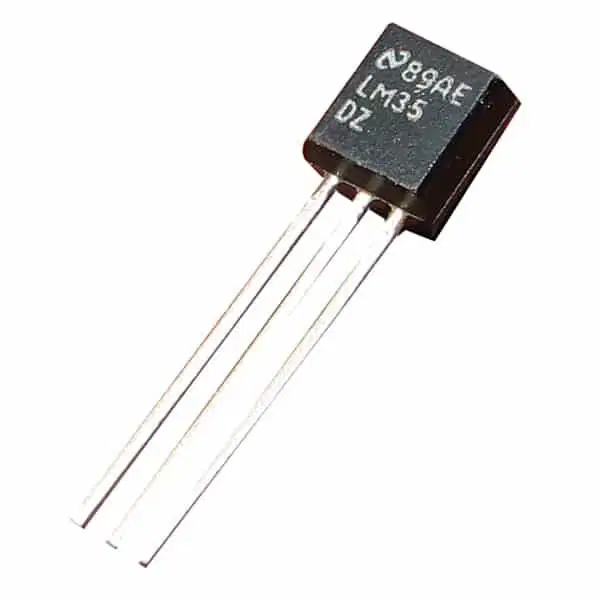
Identify the picture given and choose the correct option.
Ultrasonic Sensor
Light Sensor
Temperature Sensor
Color Sensor
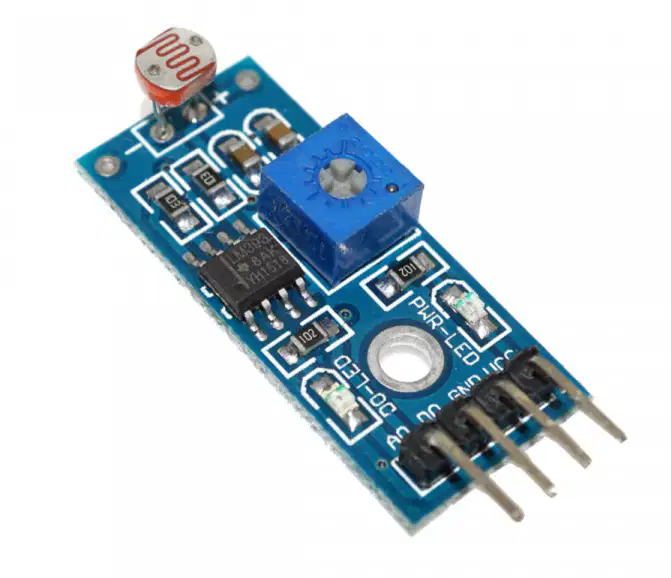
Identify the picture given and choose the correct option.
Ultrasonic Sensor
Light Sensor
Temperature Sensor
Color Sensor

Identify the highlighted part of the Lab:bit and choose the correct option.
Ultrasonic Sensor
Speaker
microphone
push buttons

Identify the highlighted part of the Lab:bit and choose the correct option.
Microbit
Speaker
microphone
push buttons

Identify the highlighted part of the Lab:bit and choose the correct option.
Microbit
Speaker
microphone
traffic lights

Identify the highlighted blue part of the Lab:bit and choose the correct option.
Microbit
Speaker
microphone
push buttons
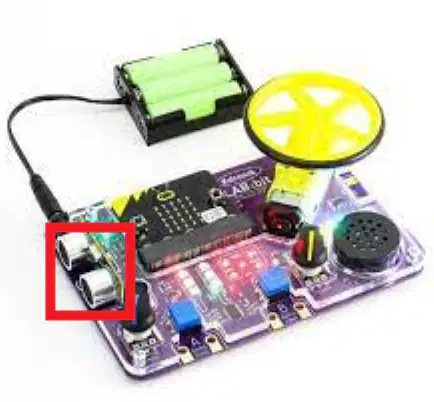
Identify the highlighted part of the Lab:bit and choose the correct option.
Microbit
Speaker
microphone
ultrasonic sensor

Identify the highlighted part of the Lab:bit and choose the correct option.
Microbit
Speaker
microphone
motor

Identify the highlighted part of the Lab:bit and choose the correct option.
Microbit
Speaker
batteries
motor

Identify the highlighted part of the Lab:bit and choose the correct option.
Microbit
Speaker
battery holder
motor
'MakeCode for microbit' website is used to code programs for Microbit.
True
False
To pause a program for a specific amount of time, use the ‘toggle’ block.
True
False
To pause a program for a specific amount of time, use the ‘pause’ block.
True
False
A Microbit is a professional micro controller.
True
False
The Microbit display can only show letters, not numbers.
True
False
A Microbit is a micro-controller.
True
False
The two type of micro controllers available are professional and educational.
True
False
A variable is defined by a name.
True
False
The first led has the address x=0, y=0.
True
False
The last led has the address x=5, y=4.
True
False
The last led has the address x=4, y=4.
True
False
A Microbit is considered as the brain of the robot.
True
False
Educational micro controller is used in washing machines and refrigerators
True
False
A sensor is an electronic device that can read specific information.
True
False
How many LED lights are there on the micro:bit display?
25
20
200
24
Which component of the micro:bit can be used to detect temperature?
Buttons
Display
Speaker
Temperature sensor
What is the purpose of the microbit's LED display?
To play games
To show images and text
To play music
To connect with other devices
What is the maximum number of blocks that can be used in a microbit program?
10
1
0
There is no limit
How can programs be transferred to the microbit?
Through a USB cable
Through Bluetooth
By typing directly on the microbit
By downloading from the internet
To pause a program for a specific amount of time, use the toggle block.
True
False
To pause a program for a specific amount of time, use the "pause" block.
True
False
The Microbit sensors can smell and taste like humans.
True
False
A sensor is an electronic device that can read specific information.
True
False
The forever block is used to create a loop that repeats indefinitely.
True
False
The repeat block is used to create a loop that repeats a specific number of times.
True
False
Buttons A and B are found on the front side of the Microbit.
True
False
A _______________ sensor measures the distance of an object.
Ultrasonic
Temperature
Light
Color
A _______ sensor that measure the degree of hotness or coolness in an object.
Ultrasonic
Temperature
Light
Color

