
Font size
 Worksheets
Unit 2a & b
Total questions: 23
Worksheet time: 1hrs 11mins
A directory file is a_________
the directory that contains data
the directory that contains data and files
the directory that contains files
the directory that contains the details of files and subdirectories of it
In the UNIX the filename isn’t case-sensitive.
True
False
None of these
Filenames starting with a –, we do avoid.
True
False
What is the most common file type?
device file
directory file
ordinary file
ordinary file and directory file
To operate the device the kernel uses the device files.
True
False
What is the directory called when we log in, the UNIX places us in?
parent
main
home
current
Everything is treated as a file by UNIX.
True
False
What represents the root directory?
\
$
/
*
To frame filename extensions no role is applied by Unix.
True
False
Which command is used to display the documentation of commands in Unix?
man
whatis
help
search
Which Unix command is used for changing the current directory?
pwd
cd
rm
cp
Which command is used for printing the current working directory?
pwd
cd
mv
Home
Which command is used for listing files in a directory?
list
wc
ls
ps
Which command is used by the user to change their login password in Unix?
cp
man
reset
passwd
Which commands are used for displaying the contents of a file in Unix?
mkdir
cat
rm
more
Which command is used to delete all files in a directory?
del *
rm *
mv *
rmdir *
echo command is used for _________
displaying diagnostic /messages
displaying date and time
displaying errors
displaying operating system details
What is the function of cp command in Unix?
delete a given file
change the directory
list all the available files in the current directory
cp is a command used for copying files and directories
Which command is used for removing/deleting files in Unix?
rm
mv
rmdir
del
Which command is used for renaming files in Unix?
rename
move
mv
cp
Which of the following are relative pathname ?
/home/A20232020
~/
/home/../../lab2b
none of the above
Select the absolute pathnames ?
/home/username/
My_Stuff/Music
../../lib/dir4
/home/username/lab2b/My_Stuff
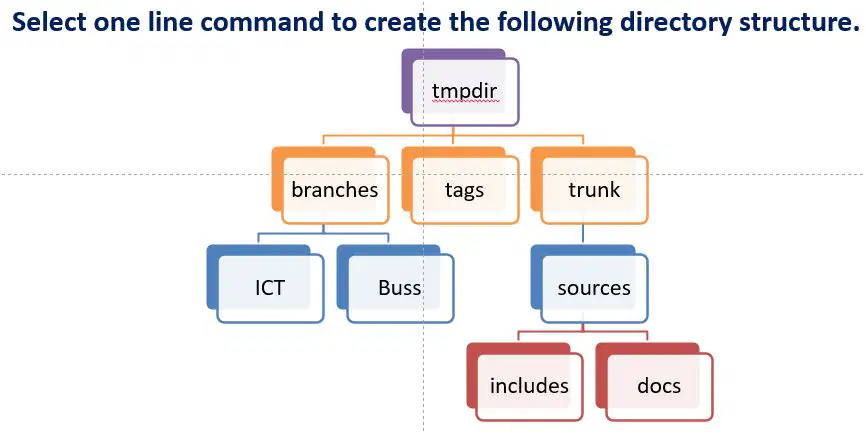
Select the correct command to create the directory structure shown in picture.
mkdir –p tmpdir/{branches,tags,trunk/sources/{includes,docs}}
mkdir tmpdir/{branches/{ICT,Buss},tags,trunk/sources/{includes,docs}}
mkdir -p tmpdir/{branches/{ICT,Buss},tags,trunk/sources/{includes,docs}}
All of the above

