
 Worksheets
1st Summative Test in CSS
Total questions: 119
Worksheet time: 1hrs 5mins


What does CPU stand for in computer specifications?
Central Processing Unit
Computer Processing Unit
Central Performance Unit
Central Power Unit
Which unit of measurement is typically used to describe computer storage capacity?
Megahertz
Megabytes
Megapixels
Megavolts
What does RAM stand for in computer specifications?
Random Application Memory
Read-Only Memory
Random Access Memory
Rapid Access Module
In computer specifications, what is an SSD?
Software Storage Drive
Solid State Drive
System Security Device
Super Speedy Disk
Which operating system is known for its penguin mascot and open-source nature?
Windows
macOS
Linux
Android
What is the primary function of a GPU in computer specifications?
Storing files
Providing internet access
Handling graphics and rendering
Managing keyboard input
Which component of a computer is responsible for supplying power to the other components?
Motherboard
Power Supply Unit (PSU)
Hard Disk Drive (HDD)
Monitor
What is the clock speed of a CPU measured in?
Gigabytes
Megapixels
Hertz
Watts
Which computer port is commonly used for connecting external hard drives, printers, and other peripherals?
USB (Universal Serial Bus)
HDMI (High-Definition Multimedia Interface)
VGA (Video Graphics Array)
Ethernet
What does BIOS stand for in computer specifications?
Basic Input/Output System
Binary Operating System
Backup Internet Operating System
Browser Interface for Online Services
What is the purpose of a computer's BIOS (Basic Input/Output System)?
To display graphics and images on the screen
To manage the computer's memory and storage
To control input and output devices
To initialize and start up the computer's hardware components
Which of the following is not a commonly used computer operating system?
Windows
iOS
Java
macOS
What does the term "bit rate" refer to in computer specifications?
The speed of the computer's processor
The number of bits processed by the CPU per second
The resolution of the computer's display
The amount of RAM in the computer
Which type of computer memory is non-volatile and retains data even when the power is turned off?
RAM (Random Access Memory)
ROM (Read-Only Memory)
Flash memory
Cache memory
What is the maximum number of colors that can be displayed by a standard 8-bit color depth?
16 colors
256 colors
16,777,216 colors
65,536 colors
In computer specifications, what does "LAN" stand for?
Local Area Network
Large Array of Networks
Linked Access Node
Longitudinal Application Network
Which computer component is responsible for temporarily storing data that the CPU is currently using?
GPU (Graphics Processing Unit)
HDD (Hard Disk Drive)
SSD (Solid State Drive)
Cache memory
What does DPI stand for when referring to a computer mouse or scanner?
Dots Per Image
Digital Photo Interface
Dots Per Inch
Data Processing Indicator
What is the primary function of a computer's power supply unit (PSU)?
Storing data
Cooling the CPU
Providing electrical power to the components
Handling network connections
Which type of computer port is commonly used for connecting high-definition displays, such as monitors and TVs?
USB (Universal Serial Bus)
HDMI (High-Definition Multimedia Interface)
VGA (Video Graphics Array)
Ethernet
What should you do before you begin disassembling a computer system unit?
Disconnect all cables and peripherals from the unit
Turn off the power supply to the unit
Wear an anti-static wrist strap to prevent static discharge
All of the above
What tool should you use to remove screws from a computer system unit?
Pliers
Wrench
Screwdriver
Hammer
Which component is typically removed first when disassembling a computer system unit?
Hard drive
Motherboard
Power supply
Optical drive
What is the purpose of thermal paste?
To hold the heatsink in place
To transfer heat from the CPU to the heatsink
To prevent the CPU from overheating
To provide a smooth surface for the heatsink to attach to
What is the purpose of the motherboard standoffs?
To provide additional support to the motherboard
To prevent the motherboard from touching the case and causing a short circuit
To provide a place to attach the power supply
To improve the airflow inside the case
What should you do before installing a new component in a computer system unit?
Clean the component with a soft, dry cloth
Apply thermal paste to the component
Ground yourself to discharge any static electricity
All of the above
Which component is responsible for converting AC power to DC power?
CPU
Power supply
Motherboard
RAM
Which type of screw is typically used to secure expansion cards to the motherboard?
Phillips head
Flat head
Hex head
Torx head
What should you do if the computer system unit does not power on after assembly?
Check that all cables and components are securely connected
Replace the power supply
Replace the CPU
Reassemble the entire unit
What is the purpose of the CMOS battery?
To provide power to the BIOS when the computer is turned off
To keep the CPU cool
To store data on the hard drive
To regulate the voltage supplied to the motherboard
Reorder the following step in disassembling AMD computer system.
Turn off and unplug the computer
Open the computer case by removing any screws or clips holding it in place.
Remove any expansion cards (such as graphics cards, sound cards, and network cards)
Disconnect all cables and wires from the motherboard and other components.
Remove the motherboard from the computer case
Reorder the following step in assembling AMD computer system.
Install the power supply unit (PSU)
Mount the motherboard onto the standoffs in the computer case.
Install the CPU and its heatsink/fan assembly onto the motherboard.
Install any expansion cards into their respective slots on the motherboard.
Connect all necessary cables and wires to the motherboard and other components.


You can use this to input printed documents to a computer ?
Trackerball
Scanner
Keyboard
Mouse
This sensor is used for burglar alarms
Temperature
Humidity
Movement/Motion
PH
Define the term 'sensor'. Choose the most appropriate definition.
Used to capture and can measure physical quantities
A hardware device that collects data and stores it.
A sensor stores data that it collects
True
False
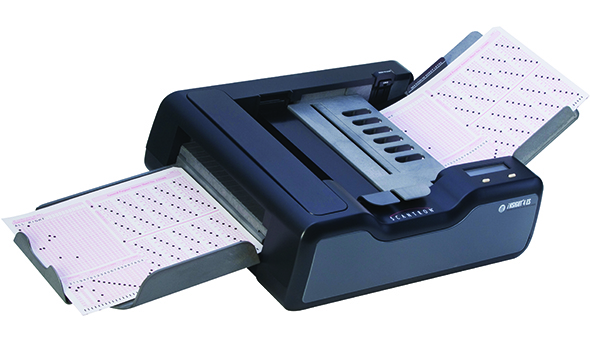
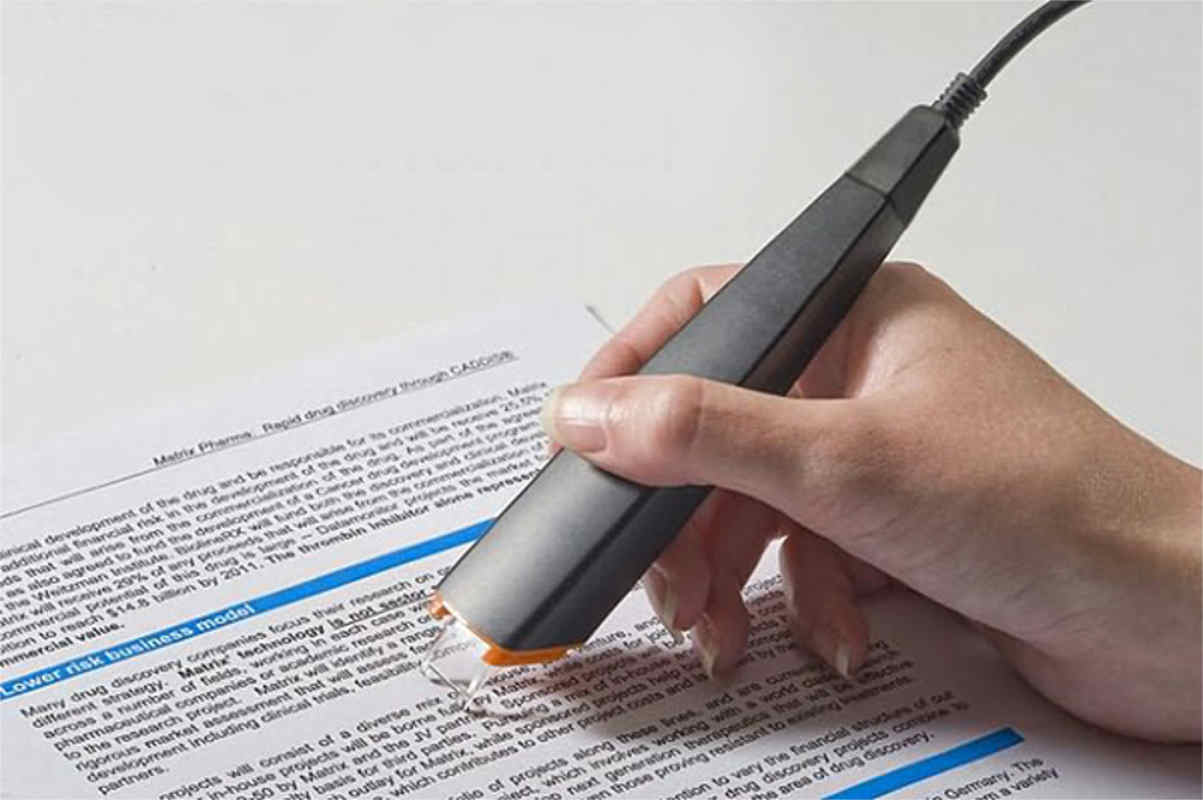


The device used to input the data from a contactless credit card
Bar code reader
Magnetic stripe reader
RFID reader
Pin Pad
What two input devices could be used with a VR flight training system?
Steering wheel/joystick
Motion sensor
bar code reader
OCR
RFID
What does BIOS stand for?
Basic Input/Output System
Binary Input/Output System
Basic Internal Operating System
Boot Input/Output System
What is the function of a BIOS on a motherboard?
To load the operating system
To configure hardware settings
To perform a Power-On Self-Test (POST)
All of the above
What does POST stand for in the context of BIOS?
Power-On Self-Transmission
Power-On Status Test
Power-On Self-Test
Post-Operational System Test
What is the purpose of the Bootstrap Loader in BIOS?
To configure hardware settings
To locate the operating system
To perform a hardware test
To update the BIOS
What are BIOS drivers responsible for?
Providing advanced graphics
Managing system resources
Giving basic operational control over computer hardware
Running software applications
What is the BIOS or CMOS Setup program used for?
Playing video games
Configuring hardware settings and system parameters
Writing emails
Installing software
Can a BIOS chip be upgraded or updated?
No, it's permanently fixed on the motherboard.
Yes, it can be upgraded by adding more memory.
Yes, if it's a flash BIOS, it can be updated with specialized software.
No, it's a one-time programmable chip.
What happens if the computer does not pass the POST?
The computer boots up normally.
The BIOS chip is automatically updated.
You receive a combination of beeps indicating a hardware issue.
The operating system is loaded.
Which of the following is not a function of BIOS?
Running software applications
Configuring hardware settings
Performing a Power-On Self-Test
Locating the operating system
What is the primary role of the BIOS on a motherboard?
To provide a graphical user interface for the operating system
To manage computer peripherals like printers and scanners
To initiate the boot-up process and provide basic hardware instructions
To control the speed of the CPU
What is the primary function of an operating system (OS) on a computer?
Managing computer hardware
Managing computer software
Allowing communication with the computer
All of the above
What role does the operating system play when multiple programs are running on a computer?
It ensures that only one program can run at a time.
It coordinates the CPU, memory, and storage for all running programs.
It shuts down unnecessary programs to free up resources.
It restricts access to the CPU and memory.
Which of the following is an example of software?
CPU
RAM
Web browser
Hard drive
What is the purpose of an operating system's "light theme"?
Enhancing gaming performance
Reducing power consumption
Providing a visually pleasing interface
Improving security
Which operating system is known for its free and open-source distribution based on Debian?
Microsoft Windows
macOS Catalina
Linux Ubuntu
Android Q
What is the upcoming tenth major release of the Android mobile operating system called?
Android 17
Android Q
Android Oreo
Android Pie
Which operating system is the successor to Windows Phone 8.1 and is no longer available in the market as of December 10, 2019?
Windows 10 Mobile
macOS Catalina
Android Q
iOS 13
What is the most popular desktop operating system in the world according to netmarketshare.com?
macOS Catalina
Linux Ubuntu
Windows operating system
Android
Which operating system dominates 70% of the mobile users worldwide, according to netmarketshare.com?
Windows 10 Mobile
macOS Catalina
Android
iOS 13
What does an operating system primarily manage on a computer?
Only hardware components
Only software programs
Both hardware and software
Network connections
Reorder the following steps in opening CMD


Accessories
Right click on
Command Prompt
Run
as Administrator.
‘diskpart'
'list disk'
'select disk 4'
‘clean’
'create partition primary’
'select partition 1'
‘active’
‘format fs=fat32
'assign'
Copy the data.
Paste the data file into
your flash drive.
Select
Open
Open OS folder directory
Click your desired operating system
Click Open
Click start
Click OK
Which of the following command is used to format the partitions in your flash drive?
DISKPART
LIST DISK
FORMAT FS = FAT32 QUICK
ACTIVE
It is a storage device that has the ability to LOAD/BOOT OPERATING SYSTEM that is save on it?
STORAGE MEDIA
BOOTABLE MEDIA
COMMAND PROMPT
RUFUS SOFTWARE
Which of the following command is used to EXIT the DISKPART
CLOSE BUTTON
START MENU
TYPE ASSIGN
TYPE EXIT
It is a software that is used to create a bootable device such as flash drives.
RUFUS SOFTWARE
COMMAND PROMPT
WINDOWS 10
WINDOWS 7
What COMMAND is used to show the LIST of the disk on your computer?
DISK PART
LIST DISK
CREATE PARTITION PRIMARY
SELECT DISK 1
This is the quickest in making a bootable USB drive relative to other bootable applications. It is free and open-source, and easy to use. We can also use it as a flash BIOS, firmware and run low-level applications, along with making a bootable USB for various types of operating systems.
EaseUS
Rufus
Diskmaker X
Etcher
ISO stands for
International Organization for Standardization
Integer Output Software
International Organization for Systems
International Office for Standardization
If the motherboard on your computer supports UEFI (Unified Extensile Firmware), you can choose MBR.
True
False
A mechanism where computer hardware can be used instead of a hard disk or a CD drive to access all the important machine booting information
DVD boot
POST boot
USB boot
Flash boot
If the motherboard uses legacy BIOS system, you should choose MBR.
True
False
What is Rufus?
A type of flash drive
A program used to create bootable flash drives
A file compression utility
An antivirus software
Which operating systems does Rufus support?
Windows only
Mac OS only
Both Windows and Mac OS
Linux only
What is the minimum size required for a flash drive to be used with Rufus?
1 GB
2 GB
4 GB
8 GB
What file system format should you choose when creating a bootable flash drive using Rufus for a Windows installation?
FAT32
NTFS
exFAT
FAT16
What is the purpose of the "Create a bootable disk using" option in Rufus?
To select the source file for the bootable disk
To choose the file system format for the flash drive
To choose the partition scheme for the flash drive
To select the device where the bootable disk will be created
What is the default cluster size for a bootable flash drive created using Rufus?
512 bytes
1024 bytes
2048 bytes
4096 bytes
What is the purpose of the "Check device for bad blocks" option in Rufus?
To scan the flash drive for errors before creating the bootable disk
To scan the source file for errors before creating the bootable disk
To scan the flash drive for errors after creating the bootable disk
To scan the source file for errors after creating the bootable disk
What is the purpose of the "Add fixes for old BIOSes" option in Rufus?
To add compatibility for legacy BIOS systems
To optimize the flash drive for use with modern UEFI systems
To improve the speed of the flash drive on certain systems
To add security features to the bootable disk
What is the purpose of the "Show advanced format options" option in Rufus?
To display additional options for the file system format
To display additional options for the partition scheme
To display additional options for the cluster size
To display additional options for the bootable disk source file
What should you do after creating a bootable flash drive using Rufus?
Eject the flash drive safely before removing it from the computer
Keep the flash drive plugged in to the computer at all times
Format the flash drive before using it for other purposes
None of the above
Reorder the following steps in creating bootable flash drive using RUFUS
Download and install Rufus on your computer.
Insert the USB flash drive into your computer's USB port.
Launch Rufus.
Select the USB drive from the "Device" dropdown menu.
Select the ISO file you want to create a bootable drive for by clicking on the "SELECT" button
Reorder the following step in creating bootable flash drive using RUFUS.
Choose the partition scheme and file system based on your requirements.
Give the drive a name that will be easy to recognize.
Click on the "START" button to start the process.
Wait for the process to complete.
Eject the USB flash drive from the computer's USB port and use it to boot the target system.
What does a device driver do in relation to a computer's operating system?
It enables hardware devices to work with the operating system.
It enhances the computer's security.
It optimizes the computer's memory.
It manages software installation.
Why might some hardware devices work without requiring driver installation?
They are inherently compatible with all operating systems.
They use a different technology for communication.
They have built-in software.
They are considered "plug and play."
What analogy is used to describe a hardware device without a driver?
A ship without a captain.
An engine without fuel.
A machine without a purpose.
An airplane without a pilot.
What potential issues can arise if device drivers are not properly installed during installation or reformatting?
Limited Internet access.
Reduced battery life.
Inefficient cooling.
Improper device functionality.
Why is it essential to choose the correct drivers when installing them for devices?
To prevent software conflicts.
To reduce disk space usage.
To avoid overheating issues.
To improve the computer's appearance.
What is the recommended approach for obtaining specific drivers when reformatting a laptop?
Use any available driver without checking specifications.
Search for drivers based on the computer's color.
Identify the device's brand and code, then search for exact specifications and download the drivers.
Install drivers randomly and see which ones work.
How can a technician simplify the process of obtaining and installing various device drivers for different devices?
By manually collecting driver files from the internet.
By purchasing a dedicated driver CD.
By using the Driver Pack application, which provides recent drivers for various devices.
By avoiding driver installations altogether.
What should you do if you don't have a driver disc for a newly purchased computer?
Use any available drivers from the internet.
Leave the computer without drivers.
Identify the device's brand and code, then search for exact specifications and download the drivers.
Rely on built-in device drivers.
What should you do if you don't have access to the internet while installing device drivers?
Proceed with the installation without drivers.
Use any available drivers you can find on your computer.
Have the drivers delivered to your location.
Ensure you have prepared an all-in-one (AIO) DriverPack Solution app to install the required drivers.
Why is it important for a technician to keep their device driver collection up-to-date?
To reduce the need for future driver installations.
To minimize the storage space required for drivers.
To avoid installing any drivers on a computer.
To ensure compatibility with the latest hardware and fix issues through driver updates.

