
 Worksheets
Robotic Process Automation-Evolve
Total questions: 55
Worksheet time: 35mins
Which of the following processes are good RPA candidates?
Extracting personal data from scanned documents and filling in digital forms
Processing claims for a health insurance company
Processing electronic financial statements
Processing paper invoices
Which of the following attributes are applicable for a process suitable for RPA?
Structured input
Repetitive
Rule-based
Processes requiring intelligent decision making
Where can you see the list of activities that can be added to the current workflow?
Outline Panel
Activities Panel
Properties Panel
Flow Variable
What was Power Automate previously known as?
Power Flow
Flow 365
Flow Automation
UiPath
In Power Automate for desktop, variables are
Conditions that can have more outcomes
Pre-build actions from Microsoft
Containers to store and retrieve data
None of the above
If you write 2 + 2 in a Display message, what will be printed out
22
4
2+2
None of above
Variables are great, because they let us
]Store information in them
Create a dynamic solution
Create a static solution
All of them
The recorder in Power Automate for desktop is used to
Automatically generate a flow based on recorded steps
Export your Power Automate for desktop flows to Excel
Recorder is used to edit existing steps
Record your robot into a video
Which of these browsers does Power Automate for desktop support
Edge
Internet Explorer
Chrome
Opera
Firefox
We want to a automate the click of a button in an application. Therefore we first try to create
Coordinates for the button
An Image
A UI Element
None of These
Can a UI element be used more than once in a flow?
Yes, if the application allows
Yes, if we use the setting 'Multiple use'
Yes
No
How can you get started with RPA Microsoft Power Automate?
By writing complex code
By using a dedicated testing team
By understanding the RPA Life Cycle
By manual data entry
What is the first phase of the Robotic Process Automation cycle?
Deployment and Maintenance
Bot Development
Manual Flow Understanding
Testing
What are the the benefits of using RPA?
Cost Reduction
Ensuring Accurancy
Enhancing Speed
Intelligent Decision Making
Output of a variable can be seen in
Actions Tabs
Flow Variables Tab
UI Elements Tab
Activities Tab
What will be the sequence of steps to read and data in excel file
Launch Excel>Read from Excel>Write to Excel>Select Active Cell
Close Excel> Read from Excel> Select Active Cell>Write to Excel>
Launch Excel>Read from Excel> Select Active Cell> Write to Excel>
None of these
There are four files in a folder sorted by name, what index location [?] will be used to extract third file
0
1
2
3
4
What expression is correct to retrieve values from Customer column through a loop
%Currentitem[‘Customer’]%
%Currentitem{‘Customer’}%
%Currentitem%[‘Customer’]
%Currentitem[Customer]%
What expression is correct to retrieve values from third row of an excel sheet through a loop
%Currentitem[3]%
%Currentitem[‘3’]%
%Currentitem%[‘2’]
%Currentitem[2]%
While trying to find a customer name on fast accounts, which option will be used?
Populate text field on web page
Press button on web page
Populate text field in window
Press button in window
Which of the following best describes the relationship between a main workflow and a subflow in Power Automate Desktop?
The main workflow can call a subflow
A subflow can call a main workflow
The main workflow can call a subflow, and a subflow can call a main workflow
Subflows and main workflows are completely independent
In Power Automate Desktop, how can you reuse a subflow in multiple workflows?
By copying and pasting the subflow
Subflows can't be reused in multiple workflows
By using a "Run Subflow" action
By manually recreating the subflow in each workflow
Which of the following steps can be used to save email attachment to a folder on desktop
Retrieve email messages from outlook
Respond to outlook message
Send email messages through outlook
Process email messages in outlook
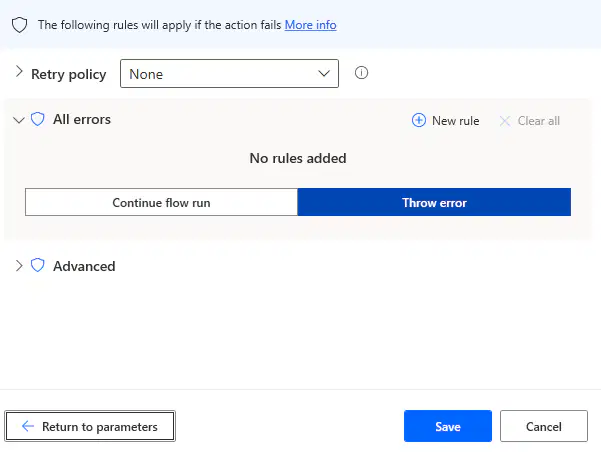
What does this image show?
Option to jump step in case of error
Option to stop flow in case of error
Stops process automatically
Shows Error Details
Select correct order to extract report from fast accounts
Populate Email ID and Password>Press Login Button>Press Download Button>Select Report Type>
Population Email ID and Password>Press Login Button>Select Report Type>Press Report Button>Press Download Button
Press Login>Population Email ID and Password>Button>Select Report Type>Press Report Button>Press Download Button
Select correct order to move files saved in downloads folder to another specific folder.
Get Files>Move Files>Sort Files
Move Files>Sort Files>Get Files
Get Files>Sort Files>Move Files
Why is pager used in web scrapping?
To search particular item
To extract element value
To rearrange pages
To move to next pages
We want to add a time gap between two steps, what step action be suitable for this?
Wait
Hold
Pause
All of these
There are 100 rows in an excel sheet which we want to read and populate in fast accounts, which action would be suitable for this?
Conditional loop
For each loop
Loop
Recorder
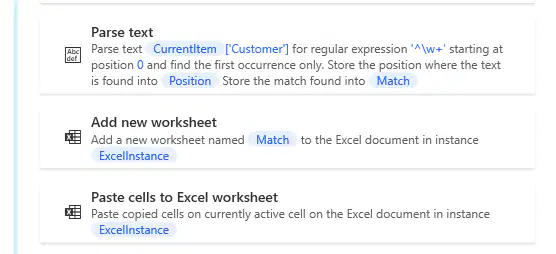
What is the use of Parse text step in this process?
To add new row
To past data in word
To allocate name of sheet
All of these
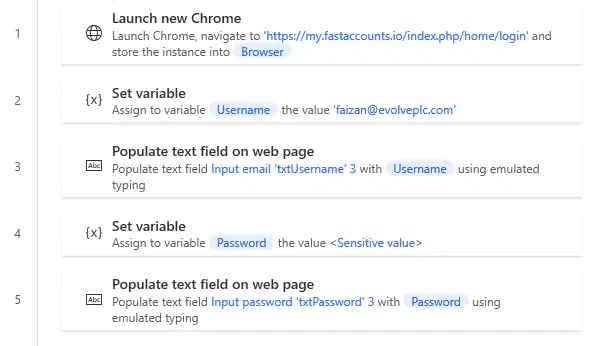
Is this sequence of steps correct to log in to fast accounts?
yes
no
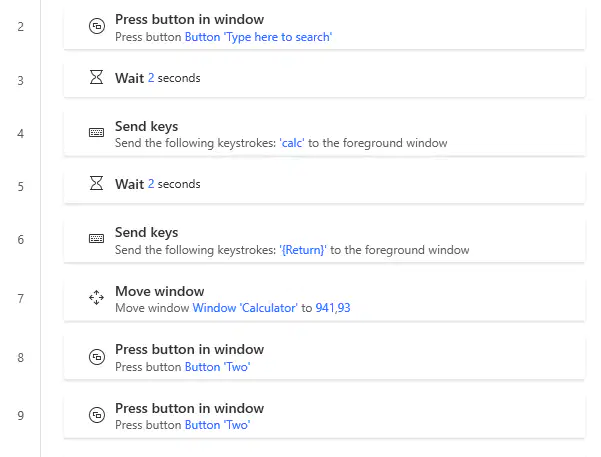
These steps have been created using Recorder?
Yes
No
May be and may not be
Send Keys option is used to
Populate text on web page
Populate text in window
Find UI element
Use Keyboard Keys
You have been asked to process excel based customer invoices into fast accounts. In excel sheet, there are multiple customers and multiple products for each customer. How may loops will be used to achieve this task?
Equal to number of customer
Equal to number of products
1
2
Which type of automation in Power Automate Desktop can be scheduled to run at a specific time or on certain days?
Business Flow
Desktop Flow
Cloud Flow
Subflow
In Power Automate Desktop, what is the key benefit of using variables?
Storing large files efficiently
Storing data for use in the workflow
Providing complex user interfaces
Controlling the flow of the automation
Which action in Power Automate can be used to change name of an existing Excel file?
Create Excel File
Rename Excel File
Rename File
Get Excel File
How can you extract data from a column "A" in row "7" in an Excel table when using Power Automate?
From a range of cells
All available values in sheet
Values from a specific cell
First Free row/column
What is web scraping in the context of Power Automate?
Logging into websites
Automating manual web browsing tasks
Extracting information from websites
Downloading files from websites
How can you specify the data you want to scrape from a web page in Power Automate?
By manually copying and pasting the data
By using a web scraping action "Scrape Data from Web Page"
By using a web scraping action "Download Data from Web Page"
By using a web scraping action like "Extract data from Web Page"
Which of the following scenarios is NOT a suitable use case for web scraping in Power Automate?
Extracting product prices from e-commerce websites
Monitoring stock prices on a financial news website
Automating data entry in fast accounts
Gathering weather information from a weather forecasting website
What is the primary benefit of automating the process of populating data on websites with Power Automate?
Eliminating the need for human data entry
Enhancing data accuracy
Ensuring timely data entry
All of these
Which of the following scenarios is NOT a suitable use case for automating website activities in Power Automate?
Generating fake user reviews on e-commerce websites
Automatically submitting job applications on career websites
Bypassing authentication on secure websites
Filling web forms with false information on forums
What is Power Automate used for in the context of emails?
To send anonymous emails hiding sender's identity
To automate and streamline email-related tasks and processes
To create properly worded emails
To automatically create email content without need to write any content
Which of the following can be achieved using Power Automate email automation?
Automatically forwarding emails to a different recipient
Automatically deleting all incoming emails
Sending an automated email response when a specific keyword is detected
Automatically changing the email sender's name
Which of the following best describes the relationship between Power Automate and email services like Outlook or Gmail?
Power Automate is an email service.
Power Automate integrates with email services to automate tasks.
Power Automate replaces email services.
Power Automate is a browser extension for email services.
In an automated order processing workflow, which of the following tasks can Power Automate perform for tracking orders?
Notify customers of order status changes
Check if the price for product is reasonable or not?
Estimate order time
Ensure timely delivery of order
What role does automation play in optimizing the order processing cycle for businesses?
Automation reduces the cycle time but can not reduce errors.
Automation has no impact on order processing.
Automation streamlines order processing, reducing errors and cycle time.
Automation makes intelligent decisions on behalf of humans
A Loop in Power Automate always has a start and an end?
Yes
No
May be and may not be
In order to save time, an automation expert wants to close an excel instance and a web browser instance in one step, is it possible?
Yes
No
Possible if excel is running invisibly
Possible if browser is Microsoft Edge
Which of the following business processes is an ideal candidate for Robotic Process Automation or RPA?
Unstructured format invoice processing
ERP Data Entry
Document scanning
Job Interviews
Ali is building a case for adopting RPA over the traditional automation techniques currently used at his company. Help him identify which among the following statements is true so that he can build a sound argument.
Traditional automation is expensive
Bot developers need to have basic knowledge of multiple programming languages
Automation and Artificial Intelligence are same
Defined processes can be easily automated without programming knowlege
Which of the following tools are used for Robotic Process Automation?
Microsoft Power Automate
IBM Automation Anywhere
UiPath
Artificial Intelligence
What is a "bot" in the context of RPA?
An automated software program that performs tasks
A small physical robot used in manufacturing
A specialized type of computer software
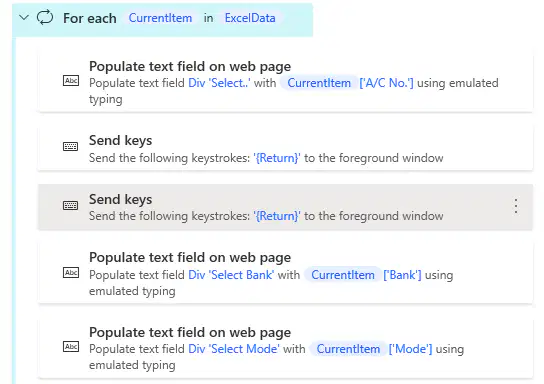
Is the sequence of steps correct in this flow?
Yes
No

