
 Worksheets
CPP Midterm
Total questions: 111
Worksheet time: 1hrs 26mins
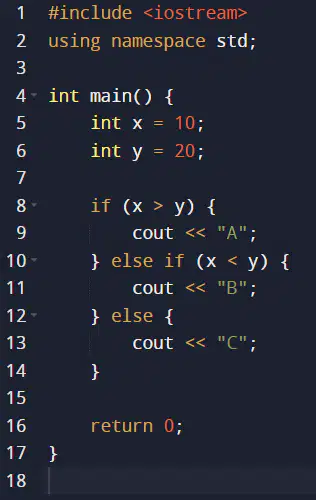
What will be the output of the following code?
A
B
C
None of the above

What will be the output of the following code?
Compilation error
A
B
Runtime error

What is the value of x after the following code is executed?
0
1
2
3
Which of the following is not a valid C++ comparison operator?
==
=
>=
!=
What is the correct way to comment out a single line in C++?
// This is a comment
/* This is a comment */
' This is a comment
# This is a comment

Given the following code, what is the value of result?
3
13
8
40
Which of the following statements is true about the --- if-else --- statement in C++?
An if-else statement can have multiple else blocks.
An if-else statement can only have one if block.
The else block is optional.
if-else statements can only be used for numerical comparisons.

What is the value of result after executing the following code?
10
20
0
30

What is the output of the following code?
A
B
C
AB
In C++, how is the if-else if ladder different from a series of independent if statements?
The if-else if ladder only executes the first true condition.
The if-else if ladder allows for multiple conditions to be true.
The if-else if ladder is more efficient and faster.
The if-else if ladder is not used in C++.
What is the purpose of the else statement in an if-else statement?
It provides an alternative block of code to execute when the if condition is false.
It terminates the program.
It repeats the if block.
It is not used in C++.

What is the value of x after the following code is executed?
1
2
3
4
True or False: An if-else if ladder can have multiple else blocks.
TRUE
FALSE

What is the purpose of the following code?
It ensures that code block A always executes.
It ensures that code block B always executes.
It executes code block A if the condition is true, otherwise, it executes code block B.
It is invalid C++ code.

What is the possible output of the following code?
A
B
C
BC
In C++, what does the else if statement allow you to do?
Define a new if condition within the same block.
Create a nested if statement.
Define an alternative condition to check if the initial if condition is false.
Skip the if condition and directly execute the code in the else block.

What is the value of x after the following code is executed?
0
1
2
3

What is the purpose of the following code?
It ensures that code block X always executes.
It executes code block X if condition is true, code block Y if another_condition is true, and code block Z if both conditions are false.
It is invalid C++ code.
It skips code block X and always executes code block Y.

What will be the output of the following code?
A
B
C
AB

What is the possible output of the following code?
X
Y
Z
XY

What is the output of the following code?
A
B
AB
No output
Which of the following is true about the if-else statement in C++?
The if-else statement can only have one if block.
An if-else statement can have multiple else blocks.
The else block is mandatory.
The if-else statement is not used in C++.

What is the value of result after executing the following code?
w
e
5
8
In C++, what is the role of the else keyword?
To terminate the program.
To repeat the if block.
To provide an alternative block of code to execute when the if condition is false.
The else keyword is not used in C++.

What is the output of the following code?
A
B
C
AB

What is the output of the following code?
A
B
C
AB
In C++, what is the purpose of the if-else if ladder?
To create a sequence of if statements that execute independently.
To ensure that multiple if conditions are true at the same time.
To provide a series of conditions to check, executing the first true condition's block.
To replace the if-else statement in complex scenarios.

What will be the value of result after executing the following code?
2
12
35
42
In C++, what does the else statement indicate?
The end of the program.
A fallback condition to execute when all if and else if conditions are false.
A loop construct.
The else statement is not used in C++.

What is the output of the following code?
A
B
C
BC

What is the value of result after executing the following code?
5
8
13
48
True or False: In C++, the if-else if ladder allows multiple conditions to be true simultaneously.
TRUE
FALSE

What is the output of the following code?
Positive
Negative
Zero
PositiveNegativeZero

What is the output of the following code?
X
Y
Z
XY

What is the value of x after the following code is executed?
0
1
2
3
What is the output of this code? int x = 10; cout << x * 2 << endl;
10
20
2
102
What is wrong with this code? int num; cin >> num cout << num << endl;
Missing semicolon after cin statement
Missing << operator in cin
num is not initialized
cout cannot output integers
What will this code output? double price = 15.99; cout << fixed << setprecision(2) << price << endl;
15
15.99
16.00
15.9900
Which code snippet correctly declares a constant variable for a tax rate?
const double TAX = 0.10;
double const TAX = 0.10;
const TAX = 0.10;
double TAX = const 0.10;
What is the output of this code? int a = 5, b = 8; if (a + b > 10) { cout << "Sum is greater than 10" << endl; } else { cout << "Sum is 10 or less" << endl; }
Sum is greater than 10
Sum is 10 or less
Nothing is printed
Error
Which header is needed for this code to work? cout << fixed << setprecision(2) << 10.555 << endl;
<iostream>
<iomanip>
<string>
<math>
What will this code output? string status = "yes"; if (status == "yes") { cout << "Approved" << endl; } else { cout << "Denied" << endl; }
Approved
Denied
Nothing
Error
Which code correctly reads a user's age and outputs it?
int age; cin >> age; cout << age << endl;
int age; cout >> age; cin << age << endl;
age int; cin >> age; cout << age;
int age; cin << age; cout >> age << endl;
What is the output of this code? int score = 75; if (score >= 80) { cout << "Pass"; } else if (score >= 60) { cout << "Conditional Pass"; } else { cout << "Fail"; }
Pass
Conditional Pass
Fail
Nothing
What is wrong with this code? int x = 10 cout << x << endl;
Missing semicolon after variable declaration
cout cannot output integers
Variable x is not initialized
Missing << operator
What is the output of this code? double total = 100.50; double discount = total * 0.1; cout << fixed << setprecision(2) << total - discount << endl;
90.45
100.50
10.05
90.50
Which code correctly checks if a number is positive?
int num; cin >> num; if (num > 0) { cout << "Positive" << endl; }
int num; cin >> num; if (num = 0) { cout << "Positive" << endl; }
int num; cin >> num; if (num >= 0) { cout << "Positive" << endl; }
int num; cin >> num; if (num < 0) { cout << "Positive" << endl; }
What is the output of this code? int x = 10, y = 20; int sum = x + y; cout << sum << endl;
10
20
30
1020
Which code snippet correctly declares and initializes a string variable?
string name = "Alice";
string name = Alice;
string name = 'Alice';
name string = "Alice";
What is the output of this code? int temp = 25; if (temp <= 20) { cout << "Cold"; } else if (temp <= 30) { cout << "Warm"; } else { cout << "Hot"; }
Cold
Warm
Hot
Nothing
What is the value of tax after this code executes? double income = 300000; double tax; if (income <= 250000) { tax = 0; } else { tax = (income - 250000) * 0.2; }
0
10000
60000
50000
Which code correctly outputs a formatted price with two decimal places?
double price = 19.999; cout << fixed << setprecision(2) << price << endl;
double price = 19.999; cout << setprecision(2) << price << endl;
double price = 19.999; cout << fixed << price << endl;
double price = 19.999; cout << setprecision << price << endl;
What is wrong with this code? int x = 5; if (x = 10) { cout << "x is 10" << endl; }
Uses = instead of == in the condition
Missing semicolon after cout
x is not declared
if statement is invalid
This code will compile without errors: int x = 10; cout << x << endl;
True
False
The following code uses the correct operator to read input: int num; cin << num;
True
False
The const keyword prevents a variable's value from being changed after initialization.
True
False
This code will output "Fail" for a score of 85: int score = 85; if (score < 60) { cout << "Fail" << endl; }
True
False
The << operator is used with cout to display output to the console.
True
False
This code will cause an error because num is not initialized: int num; cout << num << endl;
True
False
The if statement can have multiple else if blocks but only one else block.
True
False
This code correctly formats a number to two decimal places: double num = 10.555; cout << num << endl;
True
False
This code will always execute the else block: int x = 5; if (x > 10) { cout << "Greater"; } else { cout << "Not greater"; }
True
False
The (a) object is used to output data to the console in C++.
To read user input into a variable, use the (a) operator with cin.
To declare a variable that cannot be modified, use the (a) keyword.
The (a) header is required to use fixed and setprecision for output formatting.
The (a) statement executes a block of code if a condition is true.
To add a newline and flush the output buffer, use the (a) manipulator.
The (a) operator checks if two values are equal in a conditional statement.
The (a) data type is used to store text values in C++.
The (a) header must be included to use cin and cout.
This code will output "Eligible" if age is 18: int age = 18; if (age >= 18) { cout << "Eligible" << endl; }
True
False
This code will cause a compilation error due to incorrect syntax: int x = 5; if x > 0 { cout << "Positive" << endl; }
True
False
This code will always output "Fail": int score = 85; if (score < 60) { cout << "Fail" << endl; } else { cout << "Pass" << endl; }
True
False
This code correctly uses the equality operator to compare two variables: int a = 10, b = 10; if (a == b) { cout << "Equal" << endl; }
True
False
This code will output "Invalid" for any input value: int num = 100; if (num > 0) { cout << "Positive"; } else if (num < 0) { cout << "Negative"; } else { cout << "Invalid"; }
True
False
This code will compile without errors: double price = 50.0; if (price <= 100.0) { cout << "Affordable" << endl; }
True
False
This code incorrectly uses the assignment operator instead of comparison: int x = 5; if (x = 10) { cout << "x is 10" << endl; }
True
False
This code will output "High" for value = 75: int value = 75; if (value >= 80) { cout << "High"; } else if (value >= 60) { cout << "Medium"; } else { cout << "Low"; }
True
False
The else block in this code will execute if temperature is 25: int temperature = 25; if (temperature < 20) { cout << "Cold" << endl; } else { cout << "Warm" << endl; }
True
False
This code will output nothing if grade is 50: int grade = 50; if (grade >= 75) { cout << "Pass" << endl; }
True
False
This code will cause a compilation error due to missing parentheses: int x = 10; if x > 5 { cout << "Greater" << endl; }
True
False
This code correctly handles string comparison: string status = "yes"; if (status == "yes") { cout << "Approved" << endl; }
True
False
This code will output "No Discount" for total = 200: double total = 200; if (total > 500) { cout << "Discount Applied" << endl; } else { cout << "No Discount" << endl; }
True
False
This code will output "Category A" for score = 90: int score = 90; if (score >= 85) { cout << "Category A"; } else if (score >= 70) { cout << "Category B"; } else { cout << "Category C"; }
True
False
This code will cause an error because else is used without an if: int x = 5; else { cout << "Error" << endl; }
True
False
This code will output "Valid" for input = 0: int input = 0; if (input > 0) { cout << "Positive"; } else if (input < 0) { cout << "Negative"; } else { cout << "Valid"; }
True
False
This code will output "Low" for speed = 50: int speed = 50; if (speed > 60) { cout << "High"; } else if (speed > 30) { cout << "Medium"; } else { cout << "Low"; }
True
False
This code uses an incorrect comparison operator: int x = 10; if (x = 5) { cout << "Five" << endl; }
True
False
This code will output "Approved" for balance = 1000: double balance = 1000; if (balance >= 500) { cout << "Approved" << endl; } else { cout << "Rejected" << endl; }
True
False
This code will output nothing if value is negative: int value = -5; if (value >= 0) { cout << "Non-negative" << endl; }
True
False
Complete this code to output "Pass" if grade is 75 or higher: int grade = 80; if (grade ____ 75) { cout << "Pass" << endl; }
=
==
<=
Fill in the blank to compare if x equals 10: int x = 10; if (x ____ 10) { cout << "Equal" << endl; }
!=
=
<=
Complete this code to output "Negative" if num is less than 0: int num = -5; if (num ____ 0) { cout << "Negative" << endl; }
==
>
=
Fill in the blank to make this code output "Discount" for total over 1000: double total = 1200; if (total ____ 1000) { cout << "Discount" << endl; }
==
<>
<
Complete this code to output "Approved" if status is "yes": string status = "yes"; if (status ____ "yes") { cout << "Approved" << endl; }
<
!=
=
Fill in the blank to output "High" if score is at least 90: int score = 95; if (score ____ 90) { cout << "High" << endl; }
<
==
=
Complete this code to output "Valid" if input is not negative: int input = 5; if (input ____ 0) { cout << "Valid" << endl; }
<=
<
==

A traffic light system checks the current signal color to display instructions. The code should print "Stop" for red, "Prepare" for yellow, and "Go" for green. It’s not working correctly
The if condition uses = instead of ==.
else if is not valid in C++; use elif.
The string type is incorrect for signal.
The cout statements are missing endl.
Complete this code to output "Fail" if grade is below 60: int grade = 55; if (grade ____ 60) { cout << "Fail" << endl; }
>
=
==
Fill in the blank to compare x and y for inequality: int x = 5, y = 10; if (x ____ y) { cout << "Not equal" << endl; }
!= (Not Equal)
>=
==
=
Complete this code to output "Warm" if temp is between 20 and 30 (inclusive): int temp = 25; if (temp >= 20 && temp ____ 30) { cout << "Warm" << endl; }
>=
==
!=
Fill in the blank to output "Cold" if temp is below 15: int temp = 10; if (temp ____ 15) { cout << "Cold" << endl; }
>
=
==
Complete this code to output "Reject" if balance is below 500: double balance = 400; if (balance ____ 500) { cout << "Reject" << endl; }
>
! =
==
Fill in the blank to output "Valid" if code equals 123: int code = 123; if (code ____ 123) { cout << "Valid" << endl; }
!=
=
>=
Complete this code to output "High" if speed exceeds 70: int speed = 80; if (speed ____ 70) { cout << "High" << endl; }
=
<
!=

Fill in the blank to output "Approved" if status is not "no": string status = "yes"; if (status ____ "no") { cout << "Approved" << endl; }
==
>=
<=
Complete this code to output "Category A" if score is at least 85: int score = 90; if (score ____ 85) { cout << "Category A" << endl; }
==
!=
<
Fill in the blank to output "Low" if value is less than or equal to 10: int value = 5; if (value ____ 10) { cout << "Low" << endl; }
>=
==
!=
Complete this code to output "Pass" if grade is 70 or higher: int grade = 75; if (grade ____ 70) { cout << "Pass" << endl; }
<=
==
=
Complete this code to output "Negative" if num is not positive: int num = -10; if (num ____ 0) { cout << "Negative" << endl; }
=
>
!=

