
 Worksheets
Design & Modeling Unit 3
Total questions: 38
Worksheet time: 50mins
What is 3D modeling?
The process of creating a two-dimensional representation of a physical object or scene using specialized software.
The process of creating a holographic representation of a physical object or scene using specialized software.
The process of creating a three-dimensional representation of a physical object or scene using specialized software.
The process of creating a physical object using a 3D printer.
Which of the following is a commonly used software for 3D modeling?
Google Chrome
Adobe Photoshop
Tinkercad
Microsoft Word
What is the purpose of 3D modeling in computer aided design?
To simulate physical properties of objects or environments
To design user interfaces for software applications
To create virtual representations of objects or environments
To generate 2D drawings of objects or environments
Which of the following is NOT a benefit of 3D modeling?
Streamlined design process
Increased cost
Enhanced visualization
Improved accuracy
What is the difference between 2D and 3D modeling?
2D modeling is only used for artistic purposes while 3D modeling is used for practical applications as well.
The creation of flat, two-dimensional images or designs versus the creation of three-dimensional objects or environments.
The difference is that 2D modeling is done on paper while 3D modeling is done on a computer.
2D modeling is used for creating simple shapes while 3D modeling is used for complex objects.
James and Daniel are working on a digital art project. They want to join or combine some objects together in their design. Which button should they use?
Ungroup
Join
Combine
Group
Emma, Lily, and Sophia are working on a digital art project. They want to center an object perfectly on their canvas. Which tool should they use?
Group
Mirror
Align
Undo
Grace is working on a craft project and wants to make a hole in a wooden block. How should she do it?
She should group two solid wooden blocks.
She should group two hole shapes.
She should group a solid wooden block with a hole shape.
She should use the delete key.
Mia is studying engineering and she is using a software for her design project. The software is known as CAD. What does CAD stand for?
Computer Aided Design
Computational Adding Desk
Computer Automated Drive

Aria, Nora, and Lily are working on a 3D modeling software. They noticed that the curved arrows around the object allow them to do what?
rotate the object
change the color of the object
change the size of the object
duplicate the object

Aiden, Zoe, and Ethan are working on a project in TinkerCAD. They have a model of a skyscraper and they want to adjust the height of the antenna on top. Which option should they use to move the antenna vertically (up/down)?
Option 1
Option 2
Option 3
Emma is working on a project in Tinkercad and comes across an object. She is unsure if it's a hole or not. How can David tell her to identify if an object is a hole in Tinkercad?
David tells her that it's impossible to identify
David suggests that if it is clear & has stripes, then it's a hole
David tells her that the object will say hole

Michael, Aria, and Mason are working on a project in TinkerCAD. They have a group of objects selected. Which button should they click to keep these objects together?
Group
Ungroup
Delete
Align

What are the dimensions of 3-D?
Up - Down - Side
Length Width Depth
Base Height Down
Top Bottom Side

What is the volume of this prism?
6 cubic units
12 cubic units
4 cubic units
16 cubic units

What is the volume of this prism?
20 cubic feet
8 cubic feet
40 cubic feet
11 cubic feet

What does "constraint" mean in the engineering design process?
A restriction for possible solutions
A physical object holding you down
Any possible solution
What is the first step in the engineering process?
Prototype a solution
Communicate your design
Define the problem
Brainstorm multiple solutions
Criteria
Are limitations. framed as part of the problem; thing like money, time, size.
Are the goals or outcomes for a successful solution. Criteria should be determined before developing possible solutions.
A systematic problem-solving strategy that designers follow to come up with a solution to a problem.
2: Generate Concepts. Pick 3
What design ideas did your team consider?
Were there additional questions you should have asked?
How did you ensure that everyone on the team contributed ideas?
Describe how your team decided.
Step 3: Design a Solution. Pick 2
How did you test your solution?
Can you think of drawings or models that might have communicated your ideas better?
How did you communicate your ideas with your team members? For example, did you use drawings?
What design considerations did you think about?
Step 4: Build and Test Solution. Pick 3
How did you test your solution?
What design ideas did your team consider?
How did you use what you learned from your testing to modify your design?
How far back in the design process did you have to go to make design modifications?
Step 5: Evaluate a Solution. Pick 3
Did you evaluate your solution to make sure it meets the requirements identified in Step 1?
How did you test your solution?
How can your solution be improved in future iterations?
Were there additional questions you should have asked?
Step 6: Present Solution. Pick 3
What design considerations did you think about?
How did you share your solution with your classmates?
What design artifacts did you share?
How did your audience affect your choice of artifacts to present for your solution?
Which step of the design process includes "Brainstorming"?
Define problem
Generate concepts
Build a prototype
When do we usually create a Decision Matrix?
After we have brain stormed and generated concepts
After we have built and tested our design
After we have evaluated a solution
Asking things like "What is the issue we need to solve?", or "What are my criteria/constraints?"...would be which step?
Design a solution
Generate Concepts
Define Problem
When I look for and collect data for FLAWS in my design, I am at this step:
Design a solution
Build/Test prototype
Evaluate solution
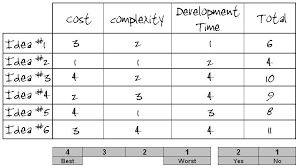
Using one of these will help your group decide on which model to build:
Design Brief
Design Evaluator
Decision Matrix
We usually draw a rough sketch during this step:
Generate Concepts
Build/Test Prototype
Evaluate Solution
What are the "Must-Haves" in a project or challenge called?
Criteria
Constraints
Brainstorming
Adding a detailed drawing of the group's idea is completed at this step of the design process.
Define the problem
Design a solution
Evaluate solution

Based on this chart, which idea was best?
Idea 2
Idea 6
Idea 3
Idea 4

Which Idea was "WORST" for development time?
Idea 5
Idea 3
Idea 2
Idea 1

Which step is most likely represented here?
Define Problem
Design A Solution
Build and Test
Often times creating a Design Brief takes place during this step:
Design solution
Build/Test prototype
Define Problem

