
Font size
 Worksheets
Formative GD 10
Total questions: 35
Worksheet time: 23mins
How do you select a shape that has no fill?
Click the interior center spot
Double click the interior center spot
Click the stroke
Double click the anchor point
Click the Outline
Which of the following correctly defines the method by which Adobe Photoshop creates images.
Raster
Encryption
Extrapolation
Vector
Bitmap
Which of the following correctly defines the method by which Adobe Illustrator creates images.
Raster
Illustration
Extrapolation
Vector
Bitmap
Pick the correct procedure to draw a perfect square in Adobe Illustrator.
choose the rectangle tool, hold shift, and drag the cursor diagonally.
input the square’s side dimensions.
double click the polygon tool
select the square polygon tool and click any open area
All
Which of the following is used to convert a raster image to a vector image?
Live Trace
Live Pixels
Live Convert
Live Paint
Image Trace
Selected tools from the toolbox will remain selected…
For approximately 15 seconds.
Until the computer is off line.
Until the software is shut down.
Until another tool is selected.
None
Selected tools from the toolbox will remain selected…
select the color tool and hit return on the keyboard
select the object and then a color from the color palette
select a brush and paint the color inside the object
simply use the paint bucket
select the object and then color from the swatches
Holding the “shift key” while drawing with the pen tool will cause which of the following to happen?
the selected pen will change to the next one up
A vertical, horizontal, and 45 degree line can be drawn
A zig-zag line can be drawn.
The pen will draw an empty line.
vertical, horizontal, and 45 degree path can be drawn
Adobe Illustrator terminology for a drawn line is…
Line
Gamma Line
Path
Point Successor
shape
At the end of drawing a line with the pen, holding down the end point and dragging will cause which of following to occur
The line will stretch
The line will change to 45 degrees
The line will curve
The line will smooth
The line will strate
Which of the following tools would be used to edit a line?
the pen
selection tool
the eraser
direct selection tool
reshape tool
How can you select and manipulate individual objects in a group?
Use the “group transform” tool
Use the “group division” tool
Use the “group selection” tool
Can’t be done. The group needs to be ungrouped first.
None
Which of the following will reduce an object PROPORTIONALLY?
Drag the handles of the bounding box while depressing “option”
Drag the handles on the bounding box.
Drag the handles on the bounding box while depressing “Shift”.
Drag the handles and hold F4 while dragging
None
Which of the following does the “Paragraph” menu NOT operate?
Indentation
Leading
Hyphenation
Format
kerning
Select from the following choices, an operation controlled by the “Character” menu.
font size
type color
leading
hyphenation
kerning
How do you create type that follows the shape of a path or an object?
It can’t be done.
Use the Pathfinder tool
Use the Path Type Tool
Deselect the Path
use vertical type on a path
A line that is drawn in Adobe Illustrator that finishes where it began is called A…
Open Path
Symbol
Closed Path
Closed Vector
vertical path
You are creating a page that will become a web page. Which units should you set in your preferences.
picas
points
inches
pixels
millimeter
You wish to change the color of the stroke on an object. You should…
Click the color in the swatch, then select the stroke tool
Stroke color must be selected before creating the object.
Click the stroke tool at the bottom of tool box and select a color
Click the bounding box and then select a color
go to control panel select stock color
Which of the following operations must be accomplished in order to add a new color to your color swatches?
ctrl+ click the new swatch on the swatches panel
Click the new swatch button on the swatches panel
Alt + click the new swatch on the swatches panel
Drag the new swatch to the swatch menu
go to swatch panel select color
Which of the following tools will cut a path into two different paths.
scissors tool
knife tool
bisect tool
transform tool
erase tool
You have expanded your image in order to work on some detail. Which of the following is the quickest way to return the display to the original size?
double-click the scaling tool
double click off the artboard
double-click the hand tool.
double-click the magnifying glass tool
Crtl + 0
The Pathfinder Tool will…
Combine grouped objects
Find a path for type
Find a path for stroke size
Find a path for rasterization
make one shape to many
Which of the following is NOT a color mode of Illustrator
CMYK
RGB
Spot Color
Grayscale
lab color
To fill type with a gradient or interested effect which of the following operations must be accomplished first?
Show type as having an empty fill
Convert type to Outline
Click the gradient and select the type while holding shift
Convert type using Pathfinder
Which of the following is NOT a benefit of using layers.
Artwork printing is controlled
Artwork outlines are easily seen
Artwork sections can be hidden
Artwork is protected from change
How do you change the leading between lines in a paragraph?
Use the leading pull down menu under “Font”
Place the cursor in front of the first line and click the option key
Press the up or down arrow key for each point of leading needed
Select the paragraph and enter the leading value in the “Character” palette
What is a “gradient fill”?
50% of one color, plus 50% of another color
A tint of a PMS Swatch
75% of one color, plus 25% of another color
A graduated blend of two or more colors within a closed path
How do you change the color in a “Mesh”?
Delete the color and then reset it with the swatch selection tool
Fill the mesh with the paint bucket tool after selecting a mesh point
Fill the mesh with the brush tool after grouping the objects
Use the direct selection tool, select a mesh point, then select the color
How do you hide an Adobe Illustrator layer?
name the layer “Invisible Layer”
click on the pencil at the left of the layer name
adjust the gamma layer for “Invisible”
click off the eye on the left of the layer name
A curve created in Adobe Illustrator is commonly referred to as a…
Bezier Curve
Venus Curve
curved vector solution
Razerian Curve
The two overlapping boxes at the bottom of the Adobe Illustrator toolbox control…
stroke and shadow
fill and stroke
history and undo
texture and gamma
A simple straight line drawn with the pen tool is also known as a…
pathway
frame
path
frameset
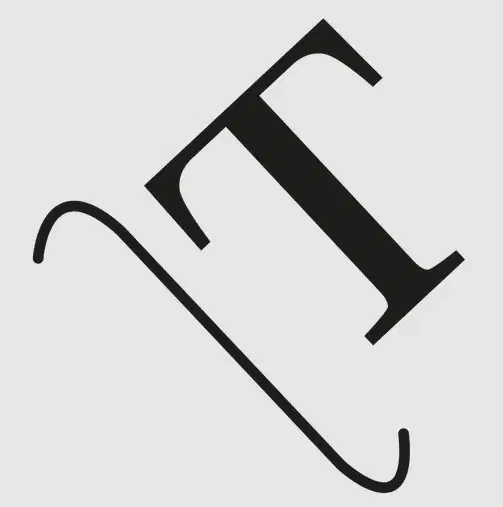
what is the name of the tool?
vertically type on a path
type on a path tool
area type tool
type tool

what is the name of the tool?
vertically type on a path
type on a path tool
area type tool
type tool

