Wayground logo

Free Printable Worksheets

Font size

S
M
L
XL
Worksheets

Networks and Security Basics

Total questions: 44

Worksheet time: 22mins

Name
Class
Date
1.
Why are passwords needed?
a)
To protect sensitive data
b)
So the server knows who you are
c)
So you do not lose your work
d)
So your work can be saved on the server
2.
Which is the best password for Jessica Wood (born 2001)?
a)
Password
b)
WoodJ2001
c)
JWood2001
d)
7-W006z00i
3.
What makes a good password?
a)
All letters, no numbers or symbols
b)
Combination of letters and numbers (not related to the person it belongs to
c)
Combination of symbols and numbers (not related to the person it belongs to
d)
Combination of symbols, letters and numbers (not related to the person it belongs to
4.
A school may have 3 different access levels.  What are access levels?
a)
Doesn't allow pupils to use YouTube
b)
Allow different people differing levels of access to a network
c)
Doesn't allow teachers to use Facebook 
d)
Disallowing everybody use of the computer network
5.
Why do most schools set access levels?
a)
So pupils and teachers can not use websites, hardware and software for the wrong reasons
b)
So pupils and teachers can get access to any part of the network
c)
So pupils can not use websites, hardware and software for the wrong reasons
d)
So pupils can not go on websites that are banned
6.
Why does a technician have the highest level of access to a network?
a)
Can be trusted on banned websites
b)
Because they can not be monitored
c)
May have to install software or fix hardware
d)
Because they are in charge
7.
What's encryption?
a)
Sensitive data is fried
b)
Sensitive data is poached
c)
Sensitive data is boiled
d)
Sensitive data is scrambled 
8.
Why do people encrypt data?
a)
To hide names and addresses
b)
To hide sensitive data from people that shouldn't see it
c)
So it needs to be decrypted
d)
So it can not be seen by anybody
9.
What is a computer virus?
a)
A malicious computer program
b)
An evil thing
c)
It takes your files
d)
It deletes your files
10.
How AREN'T computer viruses spread?
a)
Released via social media
b)
Released via emails
c)
Downloaded off the internet
d)
In a doctors waiting room (mouth to mouth)
11.
What software helps prevent viruses affecting a computer network?
a)
Virus basher
b)
Word processer
c)
Web browser (Chrome)
d)
Virus scanner
12.
What's a firewall?
a)
A piece of software designed to stop external threats e.g. hackers
b)
A fiery wall
c)
Stronger than a virus scanner
d)
Like a virus scanner but more effective
13.

is a group of computers connected

together.

a)

Network

b)

Netbreak

c)

Internet

d)

Networth

14.

The computer you use at home or school would be

called a ______________ in a network.

a)

Workspace

b)

Workforce

c)

Workstation

d)

Worktomuch

15.

______________can look like desktop computers; however, most

do not look like your “normal” computer.

a)

Surfers

b)

Servers

c)

Soups

d)

Salads

16.

A _________ is a device that enables computers to

interpret data they receive from a network or send data

in the proper form along a network.

a)

Mouse

b)

Modern Family

c)

Modem

d)

Monument

17.

A _______ is sort of like a car radio. Every

computer that has that section of

network (like a radio station) can hear

everything that is being transmitted.

a)

Stereo

b)

Hub

c)

Husband

d)

Hover craft

18.

A _____________ is more complex than a hub and works a lot like a

two-way radio. In a room full of people, only the person holding

the other radio can hear what is being said.

a)

Witch

b)

Watch

c)

Stitch

d)

Switch

19.

When information

comes into the __________, it is then sent along to the correct

number—or in this case, computer.

a)

Router

b)

Rover

c)

Rosieposie

d)

Redrover

20.

This is a type of network where the computers in the

network share resources among each other.

a)

Friendly Lines

b)

Peer to Peer

c)

Phone to Line

d)

Pear to Pear

21.

____________ is a type of connection between computers that

forms the basis of most LANs.

a)

Internet

b)

Ethernet

c)

Earthling

d)

Landing

22.

Stands for Local Area Network.

a)

LON

b)

NAL

c)

LAN

d)

NOL

23.

WAN

a)

WIDE AREA NOOB

b)

WIDE AREA NETWORK

c)

WATER APPLE NOISE

d)

WIDE APPLE-SHAPE NOSE

24.

__________work by sending data from one

machine to the next and so on around a ring

until it ends up back where it started.

a)

Toad stolls

b)

Token Takken

c)

Token Rings

d)

Total Recall

25.

________ setup allows the network to centralize

functions and applications in one or more file servers.

a)

Client/Server

b)

Client/Soup

c)

Client/Super

d)

Client/Skittles

26.

A computer _______ is someone who finds access in a

computer’s security system to break into another

machine.

a)

Haggler

b)

Hustler

c)

Hacker

d)

Honker

27.

Which is NOT a security threat?

a)

Adware

b)

Malware

c)

Spam

d)

Ham

28.

Which is NOT a step in securing your network?

a)

Installing a Firewall

b)

Advising caution on the net

c)

Putting password on social media

d)

Password protecting network

29.

File servers become the “______” of this system and provide

access to files and resources, as well as providing security.

a)

Star

b)

Heart

c)

Worm

d)

Book

30.

You should share your passwords?

a)

False

b)

True

31.

The best password is 1234

a)

True

b)

False

32.

A good password would consist of letters, numbers, and symbols?

a)

True

b)

False

33.
Which of these is the purpose of the Operating System?
a)
Allows the user to communicate with the system
b)
Allows the hardware and software of the system to communicate
c)
All of the above
34.
Which Interface uses images/icons to make it easier for the user?
a)
Command Line
b)
Graphical
c)
Voice Command
35.
Which Interface uses spoken instructions?
a)
Command Line
b)
Graphical
c)
Voice Command
36.
Which Interface communicates directly with the system?
a)
Command Line
b)
Graphical
c)
Voice Command
37.
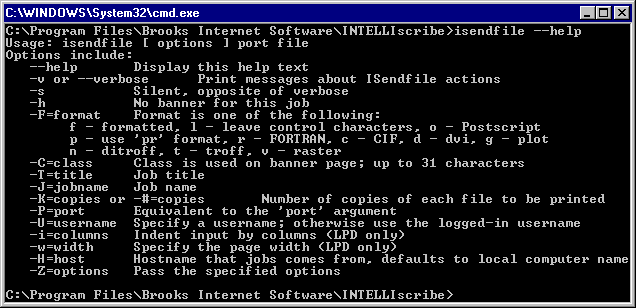
Which Interface is this an example of?
a)
Command Line
b)
Graphical
c)
Voice Command
38.
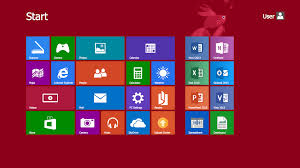
Which Interface is this an example of?
a)
Command Line
b)
Graphical
c)
Voice Command
39.
Which Interface is this an example of?
a)
Command Line
b)
Graphical
c)
Voice Command
40.
Which Interface is most suitable for advanced users?
a)
Command Line
b)
Graphical
c)
Voice Command
41.
Which Interface is most suitable for beginner users?
a)
Command Line
b)
Graphical
c)
Voice Command
42.
Below are 2 advantages and 1 disadvantage for Command Line Interface.
Choose the disadvantage
a)
Takes up less memory
b)
Takes less processing power
c)
Can be very confusing to a beginner
43.
Below are 2 advantages and 1 disadvantage for Graphical User Interface.
Choose the disadvantage
a)
The user doesn't need to memorise the commands
b)
Simple to use for beginners
c)
Takes up a lot of processing power and memory
44.
Below are 2 advantages and 1 disadvantage for Voice Command Interface.
Choose the disadvantage
a)
Suitable for disabled users
b)
Requires very little training
c)
May have difficulty understanding accents