wayground logo

Free Printable Worksheets

Font size

S
M
L
XL
Worksheets

7.2 Computer Systems Revision

Total questions: 86

Worksheet time: 58mins

Name
Class
Date
1.
Who invented the first computer
a)
Alan Turing
b)
Lovelace
c)
Charles Babbage
d)
ARPANET
2.
Who developed the first program?
a)
Alan Turing
b)
Charles Babbage
c)
Ada Lovelace
d)
Tim Berners Lee
3.
Ada Lovelace is considered the world's first what?
a)
computer language
b)
computer programmer
programmer
c)
smart lady
d)
mathematician
mathematician
4.
The word "Computer" was first assigned to...
a)
A person who conducts calculations
b)
A person who is very loud
c)
A person who doesn't sleep
d)
A person who lies
5.
The ______________ was developed in 3000 BC, and was basically beads on rods to count and was used to calculate, has upper and lower deck.
a)
UNIVAC
b)
Abacus
c)
Vacuum Tubes
d)
Slide Rule
6.

What's the name of the inventor of the Analytical Machine?

a)

Albert Einstein

b)

Stephen Hawking

c)

Charles Babbage

d)

Konrad Zuse

7.

This technology was critical in creating microcomputers and launching the digital age.

a)

transistor

b)

conductor

c)

internet

8.

The first electronic computers were used for _____________.

a)

Stock Trading

b)

Calculating Trajectory and Code Breaking

c)

Astronomy

9.
Which of the following is the correct order of the four major functions of a computer?
a)
Process --> Output --> Input --> Storage
b)
Input --> Output --> Process --> Storage
c)
Process --> Storage --> Input --> Output
d)
Input --> Process --> Output --> Storage
10.
Computer _____________ is any physical device used in or with your machine.
a)
Hardware
b)
Software
c)
Malware
11.
An example of computer hardware is...
a)
Web Browser
b)
Keyboard
c)
App
d)
Operating System
12.

What is another name for the computer screen?

a)

Television

b)

Watcher

c)

Square thingy

d)

Monitor

13.

Google Chrome is...

a)

Hardware

b)

Software

14.
Is the monitor/screen hardware or software?
a)
Software
b)
Hardware
15.

What type of device is this? (Printer)

a)

Input

b)

Output

16.

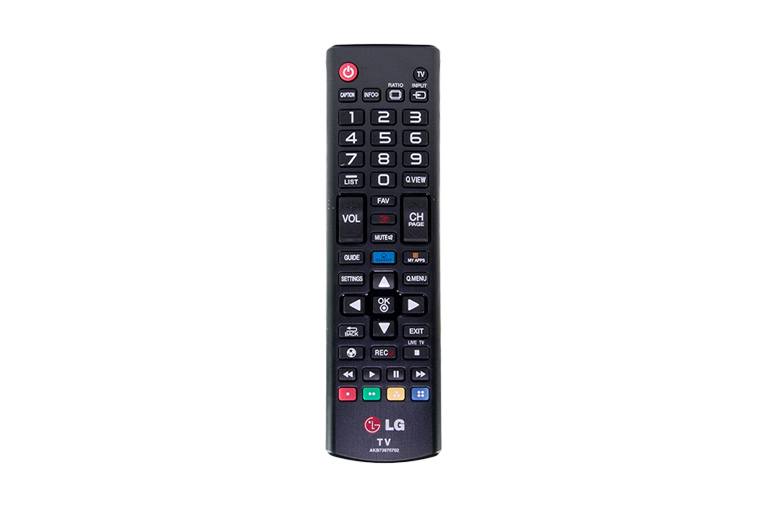
What type of device is this? (Remote Control)

a)

Input

b)

Output

17.

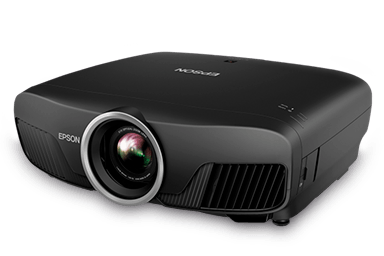
What type of device is this? (Projector)

a)

Input

b)

Output

18.

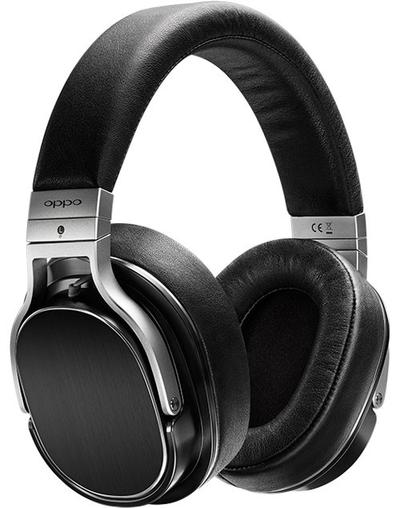
What type of device is this? (Headphones)

a)

Input

b)

Output

19.

What type of device is this? (Speakers)

a)

Input

b)

Output

20.

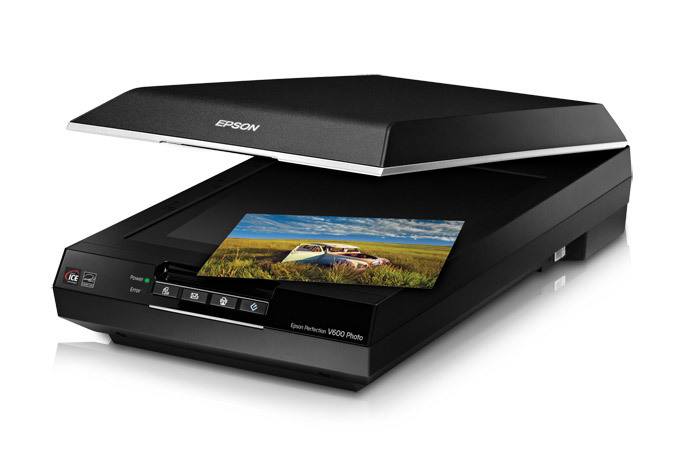
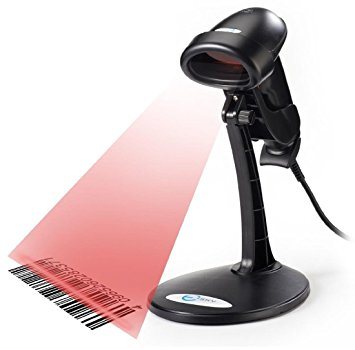
What type of device is this? (Scanner)

a)

Input

b)

Output

21.

What type of device is this? (Microphone)

a)

Input

b)

Output

22.

What type of device is this? (Mouse)

a)

Input

b)

Output

23.

What type of device is this? (Barcode Reader)

a)

Input

b)

Output

24.

What type of device is this? (Monitor)

a)

Input

b)

Output

25.
Input devices allow us to send information to the CPU (Central Processing Unit) to tell the computer what to do.
a)
True
b)
False
26.
Output devices receive information from the CPU (Central Processing Unit), then translate it into sounds or images that we can understand.
a)
True
b)
False
27.

What type of device is this? (Webcam)

a)

Input

b)

Output

28.

What type of device is this? (Smartphone screen)

a)

Input

b)

Output

c)

Input and Output

29.

What type of device is this? (Interactive whiteboard)

a)

Input

b)

Output

c)

Input and Output

30.
Which of these is not an input device?
a)
Scanner
b)
Screen
c)
Microphone
d)
Keyboard
31.
What type of device is this? CD / DVD / Blu-Ray
a)
Input
b)
Output
c)
Storage
32.
Wires are output devices because they come OUT of a computer
a)
True
b)
False
33.

What type of device is this? (Digital camera)

a)

Input

b)

Output

34.
What is the most suitable input device for inputting a short report?
a)
Mouse
b)
Scanner
c)
Keyboard
d)
None of the above
35.
What is the most suitable input device for highlighting or selecting an object on the screen?
a)
Mouse
b)
Joystick
c)
Keyboard
d)
None of the above
36.
Which of these would you use to digitise a paper photograph?
a)
Scanner
b)
 Joystick
c)
Touch screen
d)
None of the above
37.

An _____________ allows the user to put data into the computer.

a)

input device

b)

output device

38.

An __________________ allows the user to see or hear data coming out of the computer.

a)

input device

b)

output device

39.

An _____________ allows the user to put data into the computer.

a)

input device

b)

output device

40.

An __________________ allows the user to see or hear data coming out of the computer.

a)

input device

b)

output device

41.

Monitor is an _______________ device.

a)

input

b)

output

42.

Keyboard is an _______________ device.

a)

input

b)

output

43.

Headphone is an _______________ device.

a)

input

b)

output

44.

Mouse is an _______________ device.

a)

input

b)

output

45.

Console is an _______________ device.

a)

input

b)

output

46.

Microphone is an _______________ device.

a)

input

b)

output

47.

Projector is an _______________ device.

a)

input

b)

output

48.

Scanner is an _______________ device.

a)

input

b)

output

49.

Web camera is an _______________ device.

a)

input

b)

output

50.

Printer is an _______________ device.

a)

input

b)

output

51.

Choose the input devices.

a)

Scanner and printer

b)

Speaker and projector

c)

Mouse and keyboard

52.

Choose the output devices.

a)

Speaker and headphone

b)

Mouse and keyboard

c)

Scanner and printer

53.

Which one can be an input and also an output device.

a)
b)
c)
54.

Which of the following is NOT an input devices.

a)
b)
c)
d)
55.

Which of the following is NOT an output devices.

a)
b)
c)
d)
56.

Television is an input device.

a)
b)
57.

Printer is an output device.

a)
b)
58.

Radio is an output device.

a)
b)
59.
Is an expansion card which generates a feed of output images to a display. Frequently, these are advertised as discrete or dedicated graphics cards, emphasizing the distinction between these and integrated graphics.
a)
Graphic Card
b)
Sound Card
c)
TV Card
d)
Network Card
60.
Is the main printed circuit board (PCB) found in general purpose microcomputers and other expandable systems. It holds and allows communication between many of the crucial electronic components of a system
a)
Video Card
b)
Sound Card
c)
Motherboard
d)
Network Card
61.
Is the electronic circuitry within a computer that carries out the instructions of a computer program by performing the basic arithmetic, logical, control and input/output (I/O) operations specified by the instructions.
a)
USB
b)
ROM
c)
CPU
d)
UPS
62.
Is a form of computer data storage that stores data and machine code currently being used
a)
ROM
b)
USB
c)
Hard Disk
d)
RAM
63.
Is a disk drive that uses laser light or electromagnetic waves within or near the visible light spectrum as part of the process of reading or writing data to or from optical discs
a)
CD/DVD Drive
b)
Hard Disk
c)
Mother Board
d)
Power Supply
64.
Is a data storage device that uses magnetic storage to store and retrieve digital information using one or more rigid rapidly rotating disks (platters) coated with magnetic material.
a)
RAM
b)
Hard Disk
c)
DVD
d)
ROM
65.
Define Computer hardware
a)
the collection of physical parts of a computer system. 
b)
the color of the computer 
c)
how the computer looks 
66.
what does CPU stand for??
a)
Central Processing unit
b)
Control Processing unit
67.
What is the purpose of the CPU?
a)
To process all the data and instructions.
b)
To turn the computer on.
c)
To create PowerPoint presentations.
d)
To provide power to the computer.
68.
What is the main function of the CPU?
a)
To carry out processing of the data.
b)
To help with playing games.
c)
To fetch instructions from memory, decode them and execute the instructions.
d)
To heat up the computer.
69.
CPU stands for
a)
Computer Processing Unit
b)
Central Processing Unit
c)
Core Processing Unit
d)
Central Power Unit
70.
Without a CPU the computer would not work.
a)
true
b)
FALSE
71.
The CPU processes data
a)
true
b)
FALSE
72.

The CPU fetches instructions from.... and executes those instructions.

a)

Memory

b)

ALU

c)

ROM

d)

Input Device

73.

The control unit in the CPU does what?

a)

Sets the speed of the operations

b)

controls the input and output of data so it goes to the right place

c)

Controls and monitors the input and output devices

d)

Controls the ALU

74.

The ALU is found inside the CPU True or False?

a)

True

b)

False

75.

Information used by the CPU is loaded first in

a)

ROM

b)

RAM

c)

CMOS

d)

Register

76.
Clock speed is measures in
a)
bytes
b)
bits
c)
time
d)
hertz
77.

This register contains the address (location) of the instruction being executed at the current time

a)

MAR (Memory Address Register)

b)

MDR (Memory Data Register)

c)

CIR (Current Instruction Register)

d)

PC (Program Counter)

e)

ALU (Arithmetic and Logic Unit)

78.

Either stores the address from which data will be fetched from the CPU, or the address to which data will be sent and stored.

a)

MAR (Memory Address Register)

b)

MDR (Memory Data Register)

c)

CIR (Current Instruction Register)

d)

PC (Program Counter)

e)

ALU (Arithmetic and Logic Unit)

79.

Holds the instruction that is being processed (and translated) or executed

a)

MAR (Memory Address Register)

b)

MDR (Memory Data Register)

c)

CIR (Current Instruction Register)

d)

PC (Program Counter)

e)

ALU (Arithmetic and Logic Unit)

80.

Which are parts of the CPU?

a)

ALU

b)

Control Unit

c)

RAM

d)

MBR / MDR

e)

Hard Disk

81.

Clock Speed is usually measured in...

a)

Mhz

b)

Ghz

c)

Hz

d)

Rhz

82.

Tick all that could be ways of improving CPU performance

a)

Increase Clock Speed

b)

Increase Hard Disk Size

c)

Increase Data Bus Width

d)

Add more Cores

e)

Add more programs

83.
Binary data is written as
a)
1s and 0s
b)
all number between 0 and 9
c)
text only, no special charachters
d)
images
84.
A quad core processor has how many cores
a)
4
b)
1
c)
2
d)
8
85.

RAM stands for...

a)

Random Access Monitor

b)

Random Attention Mouse

c)

Random Access Memory

d)

Rotary Address Memory

86.

ROM stands for....

a)

Red Online Monitor

b)

Read Only Memory

c)

Random Online Memory

d)

Read Online Mouse