
 Worksheets
ALGORITHM & FLOWCHARTS-01
Total questions: 56
Worksheet time: 1hrs 8mins

Which Flowgorithm Shape assigns a value to the defined variable?
4
1
3
2
Which flowgorithm type will be used to define the variables in the system?
4
1
2
3
Which Flowgorithm Diagram shape is used for LOOP?
1
2
4
3

What is the result of the Z variable when the flowgorithm in the image is run?
25
12
37
37,6

In the Flowgorithm program shown in the image, which result will be displayed on the screen?
55 - 55
55 - 54
56 - 54
56 - 56
Which of the following is NOT a data type used in Flowgorithms?
Boolean
String
Real
Byte
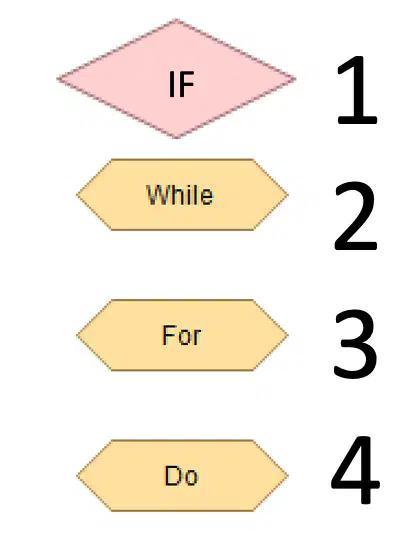
Which of the options in the image is used for looping within a specific range?
4
3
1
2
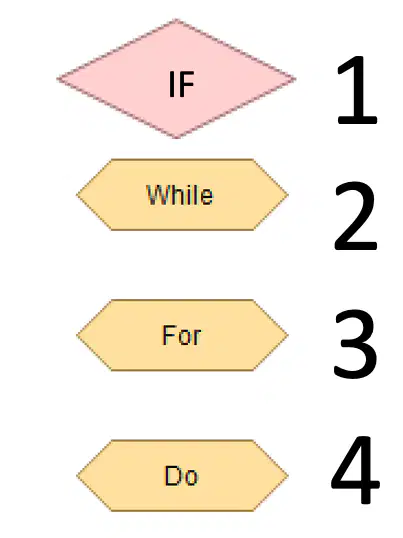
Which of the options in the image is used for a loop that must run at least once?
1
3
2
4
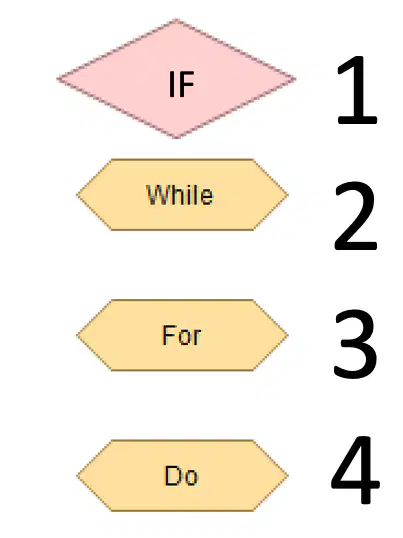
Which of the options in the image is used for a loop with an unspecified number of repetitions?
2
1
4
3
Which one is used for decision making in Flowgorithms?


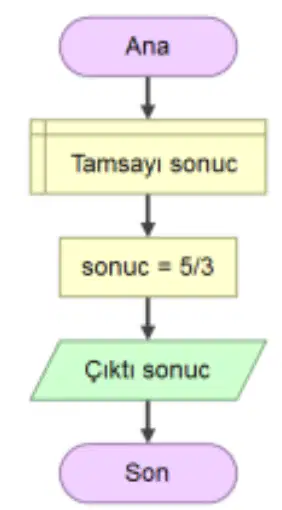
What will the result be when the flowchart in the image is run?
5
3
1,5
1

What will be the result of the Result variable when the flowchart in the image runs?
5
3
False
True
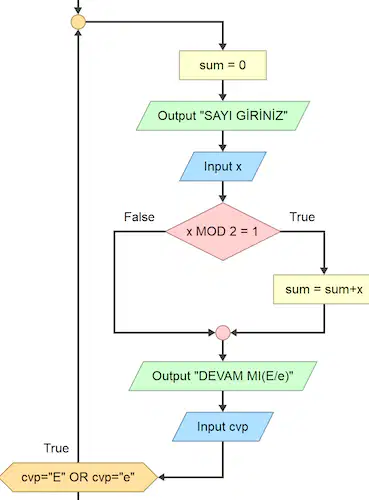
What will the result of the flowchart in the image be?
Returns the sum of numbers entered from the keyboard.
Returns the sum of odd numbers entered from the keyboard.
Returns the sum of even numbers entered from the keyboard.
Returns the remainder of numbers entered from the keyboard.

When the flowchart shown is run, what is the result for A=5, B=4, and C=9?
5 4 9 CAN FORM A TRIANGLE
5 4 9 CANNOT FORM A TRIANGLE
CAN FORM A TRIANGLE
CANNOT FORM A TRIANGLE
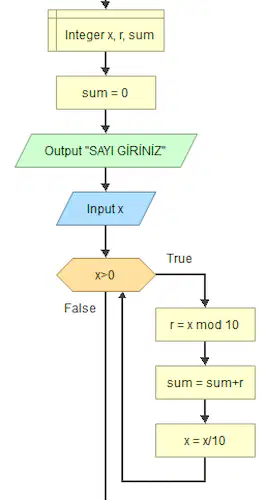
In the flowchart shown, what will the values of r, sum, and x be at the end of the loop for X = 75?
r = 5 , sum=12 , x=1
r = 12 , sum=5 , x=0
r = 7 , sum=12 , x=0
r = 7 , sum=5 , x=1
Which of the following variable names is valid for Flowgorithm?
And
Not
Integer
Data01
Real
Which of the following is an invalid variable name in Flowgorithm?
Number
Data1
Boolean
String01
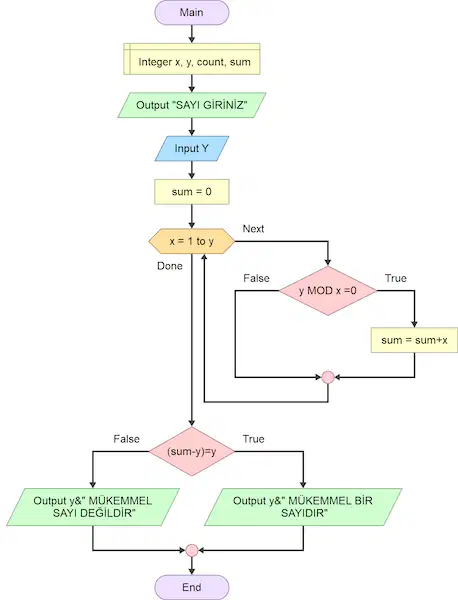
In the flowgorithm shown in the image, what will the `sum` variable and the program's output message be for y=21?
Sum = 32, Message = "Not a Perfect Number"
Sum = 21,
Message = "Not a Perfect Number"
Sum = 21,
Message = "It is a Perfect Number"
Sum = 32,
Message = "It is a Perfect Number"

What result will be displayed on the screen after the operation shown in the image?
62
50
52
70
The 4 data types used in Flowgorithm are
Function, String, Integer, Boolean
Integer, Boolean, Real, String
Boolean, String, Real, Decimal
String, Integer, Array ,Real
What does the assignment statement `x = 5` do in Flowgorithm?
Compares x to 5
Declares x
Assigns the value 5 to x
Multiplies x by 5
Which data type would store the value `1.54` in Flowgorithm?
Integer
Boolean
String
Real number (double)

What is the output of this program ?
Sorry you fail
you have succeeded
no output
error

What is the type of this loop ?
no loop
for loop
while loop
do while loop

what is the error in this program ?
Wrong variable type
Wrong order of steps
no error
wrong output
What is a variable in Flowgorithm?
A fixed number in memory
A named location used to store data
A flowchart shape
A mathematical operation
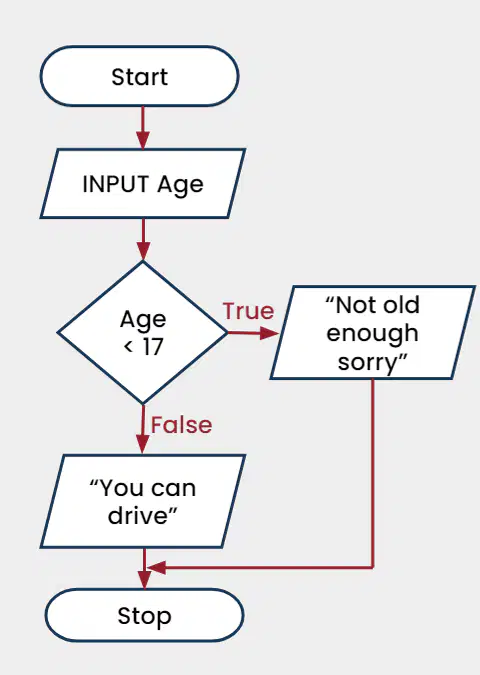
What is the purpose of the flowchart shown in the image?
To calculate the age of a user
To determine if someone is old enough to drive
To teach users how to drive
To display different types of vehicles
Which of the following is NOT a main category of operators?
Arithmetic
Relational
Logic
Assignment
Which logic operator produces a TRUE result when one of the inputs is true?
A) AND
B) OR
C) NOT
D) XOR

How many times will this loop run?
1000
999
1001
50
______________________ is a pictorial representation of steps.
Algorithm
Flowchart
Connectors
Flowlines


This flowchart works out and outputs ...
The area and perimeter of a triangle
The area and perimeter of a square
The area and perimeter of a circle
The area and perimeter of the Burj Khalifah

Select the missing instruction in this flowchart:
Input A,C
Output A,C
Print A,C
Input R

How many variables have been used in the flowchart?
2
3
4
5

What is the output when the user enter 101 as the input?
invalid input
Excellent
Pass
Fail

What is the output of the flowchart?
8
12
16
24
What result will be displayed on the screen after the operation shown in the image?
62
50
52
70
How would you write a cell reference formula for cell A1 subtracted by Cell C3?
A1-C3
A1-C3=
=A1-C3
=C3-A1
The function COUNTA is specific for _________________
Counting text
Counting cells
Counting number
Counting tables
What is the result of this statement: IF(5>4 AND 4>5, 1, 2)?
TRUE
2
1
FALSE
Use CONCATENATE to combine the text strings in cells A1, B2, and C3.
CONCATENATE(A1:B2:C3)
CONCATENATE(ALL)
CONCATENATE(A1,B2,C3)
CONCATENATE(A1B2C3)
=RIGHT("COMFORTABLE",5)
TABLE
COMFO
What does the function TRIM do in Excel?
Removes leading and trailing spaces from a text string
Converts text to uppercase
Counts the number of characters in a text string
None of the above
Which text function is used to convert a string of text so all characters are all initially capitalized?
LEFT
PROPER
RIGHT
LOWER
UPPER
Formula =A3+B4 is copied from C1 to D1. The changed formula in D1 is
=A4+B5
=A3+B4
=B4+B5
=B3+C4
Which of the following can I type in a cell to find the answer to 9+7?
9+7
=9+7
=SUM(9+7)
=SUM(9, 7)
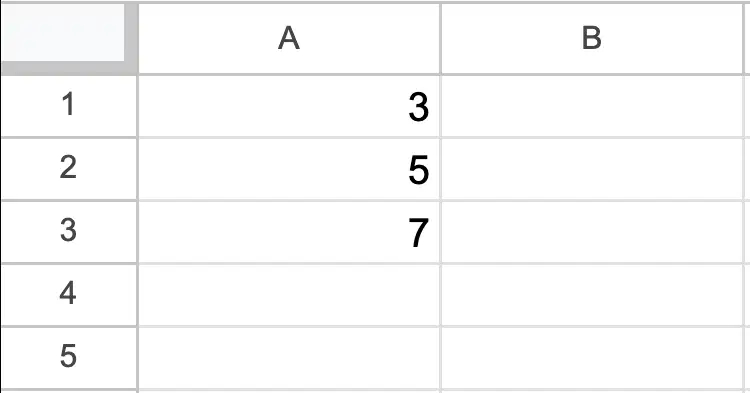
Which of the following can I type in a cell to find the average of these 3 numbers?
=AVERAGE(A1, A2, A3)
=AVERAGE(A1:A3)
=(3+5+7)/3
Which function is used to count the number of cells within a range that meet a specific condition?
COUNTIF
SUMIF
AVERAGEIF
IF
How do you extract a specific number of characters from the beginning of a string?
RIGHT(text, number_of_characters)
LEFT(text, number_of_characters)
BEGIN(text, number_of_characters)
In a spreadsheet table, the formula " =IF(A1>10, B1, IF(A1>5, C1, D1)) " will output the content of C1 if A1 equals
11.
4.
6.
5.
In a spreadsheet table, the function "=COUNTIF(A1:A5, ">=50")" will output 2 if the content of A1 to A5 are
50,49,48,47,46
51,50,49,48,47
52,51,50,49,48
53,52,51,50,49
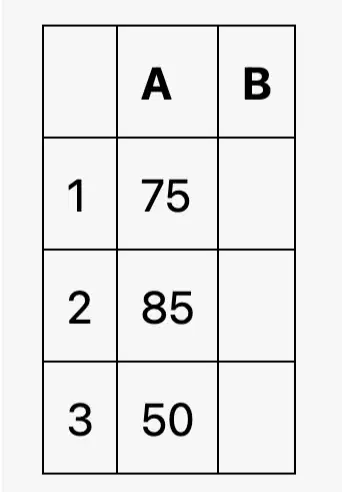
Which formula would you use to display "Pass" in the corresponding cell if the value in cell B2 is greater than or equal to 60?
=IF(B2<60, "Pass", "Fail")
=IF(A3>=60, "Pass", "Fail")
=IF(A2>=60, "Pass", "Fail")
=IF(B1>=60, "Pass", "Fail")
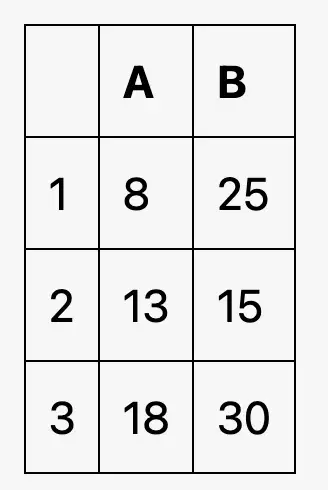
Which formula would you use to count the number of cells in column B that are greater than 20?
=COUNTIF(B2:B3, ">20")
=COUNTIF(B1:B3, ">20")
=COUNTIF(B1:B3, "<20")
=COUNTIF(A1:A3, ">20")
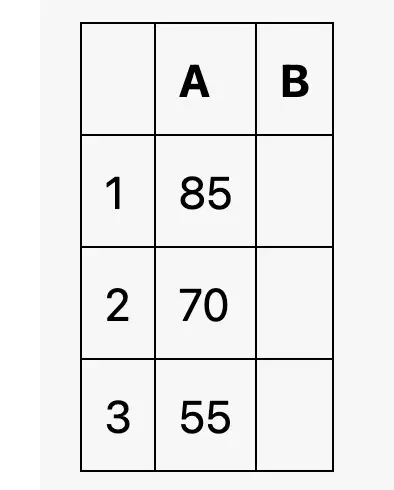
Which formula would you use to display "High" in the corresponding cell if the value in cell A1 is greater than 80, "Medium" if it is between 60 and 80 (inclusive), and "Low" otherwise?
=IF(A3>80, "High", IF(A2>=60, "Medium", "Low"))
=IF(A1>80, "High", IF(A2>=60, "Medium", "Low"))
=IF(A1>80, "High", IF(A1>=60, "Medium", "Low"))
=IF(A2>80, "High", IF(A3>60, "Medium", "Low"))
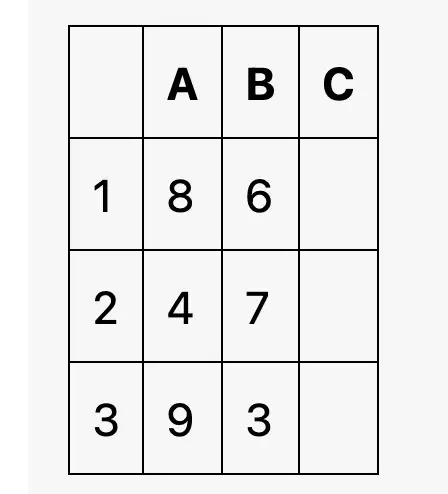
Which formula would you use to display "Yes" in the corresponding cell if both the values in cell A1 and B1 are greater than 5?
=IF(A3>5 OR B3>5, "Yes", "No")
=IF(A1>5 OR B1>5, "Yes", "No")
=IF(A2>5 AND B2>5, "Yes", "No")
=IF(A1>5 AND B1>5, "Yes", "No")

