

wayground logo

Free Printable Worksheets

NEW

Font size

S
M
L
XL
Worksheets

Excel Quiz

Total questions: 43

Worksheet time: 3hrs 32mins
Name
Class
Date
1.
What is a worksheet?
a)
A "page" within an Excel workbook that contains columns rows and cells
b)
Homework
c)
Something you get at school
d)
All wrong
2.
What do you call the blank boxes on a spreadsheet?
a)
cells
b)
info
c)
squares
d)
spots
3.
Excel allows you to
a)
read stories
b)
work with data
c)
invent ideas
4.
Which tab in Excel has charts and tables?
a)
review
b)
home
c)
file
d)
insert
5.
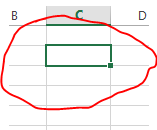
The cell in your worksheet that has been selected. It will have bolder gridlines around it.
a)
TRUE
b)
FALSE
6.
A formula is a combination of numbers and symbols used for calculations
a)
TRUE
b)
FALSE
7.
The ______ feature works behind the scenes, correcting common mistakes when you complete a text entry in a cell.
a)
Autorepair
b)
Autocheck
c)
Grammar
d)
Autocorrect
8.
How do you select an entire column?
a)
Select Edit > Select > Column from the menu
b)
Click the column heading letter
c)
Hold down the shift key as you click anywhere in the column.
d)
Hold down the Ctrl key as you click anywhere in the column
9.
To create a formula, you first:
a)
Select the cell you want to place the formula into
b)
Type the equals sign (=) to tell Excel that you're about to enter a formula
c)
Enter the formula using any input values and the appropriate mathematical operators that make up your formula
d)
Choose the new command from the file menu
10.
What would be a correct formula for sum in excel?
a)
=SUM(B3:B9)
b)
=SUMB3+B9
c)
SUM(B3:B9)
d)
=ADD(B3:B9)
11.
A command line above the worksheet where text, numbers, and formulas are entered into a worksheet.
a)
Insert
b)
Formula bar
c)
Tables
12.
A3 is an example of a cell's address
a)
true
b)
false
13.
A combination of numbers and symbols used to express a calculation. Always begins with an = sign.
a)
Cell address
b)
Worksheet
c)
Formula
14.
A(n) _________ is a prewritten formula that is built into EXCEL. 
a)
function
b)
problem
c)
equation
d)
equal sign
15.
________ are horizontal
a)
Rows
b)
Columns
16.
_____ are vertical. 
a)
Rows
b)
Columns
17.
A ___________ conveys a visual representation of data.
a)
chart
b)
picture
c)
text box
d)
style
18.
A(n) Excel ___ allows data to be easily summed and charted. 
a)
worksheet
b)
format
c)
table
d)
display 
19.
What is the default justification for cells formatted as labels?
a)
right aligned
b)
left aligned
c)
center
d)
1 inch
20.
Which is an example of a cell address?
a)
126
b)
A9
c)
=SUM
d)
75/65
21.
What combines one or more cells?
a)
merge
b)
wrap text
c)
cell address
22.
What is adjusted to fit the longest entry?
a)
cell address
b)
cell range
c)
workbook
d)
column width
23.

A column is represented by numbers.

a)

true

b)

false

24.

A row is represented by letters.

a)

true

b)

false

25.

You can add, subtract, multiply and divide in excel.

a)

true

b)

false

26.

When you enter something into excel that WILL be used in calculation, it is considered a............

a)

value

b)

label

c)

word

d)

equal sign

27.

When you enter something into excel that WILL NOT be used in calculation, it is considered a.................

a)

value

b)

label

c)

equal sign

d)

formula

28.
What is an intersection of a row and a column?
a)
range
b)
tab
c)
bar chart
d)
cell
29.
Which feature enables you to preview headers and footers, page breaks, and other features that will print?
a)
Page preview
b)
Print Layout
c)
Synchronous Scrolling
d)
Window View
30.
Which of the following is a selected cell?
a)
current command
b)
default option
c)
active Cell
d)
default cell
31.
 Press Ctrl + Home to go to cell A1.
a)
true
b)
false
32.

If you want to select two columns that are NOT next to each other to create a chart, hold down the ____ key on your keyboard.

a)

Ctrl (Control)

b)

Alt (Alternate)

c)

Shift

d)

Fn (Function)

33.

Identify this chart.

a)

Line

b)

Bar

c)

Column

d)

Pie

34.

Identify this chart.

a)

Pie

b)

Line

c)

Bar

d)

Column

35.

Tells you what each part of the chart represents.

a)

Legend

b)

Vertical axis

c)

Horizontal axis

d)

Chart title

36.

This part of the chart is usually vertical and contains data.

a)

Y axis

b)

X axis

c)

Legend

d)

Chart title

37.

This part of the chart is usually horizontal and contains categories.

a)

X axis

b)

Y axis

c)

Legend

d)

Chart title

38.

To format numbers as money, you would choose what?

a)

Numbers

b)

General

c)

Currency

d)

Increase Decimals

39.

What is this icon?

a)

Currency

b)

Increase Decimals

c)

Decrease Decimals

d)

Percentage

40.

What should my cursor look like when I am using AutoFill?

a)

Thin Black Plus Sign

b)

Thick White Plus Sign

c)

Green Rectangle

d)

White Arrow

41.

Where would you center a spreadsheet on the page both vertically and horizontally?

a)

Page Layout - Margins - Custom Margins

b)

Page Layout - Print Area - Set Print Area

c)

Page Layout - Orientation - Landscape

d)

Page Layout - Size - Letter

42.

What tab/menu would you use to add a chart?

a)

Home

b)

File

c)

Insert

d)

Page Layout

43.

How should you add an Excel spreadsheet to a Word document?

a)

Copy and Paste

b)

Copy and Paste as a Picture

c)

Cut and Paste

d)

Copy and Paste Special
