
 Worksheets
Intro to Software Final
Total questions: 94
Worksheet time: 1hrs 11mins
the main heading in a web document?
CSS stands for
Code Style Sheet
Coding Style Sheet
Cascading Sheet Style
Cascading Style Sheet
Which is the correct CSS syntax?
body {color: yellow;}
body:color=yellow;
{body:color= yellow;}
{body;color: yellow;}

What is this symbol(s) called: <>
A tag
A weird triangle thing
a paragraph
a code


Motherboard


Adobe Creative Cloud

Computer Fan


RAM


Apps


SSD
What does the tag "<br>" do in HTML?
Creates a new paragraph
Inserts a line break
Changes the text color
Inserts an image
Algorithm
Putting commands in correct order so computers can read the commands.
Finding and fixing problems in your algorithm or program.
An action that causes something to happen.
a step-by-step procedure for solving a problem
Sequencing
Part of a program that does not work correctly.
Putting commands in correct order so computers can read the commands.
An action that causes something to happen.
to write instructions for a computer.
For the following pseudocode:
set number to 10;
if (get number is 8)
flip forward;
else if (get number is 2)
flip right;
else
flip backwards;
What will my drone do?
flip backwards
flip forward
flip right
nothing

Statements that can only run under certain conditions or situations such as: if the seat is taken, then move to the next available seat.
conditionals (if/then statements)
variable
abstractions
binary

A letter or symbol to which a some value can be assigned.
Variable
Output
Bug
What is a condition?
JavaScript
Something that has to be true in order for an action to be carried out.
syntax
pseudocode

Turn Left 90º
Forward
Turn Left 90º
Forward
Forward
Turn Right 120º
Forward
Turn Right 120º
Forward
Turn Right 120º
Forward
Turn Right 90º
Forward
Turn Right 90º
Forward
Turn Right 90º
Move forward
Turn Right 90º
Move Forward
Turn Right 90º
Move Forward
Turn Left 90º
Move Forward
Turn Left 90º
Move Forward
Turn Left 120º
Move Forward
Turn Left 90º
Move Forward
Move Forward
Move Forward
Move Forward
Move Forward
Move Forward
Turn Right 90º
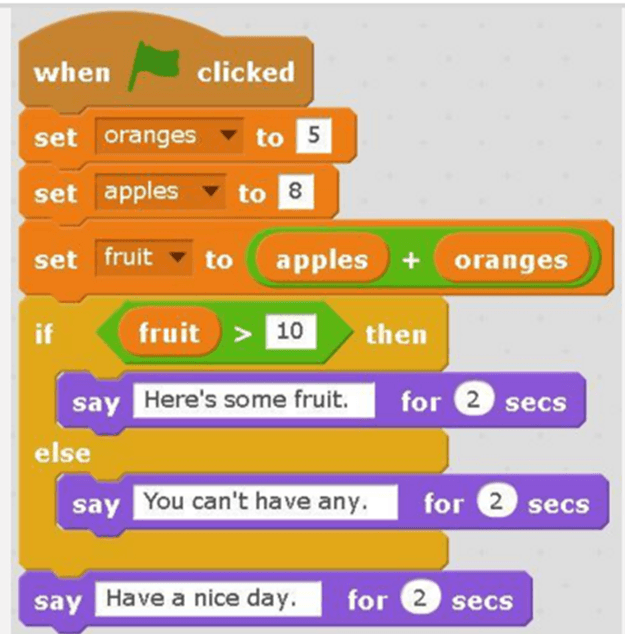
Code that makes the sprite create the same movements over and over again is called:
Variable
Conditional
Loop
Which symbol means "not equal to"?
==
<=
>=
!=
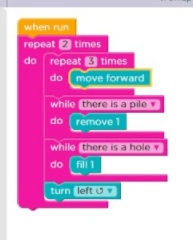
The action of doing something over and over again.
Looping
Bugging
Programming
What is the difference between sprite.visible being false and using sprite.destroy ( )?
nothing, they're both the same
sprite.destroy( ) requires that you re-create the sprite
sprite.visible = false will require that you re-create the sprite
because you can no longer see the sprite, then it no longer exists
When calling sprite.IsTouching(target) and you increase the score, why does the score go up so high?
Because the draw() function is a loop and the two sprites are touching many times.
What? no my score only goes up once. The sprites only touch once.
The IDE knows that I don't want to increase the score just by one and gives me a larger number because it thinks it's better to use larger numbers.
Because the sprite don't actually touch once I set sprite.visible = false.
the if(keyDown(up)) returns
a boolean value of true if the user presses the down key
a boolean value of false if the user presses the down key
A boolean value of true if the user presses the up key
A boolean value of false if the user presses the up key
Give an example of a nested if-condition
if(keyDown(up) and keyDown(left)) then sprite.y = sprite.y + 5;
if (keyDown(up)) then sprite.y = sprite.y + 5;
if (keyDown(up) or keyDown(left)) then sprite.y = sprite.y + 5;
if (keyDown(up)) then if(sprite.y > 400) then sprite.y = 0;
In the draw loop, if you call the text function before the drawSprites and/or background function, what happens?
You won't be able to see your text because the sprites and background will be drawn on top of the text.
You will be able to see your text because Game Lab knows you want to see the text.
You won't be able to see your sprites or background because order doesn't matter.
You will be able to see your text because the sprites and the background will be drawn after the text.
What happens if you don't call background in your draw loop and your sprite has movement?
nothing, animation is fine.
the sprites are drawn on top of each other to simulate movement, the older drawings don't get erased.
you don't need to call background because you don't have one.
you can just use sprite.move( ) so there's no need for the function background( )

What happens in this code?
nothing is shown, there are no sprites
the background is white and we can't see anything because the textsize is 0;
the background is white, the counter increases in size as the counter increase.
the background is white, and we see a number that goes up but the textsize stays the same.

Predict what will show up on console.log
true true true
true false false
false false false
true false true

What code do we add to make the elephant push the hippo off the screen?


Text programming language used to create apps in App Lab
JavaScript
programming
code
debugging

Does the screenshot show code view or design view?
design
code
Which one would you choose to add a picture to your screen?


Which view do you use to program your app so that the buttons will work?
design
code
What makes a text area different from a text input?
A user cannot type into a text area.
The user can enter multiple lines of text.
A text area always fills the entire screen.
They are the same thing.
This control is frequently used to let the user start an action.
Which of these could be used to display a different page?





Look carefully at the image.
What is the id name of the screen?
startScreen
Above
Below
Run

The image shows the properties of an object.
Which of the following are true?
You can choose more than one thing.
The object is called stopScreen
Background colour is one of the properties
I can choose an image to set as a property
Sound can be set as one of the properties of this object

Look carefully at the image.
What type of event is this the code for?
Long click
Click
Shake
Input
Look carefully at the image.
What object is this the event for?
LeftButton
RightButton
TopButton
BottomButton
Look carefully at the image.
What will happen when this event is carried out?
Nothing will happen
The left screen will display and then a sound will play
A sound will play and then the right screen will display
The screen will flash on and then flash off

Look carefully at the image.
This is an example of a user Interface.
True
False
The User Interface or UI of an app refers to..
One button on the screen
The layout of the screen that a person interacts with
The On/Off button
An event
Buttons, labels, images and the screen are all examples of objects.
True
false
When you add a new element, it is VERY IMPORTANT that you
change its ID to something meaningful
change its color to something appealing
change its text to a fun font

In Computer Science which process describes the Problem Solving Process?
Identify the problem, communicate, remix
Identify the problem, Explore, make a drawing
Define the problem, Prepare, Try, and Reflect
A program that searches for items on the World Wide Web.
Search Engine
Relevant
Trustworthy
Heading
What is a Input ?
gathers data, allows users to input data.
displays data and information for user.
What is a computer Output ?
displays data and information for user.
Input, Output, Process, Storage.
representation of fact, figure, or idea.
What is an Computer Functions ?
gathers data, allows users to input data.
Input, Output, Process, Storage.
RAM memory stores information
permanently
for a short period of time
Ram does not store information
not this choice
The brain of a computer is the
fan
motherboard
hard drive
processor
A group of connected computers that can send or receive data is (a) .

What is the width of the rectangle?
30
50
100
150

What will most likely be displayed by this code?
pig
rectangle
bear
circle
Which of these is the correct way to use a draw loop?


Which direction will the sprite move?
Up
Down
Left
Right
None

What color will be displayed?
Red
Green
Blue
Yellow

What is the purpose of this code tile?
Prevent medical emergency.
Stop drawing of text.
Stop drawing of outlines.
Stop all drawing.

This tile represents...
Greater than
Less than
Insert into
A pointy nose

When the triangle and square collide, which one will change direction?
triangle
square
neither
both

What will be displayed?
Dog
Rectangle
Nothing

What direction does the mouse move?
Right
Left
Up
Down
None

What is wrong with this code?
x has been declared more than once using var.
Values should not exceed 100.
Nothing. It is perfectly fine as is.
Which of these could be used to display a different page?
Look carefully at the image.
What is the id name of the screen?
startScreen
Above
Below
Run

The text 'click me' will appear as......
a heading on the screen
a label on the screen
a label on button1
it won't show up at all

User actions, like clicking a button or hovering over an image are examples of...
events
properties
values

In order to test your code, you have to click _____ in the emulator.
run
reset
go
When you add a new element, it is VERY IMPORTANT that you
change its ID to something meaningful
change its color to something appealing
change its text to a fun font
After we have declared the variable, which code block can be used to utilize the variable? (Does not declare the variable)


What code block can be used to increase the value of the variable by 1?


Read the code and determine what the result will be
When the button is clicked, the variable increases and the screen changes
When the button is clicked, the variable decreases and the screen changes
When the button is clicked, the variable decreases and the text changes
When the button is clicked, the variable decreases, the text changes, and a sound is played

Review the code.
What variable is being utilized in the example code?
"submit"
score
"winscreen"
"losescreen"
What is the first step of the design process?
Try to solve the problem or issue.
Define the problem
Google it.
Put a plan into action.
What is a prototype?
The final design that is ready to be manufactured.
Drawing that show a single view of an object; in a way that makes it appear 3D.
A model that is used to test certain aspects of a solution.
All choices are correct.

