
 Worksheets
1st Grade CompApps Quizzizz
Total questions: 20
Worksheet time: 11mins

Which GSuite tool is this?
Google Sheets
Google Docs
Google Slides
Google Drive
What can we do with Google Docs (select all that apply)?
Write letters
Make invitations
Create flyers
Write for school

How do I select text?
Click on it once with your mouse
Touch the screen with your finger and swipe over the text
Click with your mouse, hold the button down, and drag over the text
Which button do I click to BOLD my text?


Which button do I click to UNDERLINE my text?
Which button do I click to ITALICIZE my text?
Which button will make my text center aligned?


What can I do with this button?
Change the color of my font
Change the color of my shape
Change the size of my font
Highlight my text with different colors
Which button can I use to make a bulleted list?


What key on your keyboard do you hold to type a capital letter?
Tab
Shift
Delete
Control
Which of these words is italicized?
Option 1
Option 2
Option 3
Option 4

What GSuite tool is this?
Google Docs
Google Slides
Google Sheets
Google Drive
What can we do with Google Slides (select all that apply)?
Write letters
Make presentations
Analyze data
Write a report for school
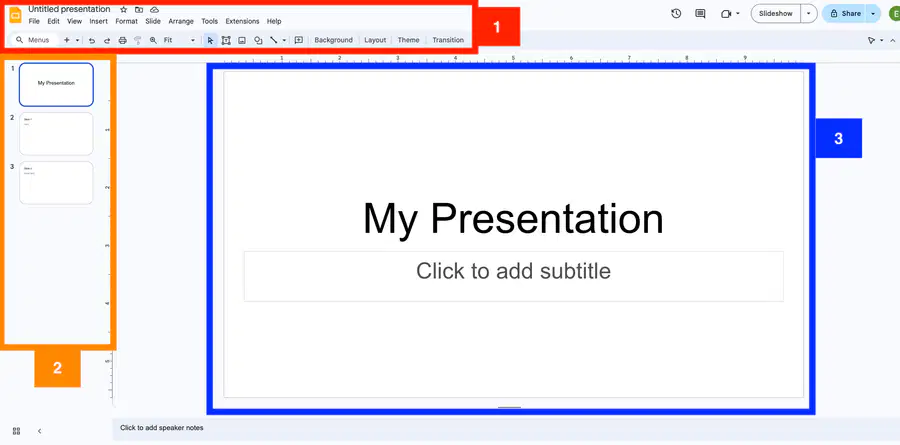
Where can I find and click between all of my different slides?
1
2
3
What do I click to change the color of my font?


What do I click to change the font that I'm typing with?

How do I add a title to this slide?
Click where it says "Click to add title" and start typing
Open a Google Doc, type what you want to say, then copy and paste it
Just start typing on your keyboard
How do I add an image to a Doc or Slides project?
Click "Insert" and then "Image" on the menu bar
Drag the image from my desktop onto the project

Click the Image icon on the toolbar

How do I resize an image?
Click on the picture and hit the - (minus) sign on your keyboard
You have to just find a smaller/bigger picture
Click on drag the blue circle at the top
Click and drag on the blue boxes on the corners
TRUE or FALSE:
Your projects save automatically in any Google app (Docs, Slides)
TRUE
FALSE

