
 Worksheets
DroneBlocks Getting Started Lesson 2
Total questions: 13
Worksheet time: 12mins
Which of the following are programming languages you can use to fly your Tello with DroneBlocks?
CHOOSE ALL THAT APPLY.
C++
Blocky / Block Coding
HTML
Python
JavaScript
Which should you do first when trying to open a saved DroneBlocks mission?
Connect to the wireless network of your Tello
Open the saved mission
When you update the firmware on your Tello drone, you need to use the (a) app.
True or False?
Before using DroneBlocks, you must have the most up to date firmware on your Tello.
True
False
Put the steps below in the correct order to connect your Tello to the DroneBlocks app?
Open the DroneBlocks App.
Power on your Tello.
Connect your device to the Tello's wifi network.
In the DroneBlocks app, click Connect to Tello in the top right corner.
Click Connect in the dialog box that opens.
Match the following parts of the DroneBlocks interface with their description.
Block Palette
Where all blocks are found.
Stage
Where you drag blocks to make mission
Status Bar
Gives drone sensor info (telemetry)
Menu / Hamburger
Where you login, create, save or launch.
What can you use to practice coding, or to test your code before running it live on your drone?
Tello App
DroneBlocks App
DroneBlocks Simulator
Canvas App
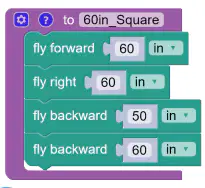
You are told to code your tello so that it will create a square that keeps its nose pointed forward the entire time. When you run the code it doesn't make a square. What is wrong with the code in this picture, and how would you correct this code?
What color is the land block?
Purple
Teal
Orange
Red
What color is the Logic block?
Purple
Teal
Orange
Red
What color is the Navigation block?
Purple
Teal
Orange
Red
Where would you see the drone's remaining battery life?
Hamburger / Menu
Palette
Stage
Status Bar
In Lesson 2, which shape was the drone coded to follow in its flight path?
Circle
Triangle
Rectangle
Square

