
 Worksheets
Computer Hardware and Software - Term Test
Total questions: 63
Worksheet time: 47mins
Section 1 - Input/Output Components
Type your Full Name.
Choose your Gender.

Male

Female
Choose your class.

Grade 9A

Grade 9M

Grade 9B

Grade 9E
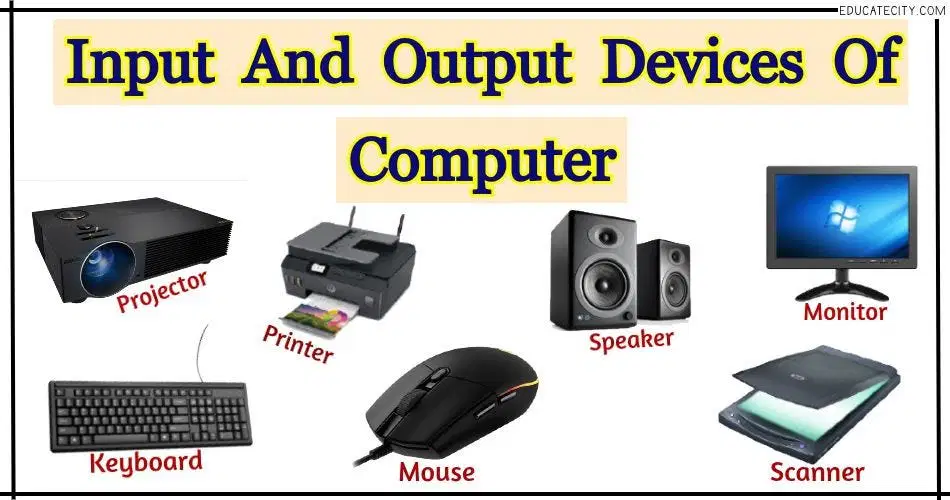
Designate the type of peripheral component of this hardware device.
(Monitor)
(a)
Designate the type of peripheral component of this hardware device.
(Keyboard)
(a)
Designate the type of peripheral component of this hardware device.
(Scanner)
(a)
Designate the type of peripheral component of this hardware device.
(Laser Printer)
(a)
Designate the type of peripheral component of this hardware device.
(Mouse)
(a)
Designate the type of peripheral component of this hardware device.
(Speaker)
(a)
Designate the type of peripheral component of this hardware device.
(Digital Camera)
(a)
Section 2 – What’s Inside a Computer:
Type your Full Name __________
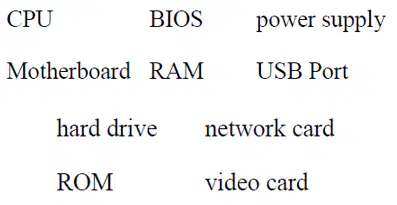
In order for the computing devices to communicate they need me. I connect and allow them to talk to each other.
Who am I?
(a)

The computer cannot startup without my interference, I wake up the computer and remind it what to do.
Who am I?
(a)

Besides being the sole provider of the communication between hardware and software, I am also the brain of the computing device.
Who am I?
(a)
I am categorized in different storage sizes, cloud storage is taking my shine, I store information on my magnetic cylinders.
Who am I?
(a)
My physical appearance when looked from the space looks like a certain landscape map. I hold all of the other circuit boards.
Who am I?
(a)
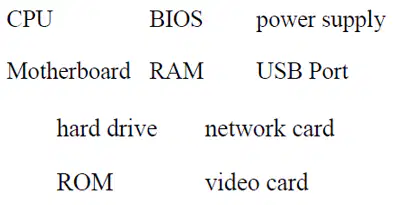
I handle the graphics that are displayed on the monitor, without me the RAM and CPU are put under a lot of stress. All the entertainment stuff become boring as they are slow.
Who am I?
(a)

Genius ones call me bass port, I have few slots on the computing devices. I am the type of port used by external drives.
Who am I?
(a)
The users use me only when they want to access their recent files. I am so helpful to the brain of the computer but when computer is switched-off I lose my touch.
Who am I?
(a)
I can also be used a permanent storage since whatever data saved on me cannot disappear when power goes off. What I am sure of is I am not HHD.
Who am I?
(a)
I am the primary soul provider for the computing devices to function and without me, I provide correct voltage and current to motherboard for it to be able to allow communication between the small components I house.
Who am I?
(a)

Section 3 - Storage:
Type your Full Name ____________

(a) memory is stored on chips located on the motherboard.

(a) memory is stored on the hard drive.

A (a) can hold information greater than a CD or DVD.

A (a) usually holds up to 650 to 700 MB.

A (a) holds even more information at least 7 GB.

The purpose of storage in a computer is to hold (a) or data.

Section 4 and 5 - Programs
Type your Full Name
Fill in the blank with the correct answer from the table of words, some words can be used more than once.

Users use this application to create a birthday card for a friend. (a)

Balancing your checkbook. (a)

Finding information on pyramids. (a)

Playing solitaire. (a)

Calculating Math (a)

Keeping an address book. (a)

Writing an essay. (a)

Making a newsletter. (a)

Writing a story about aliens. (a)

Fill in the blank with the correct answer from the table, some words can be found on the table, while some may not available. Some may be used more than once or not at all, and some words are not listed on the table.

A___________ is a set of instructions that tells the computer how to perform a ______________task.
(a)

Programs are like_____________ that allow people to work with computers without learning the computer’s ____________.
(a)

Using bits and bytes in different combinations to represent a code is known as (a) .

Copying a program onto your computer’s hard drive from another source is known as (a) the program.

People who write codes to create programs are known as _________ -____________.
(a)

Some programs can be ___________from the internet directly to your hard __________
(a)

Section 6 - Operating Systems
Type your Full Name _____________________
Fill in the blank with the correct answer from the table, some words can be found on the table, while some may not available. Some may be used more than once or not at all, and some words are not listed on the table.

The large program that controls how the CPU communicates with other hardware components is the (a) .

A computer that is easy to operate is called user friendly (a) .

(a) is the most common operating system for PCs.

Operating systems are constantly being (a) as technology advances.

A Graphical User Interface (GUI) uses (a) to help the user navigate within the computer system.

Section 7 - The Window Desktop
Type your Full Name _____________________
Fill in the blank with the correct answer from the table, some words can be found on the table, while some may not available. Some may be used more than once or not at all, and some words are not listed on the table.

You put things in the (a) that you no longer need or want.

A (a) uses graphics or pictures to help the user navigate and access programs.

The Start Menu and clock are found on the (a) .

An (a) is a small picture that links to a file or program.

At the top of each window, the (a) contains the title and buttons to close, minimize and resize.

Moving the (a) up or down allows you to see all of the information in a window.

Programs and applications run inside (a) that can be opened, closed or resized.

The (a) is like a backdrop on your desktop that can be changed.

Found below the menu bar in some windows, the (a) contains icons or options that allow you to perform specific tasks.

The (a) contains basic operations such as run, shut down, log off and find.

