
NEW
Font size
S
M
L
XL
 Worksheets
Intro to InDesign Review
Total questions: 20
Worksheet time: 10mins
Name
Class
Date
1.
The space between columns or pages in a publication. You generally want to keep this clear of objects and text.
a)
Bleed
b)
Gutter
c)
Slug
d)
Page Margins
2.
Extra space beyond your page used to show markings or provide notes for the printer.
a)
Bleed
b)
Gutter
c)
Slug
d)
Page Margins
3.
Extra space beyond your page that allows you to run objects beyond the edge of the page to ensure that they print tot he edge of the page.
a)
Bleed
b)
Gutter
c)
Slug
d)
Page Margins
4.
The space that separates text or objects from the edge of the page
a)
Bleed
b)
Gutter
c)
Slug
d)
Page Margins
5.

What part of a document is depicted by the orange in the image?
a)
Bleed
b)
Gutter
c)
Slug
d)
Page Margins
6.
Objects that serve as containers or placeholders for text, graphics and other design elements.
a)
Spread
b)
Facing Pages
c)
Frames
d)
Master Page
7.
Any two facing pages in a publication are known as what?
a)
Spread
b)
Facing Pages
c)
Frames
d)
Master Page
8.
Set of pages that are touching each other and are intended to be bound together by a spine.
a)
Spread
b)
Facing Pages
c)
Frames
d)
Master Page
9.
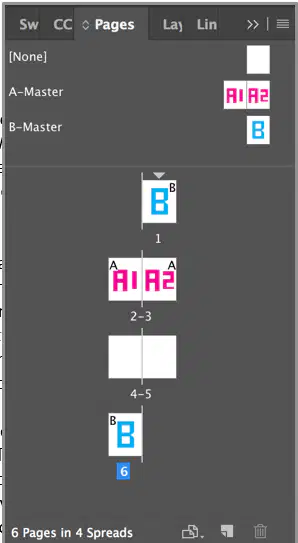
What pages are facing pages?
a)
B-Master
b)
1
c)
2-3
d)
6
10.
What symbol indicates that a text frame has more text than it can display-- that is, overset text?
a)
A solid blue square
b)
A solid yellow square
c)
A solid white square
d)
A white square with a red plus sign
11.
How can you tell if any aspect of a layout will cause output problems?
a)
Swatches Panel
b)
Paragraph Styles Panel
c)
Preflight Panel
d)
Output Panel
12.
Which menu allows you to display a panel when using InDesign?
a)
File
b)
Edit
c)
View
d)
Window
13.
The process of moving overset text to another frame is called
a)
preflighting
b)
threading
c)
placing
d)
importing
14.
When you export a file in InDesign, what is the preferred file type?
a)
PNG
b)
PDF
c)
JPG
d)
ID
15.
What tool allows you to move both frames and graphics?
a)
Type Tool
b)
Selection Tool
c)
Formatting affects Text
d)
Preview
16.
Includes all text formatting attributes (font, size, and alignment)
a)
Character Styles
b)
Paragraph Styles
c)
Object Styles
17.
Includes only character attributes (font style–bold, italic, etc. and color)
a)
Character Styles
b)
Paragraph Styles
c)
Object Styles
18.
Includes formatting such as:
fill and stroke color
stroke styles and corner effects
Transparency
Drop shadow
Feathering
Text frame options
Text wrap
a)
Character Styles
b)
Paragraph Styles
c)
Object Styles
19.
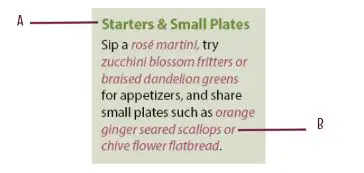
Letter A indicates which type of style
a)
Character Style
b)
Paragraph Style
c)
Object Style
20.
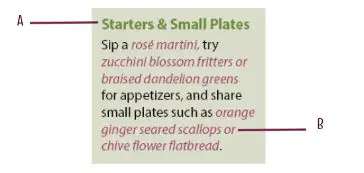
Letter B indicates which type of style
a)
Character Style
b)
Paragraph Style
c)
Object Style
Reset

