
NEW
Font size
 Worksheets
Module 11 Quiz
Total questions: 50
Worksheet time: 3hrs 30mins
What is the main focus of Module 11 in the learning material?
Programming Techniques
Safety Settings
Maintenance Procedures
Installation Processes
What is one of the tasks students are expected to do in Module 11?
Write a Research Paper
Familiarize yourself with Safety Templates
Create a Marketing Plan
Study Historical Robotics
What is a criterion for student success in Module 11?
Complete a Final Exam
Develop Safety Plan
Submit a Thesis
Pass a Physical Test
What are the four levels of safety presets available in the Universal Robots interface?
Most restricted, Restricted, Default, Least restricted
High, Medium, Low, Off
Maximum, Moderate, Minimum, None
Critical, Important, Normal, Low
How do you save the configuration settings in the Universal Robots interface?
Select "Save As"
Press "Apply" and confirm settings
Click "Save" and exit
Write the configuration to a file
What is the normal limit for momentum in the Universal Robots safety settings?
25.0 kg m/s
10.0 kg m/s
400 ms
500 mm
What is the reduced stopping distance limit in the Universal Robots safety settings?
300 mm
500 mm
750 mm/s
120.0 N
What is the Power [w] value for the 'Most restricted' mode in the Factory presets for Universal Robots?
80
200
300
1000
What is the Tool Force [N] in the 'Least restricted' mode?
100
120
150
250
According to the Factory presets, what is the Elbow Speed [mm/s] when the robot is in 'Restricted' mode?
250
750
1500
5000
If the limits of the Factory presets are exceeded, what will the robot do?
Continue operating normally
Increase its speed
Perform a security stop
Switch to 'Most restricted' mode
What does the Reduced Mode require to trigger the reduced mode in Universal Robots?
Customization of settings
Setup of safety inputs or Planes
Powering off the robot
Increasing the tool speed
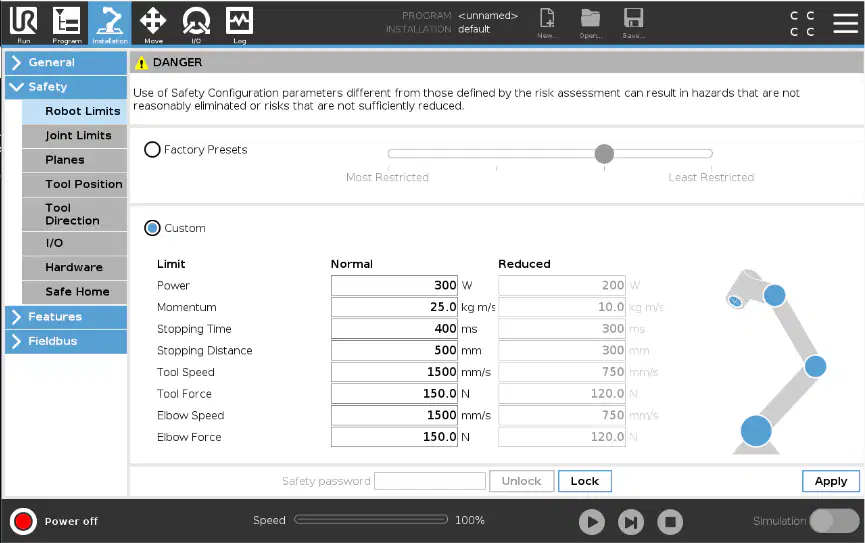
According to the image, which of the following is not a customizable setting for Universal Robots?
Elbow Speed/Force
Power
Color of the robot
Tool Speed/Force
What is the purpose of the slider between 'Most Restricted' and 'Least Restricted' in the Safety settings?
To adjust the volume of the robot
To set the safety password
To control the speed of the robot
To adjust the level of safety restrictions
Where is the allowed range for each joint shown in the Universal Robots interface?
In the Program tab
In the Move tab
In the Installation tab
In the Log tab
What is the maximum speed setting for the base joint in Normal Mode according to the Universal Robots interface?
191 °/s
191 %/s
363 °/s
363 %/s
How much is the speed reduced in Reduced Mode for the wrist 1 joint?
-11 °/s
-11 %/s
+2 °/s
+2 %/s
What is the allowed position range for the elbow joint in Reduced Mode?
-363 to 363 °
-363 to 363 ° +2 / -2 °
191 to 191 °
191 to 191 ° -11 %/s
What is the allowed position range for the Shoulder joint in Normal Mode?
A) -180 to 180 degrees
B) -363 to 363 degrees
C) -363 to 363 degrees with a ±2 / -2° tolerance
D) 191 to 191 degrees
What is the maximum speed setting for the Wrist 1 joint in Reduced Mode?
A) 191 °/s
B) -11 °/s
C) 191 °/s with a ±11 °/s tolerance
D) 180 °/s
Where is the allowed range for each joint shown in the Universal Robots interface?
A) In the 'Move' tab
B) In the 'Program' tab
C) In the 'Installation' tab
D) In the 'Log' tab
How can the maximum speed for each joint be set?
A) In the 'Features' tab
B) In the 'Safety' tab under 'Joint Limits'
C) In the 'Robot Limits' tab
D) In the 'I/O' tab
Where is the allowed range for each joint shown in the Universal Robots interface?
In the program tab
In the move tab
In the installation tab
In the log tab
What does defining a Point Feature in the context of Universal Robots' system do?
It sets a fixed point in the workspace that the robot cannot move.
It copies the position and orientation of the TCP as a new user-defined coordinate system.
It creates a new program for the robot to execute a specific task.
It deletes the existing coordinates and resets the robot's position.
How can a safety plane be added in the Universal Robots system?
By manually drawing the plane in the workspace
By using a standard template from the system
By copying a previously defined feature
By importing a plane from an external CAD file
Which restrictions can be selected for a safety plane in the Universal Robots system?
Normal
Reduced
Both
Trigger reduced mode
What is the default tool located at the center of the tool flange on a Universal Robots interface?
User defined tool
Copy TCP
Custom tool
Tool flange
How many user defined tools can be added in the Universal Robots interface?
One
Two
Three
Four
Which options are available for defining tools in the Universal Robots interface?
Copy TCP and Custom
Copy TCP and Default
Custom and Default
Custom and Original
What can be defined when adding a user defined tool in the Universal Robots interface?
Tool weight
Tool radius
Sphere radius
Tool length
What does 'Deviation' refer to in the context of Tool Direction?
The speed of the tool
The boundary restrictions
The cone angle
The power status
Which boundary restrictions can be selected for Tool Direction?
Normal
Reduced
Both
Neither
What is the purpose of defining I/O signals in the context of Safety I/O - INPUTS for Universal Robots?
To program the robot's main tasks
To define I/O signals connected to external safety equipment
To monitor the power supply of the robot
To set up the robot's communication protocols
Which function assignment is available for both input and output signals in the Safety I/O settings for Universal Robots?
Safeguard Reset
Emergency Stop
Reduced Mode
Operational Mode
What is the designation for the first input signal in the Safety I/O settings for Universal Robots?
config_in[0]
config_out[0]
config_in[1]
config_out[1]
What is the designation for the third output signal in the Safety I/O settings for Universal Robots?
config_out[2]
config_in[2]
config_out[3]
config_in[3]
What is the purpose of defining I/O signals in the context of Safety I/O - OUTPUTS?
To program the robot's main functions
To define I/O signals connected to external safety equipment
To monitor the power supply of the robot
To set up the robot's communication protocols
When does the 'Safe Home' function appear in the safety I/O settings?
When the robot is powered off
When the robot is in simulation mode
When the 'Safe Home' function is active
When the safety password is unlocked
What is the purpose of the teach pendant according to the learning material?
To control the robot's power supply
To use the robot without attaching it
To provide safety instructions for the robot
To program the robot's movements
What will happen if the selection for available hardware does not reflect the connected hardware?
The robot will execute the default program
The robot will continue to operate normally
The robot will not start for safety reasons
The robot will enter simulation mode
What options are available for the 'TeachPendant' hardware selection in the software interface?
Yes, No, Maybe
On, Off, None
Yes, No, None
Enabled, Disabled, Not available
What is the Safe Home position used for in Universal Robots?
To reset the robot to factory settings
To create a Safety Output indicating the robot is in the home position
To charge the robot's battery
To update the robot's software
How is the Safe Home position determined in Universal Robots?
By the robot's current task
By the operator's manual input
By syncing from the "General" Home Position
By a random selection process
What happens if the Safe Home Position is deleted in Universal Robots?
The robot will stop functioning
The Safety Output for home position will be unassigned
The robot's software will update
The robot will enter sleep mode
What does the warning "Safe Home position not synchronized with Home position" indicate?
The robot's battery is low
The robot is in the process of syncing
The Safe Home Position needs to be updated to match the General Home Position
The robot is currently in the Safe Home Position
What is the purpose of the "Safe Home" position in Universal Robots?
To reset the robot to its initial manufacturing settings
To create a Safety Output that indicates the robot is in the home position with specified joint angles
To synchronize the robot's software with external devices
To provide a power-saving mode when the robot is not in use
How is the "Safe Home" position determined for Universal Robots?
It is manually set by the operator each time the robot is started
It is a random position assigned by the robot's software
It is synced from the "General" Home Position
It is downloaded from the internet
What is the purpose of Recovery mode in case of a safety system violation?
To allow the robot arm to be manually moved until all violations are solved
To enable the robot to continue running programs
To disable the robot arm completely
To automatically solve all safety violations
What is NOT possible when the Recovery mode is active?
Manually moving the robot arm
Running programs
Solving safety violations
Disabling joint position limits
Which of the following are disabled in Recovery Mode?
Joint position limits
Safety violation notifications
Manual control of the robot arm
Program execution capabilities

