
 Worksheets
COMPUTER 4TH MONTHLY EXAM
Total questions: 15
Worksheet time: 30mins

1. What is this screen called?
a. Youtube
b. Desktop
c. Google Chrome

2. What part of the Desktop is this?
a. Notification area
b. Date and Time
c. Taskbar

3. What part of the Desktop is this?
a. Start button
b. Date and Time
c. Taskbar

4. What part of the Desktop is this?
a. Start button
b. task bar
c. Date and time
5. is an operating system that features a Graphical User Interface (GUI) which allows the user to manipulate icons on the computer screen to issue commands.
a. Start button
b. windows
c. Date and time
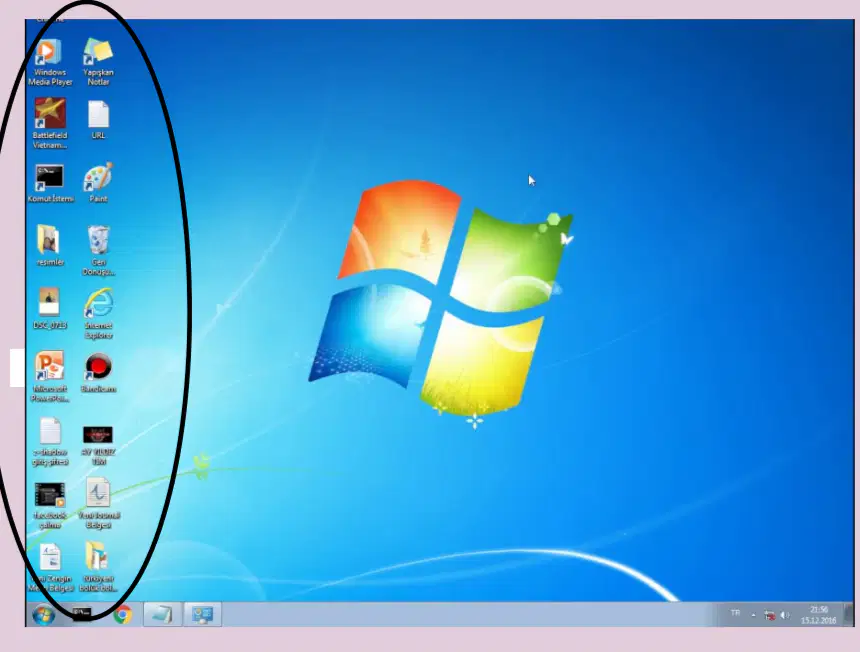
6. What are these called?
a. Icons
b. Search Box
c. Date and time
7. What are these called?It allows you to turn off your computer properly.
a. search box
b. shut down button
c. restart button
8.This is a rectangular bar at the bottom part of the screen.
a. taskbar
b. shut down button
c. restart button
9. This button is located at the left side of the taskbar. Once you click this button, you can choose software programs from a pop-up menu and change computer settings.
a. windows
b. icons
c. start button
10. A picture or graphics symbol used to represent an application or folder.
a. taskbar
b.Icons
c. Windows
11. The asdf homerow keys are struck by the
a. right hand
b. left hand
c. either hand
12. The j k l ; keys are struck by the
a. right hand
b. left hand
c. either hand
13. Which finger do you use to key the A?
a. right pinky
b. left pinky
c. either hand
14. Which key do you strike with the left middle finger:
a. D
b. F
c. K
15. Keep both thumbs on the space bar but use either thumb to strike the key.
a. True
b. False

