
 Worksheets
Test 2
Total questions: 50
Worksheet time: 2hrs 40mins
You need to create an autoscaling managed instance group for an HTTPS web application. You want to make sure that unhealthy VMs are recreated. What should you do?
Create a health check on port 443 and use that when creating the Managed Instance Group.
Select Multi-Zone instead of Single-Zone when creating the Managed Instance Group.
In the Instance Template, add the label 'health-check'.
In the Instance Template, add a startup script that sends a heartbeat to the metadata server.
Your company has a Google Cloud Platform project that uses BigQuery for data warehousing. Your data science team changes frequently and has few members. You need to allow members of this team to perform queries. You want to follow Google-recommended practices. What should you do?
1. Create an IAM entry for each data scientist's user account. 2. Assign the BigQuery jobUser role to the group.
1. Create an IAM entry for each data scientist's user account. 2. Assign the BigQuery dataViewer user role to the group.
1. Create a dedicated Google group in Cloud Identity. 2. Add each data scientist's user account to the group. 3. Assign the BigQuery jobUser role to the group.
1. Create a dedicated Google group in Cloud Identity. 2. Add each data scientist's user account to the group. 3. Assign the BigQuery dataViewer user role to the group.
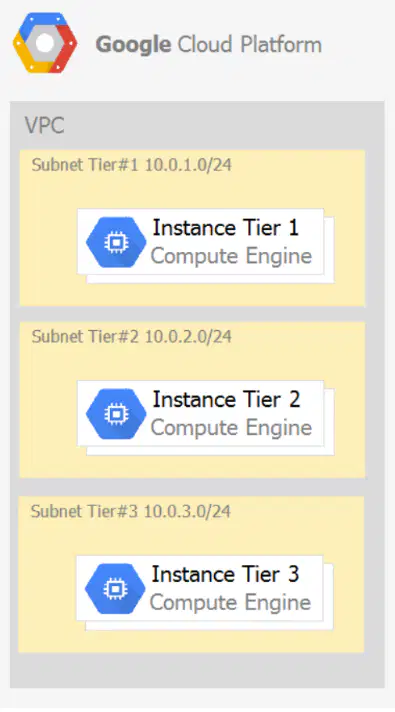
Your company has a 3-tier solution running on Compute Engine. The configuration of the current infrastructure is shown below. GCP- Question53.png Each tier has a service account that is associated with all instances within it. You need to enable communication on TCP port 8080 between tiers as follows: * Instances in tier #1 must communicate with tier #2. * Instances in tier #2 must communicate with tier #3. What should you do?
1. Create an ingress firewall rule with the following settings: ג€¢ Targets: all instances ג€¢ Source filter: IP ranges (with the range set to 10.0.2.0/24) ג€¢ Protocols: allow all 2. Create an ingress firewall rule with the following settings: ג€¢ Targets: all instances ג€¢ Source filter: IP ranges (with the range set to 10.0.1.0/24) ג€¢ Protocols: allow all
1. Create an ingress firewall rule with the following settings: ג€¢ Targets: all instances with tier #2 service account ג€¢ Source filter: all instances with tier #1 service account ג€¢ Protocols: allow TCP:8080 2. Create an ingress firewall rule with the following settings: ג€¢ Targets: all instances with tier #3 service account ג€¢ Source filter: all instances with tier #2 service account ג€¢ Protocols: allow TCP: 8080
1. Create an ingress firewall rule with the following settings: ג€¢ Targets: all instances with tier #2 service account ג€¢ Source filter: all instances with tier #1 service account ג€¢ Protocols: allow all 2. Create an ingress firewall rule with the following settings: ג€¢ Targets: all instances with tier #3 service account ג€¢ Source filter: all instances with tier #2 service account ג€¢ Protocols: allow al
1. Create an egress firewall rule with the following settings: ג€¢ Targets: all instances ג€¢ Source filter: IP ranges (with the range set to 10.0.2.0/24) ג€¢ Protocols: allow TCP: 8080 2. Create an egress firewall rule with the following settings: ג€¢ Targets: all instances ג€¢ Source filter: IP ranges (with the range set to 10.0.1.0/24) ג€¢ Protocols: allow TCP: 8080
You are given a project with a single Virtual Private Cloud (VPC) and a single subnetwork in the us-central1 region. There is a Compute Engine instance hosting an application in this subnetwork. You need to deploy a new instance in the same project in the europe-west1 region. This new instance needs access to the application. You want to follow Google-recommended practices. What should you do?
1. Create a subnetwork in the same VPC, in europe-west1. 2. Create the new instance in the new subnetwork and use the first instance's private address as the endpoint.
1. Create a VPC and a subnetwork in europe-west1. 2. Expose the application with an internal load balancer. 3. Create the new instance in the new subnetwork and use the load balancer's address as the endpoint.
1. Create a subnetwork in the same VPC, in europe-west1. 2. Use Cloud VPN to connect the two subnetworks. 3. Create the new instance in the new subnetwork and use the first instance's private address as the endpoint.
1. Create a VPC and a subnetwork in europe-west1. 2. Peer the 2 VPCs. 3. Create the new instance in the new subnetwork and use the first instance's private address as the endpoint.
Your projects incurred more costs than you expected last month. Your research reveals that a development GKE container emitted a huge number of logs, which resulted in higher costs. You want to disable the logs quickly using the minimum number of steps. What should you do?
1. Go to the Logs ingestion window in Stackdriver Logging, and disable the log source for the GKE container resource.
1. Go to the Logs ingestion window in Stackdriver Logging, and disable the log source for the GKE Cluster Operations resource.
1. Go to the GKE console, and delete existing clusters. 2. Recreate a new cluster. 3. Clear the option to enable legacy Stackdriver Loggin
1. Go to the GKE console, and delete existing clusters. 2. Recreate a new cluster. 3. Clear the option to enable legacy Stackdriver Monitoring.
You have a website hosted on App Engine standard environment. You want 1% of your users to see a new test version of the website. You want to minimize complexity. What should you do?
Deploy the new version in the same application and use the --migrate option.
Deploy the new version in the same application and use the --splits option to give a weight of 99 to the current version and a weight of 1 to the new version.
Create a new App Engine application in the same project. Deploy the new version in that application. Use the App Engine library to proxy 1% of the requests to the new version.
Create a new App Engine application in the same project. Deploy the new version in that application. Configure your network load balancer to send 1% of the traffic to that new application.
You have a web application deployed as a managed instance group. You have a new version of the application to gradually deploy. Your web application is currently receiving live web traffic. You want to ensure that the available capacity does not decrease during the deployment. What should you do?
Perform a rolling-action start-update with maxSurge set to 0 and maxUnavailable set to 1.
Perform a rolling-action start-update with maxSurge set to 1 and maxUnavailable set to 0.
Create a new managed instance group with an updated instance template. Add the group to the backend service for the load balancer. When all instances in the new managed instance group are healthy, delete the old managed instance group.
Create a new instance template with the new application version. Update the existing managed instance group with the new instance template. Delete the instances in the managed instance group to allow the managed instance group to recreate the instance using the new instance template.
You are building an application that stores relational data from users. Users across the globe will use this application. Your CTO is concerned about the scaling requirements because the size of the user base is unknown. You need to implement a database solution that can scale with your user growth with minimum configuration changes. Which storage solution should you use?
Cloud SQL
Cloud Spanner
Cloud Firestore
Cloud Datastore
You are the organization and billing administrator for your company. The engineering team has the Project Creator role on the organization. You do not want the engineering team to be able to link projects to the billing account. Only the finance team should be able to link a project to a billing account, but they should not be able to make any other changes to projects. What should you do?
Assign the finance team only the Billing Account User role on the billing account.
Assign the engineering team only the Billing Account User role on the billing account.
Assign the finance team the Billing Account User role on the billing account and the Project Billing Manager role on the organization.
Assign the engineering team the Billing Account User role on the billing account and the Project Billing Manager role on the organization.
You have an application running in Google Kubernetes Engine (GKE) with cluster autoscaling enabled. The application exposes a TCP endpoint. There are several replicas of this application. You have a Compute Engine instance in the same region, but in another Virtual Private Cloud (VPC), called gce-network, that has no overlapping IP ranges with the first VPC. This instance needs to connect to the application on GKE. You want to minimize effort. What should you do?
1. In GKE, create a Service of type LoadBalancer that uses the application's Pods as backend. 2. Set the service's externalTrafficPolicy to Cluster. 3. Configure the Compute Engine instance to use the address of the load balancer that has been created.
1. In GKE, create a Service of type NodePort that uses the application's Pods as backend. 2. Create a Compute Engine instance called proxy with 2 network interfaces, one in each VPC. 3. Use iptables on this instance to forward traffic from gce-network to the GKE nodes. 4. Configure the Compute Engine instance to use the address of proxy in gce-network as endpoint.
1. In GKE, create a Service of type LoadBalancer that uses the application's Pods as backend. 2. Add an annotation to this service: cloud.google.com/load-balancer-type: Internal 3. Peer the two VPCs together. 4. Configure the Compute Engine instance to use the address of the load balancer that has been created.
1. In GKE, create a Service of type LoadBalancer that uses the application's Pods as backend. 2. Add a Cloud Armor Security Policy to the load balancer that whitelists the internal IPs of the MIG's instances. 3. Configure the Compute Engine instance to use the address of the load balancer that has been created.
Your organization is a financial company that needs to store audit log files for 3 years. Your organization has hundreds of Google Cloud projects. You need to implement a cost-effective approach for log file retention. What should you do?
Create an export to the sink that saves logs from Cloud Audit to BigQuery.
Create an export to the sink that saves logs from Cloud Audit to a Coldline Storage bucket.
Write a custom script that uses logging API to copy the logs from Stackdriver logs to BigQuery.
Export these logs to Cloud Pub/Sub and write a Cloud Dataflow pipeline to store logs to Cloud SQL.
You want to run a single caching HTTP reverse proxy on GCP for a latency-sensitive website. This specific reverse proxy consumes almost no CPU. You want to have a 30-GB in-memory cache, and need an additional 2 GB of memory for the rest of the processes. You want to minimize cost. How should you run this reverse proxy?
Create a Cloud Memorystore for Redis instance with 32-GB capacity.
Run it on Compute Engine, and choose a custom instance type with 6 vCPUs and 32 GB of memory.
Package it in a container image, and run it on Kubernetes Engine, using n1-standard-32 instances as nodes.
Run it on Compute Engine, choose the instance type n1-standard-1, and add an SSD persistent disk of 32 GB.
You are hosting an application on bare-metal servers in your own data center. The application needs access to Cloud Storage. However, security policies prevent the servers hosting the application from having public IP addresses or access to the internet. You want to follow Google_xFFFE_recommended practices to provide the application with access to Cloud Storage. What should you do?
1. Use nslookup to get the IP address for storage.googleapis.com. 2. Negotiate with the security team to be able to give a public IP address to the servers. 3. Only allow egress traffic from those servers to the IP addresses for storage.googleapis.com.
1. Using Cloud VPN, create a VPN tunnel to a Virtual Private Cloud (VPC) in Google Cloud. 2. In this VPC, create a Compute Engine instance and install the Squid proxy server on this instance. 3. Configure your servers to use that instance as a proxy to access Cloud Storage.
1. Use Migrate for Compute Engine (formerly known as Velostrata) to migrate those servers to Compute Engine. 2. Create an internal load balancer (ILB) that uses storage.googleapis.com as backend. 3. Configure your new instances to use this ILB as proxy.
1. Using Cloud VPN or Interconnect, create a tunnel to a VPC in Google Cloud. 2. Use Cloud Router to create a custom route advertisement for 199.36.153.4/30. Announce that network to your on-premises network through the VPN tunnel. 3. In your on-premises network, configure your DNS server to resolve *.googleapis.com as a CNAME to restricted.googleapis.com.
You want to deploy an application on Cloud Run that processes messages from a Cloud Pub/Sub topic. You want to follow Google-recommended practices. What should you do?
1. Create a Cloud Function that uses a Cloud Pub/Sub trigger on that topic. 2. Call your application on Cloud Run from the Cloud Function for every message.
1. Grant the Pub/Sub Subscriber role to the service account used by Cloud Run. 2. Create a Cloud Pub/Sub subscription for that topic. 3. Make your application pull messages from that subscription.
1. Create a service account. 2. Give the Cloud Run Invoker role to that service account for your Cloud Run application. 3. Create a Cloud Pub/Sub subscription that uses that service account and uses your Cloud Run application as the push endpoint.
1. Deploy your application on Cloud Run on GKE with the connectivity set to Internal. 2. Create a Cloud Pub/Sub subscription for that topic. 3. In the same Google Kubernetes Engine cluster as your application, deploy a container that takes the messages and sends them to your application.
You need to deploy an application, which is packaged in a container image, in a new project. The application exposes an HTTP endpoint and receives very few requests per day. You want to minimize costs. What should you do?
Deploy the container on Cloud Run.
Deploy the container on Cloud Run on GKE.
Deploy the container on App Engine Flexible.
Deploy the container on GKE with cluster autoscaling and horizontal pod autoscaling enabled.
Your company has an existing GCP organization with hundreds of projects and a billing account. Your company recently acquired another company that also has hundreds of projects and its own billing account. You would like to consolidate all GCP costs of both GCP organizations onto a single invoice. You would like to consolidate all costs as of tomorrow. What should you do?
Link the acquired company's projects to your company's billing account.
Configure the acquired company's billing account and your company's billing account to export the billing data into the same BigQuery dataset.
Migrate the acquired company's projects into your company's GCP organization. Link the migrated projects to your company's billing account.
Create a new GCP organization and a new billing account. Migrate the acquired company's projects and your company's projects into the new GCP organization and link the projects to the new billing account.
You built an application on Google Cloud that uses Cloud Spanner. Your support team needs to monitor the environment but should not have access to table data. You need a streamlined solution to grant the correct permissions to your support team, and you want to follow Google-recommended practices. What should you do?
Add the support team group to the roles/monitoring.viewer role
Add the support team group to the roles/spanner.databaseUser role.
Add the support team group to the roles/spanner.databaseReader role.
Add the support team group to the roles/stackdriver.accounts.viewer role.
For analysis purposes, you need to send all the logs from all of your Compute Engine instances to a BigQuery dataset called platform-logs. You have already installed the Cloud Logging agent on all the instances. You want to minimize cost. What should you do?
1. Give the BigQuery Data Editor role on the platform-logs dataset to the service accounts used by your instances. 2. Update your instances' metadata to add the following value: logs-destination: bq://platform-logs.
1. In Cloud Logging, create a logs export with a Cloud Pub/Sub topic called logs as a sink. 2. Create a Cloud Function that is triggered by messages in the logs topic. 3. Configure that Cloud Function to drop logs that are not from Compute Engine and to insert Compute Engine logs in the platform-logs dataset.
1. In Cloud Logging, create a filter to view only Compute Engine logs. 2. Click Create Export. 3. Choose BigQuery as Sink Service, and the platform-logs dataset as Sink Destination.
1. Create a Cloud Function that has the BigQuery User role on the platform-logs dataset. 2. Configure this Cloud Function to create a BigQuery Job that executes this query: INSERT INTO dataset.platform-logs (timestamp, log) SELECT timestamp, log FROM compute.logs WHERE timestamp > DATE_SUB(CURRENT_DATE(), INTERVAL 1 DAY) 3. Use Cloud Scheduler to trigger this Cloud Function once a day.
You are using Deployment Manager to create a Google Kubernetes Engine cluster. Using the same Deployment Manager deployment, you also want to create a DaemonSet in the kube-system namespace of the cluster. You want a solution that uses the fewest possible services. What should you do?
Add the cluster's API as a new Type Provider in Deployment Manager, and use the new type to create the DaemonSet.
Use the Deployment Manager Runtime Configurator to create a new Config resource that contains the DaemonSet definition.
With Deployment Manager, create a Compute Engine instance with a startup script that uses kubectl to create the DaemonSet.
In the cluster's definition in Deployment Manager, add a metadata that has kube-system as key and the DaemonSet manifest as value.
You are building an application that will run in your data center. The application will use Google Cloud Platform (GCP) services like AutoML. You created a service account that has appropriate access to AutoML. You need to enable authentication to the APIs from your on-premises environment. What should you do?
Use service account credentials in your on-premises application.
Use gcloud to create a key file for the service account that has appropriate permissions.
Set up direct interconnect between your data center and Google Cloud Platform to enable authentication for your on-premises applications.
Go to the IAM & admin console, grant a user account permissions similar to the service account permissions, and use this user account for authentication from your data center.
You are using Container Registry to centrally store your company's container images in a separate project. In another project, you want to create a Google Kubernetes Engine (GKE) cluster. You want to ensure that Kubernetes can download images from Container Registry. What should you do?
In the project where the images are stored, grant the Storage Object Viewer IAM role to the service account used by the Kubernetes nodes.
When you create the GKE cluster, choose the Allow full access to all Cloud APIs option under 'Access scopes'.
Create a service account, and give it access to Cloud Storage. Create a P12 key for this service account and use it as an imagePullSecrets in Kubernetes.
Configure the ACLs on each image in Cloud Storage to give read-only access to the default Compute Engine service account.
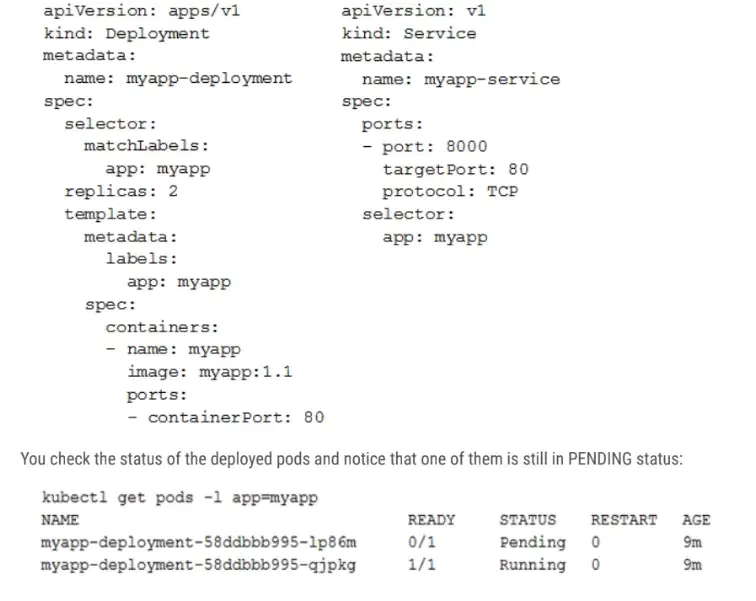
You deployed a new application inside your Google Kubernetes Engine cluster using the YAML file specified below: GCP- Question72.png You want to find out why the pod is stuck in pending status. What should you do?
Review details of the Service object and check for error messages.
Review details of the Deployment object and check for error messages.
Review details of the Pod and check for warning messages.
View logs of the container in the pod and check for warning messages.
You are setting up a Windows VM on Compute Engine and want to make sure you can log in to the VM via RDP. What should you do?
After the VM has been created, use your Google Account credentials to log in into the VM.
After the VM has been created, use gcloud compute reset-windows-password to retrieve the login credentials for the VM.
When creating the VM, add metadata to the instance using 'windows-password' as the key and a password as the value.
After the VM has been created, download the JSON private key for the default Compute Engine service account. Use the credentials in the JSON file to log in to the VM.
You want to configure an SSH connection to a single Compute Engine instance for users in the dev1 group. This instance is the only resource in this particular Google Cloud Platform project that the dev1 users should be able to connect to. What should you do?
Set metadata to enable-oslogin=true for the instance. Grant the dev1 group the compute.osLogin role. Direct them to use the Cloud Shell to ssh to that instance.
Set metadata to enable-oslogin=true for the instance. Set the service account to no service account for that instance. Direct them to use the Cloud Shell to ssh to that instance.
Enable block project wide keys for the instance. Generate an SSH key for each user in the dev1 group. Distribute the keys to dev1 users and direct them to use their third-party tools to connect.
Enable block project wide keys for the instance. Generate an SSH key and associate the key with that instance. Distribute the key to dev1 users and direct them to use their third-party tools to connect.
You need to produce a list of the enabled Google Cloud Platform APIs for a GCP project using the gcloud command line in the Cloud Shell. The project name is my-project. What should you do?
Run gcloud projects list to get the project ID, and then run gcloud services list --project <project ID>.
Run gcloud init to set the current project to my-project, and then run gcloud services list --available.
Run gcloud info to view the account value, and then run gcloud services list --account <Account>.
Run gcloud projects describe <project ID> to verify the project value, and then run gcloud services list --available.
You are building a new version of an application hosted in an App Engine environment. You want to test the new version with 1% of users before you completely switch your application over to the new version. What should you do?
Deploy a new version of your application in Google Kubernetes Engine instead of App Engine and then use GCP Console to split traffic
Deploy a new version of your application in a Compute Engine instance instead of App Engine and then use GCP Console to split traffic.
Deploy a new version as a separate app in App Engine. Then configure App Engine using GCP Console to split traffic between the two apps
Deploy a new version of your application in App Engine. Then go to App Engine settings in GCP Console and split traffic between the current version and newly deployed versions accordingly.
You need to provide a cost estimate for a Kubernetes cluster using the GCP pricing calculator for Kubernetes. Your workload requires high IOPs, and you will also be using disk snapshots. You start by entering the number of nodes, average hours, and average days. What should you do next?
Fill in local SSD. Fill in persistent disk storage and snapshot storage.
Fill in local SSD. Add estimated cost for cluster management.
Select Add GPUs. Fill in persistent disk storage and snapshot storage.
Select Add GPUs. Add estimated cost for cluster management.
You are using Google Kubernetes Engine with autoscaling enabled to host a new application. You want to expose this new application to the public, using HTTPS on a public IP address. What should you do?
Create a Kubernetes Service of type NodePort for your application, and a Kubernetes Ingress to expose this Service via a Cloud Load Balancer.
Create a Kubernetes Service of type ClusterIP for your application. Configure the public DNS name of your application using the IP of this Service.
Create a Kubernetes Service of type NodePort to expose the application on port 443 of each node of the Kubernetes cluster. Configure the public DNS name of your application with the IP of every node of the cluster to achieve load-balancing.
Create a HAProxy pod in the cluster to load-balance the traffic to all the pods of the application. Forward the public traffic to HAProxy with an iptable rule. Configure the DNS name of your application using the public IP of the node HAProxy is running on.
You need to enable traffic between multiple groups of Compute Engine instances that are currently running two different GCP projects. Each group of Compute Engine instances is running in its own VPC. What should you do?
Verify that both projects are in a GCP Organization. Create a new VPC and add all instances.
Verify that both projects are in a GCP Organization. Share the VPC from one project and request that the Compute Engine instances in the other project use this shared VPC.
Verify that you are the Project Administrator of both projects. Create two new VPCs and add all instances.
Verify that you are the Project Administrator of both projects. Create a new VPC and add all instances.
You want to add a new auditor to a Google Cloud Platform project. The auditor should be allowed to read, but not modify, all project items. How should you configure the auditor's permissions?
Create a custom role with view-only project permissions. Add the user's account to the custom role.
Create a custom role with view-only service permissions. Add the user's account to the custom role.
Select the built-in IAM project Viewer role. Add the user's account to this role.
Select the built-in IAM service Viewer role. Add the user's account to this role.
You are operating a Google Kubernetes Engine (GKE) cluster for your company where different teams can run non-production workloads. Your Machine Learning (ML) team needs access to Nvidia Tesla P100 GPUs to train their models. You want to minimize effort and cost. What should you do?
Ask your ML team to add the ג€accelerator: gpuג€ annotation to their pod specification.
Recreate all the nodes of the GKE cluster to enable GPUs on all of them.
Create your own Kubernetes cluster on top of Compute Engine with nodes that have GPUs. Dedicate this cluster to your ML team.
Add a new, GPU-enabled, node pool to the GKE cluster. Ask your ML team to add the cloud.google.com/gke -accelerator: nvidia-tesla-p100 nodeSelector to their pod specification.
Your VMs are running in a subnet that has a subnet mask of 255.255.255.240. The current subnet has no more free IP addresses and you require an additional 10 IP addresses for new VMs. The existing and new VMs should all be able to reach each other without additional routes. What should you do?
Use gcloud to expand the IP range of the current subnet.
Delete the subnet, and recreate it using a wider range of IP addresses.
Create a new project. Use Shared VPC to share the current network with the new project.
Create a new subnet with the same starting IP but a wider range to overwrite the current subnet.
Your organization uses G Suite for communication and collaboration. All users in your organization have a G Suite account. You want to grant some G Suite users access to your Cloud Platform project. What should you do?
Enable Cloud Identity in the GCP Console for your domain.
Grant them the required IAM roles using their G Suite email address.
Create a CSV sheet with all users' email addresses. Use the gcloud command line tool to convert them into Google Cloud Platform accounts.
In the G Suite console, add the users to a special group called cloud-console-users@yourdomain.com. Rely on the default behavior of the Cloud Platform to grant users access if they are members of this group.
You have a Google Cloud Platform account with access to both production and development projects. You need to create an automated process to list all compute instances in development and production projects on a daily basis. What should you do?
Create two configurations using gcloud config. Write a script that sets configurations as active, individually. For each configuration, use gcloud compute instances list to get a list of compute resources.
Create two configurations using gsutil config. Write a script that sets configurations as active, individually. For each configuration, use gsutil compute instances list to get a list of compute resources.
Go to Cloud Shell and export this information to Cloud Storage on a daily basis.
Go to GCP Console and export this information to Cloud SQL on a daily basis.
You have a large 5-TB AVRO file stored in a Cloud Storage bucket. Your analysts are proficient only in SQL and need access to the data stored in this file. You want to find a cost-effective way to complete their request as soon as possible. What should you do?
Load data in Cloud Datastore and run a SQL query against it.
Create a BigQuery table and load data in BigQuery. Run a SQL query on this table and drop this table after you complete your request.
Create external tables in BigQuery that point to Cloud Storage buckets and run a SQL query on these external tables to complete your request.
Create a Hadoop cluster and copy the AVRO file to NDFS by compressing it. Load the file in a hive table and provide access to your analysts so that they can run SQL queries.
You need to verify that a Google Cloud Platform service account was created at a particular time. What should you do?
Filter the Activity log to view the Configuration category. Filter the Resource type to Service Account.
Filter the Activity log to view the Configuration category. Filter the Resource type to Google Project.
Filter the Activity log to view the Data Access category. Filter the Resource type to Service Account.
Filter the Activity log to view the Data Access category. Filter the Resource type to Google Project.
You deployed an LDAP server on Compute Engine that is reachable via TLS through port 636 using UDP. You want to make sure it is reachable by clients over that port. What should you do?
Add the network tag allow-udp-636 to the VM instance running the LDAP server.
Create a route called allow-udp-636 and set the next hop to be the VM instance running the LDAP server.
Add a network tag of your choice to the instance. Create a firewall rule to allow ingress on UDP port 636 for that network tag.
Add a network tag of your choice to the instance running the LDAP server. Create a firewall rule to allow egress on UDP port 636 for that network tag.
You need to set a budget alert for use of Compute Engineer services on one of the three Google Cloud Platform projects that you manage. All three projects are linked to a single billing account. What should you do?
Verify that you are the project billing administrator. Select the associated billing account and create a budget and alert for the appropriate project.
Verify that you are the project billing administrator. Select the associated billing account and create a budget and a custom alert.
Verify that you are the project administrator. Select the associated billing account and create a budget for the appropriate project.
Verify that you are project administrator. Select the associated billing account and create a budget and a custom alert.
You are migrating a production-critical on-premises application that requires 96 vCPUs to perform its task. You want to make sure the application runs in a similar environment on GCP. What should you do?
When creating the VM, use machine type n1-standard-96.
When creating the VM, use Intel Skylake as the CPU platform.
Create the VM using Compute Engine default settings. Use gcloud to modify the running instance to have 96 vCPUs.
Start the VM using Compute Engine default settings, and adjust as you go based on Rightsizing Recommendations.
You want to configure a solution for archiving data in a Cloud Storage bucket. The solution must be cost-effective. Data with multiple versions should be archived after 30 days. Previous versions are accessed once a month for reporting. This archive data is also occasionally updated at month-end. What should you do?
Add a bucket lifecycle rule that archives data with newer versions after 30 days to Coldline Storage.
Add a bucket lifecycle rule that archives data with newer versions after 30 days to Nearline Storage.
Add a bucket lifecycle rule that archives data from regional storage after 30 days to Coldline Storage.
Add a bucket lifecycle rule that archives data from regional storage after 30 days to Nearline Storage.
Your company's infrastructure is on-premises, but all machines are running at maximum capacity. You want to burst to Google Cloud. The workloads on Google Cloud must be able to directly communicate to the workloads on-premises using a private IP range. What should you do?
1. In Google Cloud, configure the VPC as a host for Shared VPC.
2. In Google Cloud, configure the VPC for VPC Network Peering.
3. Create bastion hosts both in your on-premises environment and on Google Cloud. Configure both as proxy servers using their public IP addresses.
4. Set up Cloud VPN between the infrastructure on-premises and Google Cloud.
You want to select and configure a solution for storing and archiving data on Google Cloud Platform. You need to support compliance objectives for data from one geographic location. This data is archived after 30 days and needs to be accessed annually. What should you do?
Select Multi-Regional Storage. Add a bucket lifecycle rule that archives data after 30 days to Coldline Storage.
Select Multi-Regional Storage. Add a bucket lifecycle rule that archives data after 30 days to Nearline Storage.
Select Regional Storage. Add a bucket lifecycle rule that archives data after 30 days to Nearline Storage.
Select Regional Storage. Add a bucket lifecycle rule that archives data after 30 days to Coldline Storage.
Your company uses BigQuery for data warehousing. Over time, many different business units in your company have created 1000+ datasets across hundreds of projects. Your CIO wants you to examine all datasets to find tables that contain an employee_ssn column. You want to minimize effort in performing this task. What should you do?
Go to Data Catalog and search for employee_ssn in the search box.
Write a shell script that uses the bq command line tool to loop through all the projects in your organization.
Write a script that loops through all the projects in your organization and runs a query on INFORMATION_SCHEMA.COLUMNS view to find the employee_ssn column.
Write a Cloud Dataflow job that loops through all the projects in your organization and runs a query on INFORMATION_SCHEMA.COLUMNS view to find employee_ssn column.

You create a Deployment with 2 replicas in a Google Kubernetes Engine cluster that has a single preemptible node pool. After a few minutes, you use kubectl to examine the status of your Pod and observe that one of them is still in Pending status: GCP- Question94.png What is the most likely cause?
The pending Pod's resource requests are too large to fit on a single node of the cluster.
Too many Pods are already running in the cluster, and there are not enough resources left to schedule the pending Pod.
The node pool is configured with a service account that does not have permission to pull the container image used by the pending Pod.
The pending Pod was originally scheduled on a node that has been preempted between the creation of the Deployment and your verification of the Pods' status. It is currently being rescheduled on a new node.
You want to find out when users were added to Cloud Spanner Identity Access Management (IAM) roles on your Google Cloud Platform (GCP) project. What should you do in the GCP Console?
Open the Cloud Spanner console to review configurations.
Open the IAM & admin console to review IAM policies for Cloud Spanner roles.
Go to the Stackdriver Monitoring console and review information for Cloud Spanner.
Go to the Stackdriver Logging console, review admin activity logs, and filter them for Cloud Spanner IAM roles.
You are building a product on top of Google Kubernetes Engine (GKE). You have a single GKE cluster. For each of your customers, a Pod is running in that cluster, and your customers can run arbitrary code inside their Pod. You want to maximize the isolation between your customers' Pods. What should you do?
Use Binary Authorization and whitelist only the container images used by your customers' Pods.
Use the Container Analysis API to detect vulnerabilities in the containers used by your customers' Pods.
Create a GKE node pool with a sandbox type configured to gvisor. Add the parameter runtimeClassName: gvisor to the specification of your customers' Pods.
Use the cos_containerd image for your GKE nodes. Add a nodeSelector with the value cloud.google.com/gke-os-distribution: cos_containerd to the specification of your customers' Pods.

Your customer has implemented a solution that uses Cloud Spanner and notices some read latency-related performance issues on one table. This table is accessed only by their users using a primary key. The table schema is shown : GCP -Question98.png You want to resolve the issue. What should you do?
Remove the profile_picture field from the table.
Add a secondary index on the person_id column.
Change the primary key to not have monotonically increasing values.
Create a secondary index using the following Data Definition Language (DDL):
CREATE INDEX person_id_ix
ON Persons (
person_id,
firstname,
lastname)
STORING (profile_picture)
Your finance team wants to view the billing report for your projects. You want to make sure that the finance team does not get additional permissions to the project. What should you do?
Add the group for the finance team to roles/billing user role.
Add the group for the finance team to roles/billing admin role.
Add the group for the finance team to roles/billing viewer role.
Add the group for the finance team to roles/billing project/Manager role.
Your organization has strict requirements to control access to Google Cloud projects. You need to enable your Site Reliability Engineers (SREs) to approve requests from the Google Cloud support team when an SRE opens a support case. You want to follow Google-recommended practices. What should you do?
Add your SREs to roles/iam.roleAdmin role.
Add your SREs to roles/accessapproval.approver role.
Add your SREs to a group and then add this group to roles/iam.roleAdmin.role.
Add your SREs to a group and then add this group to roles/accessapproval.approver role.
You need to host an application on a Compute Engine instance in a project shared with other teams. You want to prevent the other teams from accidentally causing downtime on that application. Which feature should you use?
Use a Shielded VM.
Use a Preemptible VM.
Use a sole-tenant node.
Enable deletion protection on the instance.

