
Font size
 Worksheets
Rochelle's
Total questions: 50
Worksheet time: 28mins

Tapping on this will let me
add a character
add a background

What is the name of this code?
SET THE SPEED
RUN
END
MOVE LEFT

WHAT IS THIS BLOCK?
APPEAR
DISSAPEAR
HIDE

JUMP
HOP
MOVE LEFT
MOVE RIGHT
My dog can run the fastest. I must use __________.


I want to stop the code. I could use _________.


I want my code to run over and over. I could use _________.


Name the block.
Looks
Sound
Motion
Trigger

Name the block.
Looks
Control
Sound
Motion

What will this image do?
Grow
Shrink

What will this image do?
Grow
Shrink

Name this command.
START ON GREEN FLAG
START ON TAP
START ON BUMP
Find the move LEFT block.


Find the move RIGHT block.
Find the move DOWN block.
Find the move UP block.
Find the TURN block?


Find the GREEN FLAG block.


Find the GO BACK block.
Find the ADD block.

Name this bolck.
START ON GREEN FLAG
START ON TAP
Which block means to go to the next page?


Which block means to repeat forever?


Click on the shrink block


Find ScratchJr program icon:


Name the block
Recording block
Cat sound block
Pop Sound block

Tapping on this will let me
add a sprite
add a backdrop
add a cat

To apply bold style to font what icon should we click?

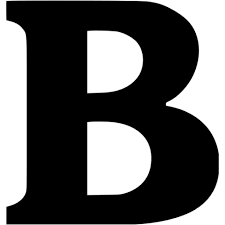
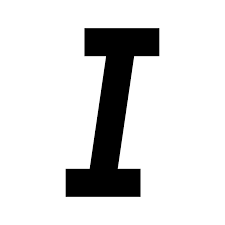
Pema wants to underline the sentence which icon should she click on ?
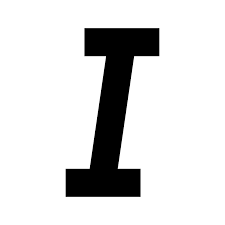

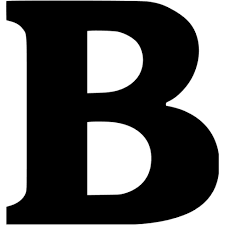

The above picture is an icon for
Change font type
Change font colour
Change font shape
Change font size
What is the keyboard shortcut for Copy?
CTRL+C
CTRL+A
CTRL+V
CTRL+P

Identify the icon name
Align Left
Align Right
Justify
Center

Identify the name of the icon
Justify
Align right
Center
Align left


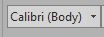
What is this icon?
Font
Increase Font Size
Font Color
Text Effects

What is this icon?
Cut
Copy
Paste
Format Painter

What is this icon?
Cut
Copy
Paste
Format Painter
When you save a document for the first time, which tab displays in Backstage?
Save As
Save
New
Info
To align paragraph left and right, use icon ....
Align Right
Align Left
Center
Justify

This part of the Microsoft Paint environment is called:
Tools Panel
Canvas
Ribbon
Brushes
Shapes

This part of the Microsoft Paint environment is called:
Tools Panel
Canvas
Ribbon
Brushes
Shapes

This part of the Microsoft Paint environment is called:
Colour Palette
Canvas
Ribbon
tabs
Zoom Control

To draw a traffic light, which shapes do we use?
Circle
Triangle
Circle and rectangle
Rectangle and line

We can use this tool for:
Writing text
Undo
Drawing
Erasing
Which icon is Microsoft Paint?


To duplicate the image by easiest way, we can use:
Draw again
Copy and Paste
Cut and Paste
Select, Copy and Paste

To make the line thicker, you use



