
Font size
 Worksheets
Indesign Review
Total questions: 14
Worksheet time: 7mins
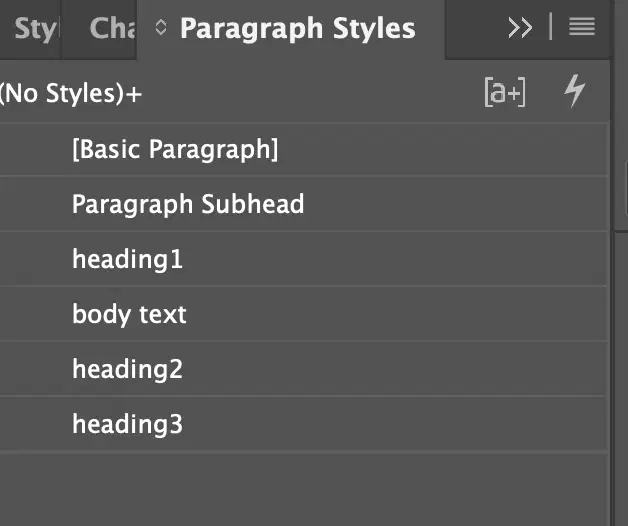
You have a document with multiple heading levels. All headings must be in a different font than the paragraph text.
You need to set up paragragh styles so that you can update only heading styles all at once. what should you do
Change Headings2 and heading3 so that they are based on Headings1.
Edit each heading style to reflect the desired attributes.
Set the basic paragragph style to use the font you want all the heading to use.

Focus on the first box, what part of the document is highlighted
The _______is background behind the InDesign document.
Bleed
Pasteboard
Footer
Focus on the second box, what part of the document is highlighted
The _______is an area where the document image is extended over the artwork area that does not contain important information and will get cut off
Bleed
Pasteboard
Footer
Focus on the third box, what part of the document is highlighted
The _______ is a line or block of text appearing at the foot of each page of a book or document.
Bleed
Pasteboard
Footer

What are the these templates called in your pages panel?
Bleed
Master Pages
Footer
Pages
Which of the following are designer deliverables in a design project? Select two
Budget Report
Sketches
Specifications
Composites
What allows a user to show/hide all non-printing items such as rulers guides, frame edges and hidden characters SEPARATELY?
Display Performance
View Options
Screen Mode
Arrange Documents
What Allows user to quickly change the display settings for the entire document for individual graphics?
Display Performance
View Options
Screen Mode
Arrange Documents
What allows a user to show/hide all non-printing items such as rulers guides, frame edges and hidden characters at the same time?
Display Performance
View Options
Screen Mode
Arrange Documents
What allows a user to quickly display multiple tabbed or floating documents in various layouts?
Display Performance
View Options
Screen Mode
Arrange Documents
You have a blank A4 document. You need to create a guide with an X value of 35px.
What should you do?
Drag a guide from the horizontal ruler onto the page and position it a 35 px
Drag guide from vertical ruler onto the page and position it at 35 px.
Activate the page tool and set the Width to 35px
A red plus sign in the lower-right corner of a frame indicates
the frame contains more text than is currently displayed
the cursor transforms into a loaded text icon
When you click the red plus sign with the selection tool the
the frame contains more text than is currently displayed
the cursor transforms into a loaded text icon
A client Hires you to create an ad that is geared towards retired people who live in cities. Which term "Best describes "retired people who live in cities"?
project scope
social influencers
Target audience
critics

