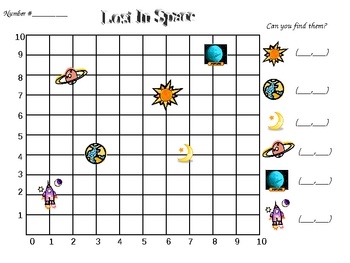
Worksheets
2nd Year CRO Review Questions
Total questions: 165
Worksheet time: 2hrs 14mins

Which of the following is the best description of what a <Less than> block reports while inside of a [Wait until] block?
If the distance is a large number.
The total time needed to run the project.
A TRUE or FALSE value.
The total time the VR Robot has until it reaches an object.

A [Drive for] block is missing.
A <Greater Than> block was used instead of a <Less Than> Block.
A [Turn for] block was used instead of [Turn] block.
A [Turn to rotation] block is missing.

Select the checkbox next to the (Position of Robot) block.
Select the checkbox next to the <Drive is moving> block.
Select the checkbox next to the <Color near object> block.
Select the checkbox next to the <Distance found object> or (Distance from) block.

What values does the <Distance found object> block report?
TRUE or FALSE.
On or Off.
Yes or No.
Zero or One.
Which of the following best describes what the <Less than> block reports?
If the first value is less than the second value.
If the first value is larger than the second value.
If the first value and the second value are equal.
The second value.
<Distance found object>
<Pressing bumper>
<Color near object>
<Bumper switch on>
What values does the <Pressing bumper> block return?
TRUE (pressed) or FALSE (released).
Positive (pressed); Negative (released).
Number values between one and ten.
Distance from object in millimeters (mm).

What does the <Pressing bumper> block report if the Bumper Sensor is pressed?
Reports TRUE.
Reports FALSE.
Reports a measured distance.
Reports an object found.

How is the <Pressing bumper> block used in this project?
It pauses the project indefinitely.
It causes the VR Robot to move forward for 200 millimeters (mm).
It checks the condition of the Bumper Sensor. When TRUE, the VR Robot will turn right 180 degrees.
It instructs the VR Robot to turn to 90 degrees.
How is the [Wait until] block used with the <Pressing bumper> block?
The <Pressing bumper> block is placed before the [Wait until] block.
The [Wait until] block is placed before the <Pressing bumper> block.
The <Pressing bumper> Boolean is placed in the hexagonal shape inside the [Wait until] block.
Both blocks are placed side-by-side at the beginning of a project.

<Distance found object>
<Pressing bumper>
<Drive is moving>
<Color sensing>


Where is point A located:
(1, 1,5)
(1.5, -1)
(-1.5, 1)
(2, -1)

Where is point F located:
(-4, 0)
(0, 4)
( 4, 0 )
(0, -4)

Which point is located at ( -2, 2)
A
B
C
D


(-3, 12)

Which letter matches the coordinate (4, -6)?
C
Z
K
None of the above
Which letter matches the coordinate (-4, -3)?
(a)

What is the vocabulary word for the horizontal line at the bottom of the coordinate plane?
X-axis
Y-axis
Origin
Ordered pair
Which of the following is the best description of what the Eye Sensor does?
It reports the (X,Y) position of the VR Robot.
It reports the distance between the VR Robot and the nearest solid object.
It can be controlled to pick up and drop disks with metal cores.
It detects if there is an object present and if so, the color of that object.

Which two sensors are being pointed to on the VR Robot?
The Left and Right Bumper Sensors.
The Front Eye and Down Eye Sensors.
The Electromagnet and Location Sensors.
The Distance and Front Eye Sensors.
What value will the <Eye Sensor near object> Boolean block report when the Eye Sensor is close to an object that has detectable colors?
It will report TRUE.
It will report FALSE.
It will report how far in millimeters (mm) or inches the Eye Sensor is from the object.
It will report the location angle of the VR Robot in degrees.
What value will the <Color sensing> Boolean block report when the Eye Sensor detects a different color than the one that was selected?
It will report the time elapsed of the project in seconds.
It will report the current heading in degrees of the VR Robot.
It will report FALSE.
It will report TRUE.
In what units does the (Position of Robot) block report the X or Y coordinates position of the VR Robot?
Degrees
Seconds
Millimeters (mm) or inches
Centimeters (cm)

How does the X coordinate value change as the VR Robot moves forward in this project on the Numbered Grid Map Playground?
It decreases as the VR Robot drives forward.
It increases as the VR Robot drives forward.
It remains -800 millimeters (mm) as the VR Robot drives forward.
It remains -100 millimeters (mm) as the VR Robot drives forward.

This project is intended to drive to number '6' on the Number Grid Map Playground but does not work. Number '6' has the coordinates X: 50 and Y: -900. What is the error?
The <Less than> block should be set to -900 not 50.
This project should use a <Greater than> block instead of a <Less than> block and be set to -900.
The <Less than> block should be set to -900 not 50.
This project should use a <Greater than> block instead of a <Less than> block and keep the same parameters.

What are the approximate coordinates for the number '13' on the Number Grid Map Playground?
X: -500 millimeters (mm)
Y: -700 millimeters (mm)
X: 500 millimeters (mm)
Y: 700 millimeters (mm)
X: 700 millimeters (mm)
Y: -300 millimeters (mm)
X: -900 millimeters (mm)
Y: -900 millimeters (mm)

What are the approximate coordinates for the number "56" on the Number Grid Map Playground?
X: 100 millimeters (mm)
Y: 100 millimeters (mm)
X: -100 millimeters (mm)
Y: -100 millimeters (mm)
X: 100 millimeters (mm)
Y: -100 millimeters (mm)
X: -100 millimeters (mm)
Y: 100 millimeters (mm)
What does using comments in a project allow users to do?
Launch the Playground window.
Describe parts of their project for other users.
Attach .VRBLOCKS files.
Watch tutorial videos.
What is computer Hardware?
The outside of the computer
The CPU
Output Devices
The physical components of a computer
What is Software?
IOS
the insides of the computer
Youtube
The set of instructions that tell the computer what to do and how to do it
The CPU is an Output Device
True
False
The Mouse is an Input Device
True
False
The Monitor is an Input Device
True
False
Information that a user physically enters into a computer by pressing a key on a keyboard, clicking a mouse, tapping a touch screen, pushing a button on a game controller, speaking into a microphone, etc.
Input
Output
Processing
Storage
Information that a user physically enters into a computer by pressing a key on a keyboard, clicking a mouse, tapping a touch screen, pushing a button on a game controller, speaking into a microphone, etc.
Input
Processing
Output
Storage
The operations performed by a computer to retrieve, transform, or classify information.
Processing
Output
Storage
Transistor
Information that a computer returns to a user such as images on a screen, sounds from speakers, and printed pages.
Output
Storage
Microchip
Input
The saving of information on memory chips, discs, or other storage media by a computer for later use.
Processing
Storage
Smartphone
Supercomputers
A system for making digital resources publicly available over the internet using a web browser that paved the way for email, chatrooms, and social media sites
World Wide Web
Supercomputers
Dark Web
Human-computer Interaction
A mobile phone that functions as a computer and allows users to access the internet.
Processing
Output
Smartphone
Supercomputers
What is a computer?
A computer is case that manipulates information or data.
A computer is an electronic device that manipulates information or data.
A computer is powered box that manipulates information or data.
A computer has the ability to:
It has the ability to store, retrieve, and process data.
It has the ability to store, retrieve, and pastas data.
It has the ability to stage, retrieve, and process data.
You can use a computer to (check all that apply)
Type Documents
Send Email
Play Games
Browse the web
Hardware is ...
any part of your computer
any part of your computer that has a hard structure
any part of your computer that has a software structure
any part of your computer that has a physical structure
Hardware is (check all that apply)
Software
Keyboard
Mouse
computer's internal parts
Software is ...
Hardware for your computer
any set of instructions that tells the hardware what to do and how to do it
all hardware components
any set of instructions for you to read
Desktop Computers have (CHECK ALL THAT APPLY)
Mouse
Computer Case
Monitor
Keyboard
The laptop computer is commonly called a
mobility device
a persons preferred computer
laptop
Tablet computers
Are worse than computers
Are more portable than laptops
Use a keyboard
Use a mouse
Which of the following are specialized computers. (click all that apply)
house phone
smartphone
wearables (fitness trackers, smartwatches)
game consoles
A PC and Mac are known as:
personal assistants
automated tellers
personal computers
What is the most common type of PC operating system
OS X
Lynux
Microsoft Windows
Lets you do many things, like write book reports and stories.
internet browser
operating system
application programs
computer viruses
Lets the computer's hardware and software work together.
operating system
application programs
computer viruses
games
Tells the hardware what to do and how to do it.
computer viruses
hardware
software
internet browser
Lets you explore the Internet to find information, pictures, videos and webpages.
software
application programs
computer viruses
internet browser
An example of a word processing program.
games
Windows
Microsoft Word
antivirus software
An example of a software program you have used before.
games
computer virus
internet browser
hardware
Software can be placed in which 2 basic groups?
System Hardware, Application Hardware
System Software, Application Software
System Controller, Application Controller
System Console, Application Console

What type of software is it?
system system
Application software

What type of software is this?
system software
system hardware
application software
application hardware

What type of software is this?
system software
system hardware
application software
application hardware

What part of the information processing cycle is this?
Output
Input
Processing
Storage
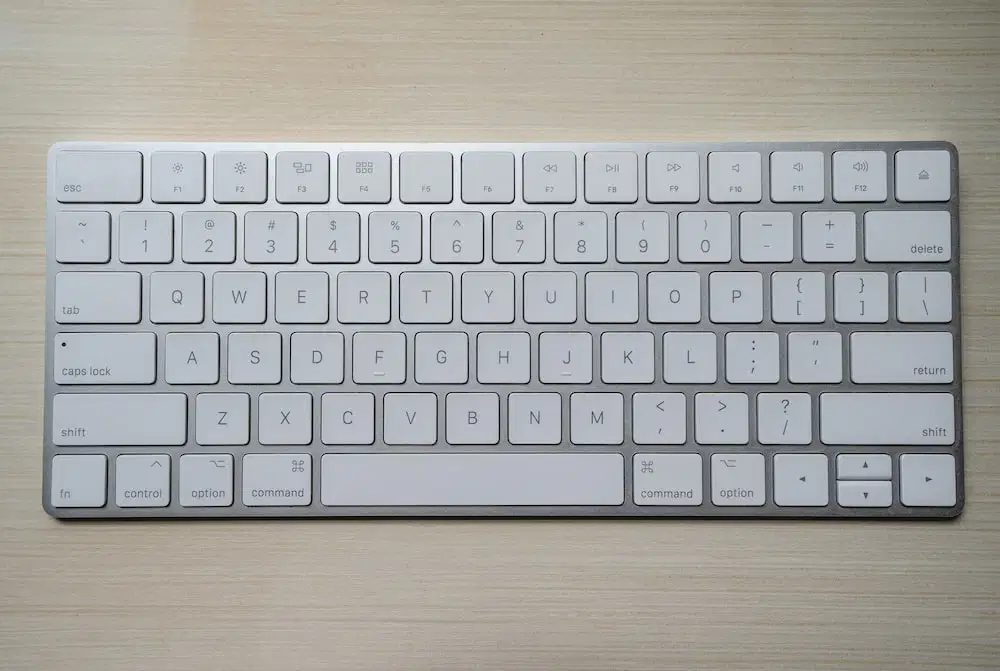
What part of the information processing cycle is this?
Output
Input
Processing
Storage

What part of the information processing cycle is this?
Output
Input
Processing
Storage
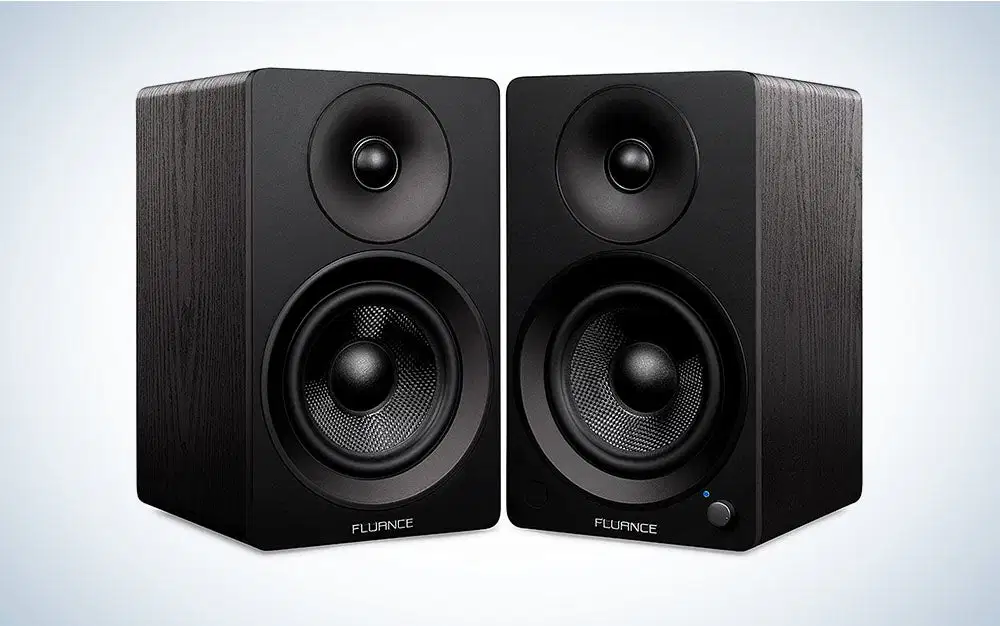
What part of the information processing cycle is this?
Output
Input
Processing
Storage

What part of the information processing cycle is this?
Output
Input
Processing
Storage

What part of the information processing cycle is this?
Output
Input
Processing
Storage

What part of the information processing cycle is this?
Output
Input
Processing
Storage

What type of software is it?
system system
Application software
Generally, when you receive an email, it will end up in your__________
Message pane
Inbox
Compose pane
Calendar
Identify the correctly written email address below.
jane@gmail
jane@gmail.com
jane.gmail@com
jane at gmail dot com
True or False: Services such as Gmail offer free email accounts.
True
False
The _______is a brief description of what the email is about.
attachment
forward
recipient
subject
Which of the following features or fields can an email have? Choose all that apply.
Attachemnts
Body
Subject
Recipients
After sending an email, when is it usually delivered?
2-3 weeks
2-3 days
within minutes
The first Tuesday of the month
If you want to share a message you received, you can______it.
foward
reply
archive
________ is another term for junk email.
Malware
Bcc
Attachment
Spam
How is traditional mail different than email?
Traditional mail is faster.
Traditional mail uses the @ sign.
Email is sealed in an envelope and uses a stamp.
Email is faster and is sent electronically.
What is an appropriate GREETING when sending an email to your teacher?
Dear Mr. Summerfield,
Hey Mr. Schulze,
What's up Athena,
Varela,
Which is the best SUBJECT when asking for homework help?
I was wondering if you could answer a question about our homework assignment
HELP
How are you?
Homework question
How would you phrase the question to your teacher?
You must answer my questions!
Would you please explain number 5 again?
I don't understand any of this assignment!
What's up with number 5! It is so confusing.
Why should you review an email before sending?
So you don't appear to eager.
To make sure the email of the receiver is correct.
So you are finished with your dinner first.
To check spelling and grammar.
Why should you limit the use of text formatting in an email?
Difficult to read
They look beautiful and swirly
Looks unprofessional
Bolder highlights better
Why should you avoid using all capitals in an email?
It is too easy to read.
People might think you are being silly.
People might think you are shouting and angry.
YOU SHOULD ALWAYS TYPE USING ALL CAPS!!!
What is a PHISHING email?
The sender is trying to get private information.
A computer virus.
A chain email to forward.
Trying to sell something.
_________is a programming language that is perfect for making games, animations, interactive stories and other visually rich programs.
Pane
Scratch
Blocks
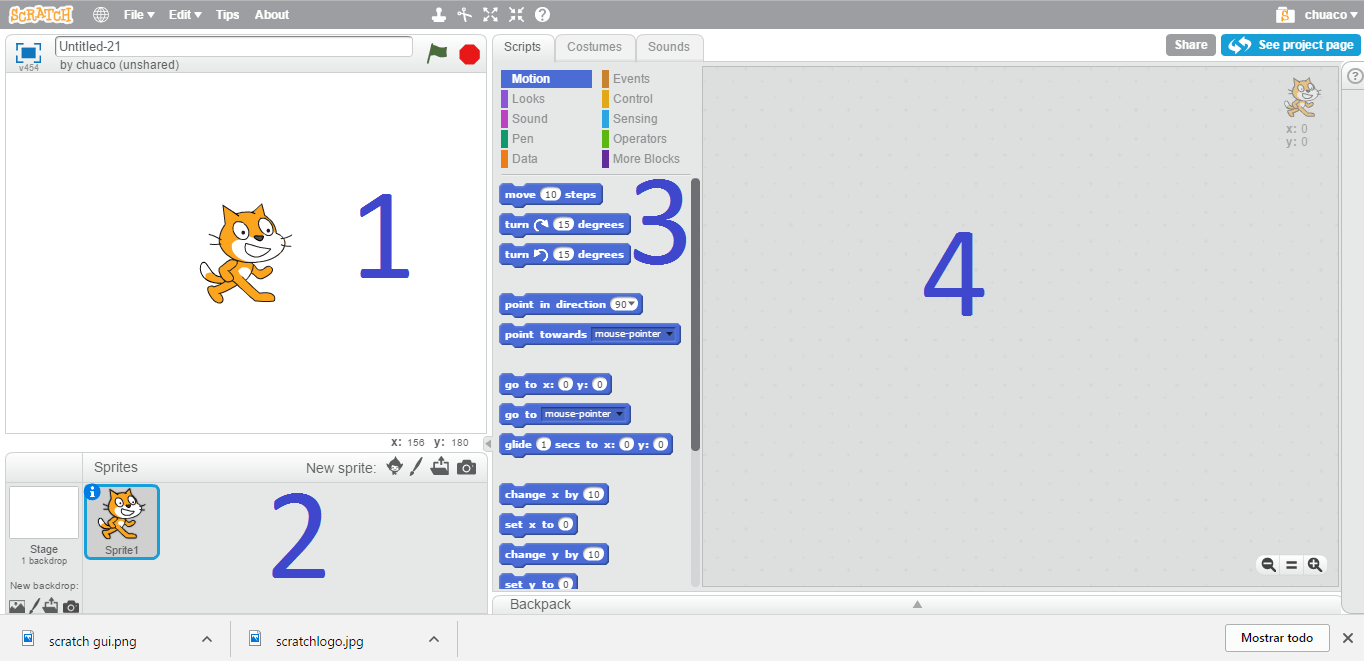
Coordinates (x,y)
determine the position of the Sprite on stage.
are near the end of the alphabet.
are a great way to organize your clothes.
If the coordinates are set to x:0, y:0,
the Sprite will be invisible.
the Sprite will be in the center of the stage.
the Sprite will be at the far left side of the stage.
the Sprite will be at the bottom of the stage.
The x coordinate is
diagonal (from lowest left to highest right).
vertical (up and down).
horizontal (side to side).
What is Scratch primarily used for?
Writing essays
Creating animations, games, and interactive stories
Solving complex mathematical problems
Editing photos
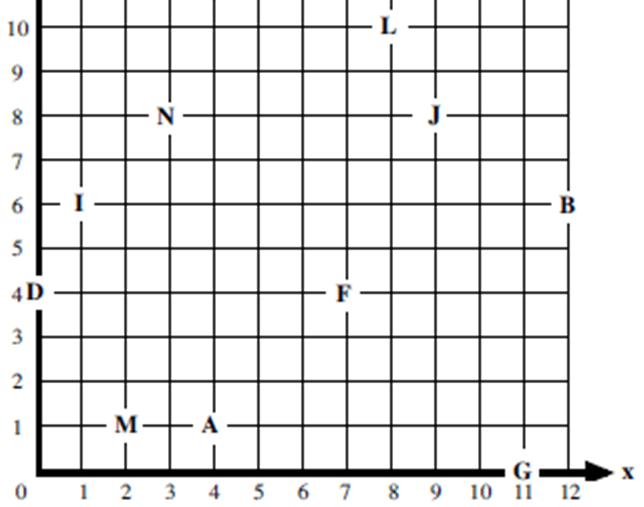
Identify the coordinates of the point A
(4,1)
(1,1)
(4,4)
(1,4)
Identify the coordinates of the point D
(4,0)
(4,1)
(0,4)
(1,4)
Identify the coordinates of the point F
(4,7)
(4,6)
(7,4)
(6,4)
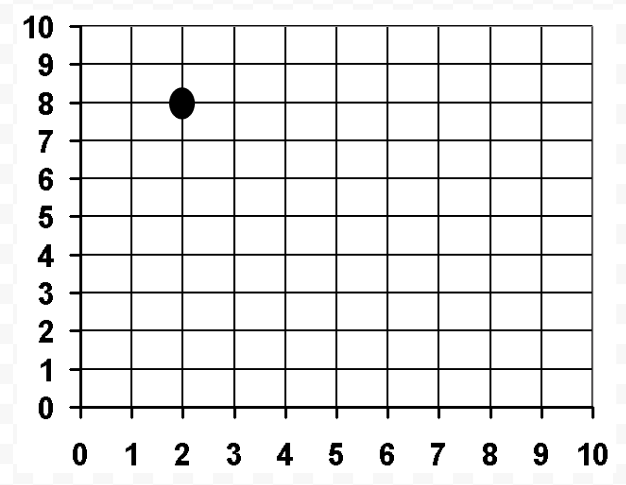

What are the coordinates of point X?
(5,2)
(2,3)
(4,4)
(6,6)