
 Worksheets
TTL 2 FINAL EXAMINATION 24-25
Total questions: 84
Worksheet time: 2hrs 30mins
What are Software Support Tools?
Tools for managing office supplies.
Tools used for creating hardware components.
Tools for designing user interfaces.
Programs or applications designed to assist with various aspects of software development, deployment, maintenance, and troubleshooting.
Which of the following is an advantage of using Software Support Tools?
Decreased collaboration among team members.
Increased efficiency and productivity.
Reduced product appearance.
Limited access to information.
Which category of Software Support Tools allows the creation of documents, web pages, tests, and various lessons and activities?
Data collection and analysis tools.
Graphics tools.
Materials generators.
Planning and organizing tools.
What type of software is commonly used for creating brochures, flyers, newsletters, and books?
Web Page Design Software.
Graphic Document Makers.
Whiteboard Activity Software.
Desktop Publishing Software.
Which tool is suitable for creating interactive lesson presentations and activities that students can engage with?
Web Page Design Software.
Test and Rubric Generators.
Whiteboard Activity Software.
Graphic Document Makers.
What is the primary purpose of PDF and forms makers?
Creating artistic and decorated documents.
Capturing and playback of D3D graphics log files.
Developing DirectX apps or games.
Creating documents in Portable Document Format (PDF) and online forms.
Which software tool is commonly used for creating social media posts, presentations, posters, videos, logos, and more?
Microsoft Excel.
Adobe Illustrator.
Canva.
Affinity Designer.
Which tool allows you to create, edit, and update web pages and websites for project work display and information dissemination?
Adobe Dreamweaver.
Microsoft WebMatrix.
Procreate
Microsoft Publisher.
What is the use of DirectX graphics tools?
Creating artistic documents.
Analyzing statistical data
Developing DirectX apps or games.
Managing optional features in Windows.
It is a tool use to collect of data from students, utilized as basis to support decision making, analyze data from experiments and research.
Graphic Tools
Data Collection and Analysis Tools
Research Reference Tools
Planning and Organizing Tools
What software is used for storing information that can be accessed and located easily by typing only the key words?
Database Software
Statistical Packages
Electronic Gradebooks
Student Response Systems or Clickers
What system allows students to take tests via online or on-screen computers which provide results afterwards?
Student Response Systems or Clickers
Computerized-based Testing Systems
Statistical Packages
Electronic Gradebooks
Microsoft Access is a _____________ type of software.
Statistical Packages
Electronic Gradebooks
Database Software
Student Response Systems or Clickers
What are student response systems or clickers?
Devices or software used to record and manage students’ grades.
Applications for designing and implementing surveys and questionnaires.
Software for creating and editing presentations.
Tools that allow students to submit answers to questions in real-time during a class.
For data calculations that produce descriptive and inferential analysis needed in research, which type of software can be used by teachers for teaching statistical procedures?
Database Management Systems
Graphic Design Software
Statistical Packages
Email Clients
Which of the following software tools is/are not an example of database software?
Microsoft Access
File make
Statistical Package for the Social Sciences (SPSS)
Quickbase
What is an electronic gradebook?
A software application for recording, calculating, and managing students' grades.
A tool for creating and editing text documents
A platform for designing and implementing surveys and questionnaires
A program for creating graphic designs and visual content.
Which type of software is suitable for designing and implementing surveys and questionnaires that teachers and students can use?
Word Processing Software
Spreadsheet Software
Presentation Software
Online Survey Tools
Which software tools are primarily used to facilitate real-time student responses during classes, often through handheld devices or mobile applications?
Student Response Systems or Clickers
Database Software
Statistical Packages
Electronic Gradebooks
What is the main purpose of graphics tools for teachers and students?
To increase the size of documents
To enhance the illustrations in documents and web pages
To create text documents
To record audio notes
Which type of program allows users to create their own graphics for insertion into documents or web pages?
Draw/Paint Programs
Image Editing Software
Charting/Graphing Software
Media Collections
Which graphics tool is primarily used for modifying, enhancing, and formatting photos?
Draw/Paint Programs
Charting/Graphing Software
Media Collections
Image Editing Software
Charting and graphing software is essential for:
Editing photos
Creating and illustrating data entries
Drawing detailed illustrations
Organizing multimedia files
Media collections provide resources such as:
Diagrams and flowcharts
Vector graphics and layout tools
Clip art, photos, animations, sounds, videos, and fonts
Photo editing features
Which graphics tool involves creating detailed vector graphics and illustrations?
Draw/Paint Programs
Image Editing Software
Media Collections
Charting/Graphing Software
If you needed high-quality fonts for a document, which graphics tool would you explore?
Media Collections
Draw/Paint Programs
Image Editing Software
Charting/Graphing Software
For creating professional and visually appealing educational materials, which graphics tool is least relevant?
Media Collections
Image Editing Software
Charting/Graphing Software
Text Editors
To organize, edit, and share photos effectively, you would use tools from which graphics tool?
Image Editing Software
Media Collections
Draw/Paint Programs
Charting/Graphing Software
Which of the following tools helps both teachers and students organize ideas and plan lessons and class schedules?
Photo editing software
Music composition tools
Planning and organizing tools
Video streaming platforms
What is a primary benefit of planning and organizing tools for teachers?
Facilitating efficient time management
Enhancing video editing skills
Generating 3D models
Composing music tracks
How do planning and organizing tools improve communication for teachers?
By enabling better collaboration among educators and smoother interactions with parents and students
By providing graphic design templates
By offering music playback features
By supporting high-resolution photo storage
For students, what is a key advantage of using planning and organizing tools?
Editing videos more efficiently
Designing websites
Enhancing audio quality
Managing their time and tracking assignments
Which feature commonly found in planning tools helps students establish effective study habits?
To-do lists
Music streaming
Advanced graphic design
Video conferencing
Which type of software helps students develop their writing skills by outlining their thoughts?
Spreadsheet software
Video editing software
Audio editing software
Outlining and concept mapping software
What is the main purpose of scheduling, calendar, and time management tools for teachers and students?
Creating digital artwork
Recording podcasts
Planning their activities and events daily, weekly, or monthly
Editing photos
Which feature of planning and organizing tools supports both teaching and learning, leading to improved educational outcomes?
Advanced photo filters
Structured environment with calendars, to-do lists, digital notebooks, communication platforms, and progress trackers
Music composition tools
3D animation capabilities
How do online dictionaries assist users?
By providing cooking tips
By offering travel discounts
By widening knowledge and vocabulary
) By streaming music
Before acquisition or before using any educational technology tool and software, the teacher should be asking himself/herself the following questions, except:
Will it match the needs of the curriculum?
Well it promote smooth rapport with students and parents?
Is it appropriate for the age of my students?
Is it appropriate for teaching and learning situations?
Before acquisition or before using any educational technology tool and software, the teacher should be asking the following questions, except:
Is it updated?
Will it match the learning capacity of my students?
Well it deepened their understanding about family life?
Well it help me demonstrate the processes?
Specific educational technology is being evaluated...except:
Before Instruction
During instruction
After instruction
After the school year's curriculum implementation
Evaluating the integration of technology during instructions is vital. The teacher should be asking himself/herself the following questions: Except,
Is educational technology attractive to the students?
Is it innovative and exciting?
Is it being used appropriately?
Is it difficult to use?
Evaluating the integration of technology during instructions is vital. The teacher should be asking himself/herself the following questions: Except,
Does it help the
students understand the lesson?
Does it help me explain the lesson?
Does it help the students to develop their higher order thinking skills?
Did it help my students achieve the intended learning outcomes?
Evaluating the integration of technology after instructions is vital. The teacher should be asking himself/herself the following questions: Except,
Did it help my students achieve the intended learning outcomes?
Is it easy to use?
Did it enhance my students' learning?
Are students looking forward to learning the next lesson?
In evaluating software programs, the teacher has to determine if the content relates to the curriculum, school standards, and instructional objectives. The teacher has to determine also the validity of the content, whether it is up-to-date or not.
Documentation and technical support
Content
Ability levels and assessment
Technical quality and Ease of Use
The teacher has to evaluate if the software matches the level of understanding and skills of the learners in order to achieve a particular learning outcome.
Ability levels and assessment
Content
technical quality
Ease of use
This kind of assessment includes multiple choice, essay, short answer, true or false, fill-in-the blank, and matching type.
Alternative assessment
Authentic assessment
Traditional assessment
Checklist
his is based on learning methods that allows the learners to do hands-on experiments or activities, do research papers, and create or produce an output that is based on the intended learning outcomes/objectives.
Traditional assessment
Authentic assessment
Alternative Assessment
Rating scales
The following are relevant statements to ethics for computer users, except:
Use the computer to help people and not to do harm.
use the computer to spread truthful information and not to do character assassination.
use your own assigned computer unit and not to interfere with others' work.
Use the computer to take advantage of the information gathered and make them as your own.
It is one of the characteristics of software that can be installed only in one computer.
Multile-user
Single-user
Network License
Community license
This is frequently used with software which are distributed on CDs/DVDs.
Single-user
Multiple user
Community License
Network license
What is a firewall?
A security system that filters and blocks unauthorized network access
A physical barrier that blocks unauthorized entry
A tool to manage school schedules
A software that speeds up internet connections
What are some security challenges faced by schools?
Hardware theft and vandalism
Natural disasters
Lack of computer literacy
Internet speed issues
How do schools prevent hardware theft and vandalism?
By installing antivirus software
By restricting internet access
By employing more IT staff
By using security cameras and locks
What is software piracy?
Deleting software files
Stealing computer hardware
Illegally copying copyrighted software
Installing unauthorized network devices
What is an End-User License Agreement (EULA)?
A contract specifying terms of software use
A policy for internet usage
A law regarding network security
A guide for installing hardware
Which license type allows software installation on a specified number of computers?
Multiple-user license
Single-user license
Network license
Community license
What is information theft?
Illegally accessing and stealing data
Stealing physical hardware
Copying software without permission
Installing unauthorized programs
What method is used to prevent information theft in schools?
Installing firewalls
Regular software updates
Using encryption
Employee background checks
What is spam?
An unauthorized software installation
A network traffic issue
Unwanted messages received through various communication channels
A type of malware
How can spam messages be reduced?
By installing firewalls
By avoiding the use of public networks
By increasing internet bandwidth
By using email filtering and anti-spam program
Which license is most cost-effective for installing software on multiple school computers?
Network license
Single-user license
Community license
Multiple-user license
What is an example of an unacceptable use of school technology?
Using inappropriate language online
Signing correspondence
. Enforcing appropriate use policies
Running antivirus software
What is considered an acceptable use of school technology?
Downloading any software
Using the internet unethically and illegally
Sharing passwords with friends
Using the internet ethically and legally
How does malware typically spread?
Via network attachments and portable storage media
Through encrypted files
By using legitimate software licenses
Through secure network connections
What is phishing?
A software update technique
A method of network encryption
A type of hardware theft
Sending legitimate-looking emails to steal personal information
What is distance education?
A traditional classroom-based form of education
An informal method of learning without any structured curriculum.
A form of education where students and instructors are separated by physical distance and use technology to interact and learn.
a Type of education that only uses printed materials for instruction.
1. Identify one of the major advantages of distance education?
Limited access to learning resources
Fixed schedule and location for classes.
Flexibility in time and place for learning.
Reduced interaction with instructors and peers.
What term is often used to describe distance education that takes place over the internet?
E -learning
Traditional learning
Face-to-face learning
Correspondence education
Which of the following is a common platform used for web conferencing in education?
Microsoft Word
Adobe Illustrator
Dropbox
Zoom
How can web conferencing improve the inclusivity of educational programs?
By allowing students with disabilities to participate in classes through accessible technologies.
By providing access to lectures only during regular school hours.
By always requiring physical attendance.
By limiting the use of subtitles and translations.
What is the primary difference between web conferencing and video conferencing?
Web conferencing includes a broader range of tools like screen sharing and chat, while video conferencing focuses primarily on video and audio communication.
Web conferencing only uses audio, while video conferencing uses video.
Web conferencing is always recorded, while video conferencing is not.
Web conferencing requires specialized hardware, while video conferencing does not.
How can broadcast radio be used in education?
By providing live, interactive video lectures.
By delivering educational content to a wide audience through radio waves.
By allowing students to submit assignments online
By facilitating real-time video discussions.
What is one major advantage of using audio conferencing in teaching?
High requirement for visual aids.
Ability to participate without needing internet access, as it can be done via telephone.
Requirement for advanced technical skills
Limited to one-way communication
Which online technology tool is commonly used for creating and sharing digital classrooms and assignments?
Adobe Photoshop
Google Classroom
Microsoft Excel
How does web conferencing enhance collaborative learning?
By allowing only one participant to speak at a time.
By restricting the use of multimedia content.
By limiting the number of participants in a session.
Answer:
By providing tools such as breakout rooms, shared whiteboards, and real-time document editing.
What is a significant benefit of using online technologies in teaching and learning?
Increased flexibility and accessibility for students and teachers to interact and access materials anytime, anywhere.Increased flexibility and accessibility for students and teachers to interact and access materials anytime, anywhere.
Reduced need for internet access.
Decreased opportunities for student engagement.
a) Limited use of multimedia resources.
How can broadcast radio be integrated with online technologies to enhance educational outcomes?
By supplementing radio lessons with online resources and interactive platforms for a blended learning experience.
By solely relying on radio broadcasts without any online components.
By using radio for entertainment purposes only.
By replacing all traditional teaching methods with radio broadcasts.
Answer:
What is a primary advantage of using broadcast radio for educational purposes in remote areas?
Is dependent on visual content.
Requires high-speed internet access.
Can reach a wide audience without internet connectivity.
Is limited to interactive sessions.
How can online discussion forums enhance learning in an online education environment?
By reducing the amount of student interaction.
By limiting the discussion to in-class time only.
By providing a platform for students to discuss course materials, ask questions, and collaborate on projects asynchronously.
By focusing solely on instructor-led lectures.
Which of the Alternative Delivery System (ADS) encourages the students to do more on the talking?
Video Conferencing
Web Conferencing
Audio Teleconference
Broadcast Radio
“In a modern classroom, Mia, a teacher, is exploring the integration of emerging technologies such as AI, AR/VR, and adaptive learning platforms to enhance her students' learning experiences. She wants to analyze the implications of these tools on student engagement and learning outcomes. Mia is tasked with evaluating the benefits and challenges of implementing such technologies in her classroom setting. Additionally, she aims to design an innovative technology-integrated lesson plan or strategy that addresses a specific learning goal in her subject area. Mia must justify her choices based on pedagogical principles and current trends in educational technology.”
As a pre-service teacher, you are observing a classroom where students are being taught using various methods that cater to different intelligences, including emotional, adversity, and wonder quotients. You notice how these approaches impact the engagement and learning outcomes of contemporary students. In this classroom, you see Samuel, a student who thrives on emotional connections, Evelyn, who excels in overcoming challenges, and Scarlett, who is driven by curiosity and wonder. What is your response to the development of these four levels of intelligence in this teaching environment? How can you specifically integrate learning strategies in your lesson plan to develop each intelligence quotient equally in class?
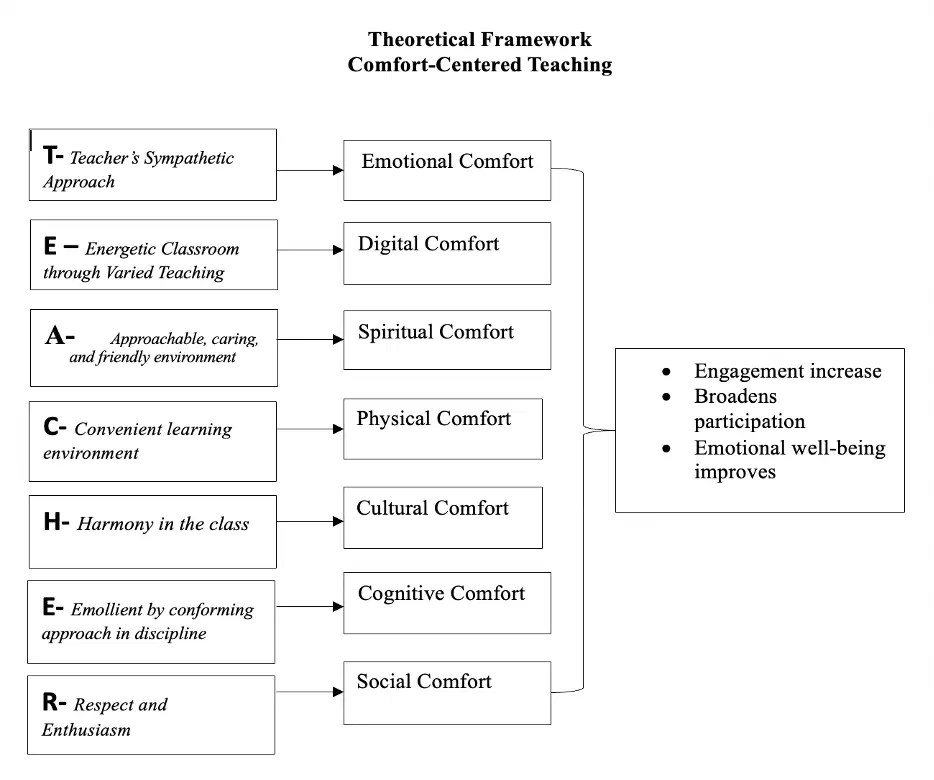
In a classroom setting, a teacher named Charlotte is implementing the Comfort-Centered Learning Framework proposed by Dr. Carale, R.T. (2014). She aims to create a supportive environment for her students. Explain each element of this framework and the parallel specific area of comfort by citing one concrete example in the implementation of her lesson plan.
In a classroom setting, Mia is exploring different teaching strategies to enhance student engagement. She decides to implement a collaborative learning approach. Support this strategy with relevant educational theory and explain its significance in the learning process.

