
 Worksheets
Von Neumann Architecture Quiz
Total questions: 91
Worksheet time: 46mins
What does the Von Neumann Architecture refer to?
The software that runs on a computer
The hardware that can make the computer fully function
The network protocols used in computers
The graphical user interface of a computer
What is the main model used for modern computers?
Harvard Architecture
RISC Architecture
Von Neumann Architecture
CISC Architecture
In Von Neumann Architecture, where are data and programs stored?
Hard Drive
CPU
RAM/Memory
Cache
Which component executes and processes data in the Von Neumann Architecture?
RAM/Memory
Hard Drive
GPU
CPU
What is the relationship between the CPU and RAM in the Von Neumann Architecture?
They work independently of each other
They work very closely with each other
The CPU only stores data, while RAM processes it
The RAM only stores data, while the CPU processes it
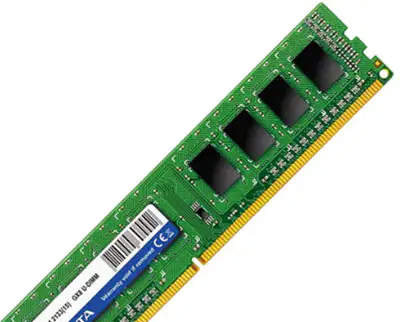
Identify the component shown in the image below:
Hard Drive
CPU
RAM/Memory
GPU

Identify the component shown in the image below:
Hard Drive
CPU
RAM/Memory
GPU
Which component of the CPU controls where the data is sent?
Arithmetic Logic Unit
Registers
Control Unit
Memory
What is the primary function of the Arithmetic Logic Unit (ALU) in the CPU?
Controls where the data is sent
Processes numeric data
Stores data temporarily
Manages input and output operations
What is the role of registers in the CPU?
Controls where the data is sent
Processes numeric data
Stores data temporarily
Manages input and output operations
What does the Fetch, Decode, Execute cycle describe?
How data is stored in the cloud
How data is processed using Von Neumann Architecture
How data is transmitted over the internet
How data is encrypted
What component fetches the data from the RAM?
Control Unit
Arithmetic Logic Unit
CPU
Registers
What temporarily stores the data from the RAM?
CPU
Registers
Control Unit
Arithmetic Logic Unit
What does the Control Unit do in the Fetch, Decode, Execute cycle?
Executes the data
Fetches the data from the RAM
Decodes the data so it can be sent to the correct place
Temporarily stores the data from the RAM
What is used if numeric data needs processing?
Control Unit
Registers
Arithmetic Logic Unit
CPU
How many times per second can modern CPUs repeat the Fetch, Decode, Execute process?
1 million times
1 billion times
1 trillion times
1 thousand times
Which of the following statements is true about memory and storage in computers?
Memory and storage are the same thing.
Memory and storage are different.
Memory is not directly accessed by the CPU.
Storage is normally lost when the computer is switched off.
What happens to memory when the computer is switched off, with the exception of ROM?
Memory is retained.
Memory is lost.
Memory is transferred to storage.
Memory is backed up automatically.
Which component directly accesses memory in a computer?
Hard drive
CPU
Graphics card
Network card
What is the primary function of memory in a computer?
To store data permanently
To send and receive data to and from the CPU
To display graphics
To connect to the internet
What is the exception to memory being lost when the computer is switched off?
RAM
ROM
Cache
Hard drive
What does RAM store?
Instructions for booting up the computer
Data and programs currently in use by the computer
The BIOS
Input and output device instructions
What happens to the data in RAM when there is no power to the computer?
The data is saved
The data is transferred to ROM
All data is lost
The data is stored in the BIOS
What does ROM store?
Data and programs currently in use by the computer
Instructions for booting up the computer
Temporary files
User files
Which type of memory allows the computer to communicate with input and output devices?
RAM
Cache
ROM
Hard Drive
What is the relationship between RAM and the number of programs you can run at the same time?
The more RAM you have, the fewer programs you can run
The more RAM you have, the more programs you can run
The amount of RAM does not affect the number of programs you can run
The more RAM you have, the slower the programs run
What is virtual memory used for?
To increase the speed of the CPU
To backup the Hard Disk
To backup the RAM
To store permanent data
What happens when the RAM is full?
The computer shuts down
Part of the Hard Disk is used to act as RAM
The CPU speed decreases
The computer stops running programs
What is the role of virtual memory when the RAM is full?
It deletes unnecessary files
It uses part of the Hard Disk to store open programs that are not in use
It increases the size of the RAM
It compresses the data in the RAM
What happens to programs that are not in use when virtual memory is utilized?
They are deleted
They are moved to the CPU
They are switched between the RAM and the Hard Disk
They are compressed
What is the term used for the long-term, permanent store of files and data in a computer?
Primary Storage
Temporary Storage
Secondary Storage
Volatile Storage
What happens to the data in storage when the computer is switched off?
It is lost
It remains intact
It is transferred to the CPU
It is transferred to memory
Which component does storage need to pass data to in order to communicate with the CPU?
Hard Drive
Secondary Storage
Memory
Network Interface
Which technology uses lasers to store and read data?
Magnetic
Solid State
Optical
Electric
What technology uses magnets to store and read data?
Optical
Solid State
Electric
Magnetic
Which technology uses electric switches to store and read data?
Magnetic
Solid State
Optical
Laser
Which of the following is a type of magnetic storage device?
Solid State Drive
CD
Hard Disk Drive
USB Flash Memory stick
Which of the following is a type of solid state storage device?
DVD
Blu Ray Disk
Hard Disk Drive
USB Flash Memory stick
Which of the following is a type of optical storage device?
Memory Card
Solid State Drive
CD
Hard Disk Drive
Which characteristic of a storage device refers to how much data it can store in MB/GB/TB?
Speed
Capacity
Cost
Durability
What does the 'Speed' characteristic of a storage device describe?
How much data it can store
How fast data is copied and opened from the device
How much the device costs
How robust the device is
Which characteristic of a storage device is concerned with the average cost of the device?
Capacity
Speed
Cost
Reliability
What does the 'Durability' characteristic of a storage device refer to?
How long the device will last
How much data it can store
How robust the device is and if it can survive being dropped
How fast data is copied and opened from the device
Which characteristic of a storage device is related to its lifespan and how long it will be working?
Portability
Speed
Cost
Reliability
What does the 'Portability' characteristic of a storage device describe?
How small the device is and if it can be moved around
How much data it can store
How fast data is copied and opened from the device
How much the device costs
Which storage technology has a very large capacity and is fast to find and write data?
Optical CD DVD Blu-ray
Solid State USB Memory stick SSD Memory card
Magnetic Hard Disk Drive
None of the above
Which storage technology is described as having a very low cost for large amounts of data?
Optical CD DVD Blu-ray
Solid State USB Memory stick SSD Memory card
Magnetic Hard Disk Drive
None of the above
Which storage technology is noted for being very portable and having no moving parts?
Optical CD DVD Blu-ray
Solid State USB Memory stick SSD Memory card
Magnetic Hard Disk Drive
None of the above
Which storage technology is described as having a slow read and write speed?
Optical CD DVD Blu-ray
Solid State USB Memory stick SSD Memory card
Magnetic Hard Disk Drive
None of the above
Which storage technology is described as being easily scratched and broke, which can corrupt data?
Optical CD DVD Blu-ray
Solid State USB Memory stick SSD Memory card
Magnetic Hard Disk Drive
None of the above
Which storage technology is described as having a limited number of store/read cycles?
Optical CD DVD Blu-ray
Solid State USB Memory stick SSD Memory card
Magnetic Hard Disk Drive
None of the above
Which storage technology is described as being very reliable with a long-life span?
Optical CD DVD Blu-ray
Solid State USB Memory stick SSD Memory card
Magnetic Hard Disk Drive
None of the above
What is software?
A. A physical component of a computer
B. A program developed through code that runs on a computer
C. A type of hardware
D. A network device
What does software often control?
A. The internet
B. The power supply
C. The hardware
D. The monitor
What type of software is needed for the computer system to run?
A. Application software
B. System software
C. Utility software
D. Network software
Which of the following is an example of an operating system?
A. Windows 10
B. Microsoft Word
C. Google Chrome
D. Adobe Photoshop
What does the OS manage in terms of memory management?
When data is opened by the RAM and prioritizes tasks during multi-tasking
The creation of folder and file structures
The creation of logon credentials
The management of new devices connected to the computer
What role does the OS play in file management?
It manages when data is opened by the RAM
It creates folder and file structures for data to keep it organized
It creates logon credentials
It manages new devices connected to the computer
How does the OS manage users?
By creating folder and file structures
By managing when data is opened by the RAM
By creating logon credentials
By managing new devices connected to the computer
What does the OS allow in terms of input/output device management?
It allows the creation of folder and file structures
It allows the management of new devices that are connected
It manages when data is opened by the RAM
It creates logon credentials
What does the User Interface (UI) allow the user to do?
Control the computer
Play games
Write code
Design graphics
What is an example of a Graphical User Interface (G.U.I)?
Windows
Linux Terminal
MS-DOS
Command Prompt
What does G.U.I stand for?
Graphical User Interface
General User Interface
Global User Interface
Generic User Interface
What is software?
A) A physical component of a computer
B) A program developed through code that runs on a computer
C) A type of hardware
D) A computer virus
What is the primary function of utility software?
A) To play games
B) To help analyze, configure, optimize, or maintain a computer system
C) To create documents
D) To browse the internet
Which of the following is an example of utility software?
A) Disk Defrag
B) Web Browser
C) Word Processor
D) Media Player
Which utility software is used for security purposes?
A) Disk Cleanup
B) Encryption
C) Diagnostic
D) Compression
Which utility software is used to free up storage space on a computer?
A) Disk Cleanup
B) Anti Malware
C) Backup
D) Compression
What is the primary purpose of Backup Software?
To scramble data in a document
To remove unnecessary files from storage
To make a copy of the files stored on the computer
To lower the file size of a document
Which type of software scrambles data in a document to make it unreadable?
Backup Software
Encryption Software
Compression Software
Disk clean-up
What does Compression Software do to a file?
Makes a copy of the file
Scrambles the data in the file
Removes data from the file to lower its size
Removes unnecessary files from storage
What is the function of Disk clean-up software?
To scramble data in a document
To make a copy of the files stored on the computer
To remove unnecessary files or data from storage
To lower the file size of a document
What is the primary function of a disk defragmenter?
To delete harmful files from your computer
To rearrange clusters of files on a magnetic HDD
To check for issues or bugs with software/hardware
To update software applications
Why must anti-malware software be kept up to date?
To rearrange files on the HDD
To check for overheating issues
To be effective as new viruses are made all the time
To improve internet speed
What does diagnostic software check for?
Rearranged files
Harmful files
Issues or bugs with software/hardware
New software updates
Which of the following is NOT a function of diagnostic software?
Checking for throttling
Checking for overheating
Rearranging files on the HDD
Suggesting fixes for software/hardware issues
What is the only language that a computer truly understands?
English
Binary
Assembly
Python
What are the internal switches in a computer known as?
Capacitors
Resistors
Transistors
Diodes
In binary, what does a 1 represent?
Off
On
Neutral
Error
What number system does binary use?
Base 10
Base 8
Base 16
Base 2
In the binary number system, what is the value of the place immediately to the left of 2?
1
4
8
16
What is the denary value of the binary number 01010011?
83
75
92
64
What is the decimal (denary) equivalent of the binary number 01101001?
101
105
110
115
How do you convert the decimal number 205 to binary?
11001101
11001111
11001100
11001110
Which of the following binary numbers is equivalent to the decimal number 128?
10000000
01000000
00100000
00010000
What does a left bit shift operation do to a number in binary?
Doubles the number
Halves the number
Adds one to the number
Subtracts one from the number
What happens if a 1 falls off the end during a left bit shift?
It is added back to the number
It is disregarded as an overflow
It is subtracted from the number
It is multiplied by 2
What does a right bit shift operation do to a number in binary?
Doubles the number
Halves the number
Adds one to the number
Subtracts one from the number
What happens if a 1 falls off the end during a right bit shift?
It is added back to the number
It is disregarded as an overflow
It is subtracted from the number
It is multiplied by 2
What is the result of a left bit shift of 1 place on the binary number 011011?
110110
101101
011011
111010
What is the result of a right bit shift of 1 place on the binary number 110110?
011011
101101
111010
110110

