
 Worksheets
Lesson on Malware
Total questions: 50
Worksheet time: 25mins
What is the main focus of the lesson on malware?
To understand the history of malware
To learn about common malware threats
To study the development of antivirus software
To explore the benefits of malware
Which of the following is NOT a learning objective of the lesson?
List the common malware threats
Examine how different types of malware cause problems for computer systems
Question how malicious bots can have an impact on societal issues
Learn how to create malware
What was the focus of the last lesson mentioned in the context?
Investigating common strategies used by hackers
Learning about different types of malware
Understanding the impact of malicious bots on society
Exploring the history of cybersecurity
What is the average annual salary for someone working in cybersecurity?
£50,000
£55,000
£62,500
£70,000
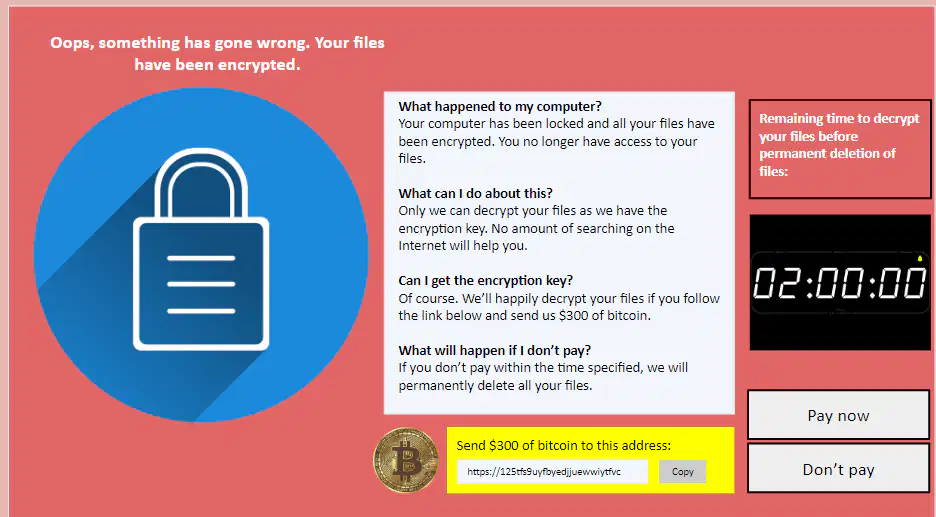
What has happened to the computer according to the image?
The computer has been upgraded.
The computer has been encrypted and locked.
The computer has been sold.
The computer has been repaired.
What is malware?
Software designed to improve computer performance
Software designed to gain access to your computer with malicious intent
Software designed to protect your computer from viruses
Software designed to enhance user experience
Which of the following is NOT a malicious intent of malware?
Disabling hardware
Data theft
Forced advertising
Improving computer speed
Which of the following is an example of malware's malicious intent?
Enhancing graphics quality
Sending email spam
Increasing internet speed
Providing software updates
What is malware?
A type of software designed to protect your computer
A type of software designed to perform useful tasks
A type of software designed to harm or exploit any programmable device or network
A type of software designed to enhance computer performance
Which of the following is NOT a category of malware?
Viruses
Trojans
Firewalls
Ransomware
Which category of malware is known for disguising itself as legitimate software?
Adware
Trojans
Worms
Spyware
Which type of malware is specifically designed to demand payment to restore access to the victim's data?
Adware
Spyware
Ransomware
Worms
Which type of malware is primarily used to collect information about users without their knowledge?
Adware
Spyware
Viruses
Worms
What is a virus in the context of computer software?
A) A beneficial program that enhances system performance
B) A malicious form of self-replicating software
C) A type of hardware component
D) A harmless piece of code
How does a virus typically replicate itself on a computer or network?
A) By enhancing the system's security features
B) By deleting all files on the system
C) By maliciously modifying other computer programs and inserting code
D) By creating backup copies of important files
What is required for a virus to infect a system?
A) It needs to be initiated/executed by a user
B) It needs to be downloaded from a secure website
C) It needs to be installed by an antivirus program
D) It needs to be approved by the system administrator
What is the most common way for computer systems to be infected by a virus?
A) By installing antivirus software
B) By executing a malicious file or program
C) By updating the operating system
D) By using a secure network connection
What is one common way to catch a computer virus?
Download an email attachment
Use a secure website
Install antivirus software
Update your operating system regularly
Which of the following actions can lead to catching a computer virus?
Clicking a confirmation button on a pop-up without reading it
Using a strong password
Regularly backing up your data
Installing software updates
Downloading files from which type of websites can increase the risk of catching a computer virus?
Illegal websites of peer-to-peer file-sharing platforms
Official software vendor websites
Educational institution websites
Government websites
What is a key difference between worms and viruses?
Worms attach themselves to files, while viruses do not.
Worms replicate themselves, while viruses do not.
Worms spread through the network, while viruses attach themselves to files.
Worms do not use system resources, while viruses do.
How do most worms cause problems in a network?
By deleting important files.
By using up network bandwidth and slowing down the network.
By corrupting system resources.
By attaching themselves to emails.
What do worms use to spread?
Email attachments
System files
Network
External storage devices
What is ransomware?
A type of antivirus software
A form of virus that is self-replicating
A type of firewall
A form of spyware
What does ransomware do to a computer?
It speeds up the computer
It locks the computer and encrypts files
It deletes all files
It installs new software
What does the attacker demand in order to decrypt the files and unlock the computer?
A software update
A system reboot
A ransom payment
A password reset
What was the estimated number of computers affected by the WannaCry ransomware attack in May 2017?
100,000
200,000
300,000
400,000
How many countries were affected by the WannaCry ransomware attack?
100
120
150
180
What did the WannaCry ransomware exploit to spread?
A security flaw in Linux
A security flaw in macOS
A security flaw in Microsoft Windows
A security flaw in Android
Which versions of Windows were at risk during the WannaCry ransomware attack?
Only the latest versions
Only the older versions
All versions that hadn't applied the update released in April 2017
Only versions released after 2017
What was the consequence for Windows versions that were no longer getting updates during the WannaCry attack?
They were safe from the attack
They were at risk
They received automatic updates
They were upgraded to the latest version
What is a trojan in the context of software?
A type of game
A piece of software that performs only useful functions
A piece of software that appears useful but performs malicious actions
A type of hardware
What might a trojan do to give an attacker remote access to your computer?
Open a 'back door'
Install antivirus software
Speed up your computer
Delete all files
From where does the name 'trojan' derive?
A type of computer virus
The story of the Trojan Horse
A famous hacker
A type of encryption
What is spyware?
Software that protects your computer from viruses
Unwanted software that monitors and gathers information on a person
A type of hardware used to enhance computer performance
A program that speeds up your internet connection
What can spyware do?
Increase your computer's processing speed
Monitor your internet usage to send you harmless but annoying adverts
Improve your computer's graphics quality
Enhance your computer's security features
What is a more sinister form of spyware?
Software that blocks pop-up ads
Keyloggers that record every keystroke made by a user
Programs that clean your computer's registry
Applications that update your software automatically
What types of malware can adware be classified as?
Worm, virus, or Trojan
Spyware, ransomware, or rootkit
Keylogger, botnet, or backdoor
Phishing, pharming, or smishing
What does adware cause a computer to do?
Encrypt files and demand a ransom
Display malicious adverts or pop-ups
Steal personal information
Slow down the computer's performance
What might indicate that your computer has been infected by adware?
Your computer is running slower than usual
You see a large number of adverts or pop-ups
Your files are encrypted and you are asked to pay a ransom
Your internet connection is frequently dropping
Which of the following is NOT one of the types of malware listed for research?
Viruses
Worms
Adware
Trojans
What are internet bots?
Automated programs that perform tasks repeatedly
Human operators that manage online services
Software that only monitors social media
Programs that only work offline
Which of the following is NOT a task performed by internet bots?
Finding new websites for search engines to index
Providing customer service online (chatbots)
Monitoring the prices of items to find the best deal (shopbots)
Writing and publishing books
What is one of the roles of chatbots?
Finding new websites for search engines to index
Providing customer service online
Monitoring the prices of items to find the best deal
Writing code for software development
What is the purpose of shopbots?
Finding new websites for search engines to index
Providing customer service online
Monitoring the prices of items to find the best deal
Managing social media accounts
What percentage of all internet traffic is believed to be bot traffic?
Over 30%
Over 40%
Over 50%
Over 60%
According to Cloudflare.com (2019), what portion of bot traffic is considered malicious?
A small portion
A significant portion
A negligible portion
None
What is one of the malicious intents of bots circulating the web?
To improve internet speed
To create social media accounts
To enhance user experience
To provide customer support
How can bots increase people's perception of their influence?
By creating fake news
By following certain users on social media
By hacking into accounts
By providing technical support
What is another use of bots mentioned in the text?
To improve website design
To scour the web for vulnerabilities
To provide online education
To enhance video quality

