
Font size
 Worksheets
Comptia A+ 1102 Comparing Windows Editions
Total questions: 27
Worksheet time: 14mins
Which Windows 10 edition has a RAM limitation of 128 GB?
Windows 10 Pro
Windows 10 Home
Windows 10 Enterprise
Windows 10 Pro for Workstations
Which Windows 10 editions support Hyper-V?
Windows 10 Home and Windows 10 Pro
Windows 10 Pro and Windows 10 Enterprise
Windows 10 Pro for Workstations and Windows 10 Enterprise
Windows 10 Pro, Windows 10 Pro for Workstations, and Windows 10 Enterprise
Which feature is available in Windows 10 Pro but not in Windows 10 Home?
Remote Desktop Protocol (RDP) client only
Domain access
EFS and BitLocker
Group Policy Editor (gpedit.msc)
How many physical CPUs does Windows 10 Pro support?
1
2
4
6
Which Windows 10 editions have a RAM limitation of 6 TB?
Windows 10 Home and Windows 10 Pro
Windows 10 Pro and Windows 10 Enterprise
Windows 10 Pro for Workstations and Windows 10 Enterprise
Windows 10 Home and Windows 10 Pro for Workstations
Which Windows 10 edition does not support EFS and BitLocker?
Windows 10 Home
Windows 10 Pro
Windows 10 Pro for Workstations
Windows 10 Enterprise
Which Windows 10 editions support Remote Desktop Protocol (RDP) client and server?
Windows 10 Home and Windows 10 Pro
Windows 10 Pro and Windows 10 Pro for Workstations
Windows 10 Pro for Workstations and Windows 10 Enterprise
Windows 10 Pro, Windows 10 Pro for Workstations, and Windows 10 Enterprise
Which Windows 10 edition supports only Remote Desktop Protocol (RDP) client only?
Windows 10 Home
Windows 10 Pro
Windows 10 Pro for Workstations
Windows 10 Enterprise
Which Windows 10 editions support Group Policy Editor (gpedit.msc)?
Windows 10 Home and Windows 10 Pro
Windows 10 Pro and Windows 10 Pro for Workstations
Windows 10 Pro for Workstations and Windows 10 Enterprise
Windows 10 Pro, Windows 10 Pro for Workstations, and Windows 10 Enterprise
Which version of Windows 10 should an organization with laptops running Windows 8.1 Pro upgrade to, in alignment with organizational policy?
Windows 10 Home
Windows 10 Pro
Windows 10 Enterprise
Windows 10 Ultimate
What must be done before performing any Windows upgrade?
Install antivirus software
Back up all data and applications
Uninstall all existing software
Disable internet connection
Can Windows 7 Home Basic be upgraded directly to Windows 10 Enterprise?
Yes, with a simple upgrade
No, it requires a fresh installation
Yes, but only with a special license
No, it cannot be upgraded at all
Which version of Windows 10 is recommended for a home user upgrading from Windows 7 Home Basic?
(select the two best answers)
Windows 10 Home
Windows 10 Pro
Windows 10 Enterprise
Windows 10 Ultimate
According to the text, what should always be kept in mind when selecting an OS and edition for a user?
The latest features
The consumer's best interests and needs
The cost of the OS
The brand of the computer
Which edition of Windows 8.1 can be fully upgraded to Windows 10 Home?
Connected (Core)
Pro
Enterprise
None
What does "D" signify in the context of the upgrade paths table?
Full upgrade is supported
Cannot upgrade to that edition
Edition downgrade; personal data is maintained, applications and settings are removed
Not applicable
What does "N/A" mean in the upgrade paths table?
Full upgrade is supported
Cannot upgrade to that edition
Edition downgrade
Not applicable
What is the purpose of an in-place upgrade as mentioned in the notes?
To upgrade to a different edition of the same operating system
To fix issues with the operating system
To downgrade the operating system
To remove personal data and settings
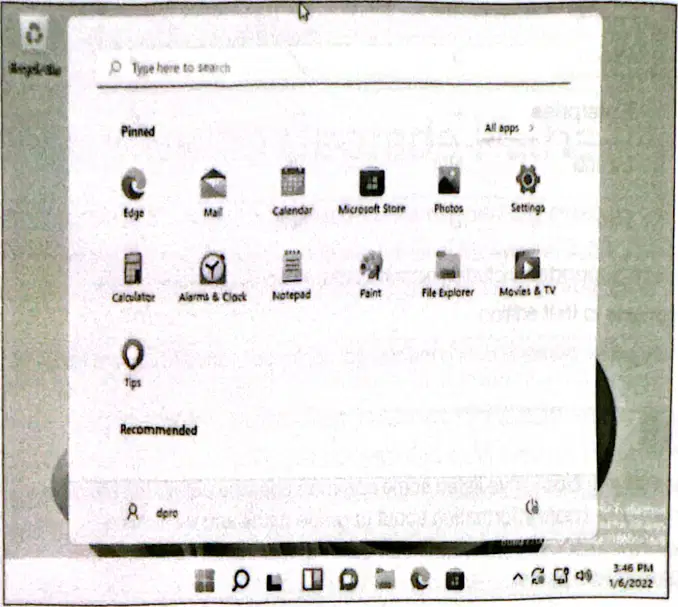
What is one of the cosmetic differences between Windows 11 and Windows 10 as shown in Figure 30.3?
The Start menu is on the left-hand side.
The Start menu is centered.
The taskbar is at the top of the screen.
The Start menu is hidden by default.
What are the "pinned" applications in Windows 11 meant to be?
The least used applications.
Applications that are not installed.
The most commonly used applications.
Applications that are hidden.
What has been redesigned in Windows 11 according to the text?
(select the two best answers)
The Control Panel
The Settings app
The File Explorer
The Task Manager
Where are the pinned apps located in Windows 11?
On the left side of the taskbar
On the right side of the taskbar
Centered on the taskbar
Hidden in a folder

Which of the following is NOT mentioned as behaving the same in both Windows 10 and Windows 11?
Applications
Settings
Control Panel
Task Manager
What is the minimum CPU requirement for a typical 64-bit Windows 11 installation?
2 GHz CPU
1 GHz CPU
3 GHz CPU
4 GHz CPU
How much RAM is required for a typical 64-bit Windows 11 installation?
2 GB
4 GB
8 GB
16 GB
What is the minimum storage requirement for a typical 64-bit Windows 11 installation?
32 GB
64 GB
128 GB
256 GB
What type of display resolution is required for Windows 11?
480p or greater
720p or greater
1080p or greater
1440p or greater

