
 Worksheets
Year 3 Health Assessment Term 4
Total questions: 12
Worksheet time: 26mins
You are playing an online game with your school friend Tara. Suddenly a message pops up on your device that says Click here to win a million dollars!!!
What would you do?
Click on the message
Ask Tara what to do
Close the window
Ignore it
You have a few new emails. Look at who they are from and what they are about.
Which one of these would be safe to open?
From: Tommy Subject: See you tonight!
From: zzgr@ftzt.com Subject: Hi from Helen
From: cheapgames.com Subject: Get cheap games NOW!
From: prizes@lotto.ru Subject: You have won $10,000!
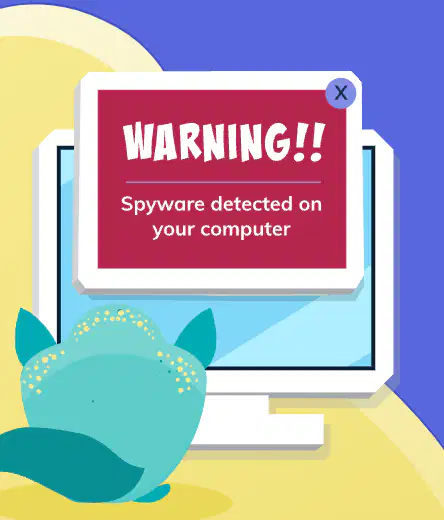
You are searching online on your computer for some information you need for a school project.
Look at the picture on this page. It shows the message that pops up on your screen.
What do you do?
Click on the message — it looks serious!
Don’t click on the message
You have a new phone and you want to keep it safe.
What do you do?
Set up a simple password that is easy for you to remember
Write your name and address and your mum’s phone number on the back
Update the operating system, software and apps regularly
Turn off ‘Find my phone’ or ‘Find my device’
You and your brother/sister are walking home from school and you notice and adult following you and trying to get your attention. What should you do?
I should quickly go to a safe place, like a nearby shop or a trusted neighbour's house, and ask for help, or call a trusted adult immediately.
Ignore them and hope they go away
Ask them nicely to leave you alone
Stop and talk to them - they might need your help
You are about to join a new website that your friends at school say is really cool.
What information do you think is OK to give the website when you join?
Pick two answers:
First name
Last name
Nickname
Home phone and address
You are having trouble doing an activity on a safe site you use at school. Your friend Charlie offers to help but says she needs your password.
Would you give your password to her?
Yes
No
You have just seen a video online that was violent and it has upset you.
What should you do?
Close the page and pretend you have not seen it
Forward it to a friend — they might like it
Turn off the screen and then tell someone you trust
You accepted a friend request from someone you played a game with online but you have never met them face-to-face. They start private messaging you with questions that make you uncomfortable.
What should do you do?
Just ignore them and hope they go away
Keep replying — you don’t want to hurt their feelings
Tell someone you trust, like a parent or teacher
Someone at school who you thought was your friend posts a photo of you looking silly with the words 'What a loser!!' It is the third time they have been mean to you online.
What do you do?
Try to ignore it, even though it is upsetting you
Comment on the post saying they are the real loser!
Talk to someone you trust, like a parent or teacher, about how you are feeling
Why is your personal information, such as your full name, date of birth and where you live so important? How can you keep this information private when you're online?
If you feel unsafe online or offline, what could you do?

