
 Worksheets
Arduino Basic Programming
Total questions: 64
Worksheet time: 40mins
int LED1= 4;
What statement is this?
Void Loop
Void Setup
Declaration
C language
int LED1=4;
What is 'int= integer' used for?
Alphabets
Capital and small letters
Combination of Numbers and Alphabets
Numbers
int LED2=8;
What is number eight is referring in the coding above?
Analog Pin
5V
Ground
Digital Pin
digitalWrite (LED1,HIGH);
What does it means by HIGH?
Blinking
Switch OFF
Switch ON
Sequence
delay (1000);
1000 in delay is equivalent to how many second?
10s
2s
60s
1s
digitalWrite (LED1, HIGH);
delay(1000);
digitalWrite (LED1, LOW);
What does the program do?
LED Switch Off at the beginning, wait for 60s and then switch ON.
LED Switch ON at the beginning, wait for 10s and then Switch OFF.
LED Switch ON at the beginning, wait for 1s and then switch ON.
LED Switch ON at the beginning, wait for 1s and then switch OFF.
digitalWrite(13, HIGH);
delay(1000);
digitalWrite(13, LOW);
delay(1000);
digitalWrite(13, HIGH);
delay(1000);
digitalWrite(13, LOW);
delay(1000);

5. What is the definition of function?
Has inputs and outputs
Every input has only ONE output
Inputs have different outputs every time
x-values and y-values
What symbol is used to indicate a comment in Arduino programming?
//
##
/*
!!
How do you declare a variable in Arduino programming?
variable_name data_type;
declare variable_name as data_type;
int variable_name;
data_type variable_name;
How do you write a digital output to a specific pin in Arduino programming?
writeDigital(pin, value)
setPinOutput(pin, value)
outputDigital(pin, value)
digitalWrite(pin, value)
What is the function of the loop() in Arduino programming?
To execute the program once
To execute the program repeatedly after setup() has been called
To pause the program for a specified amount of time
To end the program
What is the function of the delayMicroseconds() function in Arduino programming?
To pause the program for a specified amount of time in microseconds.
To speed up the program execution
To skip a section of the code
To restart the program
LED is setup-up to blink. LEDs is an
Output
Input
pinMode
digitalWrite

What is function of setup () ?
To initialize variables, pin modes, start using libraries.
Allowing your program to change and respond.
It indicates that the function is expected to return no information to the function from which it was called.

What is function of void () ?
To initialize variables, pin modes, start using libraries
Allowing the program to change, respond, and control the Arduino board.
It indicates that the function is expected to return no information to the function from which it was called.

What is function of loop () ?
To initialize variables, pin modes, start using libraries
It indicates that the function is expected to return no information to the function from which it was called
Allowing the program to change, respond, and control the Arduino board

Which one of the following arduino design below refer to the code as shown in the figure ?


Which one of the following arduino code are TRUE ?


pinMode() function configures a pin as either ______or In ________I use temperature sensor to read the room temperature. How do I write Temperature Sensor Set-up.
void setup(){
_______________________;
}
PinMode (Tsensor, Output);
pinMode (Tsensor, OUTPUT);
PinMode (Tsensor, Input);
pinMode (Tsensor, INPUT);

What does IDE stand for?
Integrated Development Environment
In Deep Environment
Internal Deep Escape
IDE

A program written with the IDE for Arduino is calle
Editor
Console
Sketch
IDE error

What is a Variable?
It is a place where you can store some data
It is a place in your code that changes
It is a name given to a special sub-routine that changes how the program works
It is when you want to add two number together
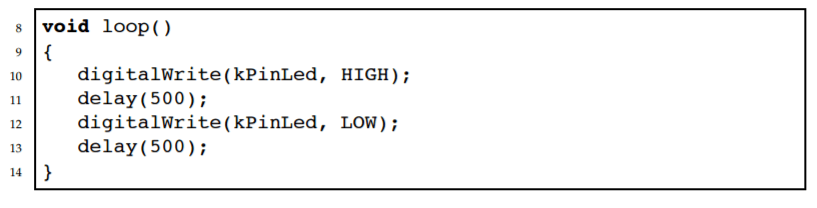
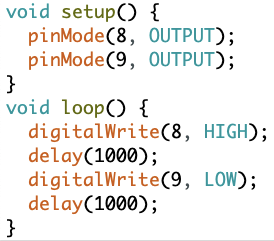
Which LED is ON ?
8
9
None!
ALL!
Where is the position of this command?
pinMode(8, OUTPUT);
void setup()
void loop()
Where is the position of this command?
digitalWrite(8, HIGH);
void setup()
void loop()
How header file is to be defined to code for servo motors?
# define Servo
# include Servo
#include<Servo.h>
Servo myservo;
If servo object is myServo and then servo control signal to make 150 degree angle, is coded as
myServo.write(150);
myServo.Write(852.5);
myServo.write(852.5);
analogWrite(852.5);
Servo signal pin must be connected to
any digital pin of Arduino
analog input pins A0 to A5
any one of the PWM pins
5V pin
What type of actuator would be best suited to operating a robot arm?
Servo
Solenoid
DC Motor
None of the above
Inputs are
Speaker
Mouse
Keyboard
Printer
Outputs are:
Mouse
Screen
Speaker
Keyboard
Printer
Ultrasonic waves are a form of _______ waves
sound
ocean
radio
seismic
How many volts do the ultrasonic sensors need to operate?
5v
12v
3v
10v
An ultrasonic sensor is a device that can measure the ________ to an object by sending out _________ waves.
density / echo
path / seismic
elevation / sonic
distance / sound
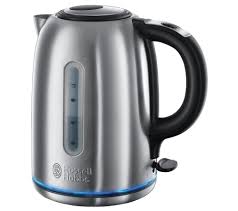
What type of sensor would be used in this kettle?
Light Sensor
Temperature Sensor
Infra-red sensor
Pressure Sensor
What is the minimum Voltage to power up an Arduino uno module?
A. 4V
B. 12V
C. 24 V
D. 5 V
What is the code used to input a library on your sketch?
A. #determine
B. #input
C. #include
D. #define
What is the function of the setup() in Arduino programming?
It is used to initialize the Arduino board and prepare it for the main loop
It is used to control the speed of the Arduino board
It is used to turn off the Arduino board
It is used to play music on the Arduino board
What is the function of the loop() in Arduino programming?
Stops the code from running
Runs the code only once
Executes the code continuously
Resets the Arduino board
What is the syntax for declaring a variable in Arduino programming?
variable_name = data_type;
data_type variable_name;
variable_name data_type;
variable_name = new data_type;
How do you write a comment in Arduino programming?
// Use double forward slashes (//) for single-line comments or /* */ for multi-line comments.
Use double forward slashes (//) for multi-line comments or /* */ for single-line comments.
Use double forward slashes (//) for single-line comments or for multi-line comments.
Use double backward slashes (\) for single-line comments or /* */ for multi-line comments.
What is the purpose of the pinMode() function in Arduino programming?
To change the color of the LED
To play a sound
To print a message on the serial monitor
To configure a specific pin as an input or output
What is the difference between digitalRead() and digitalWrite() functions in Arduino programming?
They are used for measuring temperature
They are used for controlling servo motors
They are used for playing sound
They are used for reading and writing digital signals on Arduino pins.
Explain the use of the analogRead() function in Arduino programming.
It is used to read the analog voltage value from a specified analog pin.
It is used to control the speed of a servo motor.
It is used to write digital values to an analog pin.
It is used to measure the frequency of an analog signal.
What are the two main parts of an Arduino program?
A) setup and main
B) loop and main
C) setup and loop
D) start and end
Which part of the Arduino program runs only once?
A) loop
B) setup
C) main
D) end
Which part of the Arduino program runs repeatedly?
A) setup
B) loop
C) main
D) end
Which pin mode is used for an LED in the Arduino setup function?
A) pinMode(ledPin, INPUT);
B) pinMode(ledPin, OUTPUT);
C) pinMode(ledPin, ANALOG);
D) pinMode(ledPin, PWM);

